


&replace=v%241&style=flat&logo=nodedotjs&logoColor=5FA04E&label=NodeJS%20Version&color=5FA04E)


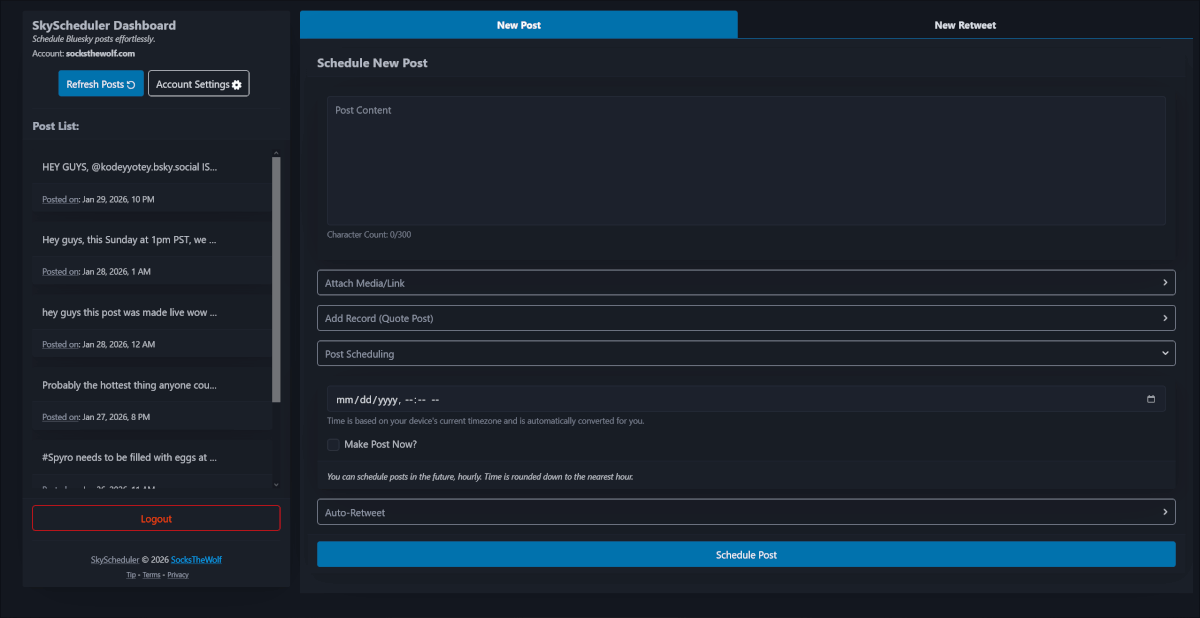

SkyScheduler is a lightweight Cloudflare Workers-based microservice application that allows you and/or your team to schedule/repost posts to a Bluesky account effortlessly. Perfect for content creators and social media managers who want to plan their social media content in advance.
- Multiple user/account handling: Manage multiple users/bsky accounts easily
- Bluesky Post Scheduling: Schedule multiple posts to your Bluesky account
- Custom Time Slots: Time selection is limited to 1hr/30m/15m/10m/5m intervals (configurable, default 1hr) to optimize worker execution and reduce unnecessary runs
- Post Threading: Schedule entire post threads with full media support per post!
- Simple Setup: Fairly minimal setup and easy to use
- Supports media posts: Automatically handles content tagging and formatting your media so that it looks the best on BSky. Image transforms via Cloudflare Images
- Handles Link Embeds: Post your content with a link embed easily!
- Automatic reposting: Schedule how many times you want your post to be reposted on the network. Get more visibility and engagement without having to do more work
- Repost anything: Need to retweet something made out of SkyScheduler? Yeah, you can.
- Invite Keys: Want to throttle the signups to your portal or keep the pool to friends/org only? Use invite keys to manage signups
- SSG Page Generation: Most pages can be automatically built and served statically, to save on processing overhead.
- Node.js (v24.15 or later)
- Package Manager
- Cloudflare Pro Workers account (you will hit CPU limits due to betterauth and egress to atproto)
Clicking the Cloudflare Badge should get you a mostly one-click install. Manual instructions are provided below.
- Clone the repository
git clone https://github.com/socksthewolf/skyscheduler.git
cd skyscheduler- Copy environment variables template
cp .env.example .env- Configure your
.envfile based off the.env.examplefile. Comments to what each variable needs to be set to can be found in there.
Note: When deploying, these variables should also be configured as secrets in your Cloudflare worker dashboard. You can also do this via npx wrangler secret put <NAME_OF_SECRET>.
Alternatively, make a file like .env.prod and use npx wrangler secret bulk .env.prod to upload all the settings at once.
-
Update your
wrangler.tomlwith changes that reflect your account.- You'll need to update the values for the kv, r2, queues, d1 to reflect the bindings on your account.
- Also make sure you update the
BETTER_AUTH_URLto your working url as well. - If you allow image resizing, you should also modify
IMAGE_SETTINGS'sbucket_urlto the correct host. - Do remember to update/remove the domain bindings!
-
Install dependencies
npm install-
Modify any site information located in:
limits.ts- site configuration and application limitssiteinfo.ts- site information such as name, description, domain, etc.ssclirc- sitemap domain/assets/_redirects- redirect configuration/assets/robots.txt- change the url to your sitemap
-
Deploy the application to Cloudflare Workers. You might need to login to your Cloudflare account if you haven't already.
npm run deployNOTE: You can also run dev by using npm run dev.
- Create your D1 tables using the following command, this will set up your tables both locally and remotely.
npm run migrate:allNOTE: If you encounter issues running remotely, you can run npm run migrate:prod or npm run migrate:local respectively.
- Run your application and go to
/setup. This will create the admin account.
Ensure you have configured the .env file with the necessary credentials and settings. The file is git-ignored to protect your sensitive information.
Most of the application can be modified with wrangler.toml's vars section or via src/limits.ts.
Both files are heavily commented to explain what the options control.
Modifying key values such as meta tag data, the application name and any descriptions is fully controlled via src/siteinfo.ts.
Changing the values in that file will modify the visual display of the application's web output.
SkyScheduler uses the minified versions of the scripts in assets/js and assets/css.
These are generated on the fly whenever any typescript file is changed or the application is deployed/ran.
SkyScheduler comes with a lot of commands to help manage the service. Documentation on the commands can be found in package.json.
The most important ones to know:
build-pages- builds the static website pages. Note: Automatically is called by wrangler builds. If SSG is disabled, this does nothing.dev- runs the app in a local environmentgenerate- run anytime you modify a file in thesrc/dbfolder. This will generate SQL migration filesmigrate- commit the SQL migrations to local/prod databases.migrate:local- migrates the SQL changes to your local dev instancemigrate:prod- does the same but commits remotely. Note: This has a chance of wrangler failing to commit, you may have to run it more than once (it is safe to execute)invite:generate- generates a valid invite keyinvite:local/remote- commits an invite key to the invite storesitemap- generates a sitemap.xml file (there's a github action that will do this automatically as well)openapi- builds the OpenAPI spec document. This is not automatically called by anything in the application, but there is a Github Action (openapi.yml) that uploads to artifacts. This can be given to the WAF.types- wheneverwrangler.tomlchanges or wrangler updates, run this command
skyscheduler/
├── assets/
│   ├── .well-known/
│   ├── css/
│   ├── dep/
│   ├── fonts/
│   ├── icons/
│   ├── js/
│   ├── screenshots/
│   └── thumbs/
├── bin/
├── src/
│   ├── auth/
│   ├── classes/
│   ├── db/
│   ├── endpoints/
│   ├── layout/
│   ├── middleware/
│   ├── pages/
│   ├── statics/
│   ├── utils/
│   └── validation/
├── migrations/
├── .vscode/
├── .github/
├── .env.example
├── .node-version
├── .markdownlint.json
├── .minify.json
├── .ssclirc
├── auth.config.ts
├── drizzle.config.ts
├── package.json
├── tsconfig.json
└── wrangler.toml
- BetterAuth - site login/authentication
- BetterAuthCloudflare - helper for BetterAuth on CF
- hono - request routing/processing
- uuid - id generation
- zod - data validation
- image-dimensions - image data validation
- toml - reading configs during SSG generation (if enabled)
- date-fns - date processing helpers
- drizzle - database orm/schemas
- just - js helper library
- htmx - client requests and responsiveness
- form-json - for handling post edits
- countable - dynamic input counter
- toastify - client notifications
- dropzone - file upload negotiation
- tribute - client autocomplete library
- pico - styling, tabs, modals
- mingcute - most icons
We welcome contributions! Here's some ways to contribute:
- Report bugs
- Suggest enhancements
- Sponsor
Project's source code is licensed under the MIT License. Name, Logos and Branding are copyright SocksTheWolf, all rights reserved.
See the LICENSE file for details.