

Xperience Community Content Sync Toolkit is an open-source toolkit that helps content editors work with Xperience by Kentico's Content Sync feature. Content Sync lets editors push pages and content hub items to a target instance, but it gives no visibility into what is still missing there. This toolkit adds that visibility with a Sync status application (under Content management) that compares this instance with its Content Sync target:
- Pages and Content hub tabs with one status per item: Incompatible, Unpublished, New, Changed, Moved, Reordered, Not published, Only on target, or In sync, with a multi-select status filter, search and a link to each item's editor.
- Explanations of what to sync, including pages moved or reordered without being republished.
- Incompatible items, which a sync would fail for because the target is missing a content type, language, channel or workspace this instance has, with what a developer needs to deploy.
- Kentico's own permissions: editors only see the channels, workspaces and pages they can see in Xperience.
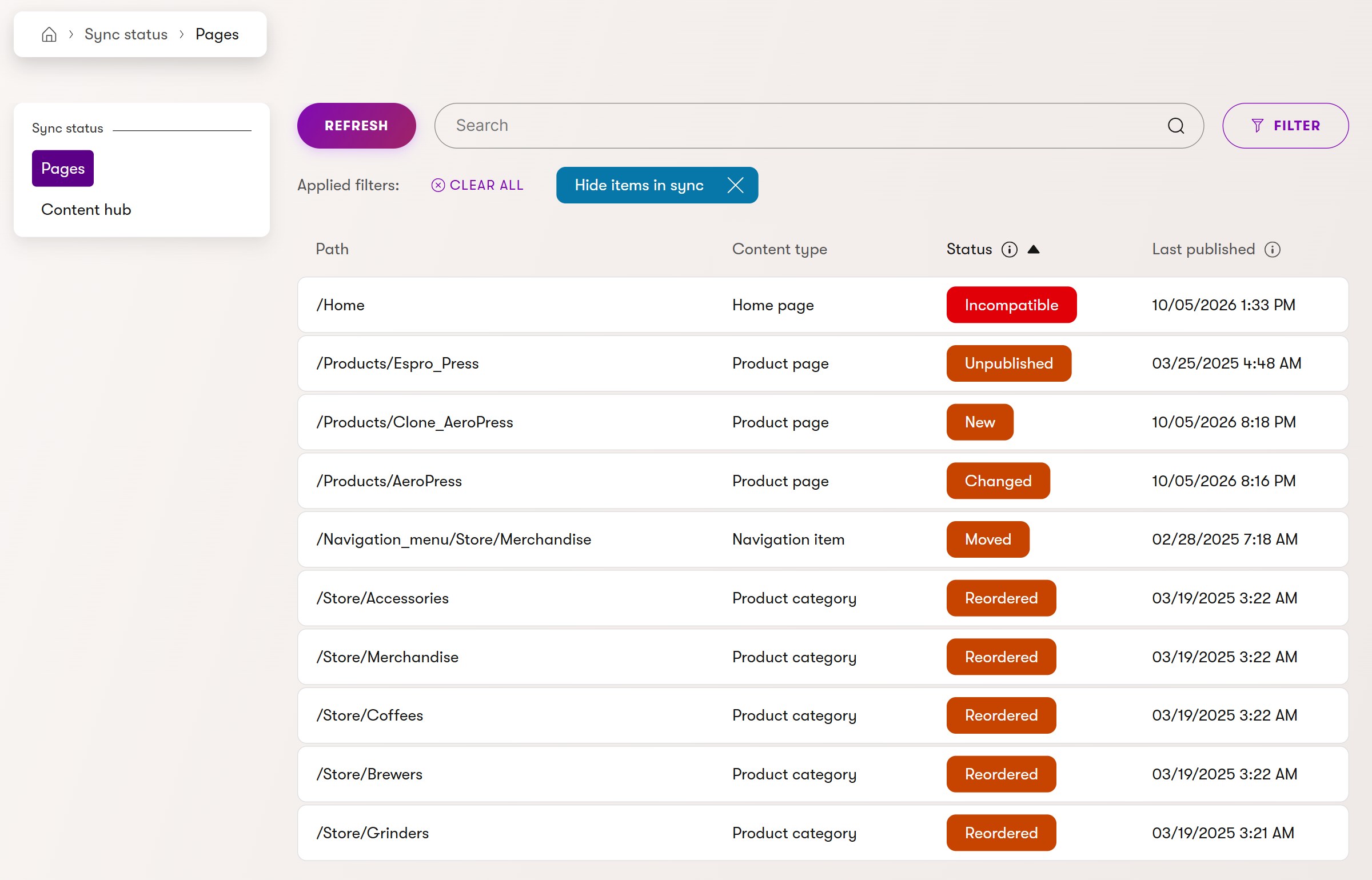
Hover a status to see what it's based on and what to do. An incompatible item names what the target is missing, in the same words as Kentico's Content Sync dialog:

A reordered level names the page that's out of place and how to fix it:

It's configured entirely by Xperience's own Content Sync settings, so there's nothing extra to set up. Inline indicators in Xperience's page tree and Content hub are planned.
This is a beta: APIs and behavior may change before 1.0.0.
The project is developed and maintained by Andres Villenas at SimpleA.
| Xperience Version | Library Version |
|---|---|
| 30.8.0 or newer | 1.0.0-beta.2 |
Runtime-verified on 30.8.0 and 31.9.1.
See the compatibility policy for the supported range.
Add the package to the Xperience application on both instances, the Content Sync source and target:
dotnet add package XperienceCommunity.ContentSyncToolkit --prereleaseThen register it in Program.cs:
using XperienceCommunity.ContentSyncToolkit;
using XperienceCommunity.ContentSyncToolkit.Admin;

builder.Services.AddContentSyncToolkit();
// On the source instance: adds the Sync status application.
builder.Services.AddContentSyncToolkitAdmin();
Both instances must run the same Xperience version (a Content Sync requirement) and the same toolkit version.
View the Usage Guide for setup, configuration, and how to use the Sync status admin application.
Instructions for contributing to this project are available in CONTRIBUTING.md.
Maintainers can find the versioning and publishing procedure in the Release Process.
Distributed under the MIT License. See LICENSE.md and
THIRD-PARTY-NOTICES.md for more information.
This project is maintained by Andres Villenas and SimpleA. It is not an official Kentico product and is not covered by Kentico product support.
Report problems through the repository's GitHub issues.