

Medication safety is often overlooked, yet dangerous drug interactions are one of the most common preventable healthcare risks. MedGuard AI is a cross-platform mobile application designed to help users identify potentially harmful medication combinations in a clear, accessible, and reliable way.
Inspired by real-world medication safety challenges, MedGuard AI combines a deterministic rule-based risk engine with optional AI-powered explanations to ensure the app remains functional even when AI services are unavailable. The focus is on patient safety, accessibility, and trust, rather than blind dependence on AI.
Built using Kotlin Multiplatform and Compose Multiplatform, MedGuard AI runs seamlessly on Android and iOS, demonstrating how healthcare-focused tools can be built responsibly across platforms without sacrificing reliability.
Medication Interaction Analysis Detects potentially dangerous combinations such as:
-
Anticoagulants + NSAIDs
-
Opioids + Benzodiazepines / Alcohol
-
Polypharmacy risks
-
Known high-risk drug pairings
-
Rule-Based Risk Engine (Always Works) A deterministic safety engine classifies interactions into:
- 🟢 Low Risk
- 🟡 Moderate Risk
- 🔴 High Risk
-
🤖 Optional AI Insights AI explanations enhance understanding when available — but the app never breaks if AI fails.
-
📊 Visual Risk Graphs Simple green / yellow / red bar graphs to help users instantly understand risk severity.
-
📷 Text-Based Medication Scanner Allows users to scan medicine labels or prescriptions and auto-populate medication names.
-
♿ Accessibility Mode Larger text, high-contrast UI, and simplified layouts for elderly users and patients with visual impairments.
-
⚠️ Medical Disclaimer & Safe Design Clear disclaimers ensure users understand that MedGuard AI is an informational tool, not a replacement for professional medical advice.
👉 [https://drive.google.com/file/d/1PDhA0t0rWj2uandyjBn5EI9AS4mYo8vD/view?usp=drive_link]


This is a Kotlin Multiplatform (KMP) project targeting Android and iOS.
MedGuardKMP/
├── composeApp/
│   ├── commonMain/      # Shared UI, logic, and domain code
│   ├── androidMain/     # Android-specific implementations
│   └── iosMain/         # iOS-specific implementations
│
├── iosApp/              # iOS application entry point
└── README.md
commonMaincontains all shared Compose UI, risk engine logic, and models.- Platform-specific code is isolated cleanly to avoid duplication.
- JDK 17 or higher
- Android Studio (latest stable)
- Xcode (for iOS builds)
- Kotlin Multiplatform plugin
- Compose Multiplatform plugin
Follow the official setup guide: 👉 https://www.jetbrains.com/help/kotlin-multiplatform-dev/multiplatform-create-first-app.html
Clone the repository: https://github.com/SillyMarvellousChad/MedGuardKMP.git
macOS / Linux
./gradlew :composeApp:assembleDebugWindows
.\gradlew.bat :composeApp:assembleDebugOr simply use the Run button in Android Studio.
- Open the
iosAppfolder in Xcode - Select a simulator or device
- Click Run
MedGuard AI does NOT require AI to function.
If you want AI explanations:
-
Create a Gemini API key 👉 https://aistudio.google.com/
-
Add a
local.propertiesfile:
apiKey=your-gemini-api-key
model=gemini-2.5-flash
If the API fails or is missing, the app automatically falls back to rule-based safety analysis.
This section explains how to explore MedGuard AI’s core functionality once the app is running.
1️⃣ Medication Interaction Check (Rule-Based + AI)
Launch the app.
Enter medications in the input field, separated by commas (example: Metformin, Amlodipine, Atorvastatin).
Tap “Check Interactions”.
The app will:
Instantly display a rule-based safety assessment (Low / Moderate / High risk)
Show a clear explanation of why the risk level was assigned
Optionally display an AI-generated insight when the AI service is available
If the AI service is unavailable, the app gracefully falls back to the rule-based engine.
2️⃣ Scan Medicines (Camera / Demo Mode)
Tap “📷 Scan Medicines”.
On supported platforms, point the camera at a medicine label (or use the demo scan button if running in emulator mode).
The detected medicines are automatically filled into the input field.
Tap “Check Interactions” to analyze the scanned medications.
This demonstrates how MedGuard AI can reduce manual input and improve accessibility.
3️⃣ Risk Visualization (Graphs)
After running an interaction check, the app displays a visual risk graph:
🟢 Green bar → Low risk
🟡 Yellow bar → Moderate risk
🔴 Red bar → High risk
This provides quick, intuitive feedback for users without medical expertise.
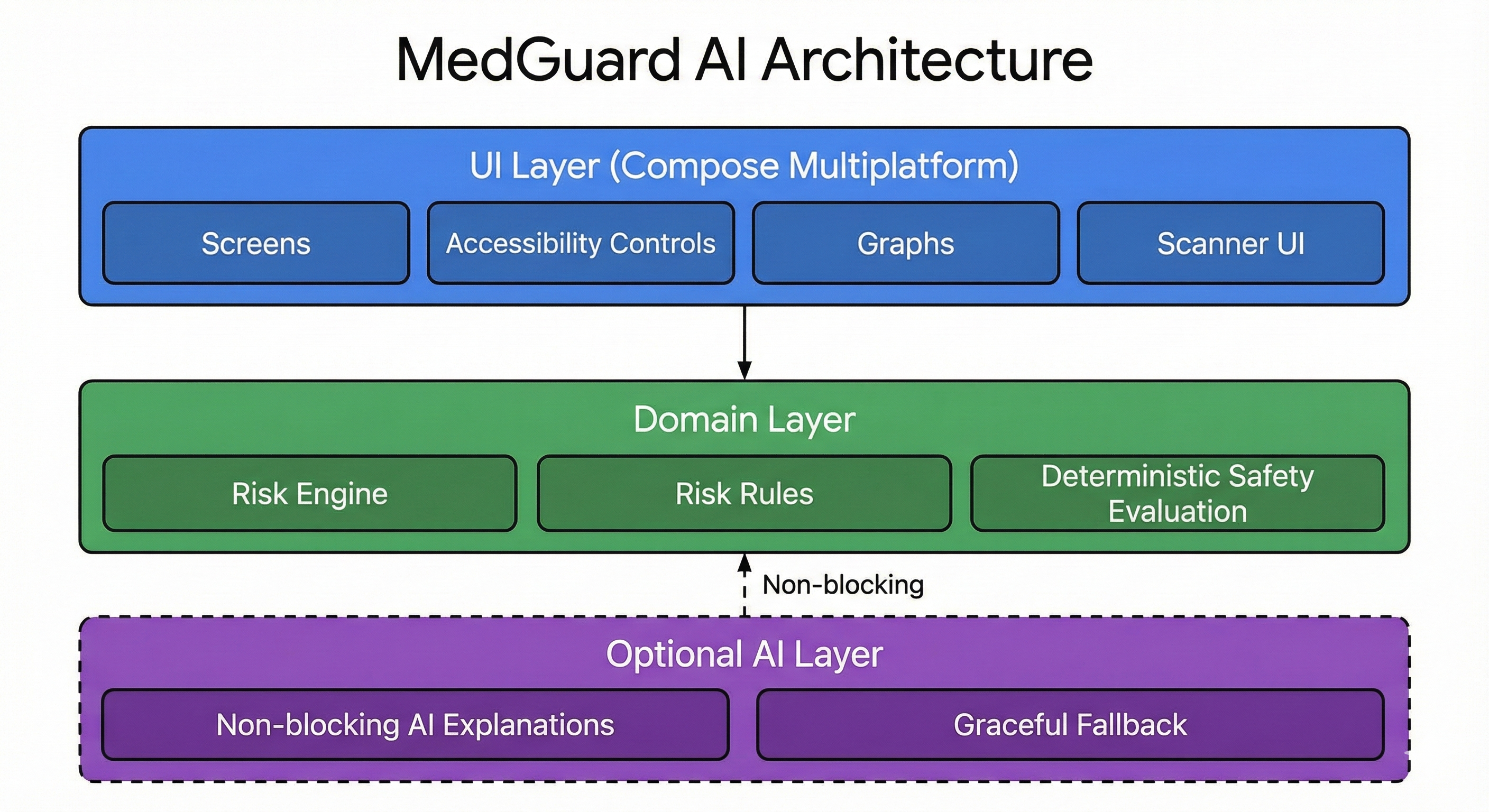
MedGuard AI follows a clean, layered architecture:
-
UI Layer (Compose Multiplatform) Screens, accessibility controls, graphs, and scanner UI.
-
Domain Layer Risk engine, risk rules, and deterministic safety evaluation.
-
Optional AI Layer Non-blocking AI explanations with graceful fallback.
This architecture ensures stability, testability, and safety, which is essential for healthcare-oriented software.
- Prioritizes user safety over novelty
- Demonstrates responsible AI usage
- Works even when AI services fail
- Designed for real patients, not just demos
- Fully cross-platform with shared UI & logic
MedGuard AI provides informational medication safety insights only. It is not a diagnostic tool and does not replace professional medical advice.
Always consult a qualified healthcare professional before starting, stopping, or combining medications.
- Kotlin Multiplatform
- Compose Multiplatform
- Gemini API (optional)
- Kotlin Coroutines
- Material 3
- Modern Android & iOS toolchains
This project is licensed under the Apache License 2.0.