




Turn an email thread into a chat-style conversation.
npm: @sarv-in/email-chat-view ·
source: Sarv/email-chat-view ·
examples: runnable examples ·
issues: report one ·
contributing: CONTRIBUTING.md
You supply the mails. It gives you back one bubble's worth of content per turn — quoted history, signatures and legal footers already removed — so a thread reads like a chat instead of like fourteen nested copies of itself.
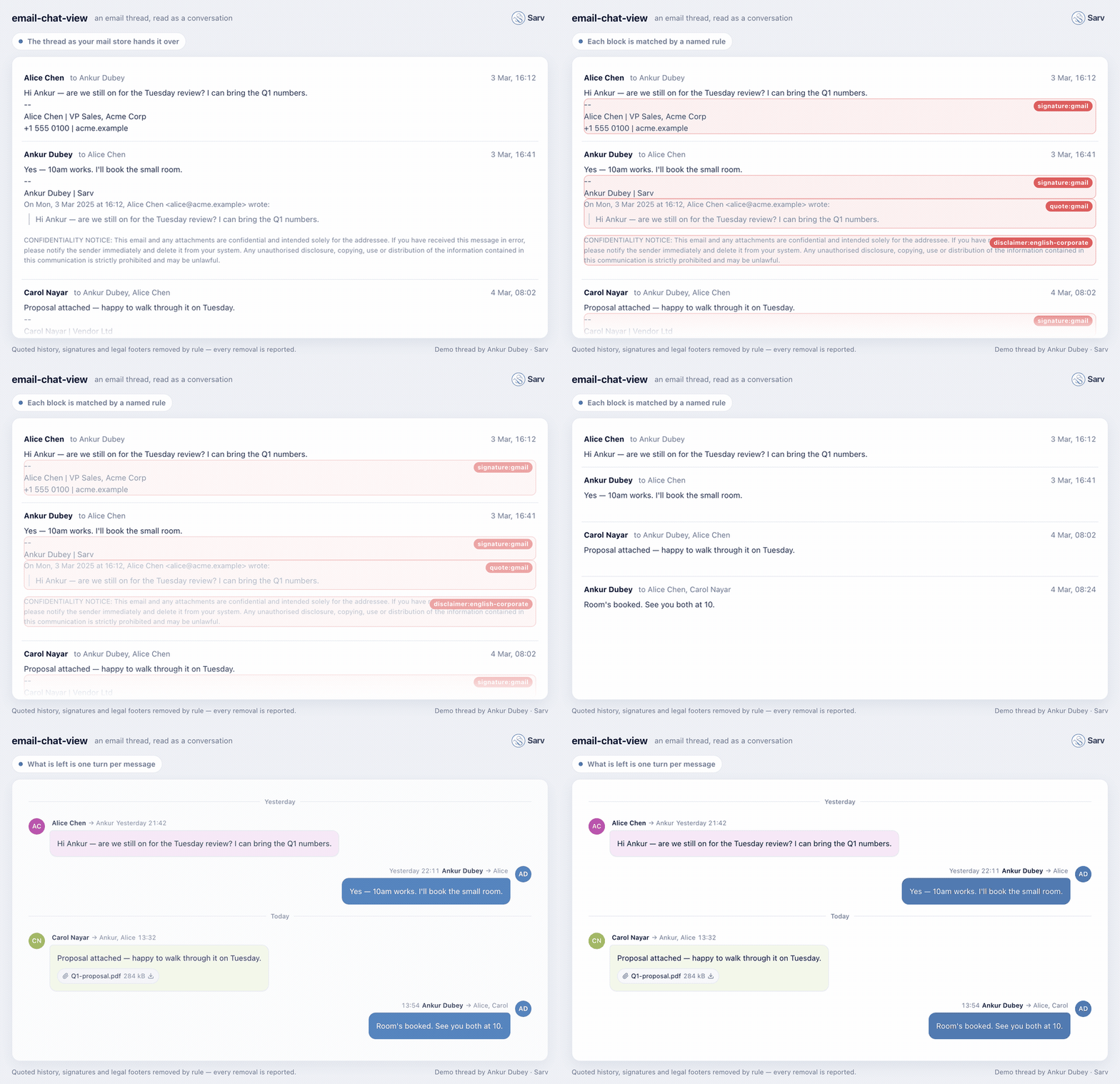
Every removal above is a named rule — the labels in the animation are the
strings the library hands back in message.applied.
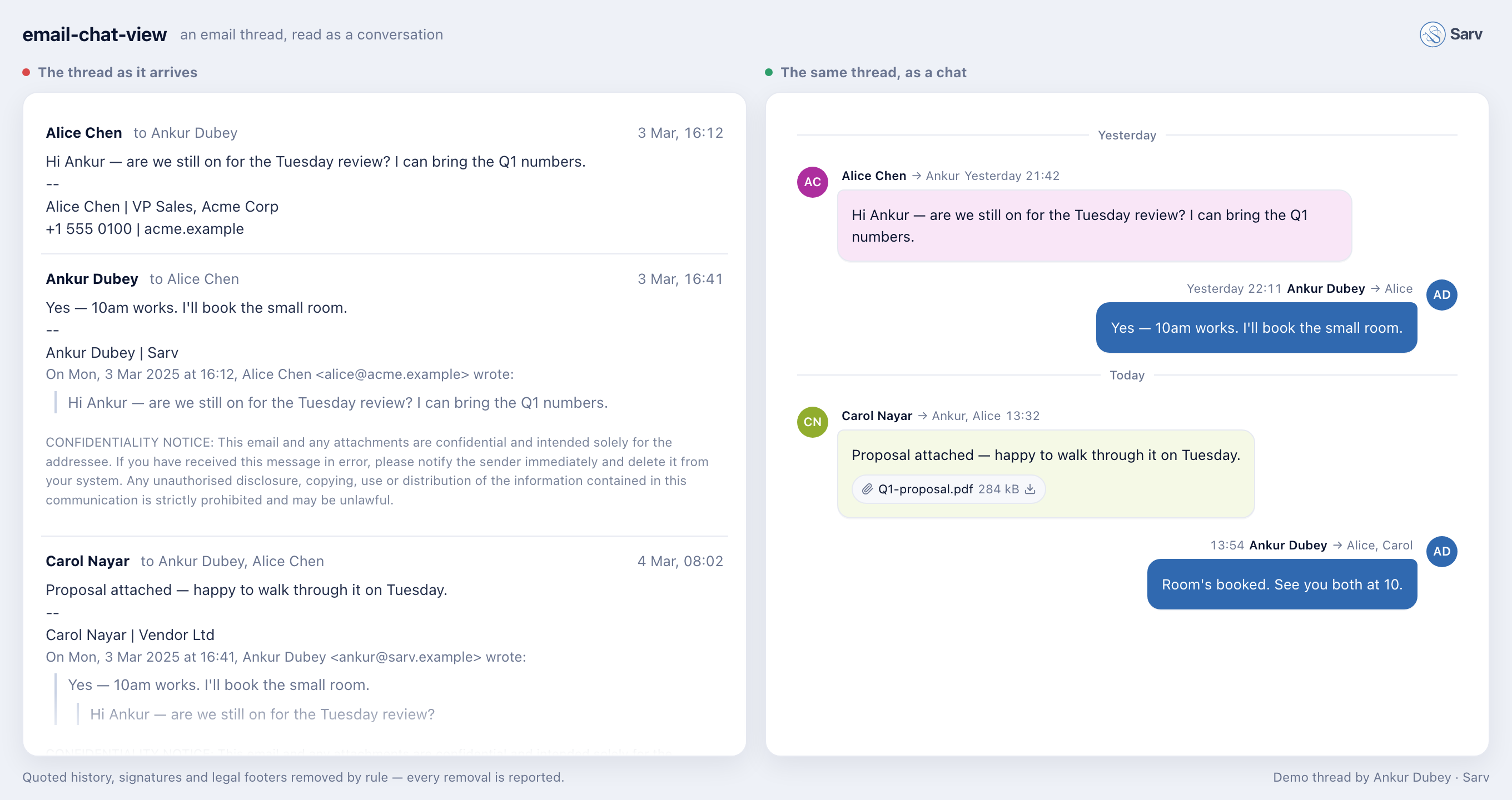
Nothing to configure. No React needed for the transform, no DOM assumed, no
mode flag, nothing global. Three small runtime dependencies come along —
dompurify, email-addresses, chrono-node — and none of them needs a line of
setup from you. TypeScript throughout, ESM and CJS,
and 100% test coverage — statements, branches, functions and lines, across
every rule and every engine. The threshold is enforced in CI on three operating
systems and Node 18/20/22, so a rule cannot land with an untested branch: each
one of them can silently delete part of somebody's email.
New here? docs/INTEGRATION.md is the same material as a walkthrough — install, shape your rows, render, and a troubleshooting table for the things that go wrong on a first integration. This page is the reference.
- Install
- Quick start
- The
Mailshape - Rendering messages you produced yourself — the AI / bring-your-own path
- Per-bubble actions: menus, star, reply
- Examples
- Running outside a browser
- Dates: say which unit you have
- Big threads: how mails are supplied
- Why part of my email disappeared
- The rules
- Writing your own rule
- Classifying automated mail
- API
- Project structure
- Development
- Contributing
- Releasing
npm install @sarv-in/email-chat-view
# or
pnpm add @sarv-in/email-chat-view
From a local checkout — a fork you are working on, or a patched build:
pnpm add file:../email-chat-viewReact and react-dom are optional peers, needed only for the view. Nothing
under @sarv-in/email-chat-view/transform imports them.
| Import | Contains | Needs React |
|---|---|---|
@sarv-in/email-chat-view |
everything, view included | yes |
@sarv-in/email-chat-view/transform |
the mail → message transform, rules, classification | no |
@sarv-in/email-chat-view/style.css |
the compiled stylesheet | — |
Both ESM and CJS ship, with matching type declarations for each:
import { mailsToMessages } from '@sarv-in/email-chat-view/transform';   // ESM
const { mailsToMessages } = require('@sarv-in/email-chat-view/transform'); // CJS
Status. Published on npm and complete end to end: the transform layer, the rule registry, the classifier and the React view (
MailChatViewand every part below it) all ship in the current release. The version is still0.x, so the surface can change on a minor bump — anything that does will be called out in the release notes.
import { mailsToMessages } from '@sarv-in/email-chat-view/transform';

const messages = mailsToMessages(mails, {
  currentUserAddress: 'me@example.com',
  dateUnit: 's', // IMAP stores usually hand you epoch SECONDS — see below
});

// [
//   { id: '1', fromAddress: 'alice@acme.example',
//     body: '<p>Hi — are we still on for Tuesday?</p>',
//     date: 1740994800000, isFromMe: false,
//     applied: ['signature:gmail', 'quote:gmail', 'disclaimer:english-corporate'] },
//   { id: '2', fromAddress: 'me@example.com', body: '<p>Yes, 10am works.</p>', ... },
// ]
mailsToMessages is pure and synchronous. It sorts oldest-first, drops drafts,
resolves who each message is from, normalizes every date to epoch milliseconds,
and cleans each body.
One bubble per mail is right when the store holds every message of the conversation. Frequently it does not: a thread forwarded in, a thread joined halfway, a colleague's reply pasted into a mail. The only copy of those messages is the quoted text inside a mail somebody else sent — render one bubble per mail and the conversation has holes in it.
import { threadToMessages } from '@sarv-in/email-chat-view/transform';

const messages = threadToMessages(mails, {
  currentUserAddress: 'me@example.com',
  dateUnit: 's',
});
Same signature, same output type, one difference: each body is split at its quote boundaries, every quoted message becomes a bubble of its own with the sender and date read off its attribution line, and the copies are merged — the same message is re-quoted by every later reply, so a five-mail thread yields fifteen candidates for five distinct messages.
Three rules decide that merge, and each one is a bug somebody hit:
- A real message — a mail's own segment — is never dropped. It is visible in the plain mail view, so a chat view that hides it makes the two disagree about what arrived.
- A quoted copy is dropped when its content already appears, whether in a real message or in a copy already kept.
- A quote whose attribution line carried no readable date is dated from the
mail carrying it and says so, via
ChatMessage.dateApprox. The view renders that as~10:04with "Approximate time" on hover, because an unmarked guess is worse than a guess. Zero would sort it to 1970 and head the thread with it.
A recovered message carries sourceId — the mail it was found inside — and an
id of <mailId>#<segmentIndex>, stable as the thread grows.
import { MailChatView } from '@sarv-in/email-chat-view';
import '@sarv-in/email-chat-view/style.css';

<MailChatView messages={messages} />;
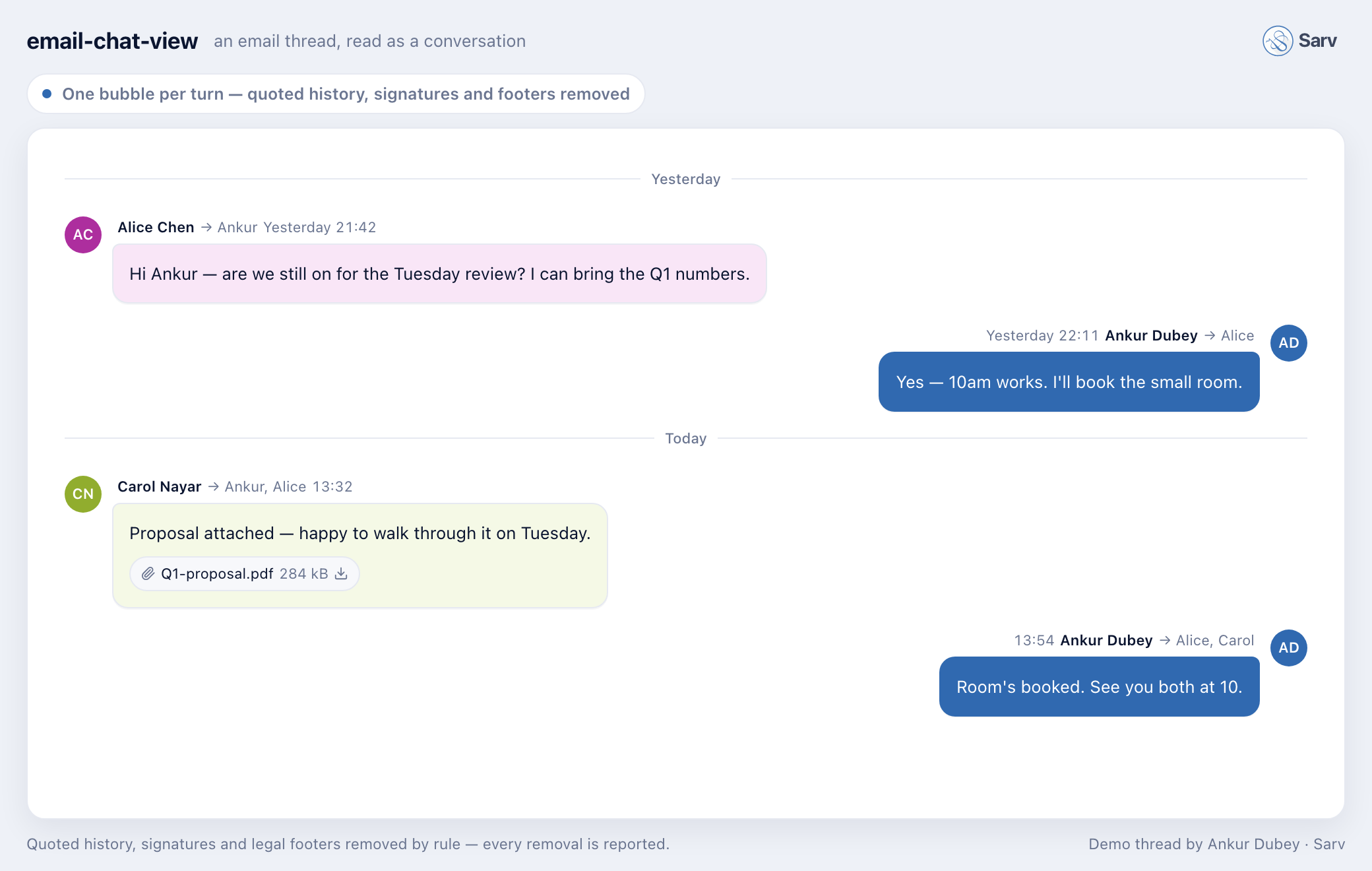
The view takes ChatMessage[] and nothing else mandatory. It does not know what
a mail is, so anything that produces per-turn content — the transform above, an
LLM extraction pass, your own parser — feeds the same component. That is why
there is no mode prop anywhere in this package: the view renders messages,
and where they came from is your business.
The mails above is a Mail[] — a plain object, with three required fields
and a body:
import type { Mail } from '@sarv-in/email-chat-view/transform';

const mail: Mail = {
  id: '1',                            // unique within the thread
  fromAddress: 'alice@acme.example',  // bare address; display name goes in fromName
  date: 1740994800,                   // epoch seconds or ms — declare which via dateUnit
  body: '<p>Hi — are we still on for Tuesday?</p>',
};| Field | Type | Notes |
|---|---|---|
id |
string |
Required. React key, and what every callback hands back |
fromAddress |
string |
Required. Bare address, no display name |
date |
number |
Required. Unit declared by dateUnit |
body |
string | null |
HTML or plain text. Optional, because metadata arrives before bodies |
fromName |
string | null |
Display name, when known |
toAddress / ccAddress |
string | null |
Comma-separated address lists, as received |
toNames / ccNames |
string | null |
Display names, positionally matching those lists |
messageId |
string | null |
RFC 5322 Message-ID; used for de-duplication |
attachments |
Attachment[] |
{ filename, sizeBytes?, mimeType?, inline? } |
bodyPending |
boolean |
Body still downloading → the bubble shows a spinner |
bodyFailed |
boolean |
Fetch failed for good → the bubble offers a retry |
isDraft |
boolean |
Excluded unless you pass includeDrafts |
Nothing else is read, so a thin mapper from your own row type is usually the whole integration — see the example in the integration guide.
The transform and the view are two independent halves, and you can take the
second without the first. ChatMessage is the whole contract between them — if
you can build that array, the view renders it, and none of the splitting or
cleaning code above runs at all.
This is the path for anything the library deliberately does not do. It makes no network calls and talks to no model, so an LLM extraction pass, a server-side parser, or a corpus-specific splitter of your own lives in your app — and then reuses every pixel of the rendering: day separators, sender runs, identity colours, the inline-vs-frame decision, sanitisation, the sandboxed frame, attachment chips, pending and failed states.
import { MailChatView, type ChatMessage } from '@sarv-in/email-chat-view';
import '@sarv-in/email-chat-view/style.css';

// Whatever produced these — a model, your own parser, a server endpoint.
const messages: ChatMessage[] = turns.map((turn) => ({
  id: turn.id,               // stable and unique; the view keys on it
  sourceId: turn.emailId,    // the mail it came out of — see below
  fromAddress: turn.from,
  fromName: turn.fromName,
  toAddress: turn.to,
  date: turn.sentAtMs,       // epoch MILLISECONDS
  body: turn.html,           // sanitised by the view; you need not pre-clean it
  isFromMe: turn.from === me,
  attachments: turn.attachments,
}));

<MailChatView messages={messages} currentUserAddress={me} />;
Only four fields are required — id, fromAddress, date, body. Everything
else is optional and degrades to a sensible default, though isFromMe is the
one you will always want: it is what right-aligns your own messages, and an
absent value means "not known", which left-aligns. Left-aligning your own
message is a cosmetic flaw; right-aligning someone else's attributes their words
to the reader, so the default is deliberately the harmless direction. Two states
are worth setting
explicitly rather than leaving the body empty: bodyPending: true renders a
spinner while a body is still being fetched or extracted, and bodyFailed: true
renders the retry affordance that calls onRetryBody. An empty body with
neither flag renders as a genuinely empty message, which is a real thing mail
does — that is why the distinction is yours to make.
Mixing the two is fine and expected. A host that offers both a deterministic
view and an extracted one calls threadToMessages for the first and its own
pipeline for the second, then hands whichever array is current to the same
<MailChatView>. There is no flag to set; the component never asks.
A bubble is not always a mail. threadToMessages recovers messages that exist
only as quotes inside other mails, and an extraction pass can carve several
turns out of one bottom-quoted email. Those bubbles have no row of their own in
your store, so message.id will not find one.
message.sourceId is the mail they came out of. Route every action through it:
const emailFor = (message: ChatMessage) => store.get(message.sourceId ?? message.id);sourceId is absent when the bubble is a whole mail, which is why the
fallback to id is part of the idiom rather than an edge case.
The view ships no actions of its own — a star, a three-dot menu and a reply button are your product's decisions, wired to your store, with your icons and your permissions. What the view provides is the slot, correctly positioned and correctly revealed:
<MailChatView
  messages={messages}
  renderActions={(message) => {
    const email = emailFor(message);         // sourceId ?? id, as above
    if (!email) return null;                 // a bubble with no row: no actions
    return (
      <>
        <StarButton email={email} />
        <OverflowMenu
          onReply={() => reply(email)}
          onForward={() => forward(email)}
          onDelete={() => remove(email.id)}
        />
      </>
    );
  }}
  renderFooter={(message) => (replyingTo === message.id ? <InlineReply /> : null)}
/>| Prop | Where it renders |
|---|---|
renderActions(message) |
at the bubble's outer edge, outside the bubble box — left of your own messages, right of everyone else's. Hidden at opacity: 0, revealed on row :hover and on :focus-within, so it is reachable by keyboard, not just by mouse |
renderFooter(message) |
inside the column, below the body — for something that belongs to the message rather than acting on it: an inline reply box, a translation notice, an extraction warning |
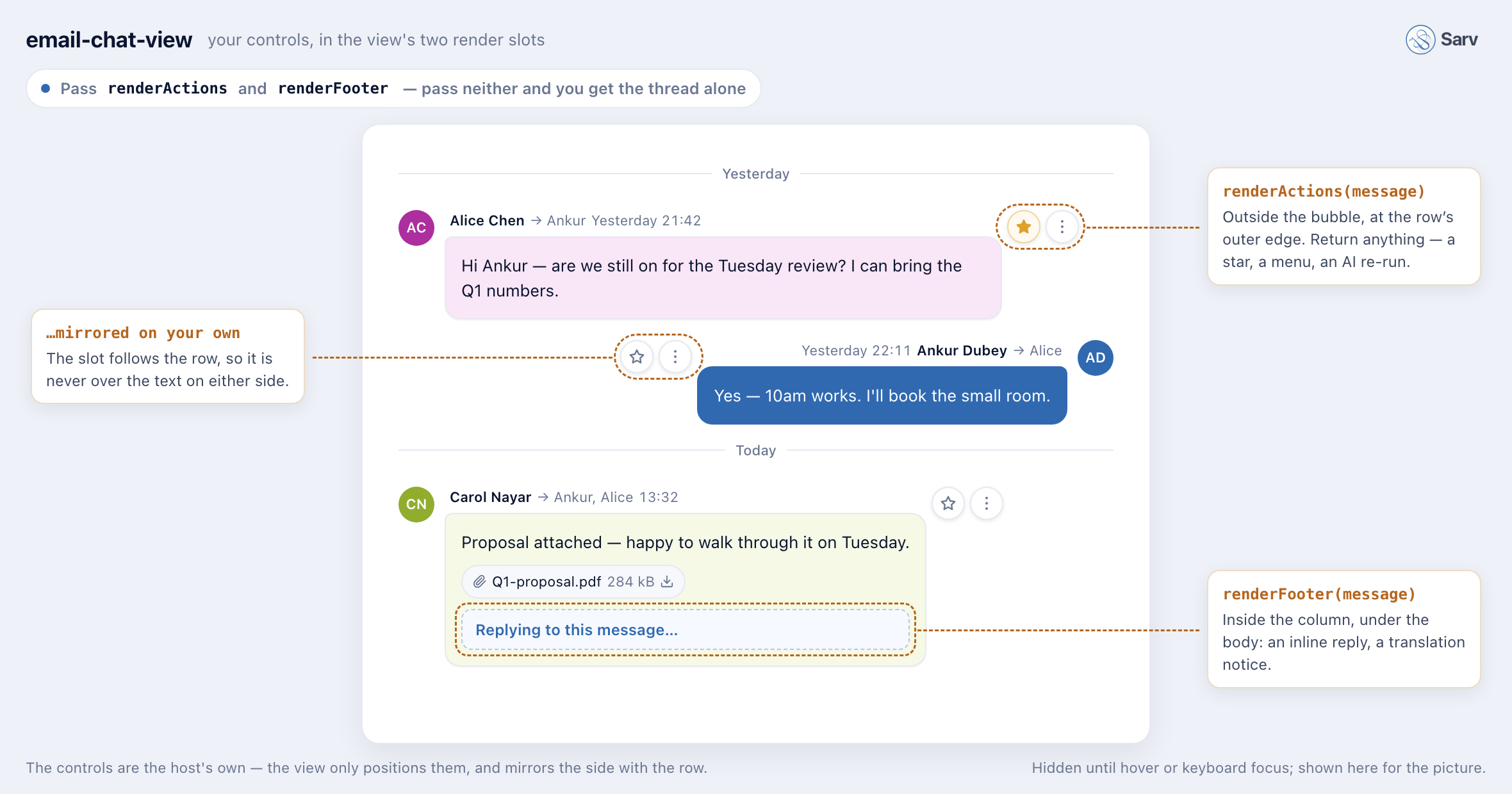
The controls in that picture are not the library's; they are a <StarButton>
and an <OverflowMenu> handed to renderActions, and a reply box handed to
renderFooter. The view only decides where they land and when they
appear — note the star sitting on the right of Alice's row and on the left of
the reader's own, because the slot follows the side the bubble is on. Pass
neither prop and none of it renders: you get the thread and nothing else.
(They are hidden until hover or keyboard focus; the picture forces them visible.)
Both are called per message and may return null — that is the correct answer
for a recovered quote with no underlying mail to act on. The row is
position: relative and the hovered row is lifted to z-index: 1, so controls
hanging outside the column are never painted over by the next bubble.
Four more callbacks cover the affordances the view does draw, because it knows
when they were clicked and you know what to do about it: onOpenLink,
onRetryBody, onPreviewAttachment, onDownloadAttachment. The library never
fetches, never navigates and never mutates anything — it reports, you act.
Working code for each of the three ways this gets used, in examples/:
| Example | Shows |
|---|---|
node-transform |
a thread → chat messages in Node — injected parser, dateUnit, the body cache, a pending body |
custom-rules |
adding a rule for an unknown client, adding a German marker, dropping a shipped rule that is too loose |
react-thread |
the view wired like a real mail client — streaming bodies, visible-range prioritisation, upward paging |
The first two run straight from a clone:
pnpm install && pnpm build
node examples/node-transform/thread-to-chat.mjsThe transform needs to parse HTML. In a browser it uses the global DOMParser
automatically. Anywhere else — Node, a worker, a test, a server-side digest
builder — pass one in:
import { parseHTML } from 'linkedom';
import { mailsToMessages } from '@sarv-in/email-chat-view/transform';

const parser = (html) => parseHTML(`<html><body>${html}</body></html>`).document;

mailsToMessages(mails, { parser });An email body is almost always a fragment (
<div>Hi</div>), not a document. The browserDOMParserhoists a bare fragment intodocument.body; linkedom does not — it leavesdocument.bodyempty and puts the nodes somewhere the passes never look.Without the wrapper nothing throws and nothing is logged. Every strip pass simply sees an empty document and returns your input unchanged, so bodies come out with their signatures and quoted history intact and it looks like the rules are broken. Wrap it.
No parser and no global DOMParser throws NoDomParserError, whose message
repeats the snippet above. hasGlobalDomParser() tells you which environment
you are in; resolveParser(maybeParser) is the resolution the transform itself
uses, exported for anyone building a pass of their own.
The suite deliberately runs with environment: 'node' and injects linkedom, so
any code that quietly reaches for a global DOM fails there rather than in your
Node process.
mailsToMessages(mails, { dateUnit: 's' }); // epoch seconds
mailsToMessages(mails, { dateUnit: 'ms' }); // epoch milliseconds (default)
Declared, never guessed. IMAP internal dates are frequently kept as epoch seconds while everything in JavaScript is milliseconds, and a silent factor-of-1000 error does not crash — it puts every message in 1970, sorts the thread wrongly, and produces date separators nobody notices are wrong for months.
A date that cannot be read (zero, negative, NaN, Infinity) is kept as NaN
and sorted last, so the view can group those under an explicit heading. The
alternative — dropping the message, or planting it at the top of the thread in
1970 — loses mail or corrupts the order.
Output date is always epoch milliseconds. Render it in the reader's zone at
render time (toLocaleString(undefined, …)); the library never formats a date
for you and never stores a local one.
A 200-message thread is not available all at once, and pretending otherwise is what makes mail clients freeze on the threads that matter most. So the library never asks for a complete thread, and never fetches anything itself.
You own the fetching. The library is told what you have so far.
Three properties on Mail carry that, and each maps to a bubble the reader can
act on:
| State | Set | Bubble shows |
|---|---|---|
| body available | body: '<p>…</p>' |
the content |
| body still downloading | bodyPending: true |
a spinner |
| body permanently failed | bodyFailed: true |
a retry affordance |
A pending message does no transform work at all — cleaning an empty string costs a parse per message, and on a freshly-opened large thread that is every message. So the usual sequence is: metadata for the whole thread arrives first and renders immediately as a column of headers and spinners; bodies stream in one at a time and fill themselves in.
import { createBodyCache, mailsToMessages } from '@sarv-in/email-chat-view/transform';

const cache = createBodyCache(); // once, outside render. Default capacity 500.

// Called again on every body that arrives — 200 times for a 200-message thread.
const messages = mailsToMessages(mails, { cache, dateUnit: 's' });
The cache is keyed on (id, body content), not on the id alone. So:
- a body that arrived is cleaned once and reused on every later call;
- when a pending body finally arrives the key changes, so exactly one message is re-cleaned and the other 199 are served from the cache;
- a stale empty result can never be served for a message whose body has since loaded, which is the bug where a message renders forever blank.
Eviction is least-recently-used, so a long session browsing thousands of messages does not retain every body it ever rendered.
For a single message — a retry, one arriving body — mailToMessage transforms
one mail without touching the rest of the thread.
threadToMessages takes a createSegmentCache() in exactly the same place, and
wants one more: splitting is the most expensive thing this package does — a
parse, a boundary sweep and a clean per segment — so without a cache every
newly arrived body re-splits every body already on screen.
Yes — pass everything you have, on every call. That is the designed path, and the cache above is what makes it cheap: one arriving body re-cleans one message, not the thread. Chunking the transform to save work saves nothing.
The transform is pure per message, with exactly one piece of thread-global context: the oldest message is cleaned with its quoted history left in place, because the thread's opener has nothing behind it to strip and the quote passes could only damage real content.
That single fact is what makes a chunked call wrong:
// WRONG — page 2 does not contain the thread's first message
const messages = mailsToMessages(pageTwoMails, { dateUnit: 's' });
The oldest mail of that page is treated as the thread opener, so its whole
quoted history is kept and one bubble renders the entire conversation. Nothing
throws. It reads as "the stripping is broken". Pass
containsThreadStart: false when that is what you are doing.
threadToMessages has a second reason: it de-duplicates quoted copies against
the real messages across the whole array. Split it into pages and a quoted copy
whose real message landed in the other page survives as a duplicate bubble.
So paginate the two places that actually cost something, and keep handing the transform the full array:
| To page | Do this | Not this |
|---|---|---|
| fetching bodies | send the mail with bodyPending: true |
leave the mail out |
| the DOM | maxRendered, hasOlder / onLoadOlder |
slice the array |
A pending mail costs no transform work at all — the body is empty, so it returns before any parsing — which is why a 200-message thread can be handed over whole on the first render and still open instantly.
If you genuinely must transform page by page, say so and the policy follows the page instead of the array:
// Page two of a thread: no opener here, so every message is quote-stripped.
const messages = mailsToMessages(pageTwoMails, { dateUnit: 's', containsThreadStart: false });
For one mail at a time — a retry, an arriving body — mailToMessage takes
isOldest directly, so pass true only for the thread's real first message.
Either way, concatenate in date order afterwards.
Threads are rendered newest-at-the-bottom, so paging goes upward. The view takes:
<MailChatView
  messages={messages}
  hasOlder={hasOlder}                       // is there more history to fetch?
  onLoadOlder={loadOlderPage}               // called when the top sentinel is seen
  onVisibleRangeChange={prioritizeBodies}   // which bodies to fetch FIRST
  maxRendered={50}                          // DOM ceiling; older ones unmount
/>
onVisibleRangeChange is the important one and the reason the library reports
visibility rather than hiding it: only the view knows which messages are on
screen, and only you can fetch them. It lets you fetch the bodies the reader is
actually looking at before the 180 they scrolled past, which is the difference
between a thread that feels instant and one that fills in from the top while the
reader waits at the bottom.
Full windowing (react-virtuoso) is a follow-up; maxRendered is the interim
ceiling.
Every message carries the list of rules that shaped it:
messages[0].applied;
// ['signature:gmail', 'quote:bare-blockquote', 'disclaimer:english-corporate']
Names are namespaced by family, and a rule appears only if it actually removed something. Content vanishing with no explanation is a mail client's worst failure mode, so this is the audit trail that makes it answerable: paste the array into a bug report and the culprit is named.
If a rule is too aggressive for your corpus, drop it — every family is independently replaceable, and a rule is a plain object:
import { cleanReplyBody, quoteRules, bareBlockquote } from '@sarv-in/email-chat-view/transform';

cleanReplyBody(html, {
  // A corpus full of genuine pull-quotes? Lose the loosest rule, keep the rest.
  quoteRules: quoteRules.filter((rule) => rule !== bareBlockquote),
});Provider conventions are data, not code. Four kinds, each with its own tiny engine, and each pass is separately callable:
| Family | Removes | Engine | Also as |
|---|---|---|---|
signatureRules |
signature blocks (.gmail_signature, #Signature, …) |
CSS selectors | stripSignature(html, opts) |
quoteRules |
quoted-history containers (.gmail_quote, blockquote[type=cite], …) |
CSS selectors | stripQuote(html, opts) |
markerRules |
everything after a prose boundary (On … wrote:, -----Original Message-----) |
regex on the serialized string | stripMarkers(html, opts) |
disclaimerRules |
trailing legal boilerplate | weighted evidence | stripDisclaimer(html, opts) |
cleanReplyBody runs all four, in that order. The order matters: the disclaimer
pass is the only one that reasons about the trailing edge of a message, so it
has to run after the marker pass has cut the plain-text history off the end —
otherwise the footer sits buried mid-document where the trailing-block walk
never looks, and survives into the bubble.
Shipped rules today:
- Signature — Gmail, Apple Mail, Thunderbird, Outlook mobile, Outlook desktop, plus a guarded generic rule.
- Quote — Gmail,
blockquote[type="cite"](Apple Mail and followers), Thunderbird, Outlook classic, Outlook new/OWA, one webmail container, and a bare<blockquote>catch-all. - Marker —
On … wrote:, forwarded-message banners,-----Original Message-----, the OutlookFrom:/Sent:/To:header block, the Outlook underscore separator. - Disclaimer — English corporate boilerplate, and an
<hr>-delimited rule.
Three details worth knowing, because each was a real bug:
maxTextLengthguards the loose rules.div[id*="signature" i]matches Outlook's entire reply wrapper on some mail; unguarded, it deletes the whole message. The limit is measured on whitespace-collapsed text, so Word's mountains of markup cannot push a short signature over it.boundary: truemeans "remove this element and every following sibling". Outlook'sappendonsendanddivRplyFwdMsgdo not contain the quoted thread — the history follows them as siblings. Removing only the element deletes theFrom:header and leaves the entire conversation on screen, which looks like the stripper ran and worked.- Earliest match wins among marker rules, and the latest
<hr>wins among disclaimer dividers. Both make the result order-independent and both degrade toward removing less — leftover boilerplate is cosmetic, a deleted paragraph is the sender's words.
A rule is a plain object, so a new one is one object and one test — no engine changes, no reading the rest of the set. Pass it at call time for a corpus only you have; open a PR when the provider is one other people also receive mail from (CONTRIBUTING.md walks through that).
Say your client wraps signatures in <div class="acme-sig">:
import type { DomRule } from '@sarv-in/email-chat-view/transform';

export const acmeSignature: DomRule = {
  name: 'acme',                    // appears in `applied` as 'signature:acme'
  provider: 'Acme Mail 4.x',       // who emits this, so the next reader knows
  selectors: ['div.acme-sig'],
  maxTextLength: 500,              // optional: only when the match is short
  test: (element) => true,         // optional: for what a selector cannot say
};
Then either pass it ({ signatureRules: [...signatureRules, acmeSignature] })
or open a PR adding it to src/rules/signature.ts with a test.
Test it against markup a real client produces, not markup you typed. A
marker rule tested against prettier input than the wild produces is a rule that
does not fire: real clients HTML-escape addresses as <bob@x.com>, and a
pattern written against <bob@x.com> matches the fixture and nothing else.
The other three kinds — LineRule, MarkerRule, DisclaimerRule:
// A convention with no container to select — it exists only as a standalone
// visual LINE. This is the shipped `mobileFooterLine` rule.
const line: LineRule = {
  name: 'mobile-footer',
  provider: 'Common / mobile clients',
  pattern: /^(sent from my |get outlook for |sent via |sent from )/i,
  maxLineLength: 60,               // REQUIRED, no default — see below
  action: 'cut',                   // 'cut' = this line and everything after it
};

// Prose boundary: everything from the match onward is history. This is the
// shipped `wroteAttribution` rule.
const marker: MarkerRule = {
  name: 'wrote-attribution',
  provider: 'Gmail / multi-client',
  language: 'en',                  // so a non-English corpus can filter the set
  patterns: [
    /<div[^>]*>\s*On\s+[^<]{4,200}\s+wrote\s*:/i,  // the markup form, if wrapped
    /On\s+[^\n<]{4,200}\s+wrote\s*:/i,             // and the bare-text form
  ],
};

// Trailing boilerplate: evidence-based, never a single phrase. Trimmed from the
// shipped `englishDisclaimer` — the real one carries ten signals.
const disclaimer: DisclaimerRule = {
  name: 'english-corporate',
  language: 'en',
  opens: /^(?:this (?:e-?mail|message)|confidentiality notice)/i, // must OPEN like boilerplate
  signals: [/\bconfidential(?:ity)?\b/i, /intended (?:recipient|solely)/i, /\bprivileged\b/i],
  minSignals: 2,                   // default 2 — one phrase is not proof
  minTextLength: 120,              // default 120 — shorter than this is a sign-off
};
maxLineLength is the load-bearing part of a line rule, which is why it has no
default: it is the only thing between the rule and the paragraph it will
otherwise eat. "Sent from my phone I could not reach you earlier, so…" is a
sentence, not a footer, and the cap is what tells them apart. pattern is
tested against the line's text already trimmed and with whitespace collapsed, so
anchor with ^ freely. Prefer action: 'line' — 'cut' takes the rest of the
message with it when it misfires, so it is only for a convention that genuinely
terminates a message.
opens is the load-bearing part of a disclaimer rule. It anchors to the
start of the block's text, so a paragraph that merely mentions
confidentiality cannot match, and neither can a wrapper holding real content
followed by a footer — the engine descends into that wrapper instead of deleting
the lot.
Patterns use bounded quantifiers ([^<]{4,200}, [\s\S]{0,2000}? — never
[\s\S]*?). An unbounded one on a 5 MB marketing email is a ReDoS waiting to
happen, and mail bodies are the most hostile input a client ever sees. Match
against both the markup form and the bare-text form: whether the boundary is
still wrapped in a <div> by the time the pass sees it depends on which earlier
rules fired.
Rules cannot break the render. An unparseable selector degrades to "matched
nothing", a throwing test vetoes the match, a throwing classification signal is
skipped — a bad rule shows an unstripped signature, never an unrendered message.
Rules that belong upstream — a provider convention, a non-English marker — are the most valuable contribution this package takes. See CONTRIBUTING.md for where the file goes, what the test has to prove, and how to capture real markup to test it against.
A newsletter is not a conversation, and rendering one as a chat bubble reads as
nonsense. classifyMail says which one you have:
import { classifyMail, isConversational } from '@sarv-in/email-chat-view/transform';

classifyMail({
  body,
  messageId: '<abc@mail123.mcsv.net>',
  fromAddress: 'news@brand.example',
  headers: { 'List-Unsubscribe': '<mailto:u@brand.example>' },
});
// { kind: 'automated', score: 6, signals: ['list-unsubscribe-header', 'esp-message-id'] }
Signals are weighted, and the verdict flips at a score of 3. Weight 3
decides on its own (List-Unsubscribe, Auto-Submitted, Precedence: bulk, a
tracking pixel, an unrendered {{merge_tag}}, an ESP Message-ID, a
no-reply@ sender); weight 2 needs corroboration. That distinction exists for
one case above all: a genuine human reply whose corporate footer says
"unsubscribe" must not be reclassified because of its footer.
Deliberately not signals: "the HTML looks designed" and "low text-to-markup ratio". Both flag every mail sent from a company with a template, including the ones a person actually wrote.
score and signals come back on every call, so a misclassification is
tunable rather than mysterious.
Everything below except the view is exported from
@sarv-in/email-chat-view/transform and, for convenience, from the package root. The
view is root-only: importing it pulls in React.
| Export | Description |
|---|---|
mailsToMessages(mails, options?) |
Mail[] → ChatMessage[]: sorted, drafts dropped, dates normalized, bodies cleaned |
mailToMessage(mail, context) |
one mail, for a retry or a single arriving body |
createBodyCache(capacity?) |
LRU memo keyed on (id, body). Default capacity 500 |
threadToMessages(mails, options?) |
the same, but the messages quoted INSIDE those mails become bubbles too |
createSegmentCache(capacity?) |
LRU memo for split bodies, keyed on (id, body) |
contentKey(html) |
the normalized key two copies of one message collapse on |
cleanReplyBody(html, options?) |
all seven passes, one parse → { html, applied } |
stripSignature / stripBanner / stripQuote / stripLines / stripSignOff / stripMarkers / stripDisclaimer |
one family each, for a corpus that wants six of the seven |
MailsToMessagesOptions: parser, currentUserAddress (string or array),
dateUnit, cache, includeDrafts, containsThreadStart, plus any
cleanReplyBody option (signatureRules, bannerRules, lineRules,
quoteRules, markerRules, disclaimerRules, keepSignOff,
keepQuotedHistory).
MailToMessageContext: isOldest (required), currentUserAddress, dateUnit,
cache, stripOptions. The reader's addresses are normalized here, so pass
them as you hold them — matching is case-insensitive.
ThreadToMessagesOptions: those same five, plus segment and solo
(CleanFragmentOptions for a quoted segment, and for a body with no quotes in
it) and refDate.
The thread's oldest message keeps its quoted history automatically: it has no history behind it, so there is nothing to cut and only genuine content a quote pass could damage.
The parts under threadToMessages. Exported because a client whose attribution
shape the three detectors do not recognise is a real possibility, and composing
a detector out of these beats forking the file.
| Export | Description |
|---|---|
splitMailBody(html, options?) |
one body → BodySegment[], newest first |
findBoundaries(body, refDate?) |
ordered, non-overlapping quote boundaries in a parsed body |
parseAttribution(line, refDate?) |
On <date>, <someone> wrote: → { name, email, date } |
parseHumanDate(text, refDate?) |
a human-written date → epoch ms, day-first, or null |
cleanFragment(node, options?) |
clean a segment already carved out of a body — it UNWRAPS quote containers instead of removing them |
sliceBetween / removeFromNodeOnward / removeUpToNodeInclusive |
cut a tree between two nodes, without Range |
pathTo / nodeAtPath / comparePaths / isPathPrefix |
child-index paths: document order without compareDocumentPosition |
BodySegment is { attribution, isOwn, html, applied }. isOwn is stated
rather than inferred from the position: a segment that cleans away to nothing is
dropped, and after that the first segment is not necessarily the sender's own.
refDate matters more than it looks. Attribution lines are full of relative
dates ("On Monday", "Yesterday at 4pm"), and resolved against the reader's clock
rather than against the mail that carried them, a quote in an old thread gets
dated after the reply quoting it — the conversation then renders in reverse.
threadToMessages passes each mail's own send time for you, and refuses any
attribution date later than its carrier.
signatureRules, bannerRules, quoteRules, lineRules, markerRules,
disclaimerRules — the default sets, plus minimalLineRules (the two the
thread splitter uses on a body with no quotes in it). Every individual rule is
exported too (gmailQuote, bareBlockquote, outlookModernQuote,
wroteAttribution, mobileFooterLine, englishDisclaimer, …), so composing
your own set is array-literal syntax, not an API.
Types: DomRule, LineRule, MarkerRule, DisclaimerRule, StripOptions,
StripResult.
applyDomRules(root, rules), applyLineRules(root, rules),
applyMarkerRules(html, rules), applyDisclaimerRules(root, rules),
cutSignOff(root) — run one pass over a document you have already parsed, with
no serialize/reparse round trip. applyDomRules accepts a detached subtree,
so you can strip inside a fragment.
classifyMail, isConversational, automatedSignals, AUTOMATED_THRESHOLD,
ESP_MESSAGE_ID_DOMAINS, hasEspMessageIdDomain. Types: AutomatedSignal,
MailClassification, MailClassificationInput.
resolveParser, hasGlobalDomParser, NoDomParserError, type HtmlParser.
normalizedText, isIgnorableNode, meaningfulChildren,
lastMeaningfulChild, isElement, safeMatches, safeQueryAll — small and
unglamorous, but a contributed rule's test hook needs them, and
re-implementing "does this element have meaningful children" per rule is exactly
how the hand-rolled strippers this package replaces drifted apart.
From the package root only — importing these pulls in React, which is why
they are not on the /transform entry.
MailChatView is the composed thread. Its props, grouped by what they are for:
| Group | Props |
|---|---|
| Data | messages (the only required one), currentUserAddress, locale, now, parser |
| Your UI | renderActions(message), renderFooter(message), emptyState, labels, className |
| Your handlers | onOpenLink, onRetryBody, onPreviewAttachment, onDownloadAttachment |
| Paging & scale | hasOlder, onLoadOlder, loadingOlder, onVisibleRangeChange, maxRendered, autoScroll, loading |
| Presentation | senderRunWindowMs, blockRemoteImages |
See Per-bubble actions for
renderActions / renderFooter, and Paging older
messages for the rest.
blockRemoteImages defaults to true and takes a predicate when the answer is
per message — which it is in any client with a "load images from this sender"
allowlist, or a setting that trusts some categories and not others:
<MailChatView
  messages={messages}
  blockRemoteImages={(message) => !autoLoadsImagesFor(message.fromAddress)}
/>
It is called for every rendered message, so read a Set, don't scan a mailbox.
Whatever it returns, the reader still gets the per-message "Load images" link —
the predicate decides the default, not what they are allowed to do.
The pieces are exported individually for a host that wants its own list:
ChatBubble, MessageBody, SandboxedBody, AttachmentChip, Avatar,
DateSeparator, ChatSkeleton, Tooltip, RecipientsSummary. So are the pure
helpers behind them — groupMessagesByDate, isSameSenderRun,
buildSenderColorMap, resolveSenderColor, inspectBody, bubbleTimestamp,
describeRecipients, parseAddressList, formatFileSize, isPreviewable,
sanitizeInlineHtml, sanitizeFrameHtml, buildFrameDocument — because the
interesting decisions should be testable and reusable without rendering
anything.
DEFAULT_LABELS / resolveLabels cover every string the view can render;
pass labels to translate or reword any of them.
Mail, ChatMessage, Attachment, DateUnit — every field documented inline,
so your editor explains them without a trip back here.
Three layers, and the boundaries between them are the design. Each one is importable without the one above it, which is what lets a Node pipeline use the transform with no React and a host with its own list use the bubble without the view around it.
src/
  index.ts          package root — re-exports transform + view
  transform.ts      '@sarv-in/email-chat-view/transform' entry — no React, no DOM assumed
  view.ts           React entry — components and the pure UI helpers
  types.ts          the public data contract: Mail, ChatMessage, Attachment
  dom.ts            injectable HTML parser (resolveParser, NoDomParserError)
  rules/            provider conventions AS DATA — signature, banner, quote,
                    line, sign-off, marker, disclaimer
  transform/        the engines that apply those rules to ONE body, and mailsToMessages
  thread/           one bubble per MESSAGE: quote boundaries, attribution lines,
                    human dates, and threadToMessages
  classify/         automated-vs-conversational scoring
  ui/               pure view logic: dates, colours, grouping, sanitize, frame
  components/       the React components
  styles/index.css  the --sec-* token layer, compiled to dist/style.css
test/               one file per module, mirroring src/
docs/
  INTEGRATION.md    the beginner walkthrough this README is the reference for
  media/            the README screenshots, rendered by scripts/media/
.github/workflows/  ci.yml (every push/PR) and publish.yml (v* tags)
Two deeper reads, both in CONTRIBUTING.md: a stage-by-stage walkthrough of what happens to a raw mail on its way to a bubble — split, clean, merge, group, render, and why that order is load-bearing — and a file-by-file map of what each module owns and why it is separate. Every source file also opens with a docblock stating the decision it encodes, so the file itself is the second place to look.
pnpm install
pnpm verify         # lint + format:check + type-check + coverage — what CI gates on
pnpm test           # vitest, Node environment, linkedom injected
pnpm test:coverage  # enforced at 100% lines AND branches
pnpm type-check
pnpm lint           # ESLint; pnpm lint:fix to autofix
pnpm format         # Prettier; pnpm format:check to verify
pnpm build          # ESM + CJS + .d.ts/.d.cts + dist/style.css
ESLint and Prettier are not advisory — both run as a CI job on every pull
request, and .editorconfig lines your editor up with them before either runs.
Prettier owns formatting outright; ESLint owns the correctness rules a reviewer
would otherwise have to catch by eye (a relative import missing its .js
extension, an unbounded quantifier facing a mail body, a hook with an incomplete
dependency list). Each rule is commented where it is declared, and
CONTRIBUTING.md explains the ones most likely to
stop a first PR.
The coverage threshold is 100% and enforced, not aspirational. Every rule in here can silently delete part of somebody's email, so an untested branch is not a cosmetic gap. Each test carries a one-line comment naming the regression it prevents; a test whose purpose isn't stated gets deleted by someone later, and the protection goes with it.
Styling is a hand-authored token layer, not Tailwind — Tailwind generates CSS by
scanning source for class names, which cannot work for components that ship
pre-built in dist/, and its preflight reset would leak into your app. Every
value is a --sec-* variable that resolves through your own design token first,
so overriding one thing is one variable on any ancestor:
.my-thread { --sec-bubble-mine-bg: #0b57d0; }Contributions are welcome, and rules are the ones that help most: a provider
whose signature markup nobody here has seen, or a non-English On … wrote:
marker — currently every marker rule is English, which is the single biggest gap
in the package.
Read CONTRIBUTING.md before opening a PR. It covers the local setup, the file-by-file map of the codebase, how to add each of the four rule kinds, what the tests have to prove (coverage is enforced at 100%), and the commit and PR conventions.
- Bugs and rule misfires: open an issue
and paste the message's
appliedarray — it names the rule that ate your text. - Security-relevant findings (sanitizer bypass, frame escape): please report them privately rather than in a public issue.
Publishing is automated and the tag is the source of truth: pushing v0.1.0
publishes 0.1.0. The version is written into package.json by the workflow, so
a release is one command and there is no second place to keep in sync.
git tag v0.1.0
git push --tags
npm version patch && git push --follow-tags works too, and still does the
right thing — it writes package.json and the matching tag together. Either
way the workflow publishes what the tag says, warning in the log if
package.json was behind.
A tag that isn't semver (v2.0, vfinal) is rejected up front rather than
three minutes later. Then it runs type-check, the whole suite and build
before anything leaves the building — a published version can't be un-published
after 72 hours, and can never be re-published at the same number.
There is no manual npm publish step, and there shouldn't be — a hand publish
from a laptop skips that gate and ships whatever dist/ happened to be lying
around.
Tarballs go out with npm provenance, so every release carries a signed record of which workflow, commit and repo produced it.
One-time setup on a fork: add an NPM_TOKEN repository secret (Settings →
Secrets and variables → Actions) holding an npm automation token. Granular
or classic both work, but it must be the automation kind — any other token type
prompts for 2FA, which no CI runner can answer.
MIT