



iced_aksel is a "batteries not included" charting crate for
the Iced GUI toolkit, wrapping the Aksel plotting core in an ergonomic
widget. It focuses on rendering large, interactive datasets with customizable
axes, grids, styles, and event handlers that plug directly into your Iced
application logic.
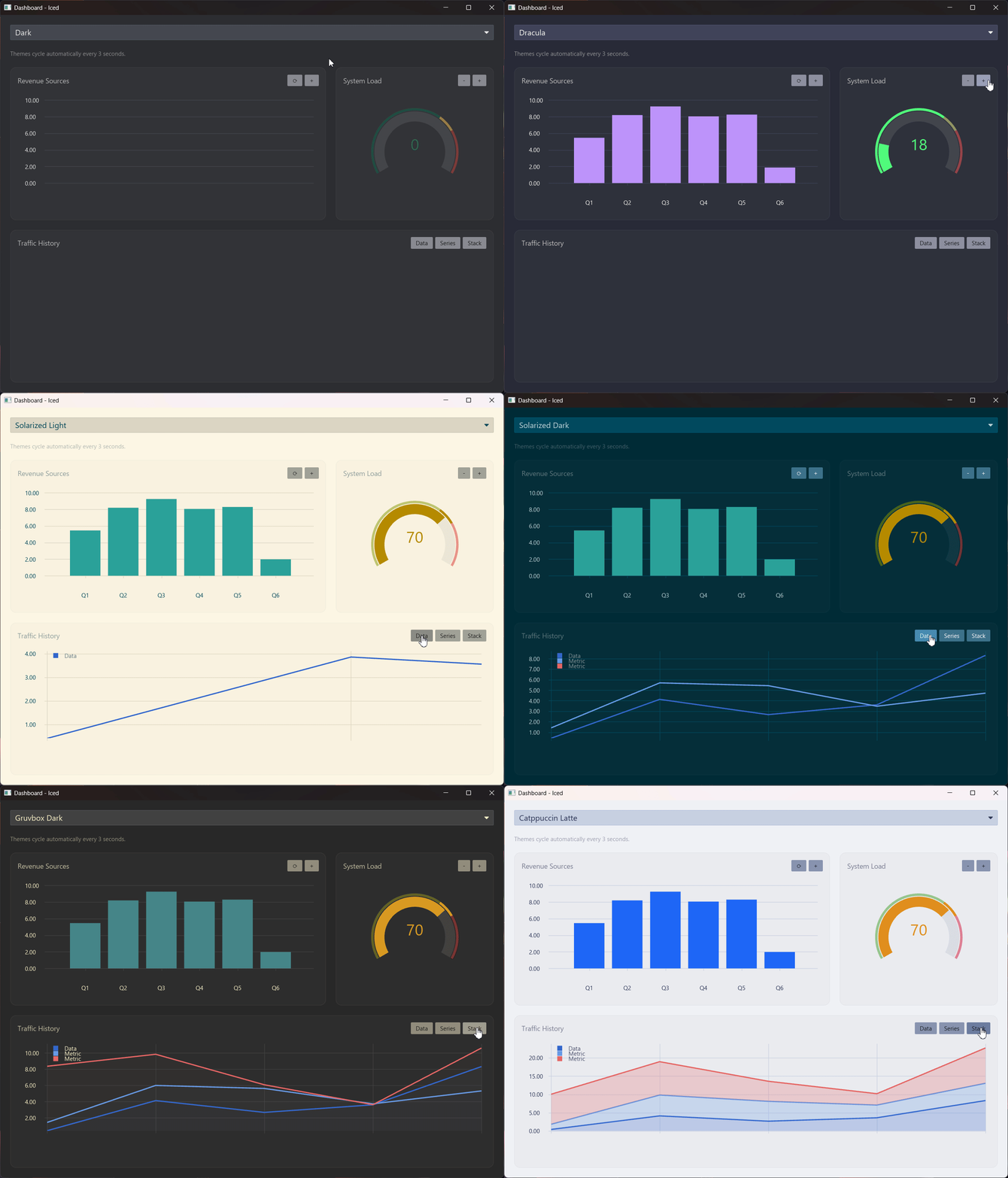
-
📈 Chart-first widget –
Chartprovides layout and event handling that feels native to Iced apps. -
🪓 Powerful axes – Configure positions, scales, tick/label policies, cursor labels, visibility, and grid renderers per axis. You can even have multiple axes on the same side.
-
🖌️Canvas-like API – Implement
PlotDatato add any shape primitive (shape::Line,shape::Ellipse,shape::Rectangle, etc.) to the plot - Or create your own shape primitives with theShapetrait! -
📏 Internal Transformation - Handles all the math headaches associated with calculating screen- vs. plot-coordinates.
-
👉 Rich interactivity – Subscribe to click, drag, hover, scroll, and double-click callbacks for both the plot area and individual axes.
-
🎨 Composable styling – Override per-axis/plot styles or swap in entire
style::Catalogs to match your own theming. -
🔥 Performant - The library handles layering and mesh-squashing to ensure proper rendering while maintaining performance!
Add the following to your Cargo.toml:
[dependencies]
iced = { version = "0.14" }
iced_aksel = { version = "0.3" }use iced::{Element, Theme};
use iced_aksel::shape::Ellipse;
use iced_aksel::{Axis, Chart, Measure, Plot, PlotData, PlotPoint, State, axis, scale::Linear, Radii};
// Initialize IDs for ***individual*** axes
const X_ID: &'static str = "x_id";
const Y_ID: &'static str = "y_id";
struct App {
state: State<&'static str, f64>,
scatter: Scatter,
}
#[derive(Debug, Clone)]
enum Message {}
impl App {
fn new() -> Self {
let mut state = State::new();
state.set_axis(
X_ID,
Axis::new(Linear::new(0.0, 100.0), axis::Position::Bottom),
);
state.set_axis(
Y_ID,
Axis::new(Linear::new(0.0, 100.0), axis::Position::Left),
);
Self {
state,
scatter: Scatter::demo(),
}
}
fn view(&self) -> Element<Message> {
Chart::new(&self.state)
.plot_data(&self.scatter, X_ID, Y_ID)
.into()
}
}
// Your own custom plot that implements `PlotData`
struct Scatter {
points: Vec<PlotPoint<f64>>,
}
impl Scatter {
fn demo() -> Self {
Self {
points: vec![
PlotPoint::new(10.0, 20.0),
PlotPoint::new(50.0, 80.0),
PlotPoint::new(90.0, 30.0),
],
}
}
}
impl PlotData<f64, Message> for Scatter {
fn draw(&self, plot: &mut Plot<f64, Message>, theme: &Theme) {
for point in &self.points {
plot.render(
Ellipse::new(*point, Radii::uniform(Measure::Screen(5.0)))
.fill(theme.palette().primary),
);
}
}
}Chartis the widget. It is the primary driver that renders the axes and plots and routes user events.Stateholds every axis definition and is shared between updates and rendering.Axiscontrols domain, scale, position, grid lines, marker, tick labels and more.PlotDatais implemented by your data structures; it receives aPlotbuilder to push shapes into.Shape,Stroke, andMeasuredescribe how primitives are drawn.
The workspace ships multiple runnable examples that showcase axes, shapes, interactions, dashboards, and stress tests. From the repository root:
# Core functionality examples
cargo run -p core_axes
cargo run -p core_scales
cargo run -p core_template

# Fancy Examples
cargo run -p showcase_candlestick
cargo run -p showcase_dashboard
cargo run -p showcase_spectrum
Each example is a separate crate under examples/ so you can copy-paste code
into your own application.
All examples can also be run in the web using trunk:
cd examples/core_axes
trunk serve
Important
Due to a
breaking change to getrandom
you might have to enable the wasm_js backend for getrandom when running in
WASM by setting the env-var: RUSTFLAGS='--cfg getrandom_backend="wasm_js"'
This only applies to examples depending on getrandom (usually through
rand).
cargo fmtandcargo clippyenforce the workspace style (Clippy perf, correctness, complexity, and style lints are denied).
Contributions are welcome! Feel free to open issues with bug reports, feature ideas, or performance traces that can help steer the roadmap.
Note
A nix-devshell is also supplied in the flake.nix for Nix users.
It can be started by running: nix develop .