Due to underlying design constraints, the plugin currently only supports matching against content that has already been loaded in the document. Therefore, when used with long documents, it may miss some keywords during search/replace operations.
You can use the plugin 「highlight-search」 for a more comprehensive search experience.
- Aa: Match case
- Whole word: ASCII word-boundary match
- Match mode: Keyword / Regular expression. Regex replace supports
$1,$&, etc. - In selection: Search only within the current selection or block selection
- Aa*: Preserve the match’s letter case when replacing (unavailable in regex mode)

- Include in search: Toggle which types are searched — document title, image title, inline memos, paragraph blocks, heading blocks (H1–H6), list blocks (unordered / ordered / task), math blocks, code blocks, tables, databases, blockquotes, callouts, super blocks, embeds, HTML, Mermaid, and more
- Folded block content: Whether to search hidden content inside non-heading folded blocks
- Limit search: Search only within selected inline types (multi-select). An empty query previews those hosts. Limit choices reset when the search UI closes

- Open the search bar from the top-bar icon or hotkey (default
Ctrl+F/ macOS⌘F; changeable in SiYuan hotkeys) - Yellow = all hits, orange = current;
Enternext,Shift+Enterprevious,Escclose - On desktop, drag the count area to move the panel; click the top-bar icon again to reset position
- A selection on open only prefills the query; it does not turn on “In selection”
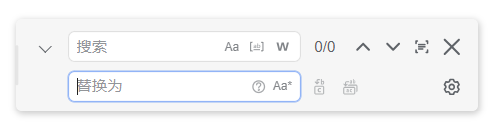


- The replace row is collapsed by default; click ⌄ to expand, or open the replace area with a hotkey (default
Ctrl+H/ macOS⌘H; changeable in SiYuan hotkeys) - Supports Replace / Replace all
- Write-back prefers the document’s Protyle transaction, so
Ctrl+Z/Ctrl+Yusually work for undo/redo
Some hits are searchable/highlightable but not auto-replaceable, e.g. databases, Mermaid, rendered HTML-block text, inline/block math, and words spanning complex marks. Replace tips and advances; Replace all counts them as skipped.
Under the publish service, export preview, or document read-only mode, find & highlight still work; replace is disabled and settings are not persisted (in-session toggles still apply locally).
See CHANGELOG.md
- Install Node.js and pnpm
- Run
pnpm iin the repo root pnpm run devfor development builds;pnpm run buildto producepackage.zippnpm run smoke:sharedfor shared-matcher smoke tests
Enable the plugin under SiYuan → Bazaar → Downloaded.
MIT License
- Built on the SiYuan plugin sample template
- “siyuan-plugin-hsr-mdzz2048-fork”: provided the basic architecture ideas for this plugin
- “famotime/siyuan-sou-easy”: provided ideas for feature extensions