
Embed an Excel-like spreadsheet in your browser app with a React component or a JavaScript API. Gridcraft Embed brings editable cells, spreadsheet formulas, formatting and XLSX import/export into your own interface. Choose the full spreadsheet UI or an editable cells-only grid, with light and dark modes.
This is an unofficial, independently maintained integration of Gridcraft, currently a prototype. The workbook runs locally in the browser using WebAssembly and a canvas; no iframe or spreadsheet backend is required.
- React spreadsheet component: a typed API for reading cells, writing values and formulas, executing commands, and reacting to workbook changes.
- Excel files in the browser: import and export
.xlsxworkbooks through the API. - Spreadsheet UI: ribbon, formula bar, sheet tabs, formatting, tables, charts and filters from Gridcraft.
- Embedded grid: cells-only mode, dark mode and custom cell fill/text colors.
Looking for Excel in the browser? This package provides an Excel-like editing experience in your app. It does not embed Microsoft Excel or provide complete Excel compatibility; see features and limits.
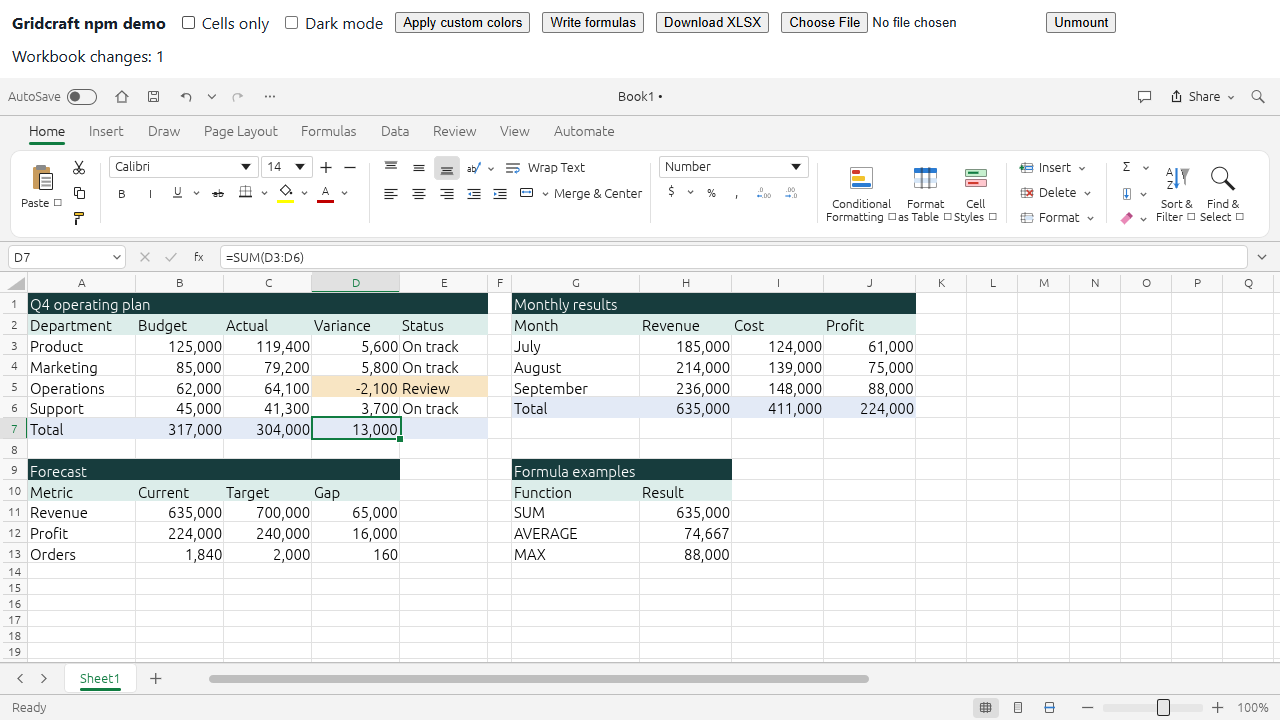
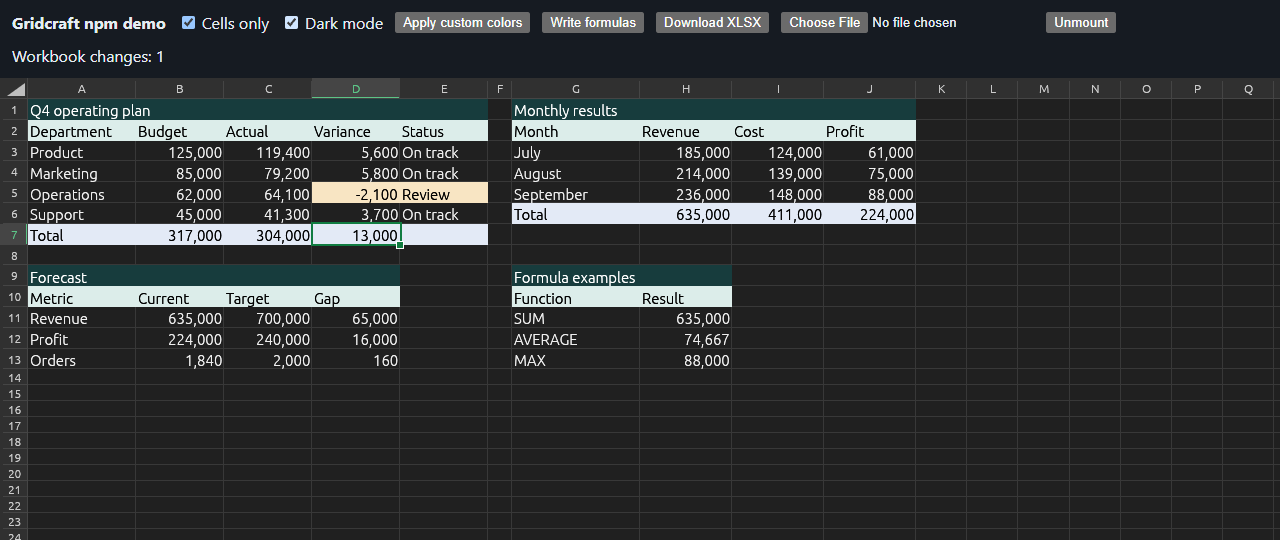
Dark mode and cells-only preview
npm install gridcraft-embedThis is an unofficial prototype, independently packaged from Gridcraft. The exact engine release and source commit are recorded in UPSTREAM.md. The npm wrapper uses its own version numbers.
import {useRef} from "react";
import {Gridcraft} from "gridcraft-embed/react";
import type {SpreadsheetAPI} from "gridcraft-embed";

export default function App() {
  const spreadsheet = useRef<SpreadsheetAPI | null>(null);
  return (
    <Gridcraft
      ref={spreadsheet}
      style={{height: 700}}
      options={{cellsOnly: true}}
      onReady={(api) => {
        api.setValues("A1", [
          ["Revenue", "Cost", "Profit"],
          [1000, 400, "=A2-B2"],
        ]);
        api.execute("home.bold", {range: "A1:C1"});
      }}
      onChange={(api) => console.log(api.readRange("A1:C2"))}
      onError={(error) => console.error(error)}
    />
  );
}
ref.current is null until initialization finishes. onReady supplies the initialized API directly. options are applied once on mount; use a new React key to replace the configuration. Next.js consumers should put this component inside their own "use client" boundary. SSR imports/rendering are tested; Next.js bundling is not.
Use options={{dark: true}} to start in dark mode, or call api.execute("view.darkMode", {on: true}) to switch without remounting. Starting with 0.1.2, unformatted cells, merged areas, gridlines and the in-cell editor follow the dark theme. Automatic text colors adapt for readability; explicit workbook fill/font colors are preserved. Theme changes affect rendering, not workbook styles or exported XLSX files.
api.execute("home.fillColor", {range: "A1:C1", color: "#173C3D"});
api.execute("home.fontColor", {range: "A1:C1", color: "#FFFFFF"});
The canvas UI does not expose custom interface palette tokens through CSS or JavaScript yet.
<Gridcraft options={{cellsOnly: true}} /> renders the editable grid with row/column labels and scrolling. The title bar, ribbon, formula bar, sheet tabs, status bar and side panes are hidden. Cell editing, formulas, keyboard shortcuts and the workbook API remain available; necessary dialogs and error messages can still appear.
Call api.setCellsOnly(true) or api.setCellsOnly(false) to switch views without remounting or replacing workbook data. This is also available as api.execute("view.cellsOnly", {on: true}). The default is the full spreadsheet UI; the demo starts in cells-only mode and provides a checkbox to switch views.
api.setCell("B2", "=SUM(A1:A10)");
const cell = api.getCell("B2"); // value, formula, text, style, etc.
api.setValues("A1", [[1, 2], [3, 4]]);
const range = api.readRange("A1:B2");
await api.importWorkbook(file); // File or Blob, Uint8Array, ArrayBuffer
await api.importWorkbook(bytes, "Book.xlsx");
const xlsx = api.exportWorkbook("xlsx"); // Blob
api.undo();
api.redo();
const commands = api.commands(); // Discover ids, parameter docs and enabled state
api.execute("home.bold", {range: "A1:B2"});
const unsubscribe = api.onChange((api) => {/* save, inspect, etc. */});
unsubscribe();
execute is synchronous and throws on command errors. Commands and their JSON parameter schemas come from Gridcraft. Import adds/activates a document using Gridcraft's existing behavior, replacing an untouched blank document; it does not overwrite an edited document. Export serializes the active workbook and does not clear its dirty flag. The ribbon's own Open/Save buttons still use browser file pickers/downloads.
Change notifications cover workbook mutations from the API and UI. They are coalesced and polled every 150 ms, not an individual-cell event stream. Selection alone is not a workbook edit. No persistence or collaboration service is included.
import {createSpreadsheet} from "gridcraft-embed";
const api = await createSpreadsheet(canvas, {webgl: true});
// Give the canvas a sized container and width/height: 100% in CSS.
api.setCell("A1", 42);
// Required when you remove the canvas:
api.destroy();
Use a separate canvas per instance. React handles cleanup automatically, including pending mounts under StrictMode. destroy() is idempotent. Each mounted UI has a separate workbook session; the compiled WASM module is shared. options.wasmUrl lets you specify the WASM location (the first mount's URL is used for shared initialization).
This embeds Gridcraft's existing ribbon, formula bar, sheets, formulas, formatting, tables, charts, filters and other implemented commands. It inherits Gridcraft's feature coverage and XLSX fidelity; this is not complete Microsoft Excel compatibility. It has no VBA/macro execution or React-controlled cell DOM.
Verified with a production Vite build and a Chromium browser using WebGL2. WebGPU, Safari, Firefox, Next.js builds, large workbooks, long-running stability and assistive technology behavior have not been validated here.
- WASM is about 21.0 MB before compression and 7.2 MB with gzip; load it on demand and use HTTP compression.
- Browser imports/exports currently convert bytes through base64, increasing memory use for large files. Commands run on the browser's main thread.
- The existing UI can drop very fast consecutive characters delivered within one animation frame. Normal-speed keyboard entry was verified; this upstream input issue remains open. Treat this as a prototype pending an input-handling fix.
- Browser date functions now use the real UTC clock, matching the upstream engine's UTC semantics rather than a fixed date. Date-time timezone parity with Excel has not been audited.
- Some standalone-app commands have desktop assumptions. A listed command does not guarantee it makes sense in an embedded browser environment.
- Retain the supplied license, attribution and third-party notice files when distributing the compiled runtime.
.github/workflows/upstream-release.yml checks upstream GitHub releases every five minutes (at minutes 2, 7, 12, etc.). GitHub schedules may be delayed or dropped, so this is not a guaranteed five-minute detection time. Each new published release is processed in publication order, with a separate npm version. Drafts are ignored; prereleases publish under the next npm tag and stable releases under latest.
Pushing changes to the integration crate, UI patch, adapters, tests, release scripts, manifests, source pin, or this workflow on main also starts validation. If no new release exists, this validates the current pin without publishing a duplicate version.
The workflow also accepts an authenticated repository_dispatch event with event_type: upstream-release. An external release notifier can use this endpoint to start a check without waiting for the schedule:
POST https://api.github.com/repos/PonyTrap420/gridcraft-embed/dispatches
Authorization: Bearer <TOKEN>
Accept: application/vnd.github+json
Content-Type: application/json

{"event_type":"upstream-release"}
Use a GitHub App token or a fine-grained personal access token scoped to this repository with Contents: write permission. Keep it in the notifier's secret store. The dispatch only requests a check: release metadata and source commits are fetched from upstream by the existing planner; payloads cannot override the source pin. Duplicate notifications use the same release state and concurrency group as scheduled and manual runs.
Receiving upstream release webhooks requires a webhook or GitHub App installed on storytold/gridcraft, which needs its owners' cooperation. Adding a release trigger in this repository would only observe this repository's releases. No upstream webhook or external notifier is configured by this repository; without one, detection uses the schedule above. See GitHub's webhook setup requirements and repository dispatch API.
The planner selects an upstream release and resolves its tag to an exact commit. A separate validation job fetches and patches that source, installs our rust/embed crate, builds WASM and dependency notices, runs adapter, isolation and Chromium tests, and builds the production demo. The isolation test deliberately makes upstream's standalone browser module uncompilable; the embedding crate must still build. The small UI patch only covers cells-only mode and theme rendering. Upstream's standalone browser application is not modified or compiled into our runtime.
Candidate changes stay in the validation job until all checks pass. The publish job verifies checksums for the tested package and source archive before promoting them. upstream-state.json records the released source commit, npm version, and publishing status; a failed publish retries the same package version.
A patch, compilation, missing-license or test failure is recorded in upstream-candidates.json on the separate upstream-candidates branch. Later scheduled checks report that candidate as awaiting a fix instead of rebuilding the same known failure. The key includes the upstream release/commit and a fingerprint of our integration inputs. Changing those inputs automatically permits another attempt. Setup, dependency-download and license-network failures remain retryable. Failed candidates keep their place in publication order, so newer releases do not silently skip them; the released source pin stays unchanged.
Publishing uses npm's GitHub trusted publisher for PonyTrap420/gridcraft-embed, workflow filename upstream-release.yml, with direct publishing enabled. No npm token is stored in GitHub. The repository variable NPM_PUBLISH_ENABLED=true enables release publication after this relationship has been configured. In Actions → Upstream release → Run workflow, force_build=true validates the current release when no update exists, and retry_failed=true explicitly retries a recorded failed candidate. Scheduled runs never override a recorded failure on their own.
To reproduce a build, install Rust 1.95.0 and its wasm32-unknown-unknown target, then run npm ci, npm run upstream:prepare, node scripts/install-bindgen.mjs, npm run build, and npm test.
This repository contains the JavaScript/React adapters, the owned embedding crate and browser services under rust/embed, types, demo, tests, release scripts and the UI integration patch. upstream-state.json references the original Rust repository by exact commit. Builds fetch that source into .work/upstream, apply the UI hooks, and copy our crate into its workspace. Only our local crate is added to the lockfile; upstream dependency versions, Git pins and checksums are retained and checked by Cargo's --locked build. The fetched engine checkout stays out of Git. Rust 1.95.0 is used because the pinned egui dependencies require it, despite upstream's lower workspace rust-version declaration.
npm ci
rustup toolchain install 1.95.0 --profile minimal --target wasm32-unknown-unknown
npm run upstream:prepare
node scripts/install-bindgen.mjs
npm run build
npm test
npm run test:isolation
npm run dev
With the demo server running, npm run test:browser runs browser checks. Set CHROME_PATH to your browser executable if it is not at a standard Windows Chrome/Edge path, or install Playwright Chromium with npx playwright install chromium. npm run demo:build verifies a production bundle. npm pack produces a runtime-only tarball with WASM and license files; Rust sources, demo, tests and dev dependencies are excluded.
npm run build generates both the browser runtime and the dependency license notices included in the npm package. The first source preparation requires network access. A matching prepared checkout is reused; changed pins, patches, embedding sources or local edits require a fresh .work/upstream and receipt. Existing checkout files are preserved on mismatch. GRIDCRAFT_SOURCE can select a custom prepared checkout containing the UI hooks and gridcraft-embed-wasm crate. WASM_BINDGEN selects a CLI executable; keep its version aligned with the lockfile. CARGO_TARGET_DIR can select a shared build cache.
See UPSTREAM.md for provenance and VALIDATION.md for results and remaining gaps.