
Abandon all your quests, or just the ones you tick, straight from the quest log


 Menu |
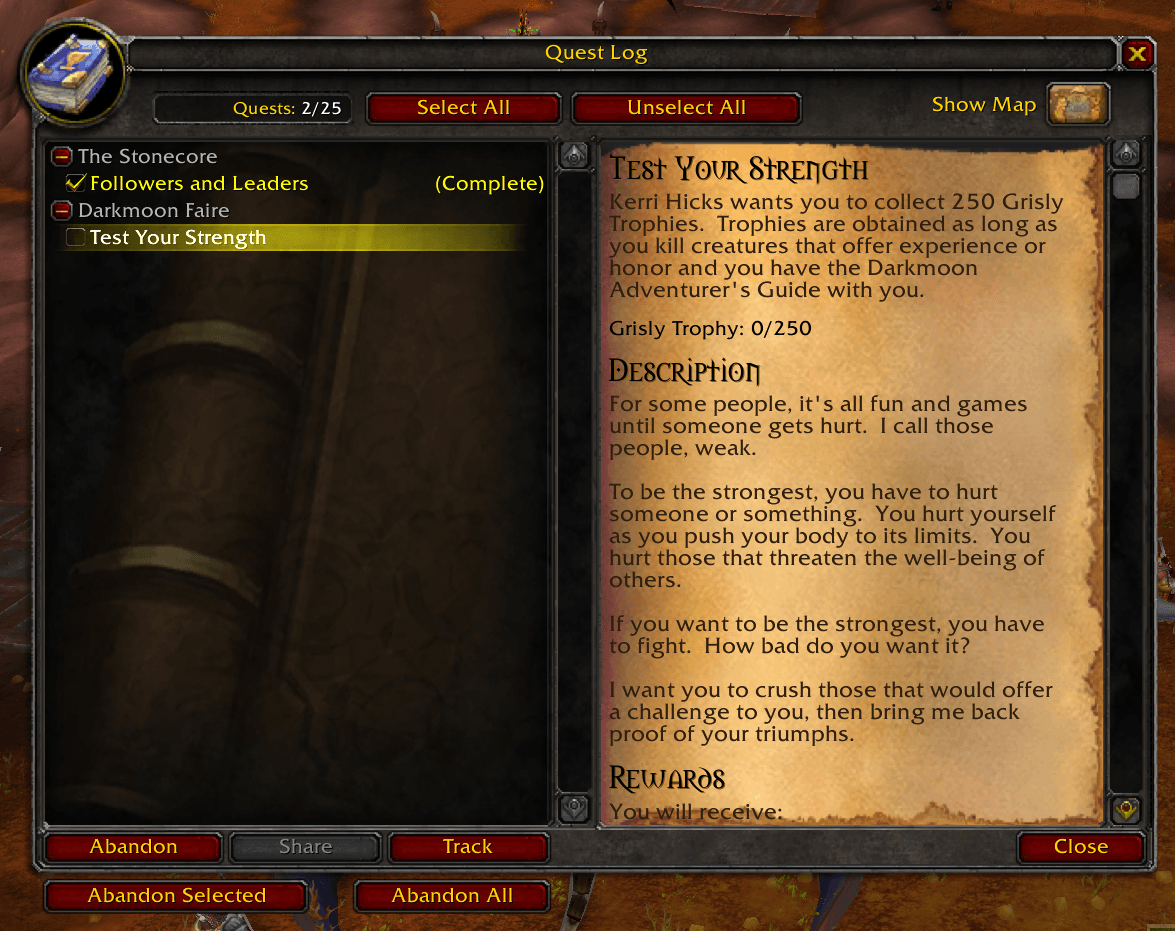
Remove Questie adds a checkbox next to every quest in your quest log and four buttons to clean it up, so you can drop a whole batch of quests at once instead of abandoning them one by one.
- A checkbox next to each quest to mark it.
- Select All / Unselect All buttons.
- Abandon Selected abandons only the ticked quests; Abandon All abandons every quest in the log. Both ask for confirmation first.
- Each abandoned quest is listed in the chat.
- Works in the classic quest log (TBC Anniversary, Mists) and in the world map quest log (WoW Forever). Translated into 20 languages.
- Download the zip from the latest release or from CurseForge.
- Extract the
RemoveQuestiefolder into the AddOns folder of your game version:- TBC Anniversary:
World of Warcraft/_anniversary_/Interface/AddOns/ - Classic (Mists):
World of Warcraft/_classic_/Interface/AddOns/ - WoW Forever:
World of Warcraft/_forever_/Interface/AddOns/
- TBC Anniversary:
- Restart WoW and enable the addon.
- Open the quest log (
L), tick the quests you want to drop and press Abandon Selected, or press Abandon All. - There are no slash commands or settings.
Both abandon buttons show a confirmation window first (Abandon Selected tells you how many quests it will drop); nothing is abandoned until you press Yes. Selections are not saved between sessions. Despite the name, it does not need or touch the Questie addon.
Author: Pirson · GitHub · CurseForge · MIT License