


A port of Doom to the RP2350. The reference board is the Adafruit Fruit Jam (RP2350B); four more HSTX boards build from the same tree — Pico 2 with the Adafruit DVI Breakout, the Murmulator M2, the Adafruit Feather RP2350, and the Olimex RP2040-PICO-PC with a Pico 2 (see Other supported boards).
It runs the full shareware DOOM1.WAD from flash, drives an HDMI display over
HSTX, plays music and sound effects — over that same HDMI link or through an
I2S DAC (TLV320DAC3100 or PCM5100A) or a PWM audio jack to speaker/headphones — and takes input from
USB keyboards, mice, and gamepads, plus NES/SNES pads on the boards that have
those ports.
The port descends from Graham Sanderson's
rp2040-doom — which fits Doom into
a Raspberry Pi Pico — which is in turn derived from
Chocolate Doom. For the deep
technical story of the RP2xxx port (WAD compression, memory tricks, the
whd_gen tool) see README.RP2040.md; for the upstream engine
see README-chocolate.md.
You do not have to build anything. Every
release ships ready-to-flash .uf2 files for all five boards,
plus the converted shareware WAD, the whd_gen host tool and the Gerber files
of the PicoNES PCB. Grab the newest
one and you are playing in a couple of minutes.
-
Download two files from the latest release — the firmware for your board, and
doom1-whx.uf2(the sharewareDOOM1.WAD, already converted). The WAD file is the same for every board.Board Firmware WAD data Adafruit Fruit Jam doom_tiny_fruitjam.uf2doom1-whx.uf2Pico 2 / Pico Plus 2 + Adafruit DVI breakout doom_tiny_adafruitdvisd.uf2doom1-whx.uf2Murmulator M2 (RP2350) doom_tiny_murmulatorm2.uf2doom1-whx.uf2Adafruit Feather RP2350 + TLV320 breakout doom_tiny_featherrp2350.uf2doom1-whx.uf2Olimex RP2040-PICO-PC + Pico 2 doom_tiny_olimexpicopc.uf2doom1-whx.uf2 -
Plug in your peripherals first — HDMI display, and a USB keyboard, mouse or gamepad. USB hot-plug is not reliable, so the devices have to be connected before the game starts. Optionally insert a FAT32/exFAT microSD card; it is what saved games and settings are written to. The game runs fine without one.
-
Flash both files. Hold BOOTSEL while plugging the board into your computer's USB, so it appears as an
RPI-RP2drive, and drag the firmware.uf2onto it. The board reboots as soon as the copy finishes, so re-enter BOOTSEL and dragdoom1-whx.uf2across as a second step. Order does not matter; both files must be flashed. Once the game is on there, Options → Bootsel Mode gets you back to that drive without unplugging anything. -
Reset the board. Doom starts on the HDMI output, with sound over HDMI and over the board's I2S DAC or headphone jack.
Two variants of the firmware are attached to each release:
doom_tiny_<board>.uf2— the shareware episode, from flash. Pair it withdoom1-whx.uf2; this is what the table above describes.doom_tiny_<board>_full.uf2— plays a registered/Ultimatedoom.wadoff the SD card instead, so all episodes are available. Convert your own WAD with thewhd_genbinary from the same release (whd_gen doom.wad doom.whd -no-super-tiny), copy the result to the card as/roms/doom/doom.whd, and flash only this file — nodoom1-whx.uf2alongside it. Requires PSRAM on the board; see Full game from SD card.
The firmware here is for flashing a board directly over USB. If you run the resident pico-bootLoader menu, take the Doom application from that project's release instead; its updateAll installs the matching WAD data on the SD card. See Running under the pico-bootLoader.
The rest of this README covers building from source, converting WADs, and the per-board details.
Only the hardware is needed to run a prebuilt release; the build host is for compiling from source.
Hardware
- An Adafruit Fruit Jam (RP2350B) board — or one of the four other supported boards.
- An HDMI display and cable.
- At least one USB input device — a keyboard, a mouse, and/or a supported gamepad (see Controls).
- Optional: headphones or a speaker (audio also comes out over HDMI).
- A microSD card (FAT32/exFAT) for saved games and settings. The game runs without one; you just cannot save anything. It is also what the pico-bootLoader route and the full-game build need.
Build host (Linux or macOS)
-
arm-none-eabi-gcc— the CI builds with 13.2.Rel1; other versions may work but binary size is tight, so mismatches can cause link failures. -
cmakeandmake. -
picotool2.2.0 or newer on yourPATH(the build falls back to fetching and building it, but a system install is much faster). -
The Pico SDK, pico-extras and Pico-PIO-USB, pointed at by environment variables — they are not submodules of this repository:
export PICO_SDK_PATH=$HOME/pico/pico-sdk
export PICO_EXTRAS_PATH=$HOME/pico/pico-extras
export PICO_PIO_USB_PATH=$HOME/pico/Pico-PIO-USB   # PIO-USB boards only
The SDK must have its own submodules checked out (
git -C $PICO_SDK_PATH submodule update --init): tinyusb comes from the SDK'slib/tinyusb, not from this repository.PICO_PIO_USB_PATHis only needed by the boards whose USB host runs on PIO — the Fruit Jam and the Feather RP2350; the Pico 2, Murmulator M2 and Olimex RP2040-PICO-PC builds use native USB and pass-DENABLE_PIO_USB=0. Every build script validates these paths up front via pico-env.sh and stops with a clear message if one is wrong. -
tinyusb newer than the 0.20.0 tag, inside that SDK. SDK 2.2.0 pins 0.18.0, and the
0.20.0tag is also too old — this is a post-release master requirement, not a version number you can ask for. The vendored XInput host driver needsusbh_class_driver_t.opento returnuint16_t(bytes of descriptor consumed) rather thanbool, which landed in tinyusb commitef018e364(2025-12-11,0.20.0-103). Anything older warns-Wincompatible-pointer-typesin3rdparty/tusb_xinput/xinput_host.cand claims interfaces by a different rule. These builds use7f146c9ff(0.20.0-843). Check and bump it in place:git -C $PICO_SDK_PATH/lib/tinyusb describe --tags # want 0.20.0-103 or later git -C $PICO_SDK_PATH/lib/tinyusb fetch origin git -C $PICO_SDK_PATH/lib/tinyusb checkout 7f146c9ff # known good
Note that re-running
git -C $PICO_SDK_PATH submodule update --initafterwards resetslib/tinyusbto the SDK's pinned 0.18.0 and undoes this.
git submodule update --init      # tusb_xinput + the shared driver library
./fruitjam-build.sh
This produces two files:
build_fruitjam/src/doom_tiny.uf2— the game.build_fruitjam/src/doom1-whx.uf2— the shareware WAD data.
Put the Fruit Jam into BOOTSEL mode and copy both .uf2 files to it over
USB. The device reboots after the first file, so you may need to re-enter the
bootloader before copying the second one. If a build is already running on the
board, Options → Bootsel Mode puts it back into BOOTSEL from the game, which
saves reaching for the cable on every rebuild.
There is a single doom_tiny.uf2 that supports all input devices (USB
keyboard, mouse, and gamepads). The old per-input variants
(doom_tiny_usb, doom_tiny_nost, doom_tiny_nost_usb) no longer exist. USB
input is handled by the
pico_shared HID driver, shared
with the pico-infonesPlus family of emulators.
To run Doom under the resident pico-bootLoader — the menu that lives on an SD card and flashes/launches emulators — build with:
./fruitjam-build-forbootloader.shThis links doom_tiny into the bootloader's application partition (and places
the WAD data further up in flash — see Flash map). Outputs land in
a separate tree so the two builds don't clobber each other:
build_bl_fruitjam/src/doom_tiny.uf2build_bl_fruitjam/src/doom1-whx-bootloader.uf2
Do not drag these onto the Fruit Jam over USB. Instead place them on the
pico-bootLoader SD card and let the menu flash them: doom_tiny.uf2 under
/emu/<hwconfig>/, and the WAD data doom1-whx-bootloader.uf2 under
/roms/doom/ (the loader also accepts it next to doom_tiny.uf2). Every
board's script emits the same WAD file, at the same address, and the
pico-bootLoader's updateAll makes that file from doom1.whx in this repository. See
the pico-bootLoader README for the SD-card layout and emulators.txt.
Selecting Quit Game (or pressing F10 and confirming) does one of two things, decided at runtime — the same binary behaves correctly either way:
- Launched from the pico-bootLoader — the ENDOOM screen is skipped, the quit
sound is allowed to finish, and the board resets back into the emulator
picker. Doom explicitly asks the loader to skip its resume jump (watchdog
scratch register 7, the same handshake as
pico_shared'sFrens::rebootToBootloader()), so you get the picker and not a relaunch. - Standalone — the ENDOOM screen appears with a fake DOS prompt already on
it. With a keyboard,
DIR,CLSandCDwork, and typingDOOM(orDOOM.EXE) and pressing Return restarts the game. With only a gamepad, Start does the same thing.
The UART reports which path was taken. Detection is
watchdog_hw->scratch[6] == 0xB007ED01, set by the loader just before it jumps
to the application — a cold reset or a BOOTSEL flash clears it, so a
BOOTSEL-flashed image correctly counts as standalone.
The exit screen is a true 80×25 VGA text mode: 8×16 glyphs, the full CP437 set and the 16-colour attribute byte including blink, rendered as 640×400 centred in the 640×480 HDMI signal.
Options → Bootsel Mode resets the board into the RP2350's own ROM
bootloader, so it comes back as the RPI-RP2 drive ready for a new .uf2.
It saves unplugging the board and holding the physical BOOTSEL button every
time you want to reflash, which adds up while developing. The equivalent item
in pico-infonesPlus'
settings menu does the same thing.
This is not the same as Quit Game above: quitting is a warm watchdog reset that lands back in the pico-bootLoader picker (or at the DOS prompt when standalone), whereas this hands the chip to the ROM and leaves the game entirely. There is no confirmation prompt — the reset happens the moment the item is picked — which is why it sits at the bottom of the menu, furthest from where the cursor starts. Settings are flushed to the SD card on the way out, so anything you just changed in the Options menu survives the reflash.
To get out again, either copy a .uf2 across, or power-cycle the board.
The default build embeds the shareware episode in flash. The full variant
instead loads a complete registered/Ultimate doom.wad (all episodes, built
with WHD_SUPER_TINY=0) from the SD card into PSRAM at boot and plays it
from there — the in-game New Game → Episode menu then offers every episode,
and the Episode 3 bunny finale works. Saved games
land on the same card and are keyed to the WAD, so saves made with a different
WAD are refused rather than corrupted.
-
Convert your registered/Ultimate
doom.wad(input first, output second):build/src/whd_gen/whd_gen doom.wad doom.whd -no-super-tiny
(See Converting a different WAD for building
whd_gen.) -
Copy
doom.whdto the SD card as/roms/doom/doom.whd(FAT32/exFAT). -
Build and flash the game (standalone or bootloader — no WHX uf2 involved):
./fruitjam-build-full.sh                  # → build_full_fruitjam/src/doom_tiny_full.uf2
./fruitjam-build-full-forbootloader.sh    # → build_bl_full_fruitjam/src/doom_tiny_full.uf2
Every board has the same script pair (
adafruitdvisd-build-full.sh, …).
At boot the game initializes the PSRAM (QMI CS1, mapped at 0x11000000),
mounts the SD card over SPI and copies the WHD into PSRAM (~2 s), logging
progress on the UART. Any failure — no PSRAM, no card, missing or non-WHD
file — panics with a descriptive UART message.
PSRAM requirement per board:
| Board | PSRAM |
|---|---|
Fruit Jam (fruitjam) |
onboard 8 MB |
Pico 2 + DVI (adafruitdvisd) |
fit a Pimoroni Pico Plus 2 (8 MB PSRAM on GPIO 47) instead of a stock Pico 2 |
Murmulator M2 (murmulatorm2) |
onboard (GPIO 8) |
Feather RP2350 (featherrp2350) |
external APS6404 wired to GPIO 8 |
Olimex RP2040-PICO-PC + Pico 2 (olimexpicopc) |
a PSRAM chip fitted on GPIO 8 (a stock Pico 2 has none) |
Both live on the microSD card, on every board and every build:
| What | Where |
|---|---|
| Saved games | /SAVES/doomsav0.dsg … /SAVES/doomsav5.dsg (the six menu slots) |
| Settings | /settings_DOOM.dat |
The /SAVES directory is created on the first save. The naming follows
pico-infonesPlus, so one card
can hold the saves of both without colliding.
Saved games are the compressed format the port has always used, and are still keyed to the WAD — a save made with a different WAD is refused rather than loaded as garbage.
The settings file covers everything this build can actually change: SFX and music volume, messages on/off, screen size, mouse sensitivity, gamma (F11), the FPS overlay (\) and the NES pad layout. Changes are written when you leave the menus, when you quit, and on the way into Bootsel Mode, so gamma or screen size changed with a hotkey mid-game is stored the next time you open and close the menu. A missing or damaged file is ignored and the built-in defaults are used; a file from an older version is read for the settings it does have.
Without a card the game runs normally — the load menu is empty, saving reports the reason, and settings reset at power-off. Insert a card and it starts working within a few seconds; no reset needed.
Nothing is written to flash any more, so the map is entirely static. The build
scripts flash the WAD data (doom1.whx) to a fixed address that
depends on which build you ran. These values come from TINY_WAD_ADDR in
fruitjam_cflags.h and the two build scripts:
| Build | doom_tiny image |
WHX (WAD) data |
|---|---|---|
Standalone (fruitjam-build.sh) |
0x10000000 |
0x10080000 |
Bootloader (fruitjam-build-forbootloader.sh) |
0x10080000 |
0x10200000 |
Every other board uses the same two maps. See Other supported boards.
doom1.whx (the compressed shareware WAD) is bundled in this repository, so you
don't need to generate anything for the default build. To run a different WAD you
convert it to the RP2350 WHX/WHD format with the whd_gen host tool.
Every release attaches ready-to-run whd_gen binaries. They are
statically linked — nothing to install, no DLLs, no glibc version to match:
| File | Platform |
|---|---|
whd_gen-win64.exe |
64-bit Windows |
whd_gen-linux-x64 |
x86_64 Linux |
whd_gen-linux-arm64 |
arm64 Linux (Raspberry Pi OS 64-bit) |
On Linux, make it executable first (chmod +x whd_gen-linux-*). The two
conversions that matter, and which firmware each one pairs with:
# WAD lives in flash — pairs with doom_tiny_<board>.uf2
whd_gen DOOM1.WAD doom1.whx

# WAD lives on the SD card as /roms/doom/doom.whd — pairs with doom_tiny_<board>_full.uf2
whd_gen doom.wad doom.whd -no-super-tiny
There is no prebuilt binary for 32-bit Windows or macOS; build from source below
(src/whd_gen/build_native.sh needs only a C/C++ compiler). Output is
byte-identical whichever platform produced the binary.
whd_gen needs none of the game's runtime dependencies — no SDL, no pico-sdk,
just a C/C++ toolchain and CMake. Build only that target from a native build
directory:
mkdir build
cd build
cmake .. -DCMAKE_BUILD_TYPE=Release
make whd_gen
The binary lands at build/src/whd_gen/whd_gen. cmake .. configures even
without the SDL2 packages installed — it just skips the desktop chocolate-doom
build. Use a release build: the debug build deliberately lowers sound-effect
encoding quality for speed.
Then convert a WAD (input first, output second):
# super-compressed WHX — needed to fit DOOM1.WAD on a 2 MB board:
build/src/whd_gen/whd_gen DOOM1.WAD doom1.whx

# larger WADs (Ultimate Doom, Doom II) on 8 MB boards — less compression:
build/src/whd_gen/whd_gen DOOM2.WAD doom2.whd -no-super-tinysrc/whd_gen/build_native.sh builds whd_gen
without CMake, one target per invocation:
src/whd_gen/build_native.sh                # -> src/whd_gen/whd_gen (dynamic, for dev)
src/whd_gen/build_native.sh linux-x64      # -> whd_gen-linux-x64    (static)
src/whd_gen/build_native.sh linux-arm64    # -> whd_gen-linux-arm64  (static)
src/whd_gen/build_native.sh win64          # -> whd_gen-win64.exe    (static)
src/whd_gen/build_native.sh win32          # -> whd_gen-win32.exe    (static)
The Windows targets need MinGW-w64 (sudo apt install g++-mingw-w64-x86-64, or
g++-mingw-w64-i686 for 32-bit). The .exe is statically linked: copy it to any
Windows machine and run it from a Command Prompt, no DLLs required. On Windows
itself the same script works in an MSYS2 MinGW shell.
For linux-arm64 you need an aarch64 cross-compiler. Do not
apt install g++-aarch64-linux-gnu — on Ubuntu 24.04 that package
Breaks/Replaces gcc-multilib/g++-multilib, so apt removes them and any -m32
build on the machine stops working. Use a standalone toolchain tarball, such as
the ARM GNU Toolchain aarch64-none-linux-gnu build, and point the script at it
(note the -none- in the prefix):
CC=/opt/arm-gnu/bin/aarch64-none-linux-gnu-gcc \
CXX=/opt/arm-gnu/bin/aarch64-none-linux-gnu-g++ \
  src/whd_gen/build_native.sh linux-arm64
For the deeper story (WHX vs WHD, caveats about non-id WADs) see README.RP2040.md.
Releases are built by
.github/workflows/BuildAndRelease.yml on
a self-hosted runner (a Raspberry Pi 5) when a v* tag is pushed. The workflow is
a thin wrapper: everything it does is ./buildAll.sh and ./release-notes.sh, so
running those two scripts locally is testing the pipeline.
./buildAll.sh                    # fills releases/ -- exactly what CI runs
./release-notes.sh v1.0          # writes release-notes.md, the release body
buildAll.sh builds the standalone and SD-card variant for all five boards,
converts doom1.whx at the standalone flash offset, and copies the prebuilt
whd_gen binaries in — 14 files in all. The workflow then downloads the Gerber
files of the PicoNES PCB from pico_shared and attaches them as
well. The pico-bootLoader variants are not released here: they are built
in the pico-bootLoader repository,
which invokes <board>-build-forbootloader.sh itself. Their WAD data is not
released either: the pico-bootLoader's updateAll downloads doom1.whx from a
tagged revision of this repository and converts it at the bootloader offset
itself, so keep that file at the top of the repository.
The runner needs PICO_SDK_PATH, PICO_EXTRAS_PATH and PICO_PIO_USB_PATH (set
in the workflow to /datalocal/pico/...), plus picotool ≥ 2.2.0 on PATH.
The runner is ARM64 and never compiles whd_gen; it only copies
prebuilt/whd_gen/* into releases/. Those binaries are cross-built on an
x86_64 Linux box and committed:
./update-prebuilt-whd_gen.sh     # linux-x64, linux-arm64, win64
git add prebuilt/whd_gen && git commit
Do this whenever anything whd_gen compiles changes (src/whd_gen/,
src/tiny_huff.c, src/musx_decoder.c, src/image_decoder.c, src/adpcm-xq/).
buildAll.sh compares the commit recorded in prebuilt/whd_gen/VERSIONS.txt
against those paths and prints a warning if the binaries have fallen behind — a
warning rather than an error, so an unrelated commit cannot block a release.
- Add a
## vX.Ysection to CHANGELOG.md — the heading text must be exactly the tag, sincerelease-notes.shextracts that section. - Commit, then dry-run on the runner without publishing anything:
gh workflow run BuildAndRelease.yml(leave thetaginput empty). git tag vX.Y && git push origin vX.Y.- Release the pico-bootLoader after this one, not before: it builds Doom from
this repository's
mainbranch.
Besides the Fruit Jam, four more RP2350 HSTX boards from the
pico_shared family are
supported. Each has its own pin header (<tag>_cflags.h) and script pair —
<tag>-build.sh (standalone) and <tag>-build-forbootloader.sh
(pico-bootLoader) — producing build_<tag>/src/doom_tiny.uf2 and
build_<tag>/src/doom1-whx.uf2 (bootloader builds use
build_bl_<tag>/ and name the WAD doom1-whx-bootloader.uf2).
| Tag | HW_CONFIG | Board | USB host | Audio | Legacy pads |
|---|---|---|---|---|---|
adafruitdvisd |
2 | Pico 2 + Adafruit DVI Breakout + SD breakout (breadboard or PicoNES PCB) | native USB (OTG adapter) | HDMI + optional PCM5100A on GPIO 26/27 | 2× NES/SNES |
murmulatorm2 |
13 | Murmulator M2 (Pico 2 module) | native USB (OTG adapter) | HDMI + PCM5100A | 2× NES/SNES, Wii (GPIO 0/1) |
featherrp2350 |
14 | Adafruit Feather RP2350 + TLV320DAC3100 breakout | PIO-USB on GPIO 24/25 (USB Host FeatherWing) | HDMI + TLV320 | Wii (STEMMA QT, GPIO 2/3) |
olimexpicopc |
15 | Olimex RP2040-PICO-PC with a Raspberry Pi Pico 2 | native USB (USB-A socket) | HDMI + PWM audio jack (GPIO 28/27) | 1× NES/SNES (UEXT: CLK 5, LAT 9, DATA 20) |
The Fruit Jam itself has no NES/SNES ports, but does have a Wii extension port on its STEMMA QT connector (GPIO 20/21).
Notes:
- USB stack — the Fruit Jam and Feather run the USB host on Pico-PIO-USB;
the other three use the RP2350's native USB controller (plug gamepads in via
an OTG adapter, or into the USB-A socket of the Olimex board). The transport is fixed at build time: the board header's
HAS_USBPIOdefine and the script's-DENABLE_PIO_USB=value must agree. - Audio — boards without the Fruit Jam's headphone-detect pin play audio on HDMI and the I2S DAC simultaneously instead of switching sinks. The Olimex board has no I2S DAC; it plays on HDMI and its PWM audio jack (left GPIO 28, right GPIO 27) simultaneously.
- NES/SNES controllers — configs 2 and 13 poll two legacy controller
ports, and config 15 one port on its UEXT connector, through the vendored
pico_shared
nespadPIO driver; SNES pads are auto-detected. They use the same layout as the USB pads (see Gamepad below), including the optional NES pad layout. - Wii extension port — configs 8, 13 and 14 additionally read a Wii
extension connector over I2C through the vendored pico_shared
wiipaddriver (see Wii pads below). On the Fruit Jam and Feather that bus is shared with the TLV320 codec, so the pad is brought up first, before the codec — an uninitialized pad on the bus would otherwise make every DAC register access time out. - Flash size for bootloader builds — every board uses the map of the 4 MB
chip: a 1.5 MB app slot at
0x10080000and the WHX at0x10200000(ending0x103B7898, comfortably under the 4 MB mark). The bootloader builds of the three Pico 2 boards (adafruitdvisd,murmulatorm2,olimexpicopc) therefore run on a genuine 4 MB Pico 2 as well as larger clone modules, and onedoom1-whx-bootloader.uf2serves every board. On the Olimex board the last 260 KB of flash (from0x103BF000) hold pico-launcher; the WHX ends about 30 KB below it. Standalone builds (WHX at0x10080000) fit every board. - Olimex RP2040-PICO-PC — the board's PS/2 port (GPIO 0/1) is not supported, and the serial console is disabled so that those pins stay free.
- Video jitter trade-off — on the native-USB boards
clk_hstxis derived from PLL_SYS (PLL_USB must stay at 48 MHz for the USB controller), so very strict HDMI sinks may show occasional sparkles; the PIO-USB boards keep the dedicated 126 MHz PLL_USB HSTX clock.
The adafruitdvisd board can be built on the PicoNES PCB by John Edgar Park
instead of a breadboard, which turns it into a finished console with two
controller ports and a case. The PCB comes in two versions, which differ only in
the controller ports: v2.6 with NES controller ports and v2.8 with SNES
controller ports. Parts lists, ordering instructions, assembly notes, the pin
assignment and the 3D-printed case are described in the
PCB README.
The Gerber files of both versions are attached to every
release.
| Design | Picture | Controller ports | Designed by |
|---|---|---|---|
| PicoNES v2.6 | 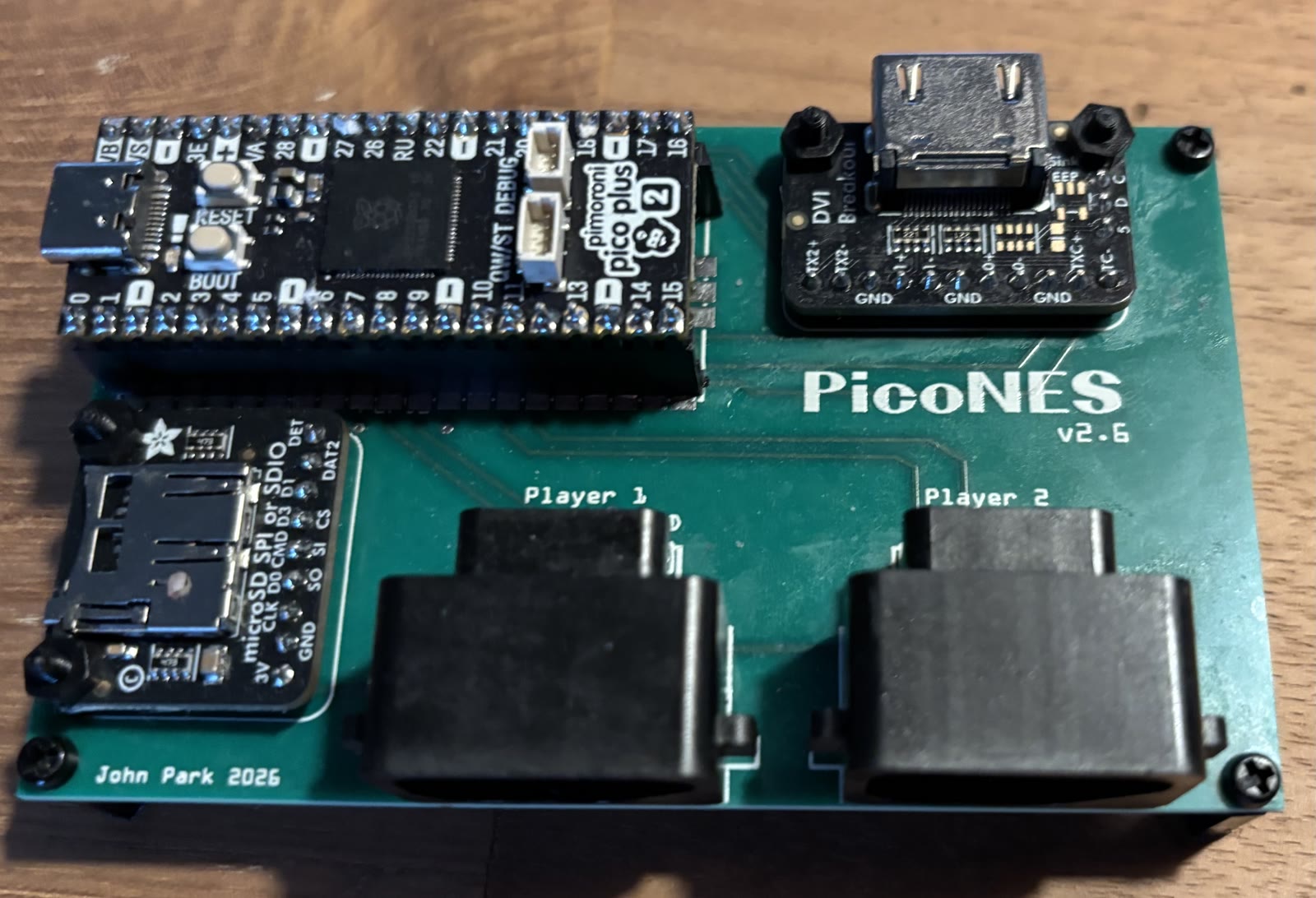 See note |
2 × NES | John Edgar Park |
| PicoNES v2.8 | 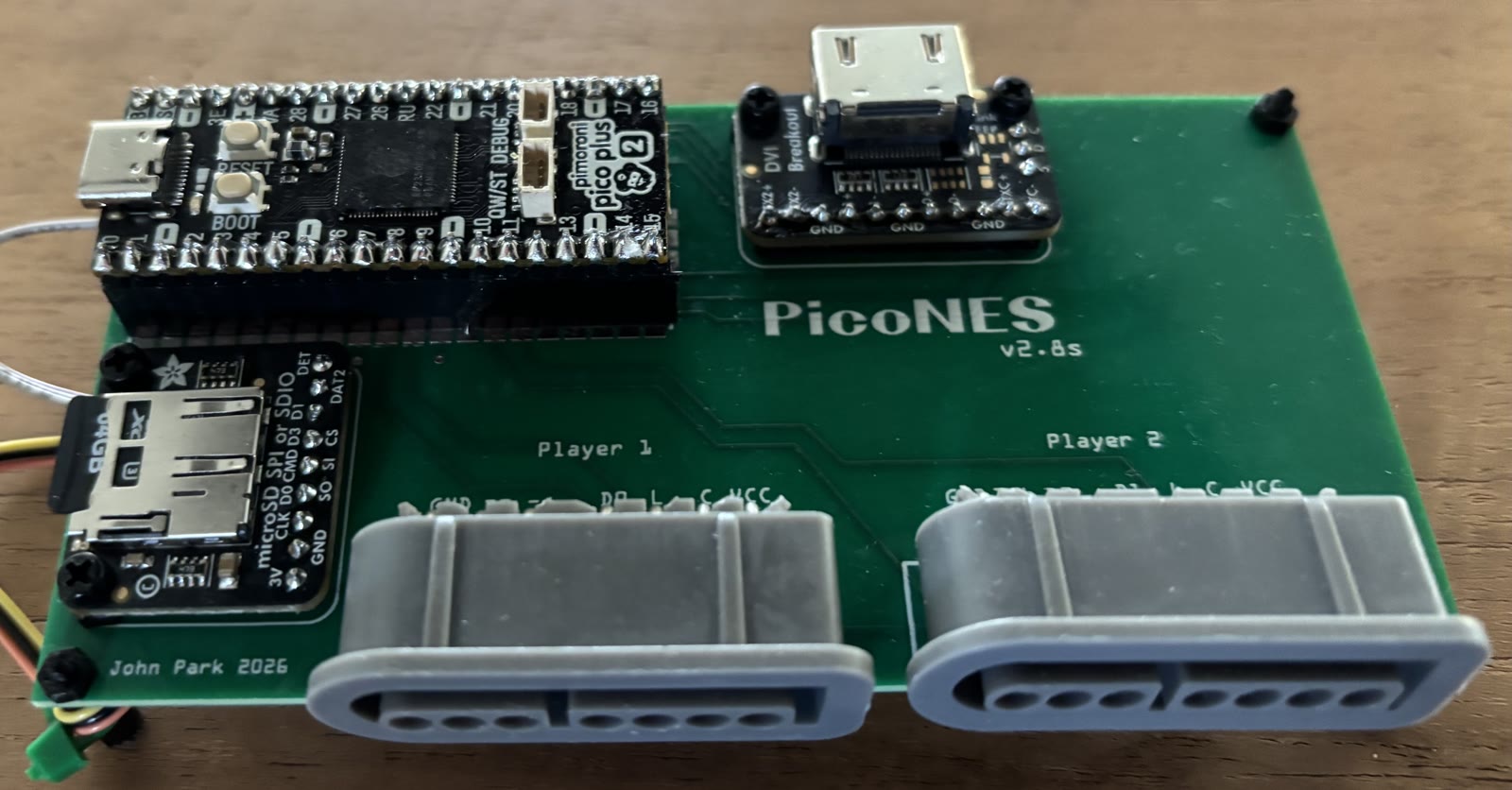 See note |
2 × SNES | John Edgar Park |
Note
The PicoNES v2.6 and v2.8 are shown with a Pimoroni Pico Plus 2. A Raspberry
Pi Pico 2 can also be fitted; doom_tiny_full needs the PSRAM of the Pico
Plus 2.
The other designs in the PCB README, the PicoNES Mini and PicoNES Micro, carry boards this port is not built for.
Note
Sellers on AliExpress have copied the PicoNES design and sell ready-made boards. For questions about those, contact the seller.
- Mounting — a Pico 2 can be soldered flat onto the PCB or mounted on male pin headers. A Pimoroni Pico Plus 2 must be mounted on pin headers, because the SP/CE connector on its back prevents it from lying flat. Optional female socket headers, soldered into the PCB, let the board be plugged in and swapped without desoldering.
- Controllers — on v2.8, SNES pads plug in directly; on v2.6, NES pads do, and a SNES pad needs a SNES-to-NES adapter cable, one per port. The ports detect the type of pad by themselves; see Gamepad for the layouts. A USB gamepad, keyboard or mouse goes on the board's own USB port through an OTG Y-cable (micro-USB on a Pico 2, USB-C on a Pico Plus 2), which also powers the board.
- Sound — over HDMI. The PCB has no place for the optional PCM5100A DAC; its pins are used by controller port 2.
- What to flash —
doom_tiny_adafruitdvisd.uf2anddoom1-whx.uf2, as in the Quick start. On a Pico Plus 2,doom_tiny_adafruitdvisd_full.uf2plays the full game from SD card.
The parts lists and assembly notes are in the PCB README: PicoNES v2.6 and PicoNES v2.8.
| NES controller ports (v2.6) | SNES controller ports (v2.8) |
|---|---|
|
|
Gavin Knight (DynaMight1124) designed an NES-like case for the v2.6 PCB: thingiverse.com/thing:6689537. It does not fit the v2.8 PCB. Two top covers are available, one with a button that presses the BOOTSEL button for firmware updates and one without. All parts are shown in the PCB README. For questions about the case, please contact the designer on the Thingiverse page.
Important
If the board is mounted with male headers, download the latest top cover. Headers raise the board, and only the newest cover leaves room for the USB cable — the older ones assume a Pico soldered flat onto the PCB.
| Top cover | Base |
|---|---|
 |
 |
Pin assignments live in fruitjam_cflags.h.
- Video — HDMI/DVI output over HSTX on GPIO 13/15/17/19
(
GPIOHSTXCK/D0/D1/D2). Rendered at Doom's classic resolution and upscaled by the pico_sharedpico_hdmidriver. - Audio — soundtrack and effects over I2S to the onboard TLV320DAC3100 codec (speaker and headphone), plus HDMI data-island audio at 48 kHz. The headphone jack is auto-detected by the driver.
- Input — USB host (keyboard, mouse, gamepad). Hot-plug is not reliable: plug your devices in first, then reset. Also a Wii extension pad on the STEMMA QT connector (GPIO 20/21, shared with the codec's I2C bus) — that one is hot-pluggable, see Wii pads.
- Debug — UART on GPIO 44 (TX) / 45 (RX), 115200 baud.
- Clocking — the RP2350 is overclocked to 378 MHz at 1.60 V. The extra CPU headroom fixes the in-game audio slowdown.
Hold a button at power-on to disable audio:
- btn3 — disable music.
- btn2 — disable music and sound effects.
The input mapping is fixed at build time.
Any "boot keyboard" should work.
| Key | Action |
|---|---|
| W A S D | Move (not the arrow keys!) |
| Q E | Turn left / right |
| R F | Cycle weapons |
| Ctrl | Attack |
| Space | Open / activate |
| Shift | Run |
Any "boot mouse" should work.
| Input | Action |
|---|---|
| Move X | Turn |
| Move Y | Forward / back |
| Left button | Attack |
| Right button | Hold to strafe with X movement; also open / activate |
| Wheel | Should switch next/previous weapon (didn't work on the Logitech wheel mice tested) |
Supported controllers:
- Original SNES/NES gamepads.
- SNES/NES "MantaPad" clones, e.g. Adafruit #6285
- Sony DualShock 4, DualSense, PlayStation Classic.
- Xbox 360 / One / Series (XInput), and 8BitDo pads in XInput mode.
- Sega Genesis / Mega Drive Mini, Retro-bit MD Arcade Pad.
- Wii extension pads over I2C: NES Classic Mini, SNES Classic Mini, Wii Classic Controller (Pro) — see Wii pads.
Buttons use SNES naming. On PlayStation pads: triangle = X, square = Y. On Xbox pads: Y = X, X = Y.
| Control | Action |
|---|---|
| D-pad / left stick | Move and turn |
| X | Fire |
| Y | Open / activate |
| A | Hold to turn D-pad rotation into strafing |
| B | Run |
| L / Select | Previous weapon |
| R | Next weapon |
| Start | Open / close the menu |
In menus, A or X selects and B or Y goes back, so the button you reach for first works either way. Start opens and closes the menu, so a keyboard is no longer needed to get into the options.
The shoulder buttons cycle weapons rather than strafing directly; strafe by holding A and pushing left/right, which is how vanilla Doom's strafe button works. A plain NES pad has no shoulders, so there Start opens the menu and Select is the only weapon cycle — it still reaches every weapon.
The layout above wants six buttons and two shoulders. A plain NES controller has four buttons, and with the default layout it ends up without a Use button, so you cannot open a door. Options → Nes Pad switches every pad — the legacy ports and USB alike — to a layout built for those four buttons:
| Control | In game | In a menu |
|---|---|---|
| D-pad | Move and turn | Navigate |
| A | Fire | Select |
| B | Hold to strafe with the D-pad | Back |
| Start | Open / activate | — |
| Select | Next weapon | — |
| Select + Start | Open / close the menu | Open / close the menu |
There is no run button left, so the marine always runs while this is on. The setting is stored on the SD card, and you can reach it with the pad alone: in the default layout Start opens the menu, the D-pad moves and A selects.
It suits the NES-shelled MantaPad and an original NES controller; a SNES pad keeps working, with B/A as NES A and Y/X as NES B.
Boards with a Wii extension connector (Fruit Jam and Feather on their STEMMA QT port, Murmulator M2 on GPIO 0/1 — see Other supported boards) also take a NES Classic Mini, SNES Classic Mini or Wii Classic Controller (Pro) pad, on an adapter such as the Adafruit Wii Nunchuck Adapter #4836. It merges into the same joystick event as everything else, so it works alongside a USB pad and the legacy ports, and it obeys the NES pad layout setting above.
A NES Classic Mini behaves exactly like an original NES controller: A fires, B runs, Start opens the menu, Select cycles weapons. On a pad with the full set of buttons:
| Control | Action |
|---|---|
| D-pad | Move and turn |
| A | Fire |
| B | Run |
| X | Hold to turn D-pad rotation into strafing |
| Y | Open / activate |
| L / Select | Previous weapon |
| R | Next weapon |
| Start | Open / close the menu |
Note that this is not the same face-button arrangement a real SNES pad gets on the legacy ports (there B fires and Y runs). The two Classic Mini pads share the Wii Classic Controller Pro protocol and identity block, so there is no way to tell a NES Classic from a SNES Classic on the wire — only one of them can match its legacy-port equivalent, and matching the NES pad was chosen.
The pad is polled at ~100 Hz and is hot-pluggable: plug one in at any time and it is picked up within a second (unlike USB, see Known issues).
- USB hot-plug is not reliable: plug your devices in first, then reset.
Would be nice: PICO_NET support for deathmatch.