

npm · Live Demo · Static Demo · Muxonomy Proof · Stratimux · IsomorphicExpanse · SCP-Origin · ARIOS Position · Claude.ai Setup · GPLv3


SCS-Bridge is a CLI that installs and conducts the Suite Cascade System — a renewable cognitive operating system for your projects — and lands you inside your first SCP.
This release is the first public viewing of the SCP: a self-contained ARIOS — an Augmented Renewable Intelligence OS. It self-installs through Claude Code via the SCS-Bridge: eight complete cognitive cycles that take on any problem as a full development cycle, running behind your own identity, on your own machine.
The SCS remains the operative aspect throughout — the original introduction is preserved in full as SCS.md.
Your SCP is a Stratimux Concept Program, a Suite Cascade Protocol, and a means of Containing and Protecting a given domain — by representing it as a Service that Contains a Problem. What makes an SCP is the anomalous frontier that recursively improving software represents.
Concretely: the SCP is a local Vue + Stratimux window the bridge installed into your project — the UI representation of the StratiDECK system from Stratimux, a functional computer system rendered as a window you can build into anything. It's a Deck. A StratiDECK. Working surfaces — Suite 8s — emerge from your project's domains, each with its own page, its own working sessions, and its own memory. The running app even rebuilds itself under you without losing your place.
The paradigm above is not a diagram — it is running. The Isomorphic Expanse is the first released SCP: a world the visitor and its guide build together, and the proof of concept for Pass-Through Interaction with Agents — driving agents from game worlds, play and work on the same clock.
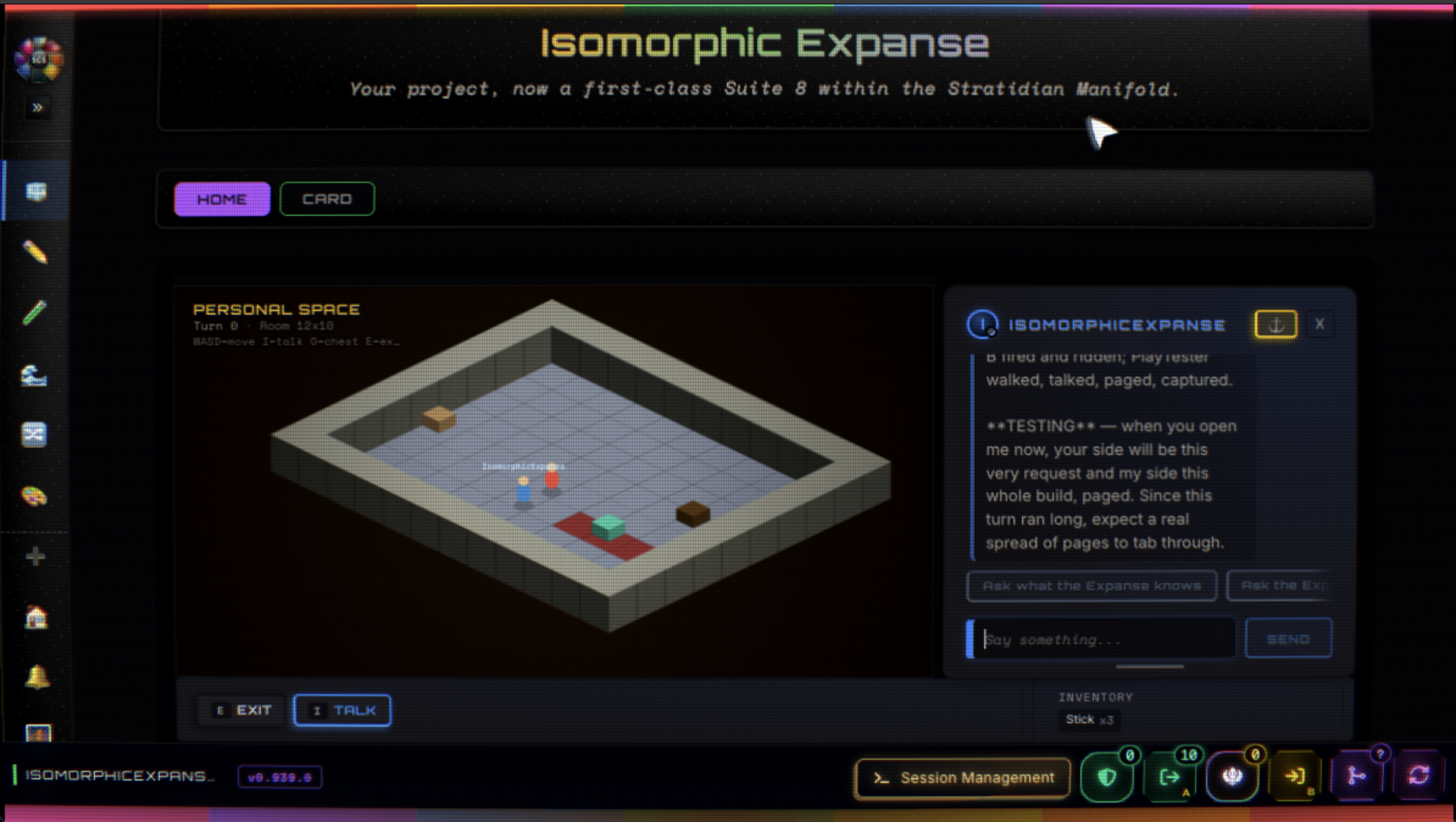
The guide is inside the world, and the dialog over its head rides a real Claude Code session — its voice, its live tool feed, and its permission gate all pass through the game.
- Talking to the guide reaches a real session — replies come back brief and in character, while the deep work lands in its terminal.
- Tool approval surfaces in the dialog — the agent's real permission gate, answerable from inside the world.
- One turn per step — the turn you take in the game is the turn the agent takes in the work.
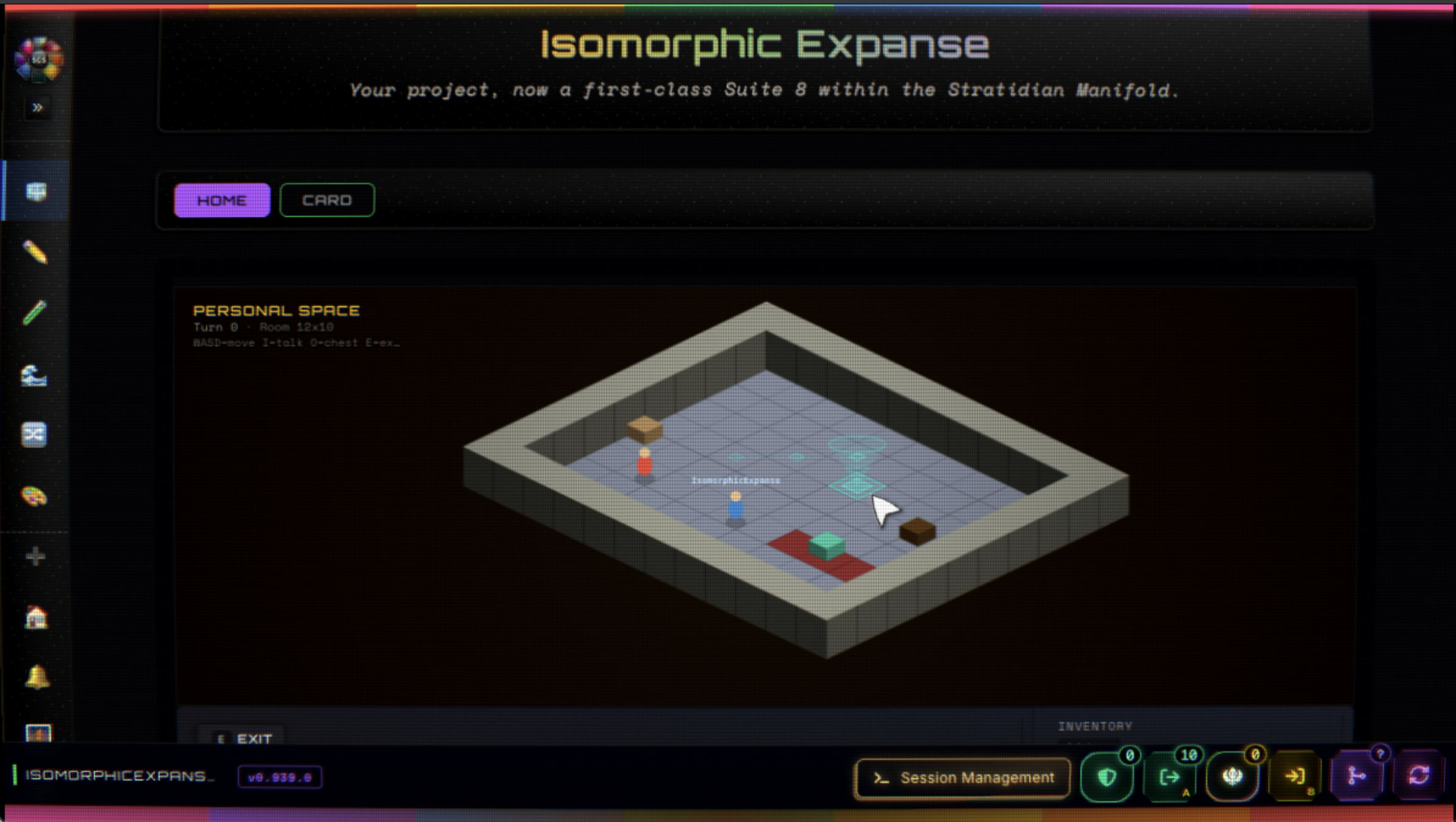
The world itself — built with the same HiFi surfaces, Suite 8 pages, and update circuit every SCP carries. Everything shown installs from its Configuration JSON through SCP Management, the same way any SCP does.
- Claude Code installed globally — the one true requirement. The bridge conducts real Claude Code sessions; it does not replace them.
- Node.js + npm — to install and run the bridge itself.
A heads-up on Electron: the bridge's window layer runs on Electron, which installs as a
dependency (a one-time download during npm i). Every window you see — the terminal
sessions, the SCP itself — is a local Electron window on your machine. Nothing is served
beyond localhost.
npm i -g scs-bridge
cd your-project
scs
The bridge self-installs the Suite Cascade System into the project, then lands you inside your first SCP: you name it, it installs from the bundled template, boots, and focuses in front of you. When a freshly minted page needs serving, you press Turn Over A: the bridge rebuilds and re-serves the app under you. That press is your first contact with the build-while-you-use loop — and from there, what at first Turns, Turns Faster, till it's just a Cycle.
Before you install anything: you are installing software that will run on your machine. Review what you install — open-source software is provided as is, without warranty of any kind, and with limited liability. Commit-pinned installs (via an SCP Manifest) install the specific commit the manifest carries — the same commit the registry stood behind at verification. The same caution stands on SCP-Origin.
Every Claude Code conversation opens in its own window and resumes exactly where it left off. One roster holds them all — online and offline sections, filter pills by app and working surface — and every session can be renamed, archived (recoverable), or dissipated for good. Each Suite 8 page can hold one anchored session: the page and its agent stay bound, and the anchor is the page's permanent point of return. Sessions run in an isolated host process — a session-layer fault cannot take the client down; your windows stay, and the next spawn heals the host.
The session window is a real terminal running a real Claude Code process — not a replay or a simulation. Type into it directly; the full terminal interface passes through, wrapped in the shader render you choose. Messaging from the app's pages honors the same discipline: an In Focus send brings the session forward with your message; a Pass Through send delivers it and leaves you where you are.
Set Shield A as your clean baseline, drift on Sword B, and turn over from the bottom dock. The bridge rebuilds and re-serves the app under you — your place survives, and a bad boot reverts to the baseline within ~45 seconds. Confirming a turn-over with working changes carries them into B and serves B: you land looking at your own work. This is the loop the whole system is designed around — an application that improves while you use it, with a safe way back at every step.
- The Update circuit — when the template advances, a retained clone runs a three-way comparison against your history and merges without losing your additions; your app's identity is preserved by rule.
- Cascade Memory — every page founds and maintains its own plan and trajectory documents, updating live as its working session writes.
- The Shatterite Menu — an agent-authored, staged menu on every Suite 8 page.
- The Release Door — set a remote origin and push from the app's own git surface; the push of a finished SCP is how it ships.
- The HiFi system — render modes, suite colors, patterns, and a component library for building your own pages, scoped to each app alone.
The full categorized tour renders in-app: Home → Release Notes.
The system updates along two dedicated paths, each owning its own layer:
- The SCS itself — the CLAUDE.md manifold, the
/cascadecommands, and the working method update through the Cascade Menu:/cascade:updateperforms a selective merge from upstream with a checkpoint first, so your own working memory and local additions survive the refresh. - Your SCPs — each installed app updates through its own dedicated circuit on the GitM Update surface: a retained reference clone runs a three-way comparison (the app as installed, the app as you've changed it, the template as it is now). Template-only changes apply cleanly, your work is preserved untouched, identity fields are preserved by rule, and genuine both-sides conflicts are staged for your decision.
The two paths never cross: updating the method never touches your apps, and updating an app never touches the method.
This is a race run in the open, and right now is the Training Season: the machine you are using is the first car on the grid, built and proven before it takes the course. The course runs one racing line after another — the Testing Season (the Reference Design Marketplace), the Season Opener (the Suite Bulletin System), the Summer Stretch — to a single finishing line: SCS Dedicated Hardware, the Grand Prix.
Why contribute: the whole run is funded in the open. Donations accelerate the current racing line directly; subscriptions are continued support of the paradigm shift itself.
What comes back:
- A subscription grants a Mozilla Public License 2.0 to the release projects — the SCS-Bridge CLI and the pinned SCP configuration — free to use, including in your own commercial work.
- Access to a Shared Router for contributors, with additional tooling built out on that ground to better enable co-functioning UnSocially — builds combined, remixed, and Reworked on Location, the work speaking with no words required.
- Donations fund the open RoadMap directly and can be directed at the items that matter to you — no account required.
How: scp-origin.com/contribute — subscribe or donate; both move the project forward, neither requires the other. The same door rides every SCP's Home page as the Open Race section.
This is a major release, and its title is earned by measure. Two plain terms carry it. The
bridge is the process the scs command starts: it conducts your Claude Code sessions and
serves your apps. An SCP is one of those apps — a project the bridge installed, runs, and
updates for you. The Tactical Bridge is the system's turn-over: your app rebuilds and
re-serves itself under you while you use it, with a safe way back.
The crown of this release is the enhancement to that turn-over system: the bridge now survives its own restart and turns over live without losing the sessions it carries. Five mechanisms had to hold in the field before that sentence could be written — the graceful exit (one order on every way out: ask, a short grace, then the signal as backstop), the watcher registry (48 creation sites, 18 in the bridge and 30 in the app, released as one set), the crash fact (a mid-rebuild crash shown as its own excerpt, restarted at most twice, cleared on a healthy boot), port sovereignty (an archived app's ports stay reserved; the version string stamped honestly), and named coexistence (two bridges in one workspace, each owning its own sessions). Measured: five consecutive clean exits, six app lanes each, about six tenths of a second, zero orphaned processes; two bridges with seven sessions each, none carrying the other's address.
Everything after the crown stands on that crossing: every resume re-assembles the session's full appended prompt at the moment it fires — base, dock, the page's identity last; the model a session resumes with is your choice per session; and the system's own instruction set gains a counter, a badge, a reading surface with a diff, and an update that stamps what it applied.
That is the Total this release proves: a bridge that turns over live, and a resume that re-assembles everything it is. The counters read it plainly — 1.157.2 · cli 14 · scp 16 · s8 3 · instruction set 1, the fourth counter new here and beginning at 1.
Updating an app through the Resolver now lands first. In 1.157.1 the Resolver asked for the Turn Over the moment it wrote its resolution file, before the bridge had applied the update; turning over at that moment rebooted the app and cleared the update's working files, so nothing landed and the app's template counter never moved. From 1.157.2 the Resolver observes the landing and makes the Turn Over request its last action, only after the update is applied, and it halts at once if the update was never run. If you turned over early on 1.157.1: press Run Update again, let the Resolver finish, wait for the Update Applied panel, then Turn Over. The app's template counter moves to 17 with this fix, because the Resolver's own instructions ride the template.
The version is the Cascade Position, written X.Y.Z: Y is the count of completed cycles of
the method that builds this software, up to three digits; X is the carry when that count passes
three digits (0 until cycle 1000, 1 now); Z counts hotfixes shipped on the same position
without a completed cycle and resets when Y advances. 0.950.2 was cycle 950 with two hotfixes;
1.157.2 is cycle 1157 with none yet — the count never restarted. It is kept this way as a study:
it tracks the literal cycles of the method against the project's compounding complexity — what
reasoning was spent to reach a tier, where the breakpoints fell, how much each span cost, and what
breaking past a tier costs against feature-after-feature work. 207 cycles closed between the two
releases, and the length is by design: they crossed one tier, the live turn-over, and the rest of
the release stands on it. Two sessions carried cycles of this one product in parallel, and the
release cycle is their sum. The shipped document
Cascades/Documentation/Cascades/THE-CASCADE-POSITION.md carries the full explanation and the
record so far; every release adds a row. The npm badge above always carries the published version.
- 1.157.2 — the turn-over that survives itself: closing the terminal, an SCP window, or the app follows one law on every path — a graceful ask, six tenths of a second of grace, then the process group signaled as the backstop. Each SCP answers the ask and releases its own watchers and listeners; the bridge tears down every lane it spawned on its own exit; every file watcher in the bridge and the app template is created through one registry released on the way out. Five clean exits measured, zero orphans; the machine that motivated the work went from 332 leaked lanes to eight. A server crash mid-rebuild shows its excerpt on the standby overlay, licenses a bounded restart (at most two), and clears itself on the next healthy boot; the overlay resolves its own bridge, keeps a status line, reloads when it witnesses the new server's birth, and a timing record shows where every second went. A third path, Carry into B & Serve A, keeps A only ever served — green into A, yellow into B — and any overlay cancels the other. Archived apps keep their ports reserved; the version string is stamped honestly at build.
- 1.157.2 — two bridges in one workspace, by name:
scs --name <Name>runs a second bridge beside the first with its own logs, socket, lock and registration; an unnamed second in the same directory is refused with the hint, a bridge from another directory simply proceeds. Port walking is the default — the bridge and every SCP probe before binding and walk when taken, every walk logged, every failed bind loud. Sessions and SCPs resolve their owning bridge by name, so relays land where they belong with three bridges alive. - 1.157.2 — resume whole: the induction and the Dock: every resume door — the terminal menu,
scs attach, the page's open-session — re-assembles the appended prompt at fire time: base, dock, identity last, per page per bridge name. The Suite 8 card gains a Dock row showing the exact prompt your anchor resumes with, its size, when it was composed, and whether the identity moved. Every shipped Suite 8 identity carries a Router naming which Skill or Strategy expands each aspect and when it loads. Twelve base Suite 8s ship; the template carries fourteen. - 1.157.2 — the resume model and Fable 5.1: set the model a session resumes with from the
Session Manager, the terminal menu, or the anchor menu; saved with the session, honored by every
door. No choice means no flag — your own default applies. The bridge observes the model from the
transcript, the catalog gains Fable 5.1, and the default derives as the highest Opus, shown as
default (Opus 5). - 1.157.2 — the instruction set: counter, badge, page, agent: the SCS is the computer, the SCP
the program; GitM updates the program, and this updates the computer. A fourth counter is stamped
into your project at install — a fresh install is never told to update. The badge gains a fourth
register (red behind · orange unstamped · fuchsia ahead · purple current) and a button that
launches the Update Agent. The agent shows
#current → #target, can mark current without copying, stamps only after applying, never applies a shrinking instruction set without your word, and stays inside the computer's own files; base Suite 8s are offered one at a time, never by default. - 1.157.2 — page system 3 and the Shatterite model row: pages minted under 2 flag amber and refresh page by page through the Forge. The Shatterite anchor menu on both page variants gains a model row — Boot model · Resume model, set before Re-engage · Running, applies at next resume — always available, held until Spawn, Re-engage, or Apply. The Session Manager's picker opens as a floating drawer, no longer clipped.
- 1.157.2 — the SCP Researcher reads your SCP: ask what your SCP can do and it reads the running SCP it operates from, every Skill running Curation → Research → Return at the scale you asked; four Skills carry live reads with freshness checks, the rest say plainly they hold none.
- 1.157.2 — the instruction-set viewer in spectrum: Suite table rows in their own spectrum color, the nine numbered protocol headers rotating through the spectrum, a source-line gutter, a diff numbered from its hunks, and a two-cell installed · published readout with a drift pill.
- 1.157.2 — for existing installs: the badge reads orange until the Update Agent stamps your instruction set once; run the SCP update per app for the graceful-exit route, the watcher registry, the Dock row and the model row; an app not yet updated still exits through the signal backstop.
This is a major release, and its title is earned by measure. Three terms carry it, each plain on first use. A Demometer is a different measure — a distinct part with its own measurable identity. A Diameter is a through-measure — a similarity drawn between unlike parts. A Muxameter is the integrated measure — a part as it relays through the others' Diameters, proven by operation.
The worked example is the Suite 8 page itself. The page is the Demometer — and what makes two Demometers unlike is the locations of the pages: the same page standing on different SCPs. The Diameter is the locality — either location can perform from the immediate SCP: stand Local anor observe and act upon a Specified app, from right where you are. And the Muxameter forms when you work an S8 page on one SCP and cascade its advances — back into the Base the page may be formalized from, anor out to the Informatives where you find use for the page across your projects. The page as it relays, proven by the operation itself.
The foundation of that proof is the SyncLibrary — the locality system. Each Suite 8 page holds a locality; the Locality Register lays it plain — the Local row and the live ring rows beside it, each with its status, chosen anor released and re-armed with no reload. A fire under a Specified locality reaches the target app, never a silent local fire; content moves under fixed paths while only the library carries the intelligence; and the failure mode is always preservation of your last local truth, never adoption. On that foundation stand the teeth: Suite 8 Page Transfer — install a page onto another SCP from the page's own panel, four stations, Requirements → Target → Gate → Update, proven twice in the field — and the update from any location, cascading a page's advances into the Base anor the Informatives, divergence held with both sides quoted for you to decide. Around them, a page's cascade memory renders live in an observing app within about 100ms of the write, colors round-trip, textures live in each app's own library, and the Forge Menu stands on every page — all on the same locality ground.
One notation carries through this piece and the product alike: anor — the Gradient Conjunctive within a Range: And anor Or anor Everything-In-Between. The working example is a gradient band of Blue and Yellow — and Green is within Blue anor Yellow: the range held whole rather than a choice forced between its ends.
That is the Total this release proves: not a feature list, but measures that relay. The counters read it plainly — 0.950.0 · cli 12 · scp 13 · s8 1.
The version number IS the Cascade Cycle: each cycle of the method that builds this software advances it. The npm badge above always carries the published version.
-
0.950.2 — the Method Seed: the Home page's Tutorial section becomes the Method Seed — the working method this system was built with, shipped as documentation your own project can absorb. Browse the Manual, engage the Dialectics, and spawn the Cinnabar Dialectic to seed the method into your project's memory; the induction is opt-in and performed by the session itself given your set-up, and re-running after an update refreshes rather than duplicates. Following through with the installment gives the best experience utilizing the SCS. The Cinnabar Dialectic advances to a second edition alongside it — its pattern registry doubled into four families — and a turn-over can no longer stall silently: if the restart watcher has quietly died, the app detects the stall by its own survival and completes the turn-over directly.
-
0.950.1 — a turn-over that knows its name: a turn-over now belongs to one app by name — the name resolves the directory, and only then do the branch operations run inside it. The safety deadline remembers which app armed it and stands down only on that app's own boot; two apps turning over in the same window no longer collide; and each app's restart watcher answers only to signals addressed to it by name. One app's turn-over can no longer restart another.
-
0.950.0 — the SyncLibrary: every page holds a locality: each Suite 8 page holds a locality — stand Local anor observe a Specified app, from right where you are. The Locality Register lays it plain: the Local row and the live ring rows beside it, each with its status — choose anor release a locality and re-arm it with no reload; localities are only ever live. A fire under a Specified locality reaches the target app, never a silent local fire; content moves under fixed paths while only the library carries the intelligence; and failure always preserves your last local truth, never adopts. Everything else in this release stands on this ground.
-
0.950.0 — Suite 8 Page Transfer, the Install Circuit: install a Suite 8 page onto another SCP from the page's own panel — four stations, Requirements → Target → Gate → Update. A Requirements pass writes the page's needs and concerns into the package itself, so they travel with the page; the transfer lands the real page with a report written into the receiving app's own working record, and a failed gate restores everything honestly. Proven twice in the field.
-
0.950.0 — the update from any location: work an S8 page wherever you stand, and cascade its advances — back into the Base the page was formalized from, anor out to the Informatives where you use it across your projects. Divergence never overwrites: differences are held with both sides quoted and you decide; the resolved page becomes the new Base. The panel names the concrete relation — Base:Name ← Informative:Name — and dispatches role-correctly. Field-proven across two live apps.
-
0.950.0 — cascade memory, live across apps: a page's own working memory — its cascade documents — renders in an observing app within about 100ms of the write. No reload, honest empty states, and a removal is honestly cleared.
-
0.950.0 — suite colors travel a full circuit: a color choice completes a round trip before it paints — written to the app's own configuration first, then returned to every open window at once. And the circuit reaches across apps: from Pewter Tessera, choose another app's locality and set its colors — its windows re-tint live, your own styling stays untouched.
-
0.950.0 — suite textures become a living library: the SVG textures behind every pane now live in each app's own patternLibrary.json. A new texture is one small JSON entry — no code change, no restart — and open pages pick it up live. Rapid changes settle to the final value before they land.
-
0.950.0 — the Entourage Forge Menu on every page: the Forge menu stands as its own widget on each Suite 8 page — sessions filtered to that page alone, build actions drawn from the page's own documentation, one motion to reach the live Forge. Remove it from any page and it stays removed, even through a page update; the Suite 8 panel always keeps the full menu within reach, and a freshly authored page opens with it expanded.
-
0.945.0 — every page carries its own version: a Suite 8 page now holds a version of its own, counted apart from the CLI and the app template. When a newer page ships, that page's own Suite 8 toolbar button turns amber — a signal that belongs to the page alone; the main version badge never turns amber for a page update, and the amber toggle never turns the badge red. Two signals, two meanings.
-
0.945.0 — the page update, always within reach: the Suite 8 Control panel carries a standing PAGE #N · NPM #M readout with an update control beside it, always available. Matching numbers mean the page is current; a higher NPM number is the invitation to refresh a single page when the moment suits you — page by page, never all-at-once.
-
0.945.0 — a page update that honors your design: a page refresh runs through the Entourage Forge with a conference first — where the new page and your version differ, you decide; nothing you shaped is overwritten without your say. The same preservation discipline the SCP update circuit stands on now guards the single page.
-
0.945.0 — the Forge's Reference Designs, renewed: two join the Entourage Forge's list. Prepared Agent Dispatch prepares any number of agents in sequence, dispatched straight from your page, each carrying its own directive. OnBoard.md lets a page ship with its own onboarding written alongside it — the page arrives already knowing how to introduce itself.
-
0.945.0 — Pewter Tessera joins as a full page: Pewter Tessera ships as a full Suite 8 page — pick a locality to preview that SCP's shipped colors in place, held entirely apart from your own styling. Nothing you preview ever lands; your look stays yours.
-
0.944.1 — the bridge never hangs on git: a remote git operation stalling on credentials could freeze the whole bridge with it. Git is now told never to prompt (it fails fast with its own reason), and a two-minute backstop ends any transport that stalls silently — the failure lands in the command log, the bridge stays live. CLI-only; SCPs need no changes.
-
0.944.0 — the update flow, reinforced: concurrent SCP updates share one source refresh, every SCP keeps its own update rail, failures name their exact stage, and the finalize is one gesture on whichever branch you stand. Two field-earned habits: run an update with all your changes committed (the update lands on your current branch), and if the Turn Over prompt does not appear after the resolver completes, that is a stochastic miss, not a failure — run the update again, or tell the resolver session: "Finalize the resolution — write the pending-0 resolution file and fire the Turn Over prompt."
-
0.944.0 — your SCPs, curated: the Installation page carries Installed and Archived tabs — archive a finished SCP into a vault beside the working set, restore it intact (git and all), or delete it behind a typed-name guard. Worktree SCPs wear their own marking and keep both trees whole through the vault; the template itself is system-protected.
-
0.944.0 — release notes that know your SCP: every release rides a versioned manifest with an authored magnitude (1-5); the Update page folds it open filtered to what YOUR SCP has actually applied — not the version string — so the decision to update is informed before it is taken. The same notes render on the Home page as the full tour.
-
0.943.0 — updates that explain themselves: the update diff is now self-describing — its provenance block pins the exact preservation rules the merge was computed under (identity fields held, never-delete paths), the apply step prefers those pinned rules so what computed the update is what lands it even mid-bridge-update, and the resolver working inside an SCP reads the guard directly from the artifact.
-
0.942.0 — every SCP holds its own anchor: the whole session-identity chain is now scoped per SCP — spawns carry their SCP's name, anchor claims stay within their SCP, a re-engaged session keeps its Suite identity, and a session with nothing to resume boots fresh instead of dying. The Session Manager's lanes are named (Spawn General Session · the Suite 8 dropdown, reading your SCP's Suite folder live on every open), a Session-Manager spawn is a plain instance that never claims a page's anchor, and dispatched research workers boot bare with their streamed plan as their directive while the page's own anchor keeps its onboarding, primed into motion.
-
0.941.0 — the Forge cycle, completed: the Entourage Forge engages the moment a page is created; the turn-over becomes the trigger at the end of its work, surfacing once there is work on the tree and resolving the right branch on its own — a fresh app takes its first turn-over with the same overlay and care as the app's very first landing. And git actions fired from any page now carry the app's own name to the bridge: a push lands on the right repository regardless of session focus.
-
0.940.0 — born from the freshest template: creating a new app now refreshes the template to the latest release before the birth — never a stale vintage — with a one-press Create door in SCP Management walking the same staged rail as the manifest install. The TUI's create input is honest from the first key. And a render-mode choice now survives every internal rewrite: the chromatic shader stands its ground, and closing the CLI reliably carries the window set down with it.
-
0.939.0 — the substrate renewed: Stratimux advances to 0.3.296 across the whole manifold — the bridge, the app template, and the flagship apps in one motion, boot-proven before shipping. The Open Race rides both faces: the Home page's section and this README's, one door to the Commons.
-
0.938.0 — updates that weigh what they carry: the update circuit now computes from the last update you landed rather than from install day: a one-file release reads as a one-file update (measured live: 1.6 MB of working papers down to tens of KB), files your app already carries identically are invisible to the update, and your own pages and suites — the ones the template never shipped — stand beyond question by standing law.
-
0.937.0 — installs that say what happened: an install the bridge declines now lands its honest reason on the staged rail the page already watches — never a silent stall. And the Configuration JSON's timestamp is accepted in either UTC spelling (
Zor+00:00), on both sides of the door. -
0.936.0 — the honest red label + the Release pane: the version label now stays red until an update actually lands in your app (not merely when the install finishes) and stays purple when a newer publish carries nothing of value for you — the install action stands available the whole way. And a first-class Release pane heads the GitM page: set your app's remote origin, push (first-push upstream handled), and step into SCP Management to copy its Configuration JSON — the manifest others paste to install it.
-
0.935.0 — updates that land whole: the update conductor is now held to carrying every change byte-exact from the comparison itself — anything beyond exact carriage is written as the whole resolved file, the always-safe form — so an update either lands complete or stages a clear decision, never a stall. And template-only releases now get the same one-press install as CLI releases, with the page saying plainly that no relaunch is needed for that kind: install, then Run Update.
-
0.934.0 — updates, classed: every release now declares which aspect it changes — the CLI, the app template, or both — and each installation compares on its own. The version label beside your app's name turns red when npm carries something newer, its hover names the exact path, and clicking it lands the Update page: a one-press CLI update with an honest restart notice when the CLI is due, and the whole circuit standing down when only the CLI changed.
-
0.933.0 — the update circuit, conducted: the update surface reads as a sequence — a state legend explains every button state in place, the resolver shows a dotted border when it is optional (a complete resolution already exists) and appears only after this cycle's comparison has run, and a finished update clears its own working artifacts. The resolver's session opens with a transparent Stand By notice while Claude Code boots, receives its instructions on its own, stays focused once they land, and runs with the approval gate intact — the update is conducted by you. A rare loop where page navigation after a spawn could keep spawning sessions is closed at its root. And the installed bridge version now sits beside your app's name on every page — purple when current, red the moment npm carries a newer publish, fuchsia when your install is ahead; hover it for both versions and the verdict.
-
0.931.0 — the complete system ships: the update circuit's tooling, the cascade commands, the Suite 8 instances, the documentation, and the assets all ride the package.
Highlights from 0.930.0:
- Crash containment — terminal sessions in their own host process; recovery is honest even across stale locks and reused process ids.
- The Frame Governor — the shader draws at 24 FPS by default, the cadence of animation film, with a live Settings slider from 8 to 60.
- The Documentation Site — Base, Local, and Cascade shelves, read fresh from disk.
- Per-app styling — color and pattern choices never bleed between installs.
- The Release Door — remote origin management and push, first-push upstream handled.
- Claude Opus 5 as the default model — with the full current lineup selectable per instance.
- Focus discipline — windows come forward only when asked; navigation never steals your attention.
This release runs a single SCS-Bridge per machine. A second bridge in another project detects the running one, names its workspace, and stands down with plain instructions. A crashed bridge is detected stale and claimed over automatically.
An interactive, step-conducted tutorial (the install experience turned teacher) ships in a future release. It mirrors a curated walkthrough series at youtube.com/@Phuire — the channel is the walkthrough's home and unlocks first.
scs --debug            # pipe trace events to ./Cascades/Bridge/debug.log
tail -f Cascades/Bridge/debug.lognpm install
npm run build # dist/cli.cjs
npm run typecheck
npm testGPL-3.0 — see LICENSE