




A terminal UI for managing and connecting to SSH hosts. Combines your ~/.ssh/config with a built-in host database, tunnels, key management, and an audit log -- all in one keyboard-driven interface.
⚠️ This project is ~98.5% vibe-coded slop — see Model credits for the ever-growing pack of LLMs responsible — the other ~1.5% is real humans (see Contributors). It has — and will keep having — stupid bugs LLMs can't see. Use at your own risk.

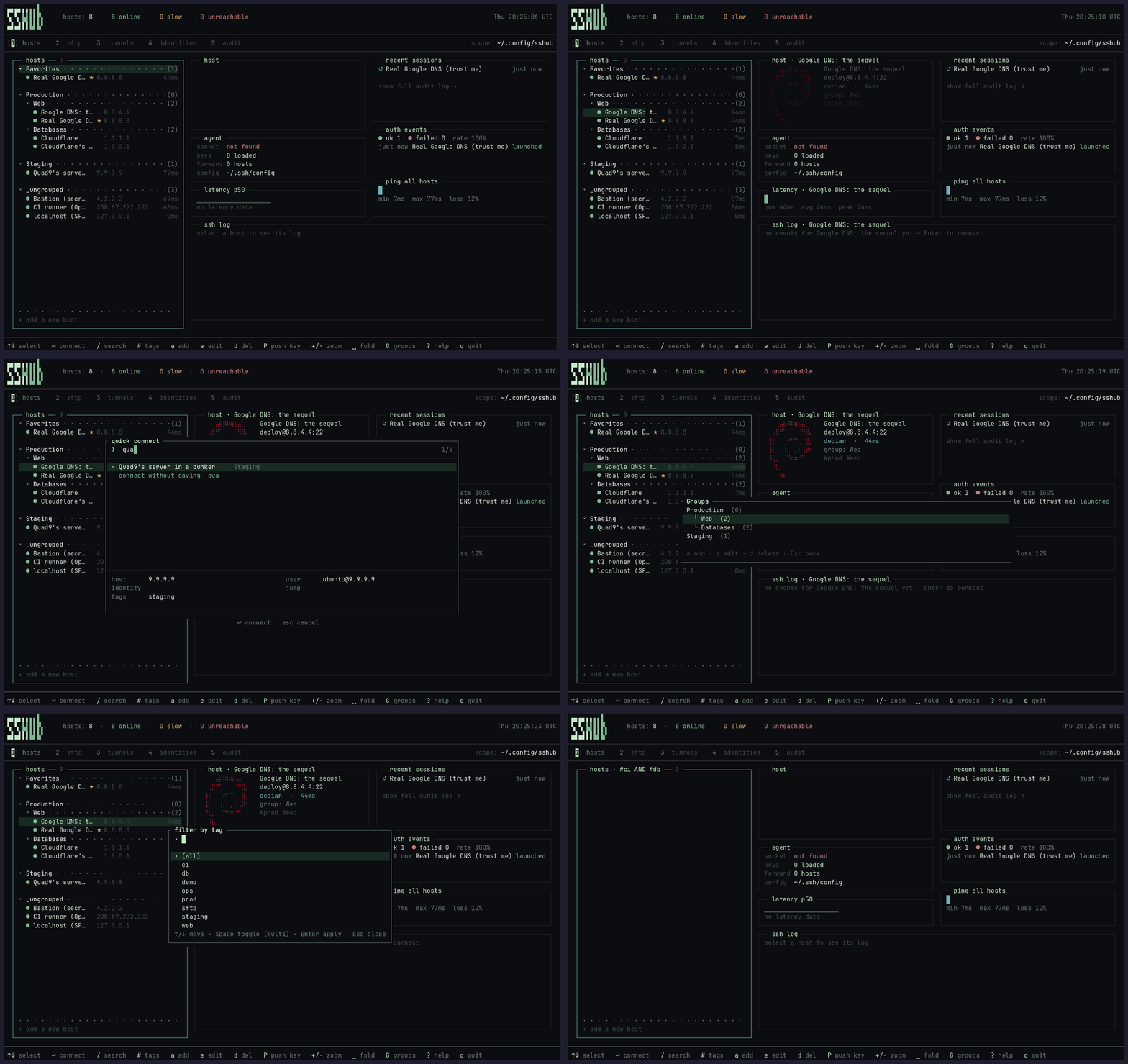
Navigating the dashboard — nested host groups, the fuzzy palette (/), the group manager (Shift+G), and the multi-tag filter (#):
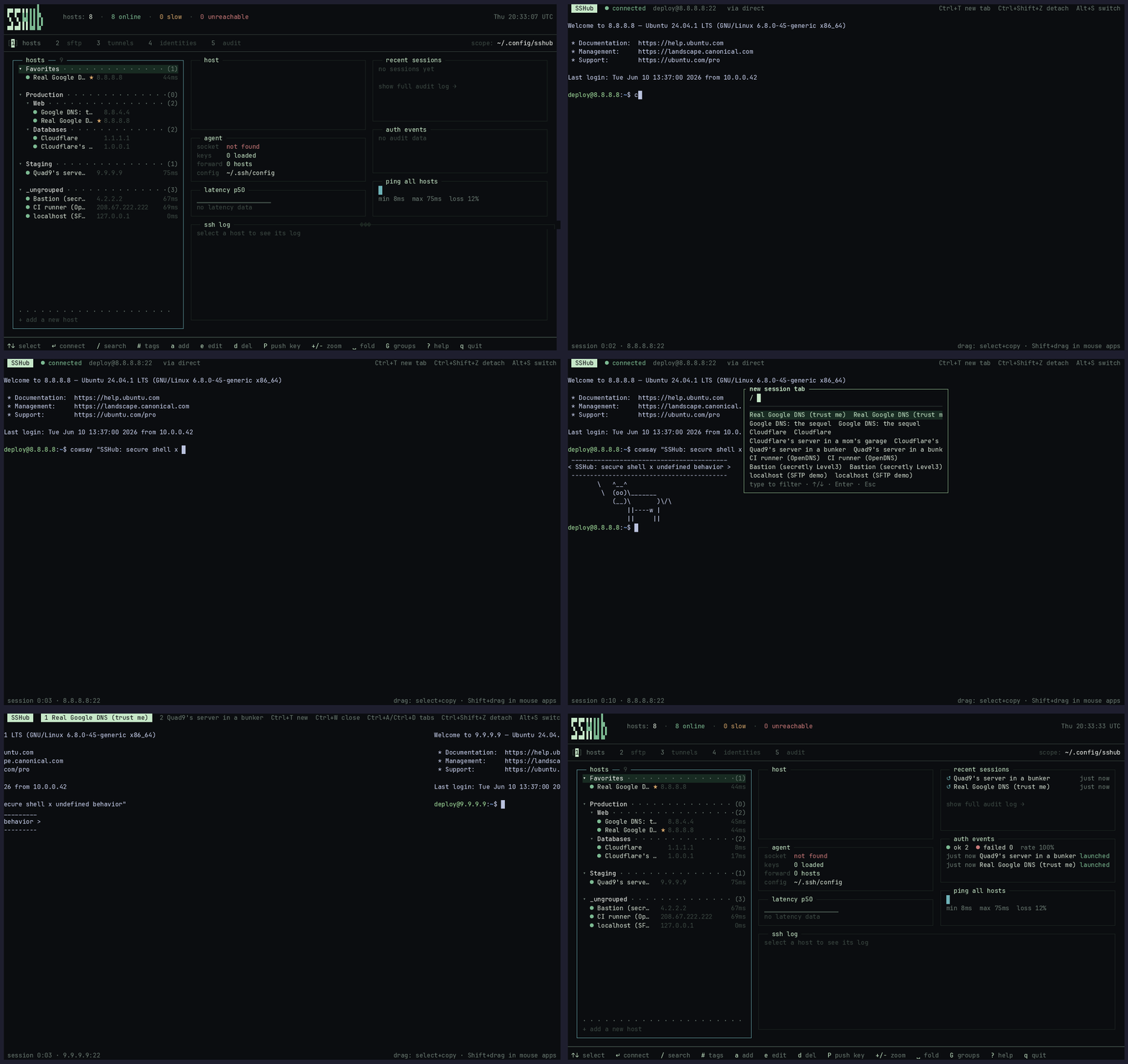
Connecting to a host — the session runs in an embedded PTY right inside the TUI:
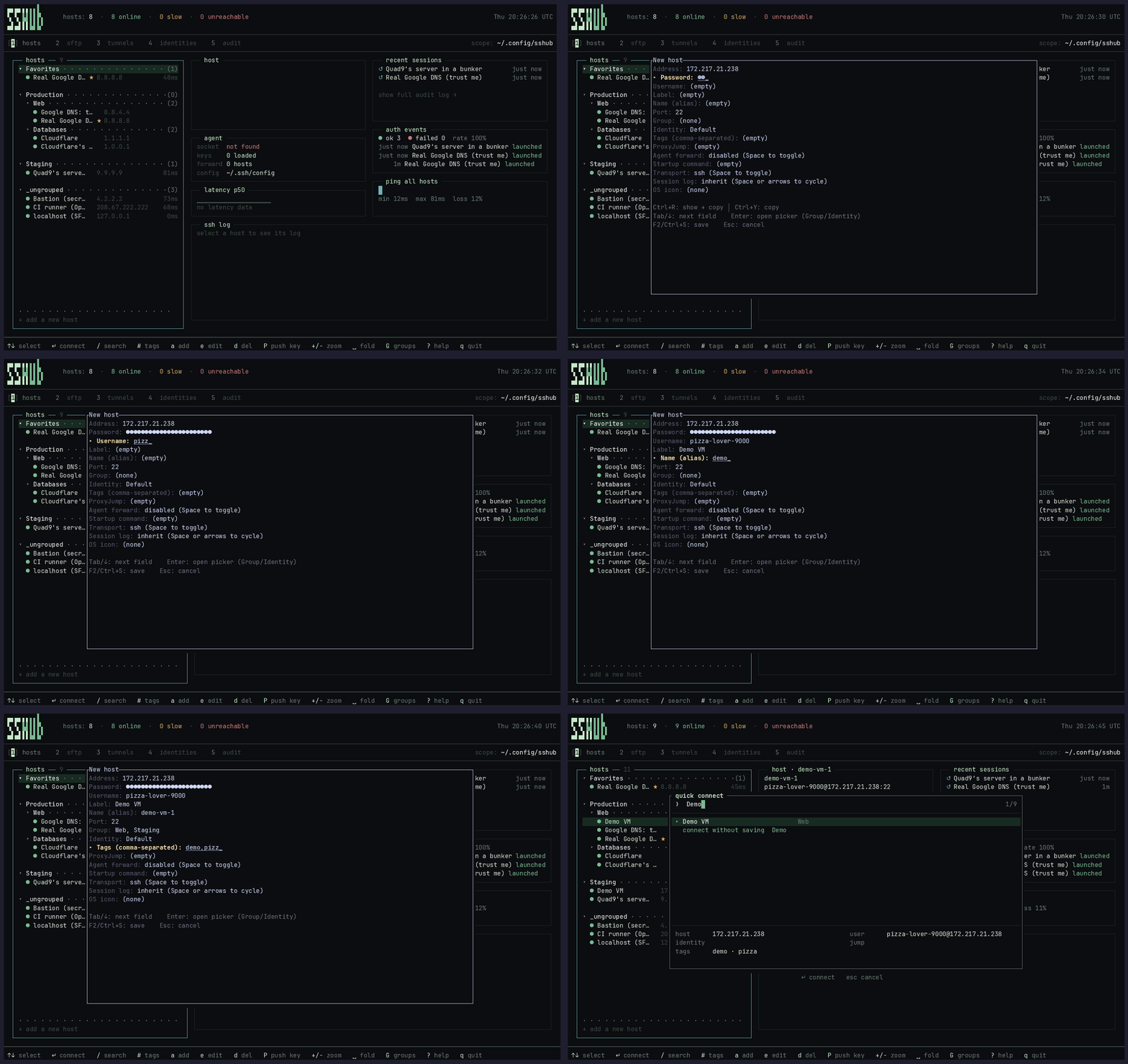
Adding a managed host and marking it as a favorite:
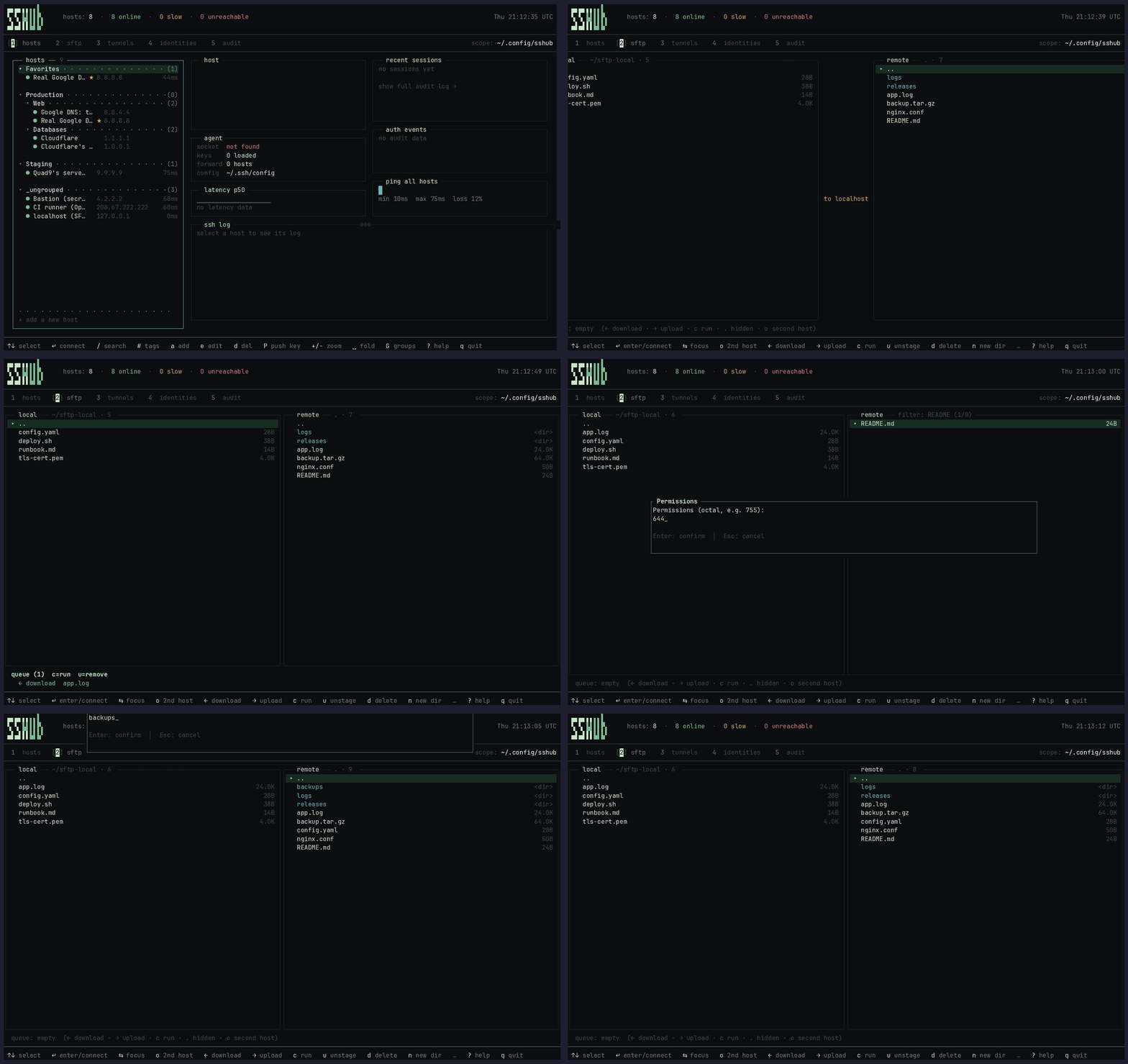
Transferring files over SFTP — a dual-pane browser (remote / local) with a staged transfer queue:
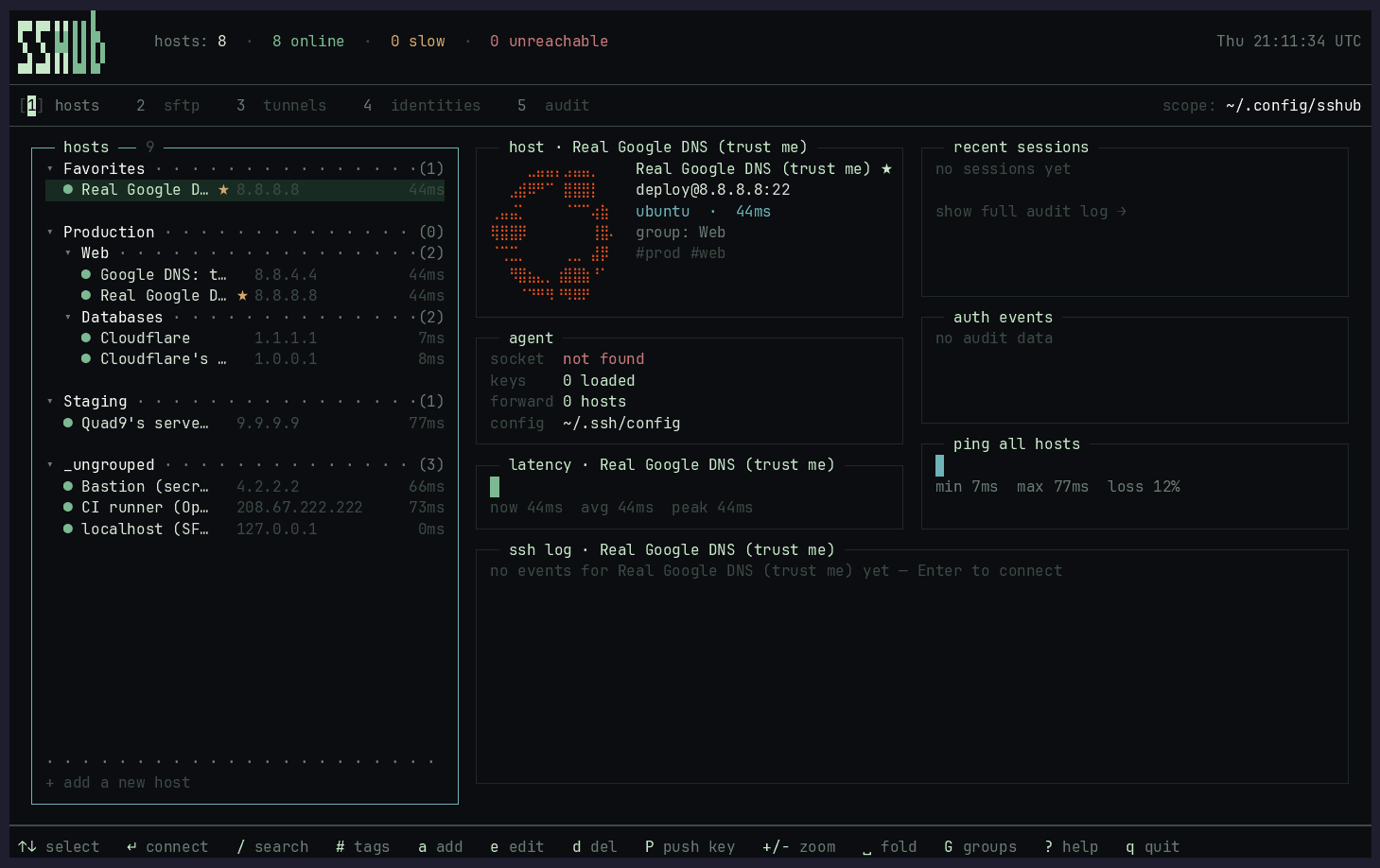
The hosts dashboard — nested groups on the left; the selected host's card shows its auto-detected OS logo, fact sheet, and per-host latency, with live agent / ping panels alongside:
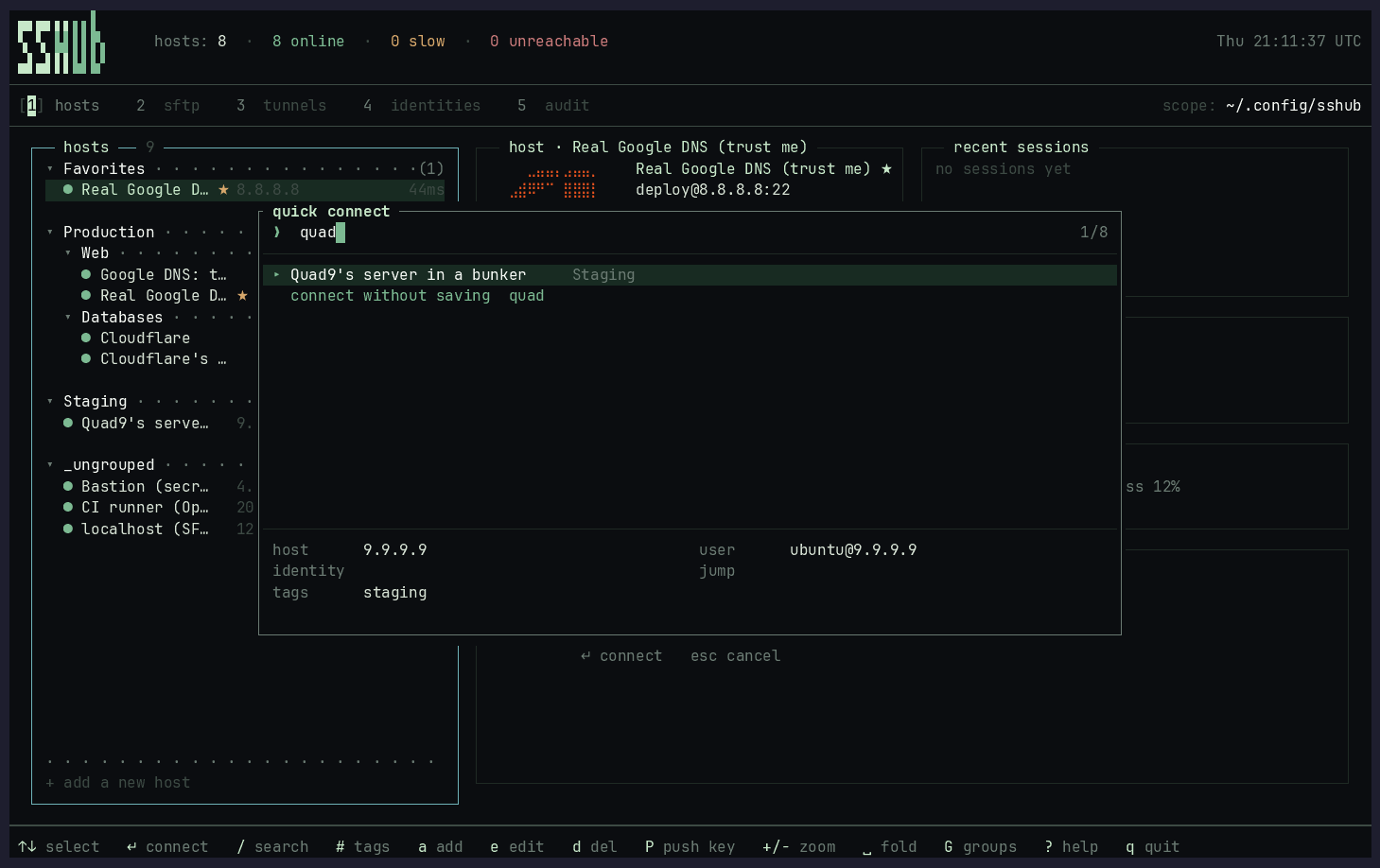
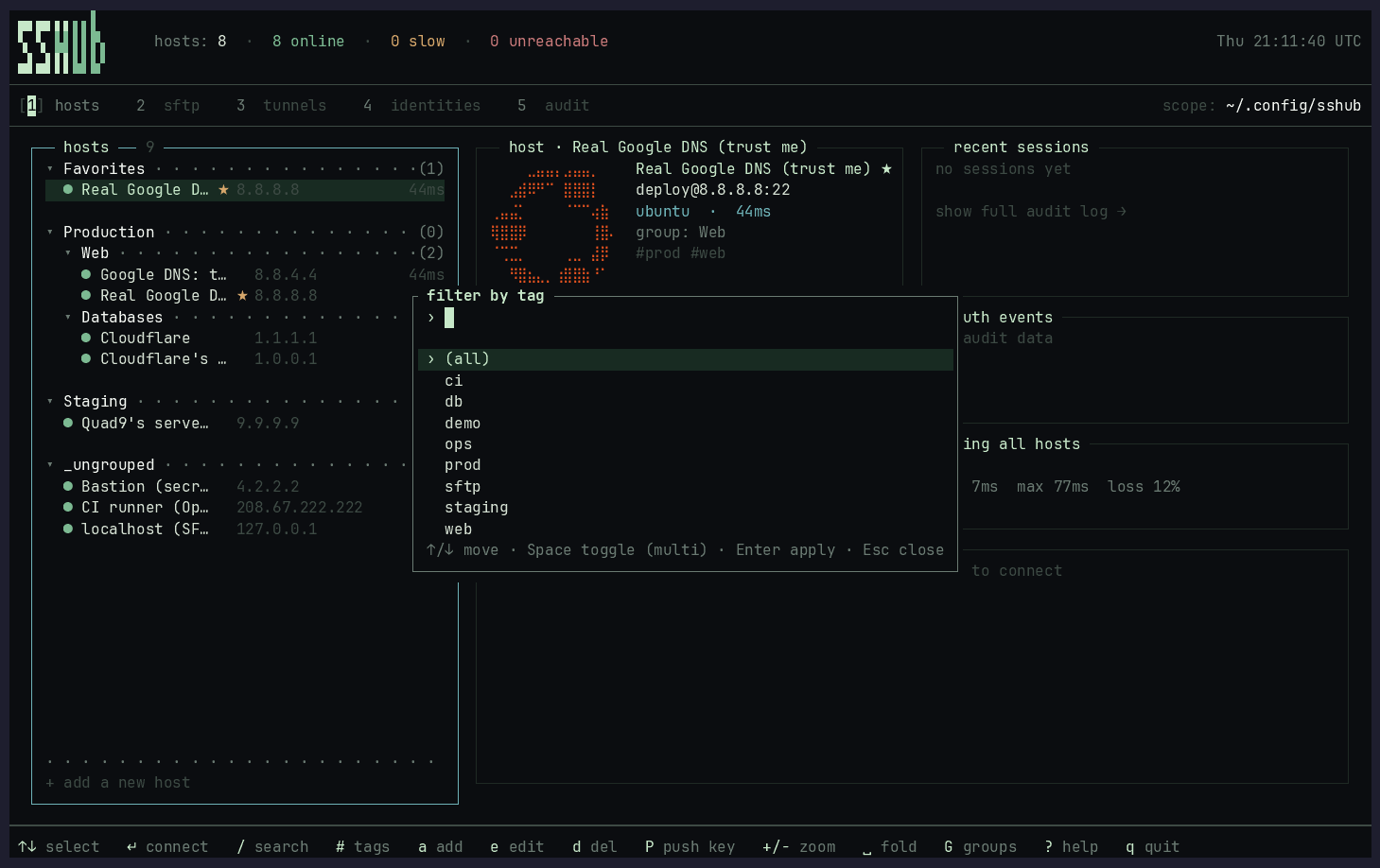
Fuzzy quick-connect palette (/) and the multi-tag filter (#):
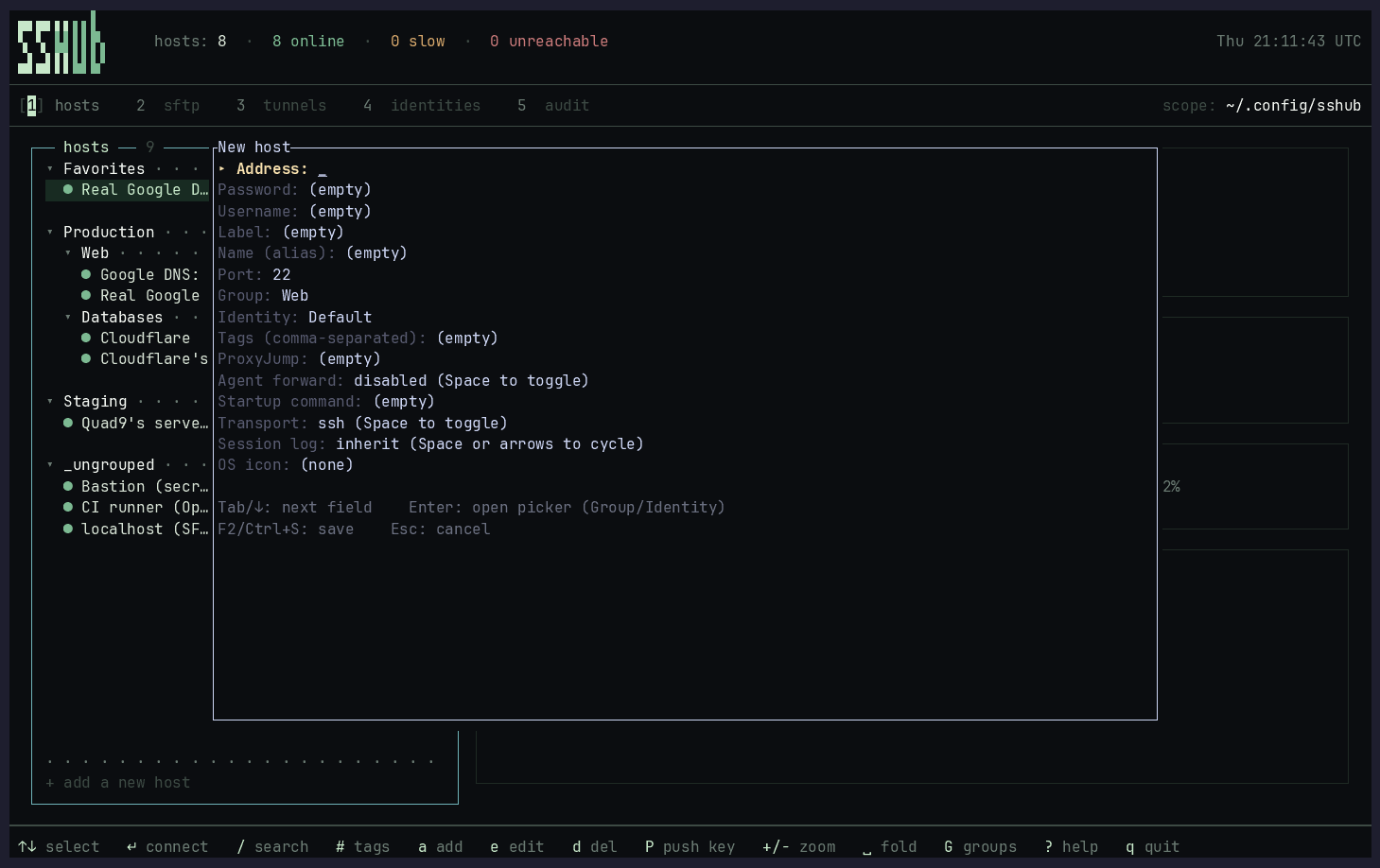
Add/edit host form, the rebindable keybindings editor (Ctrl+K), and the scrollable help overlay (?):
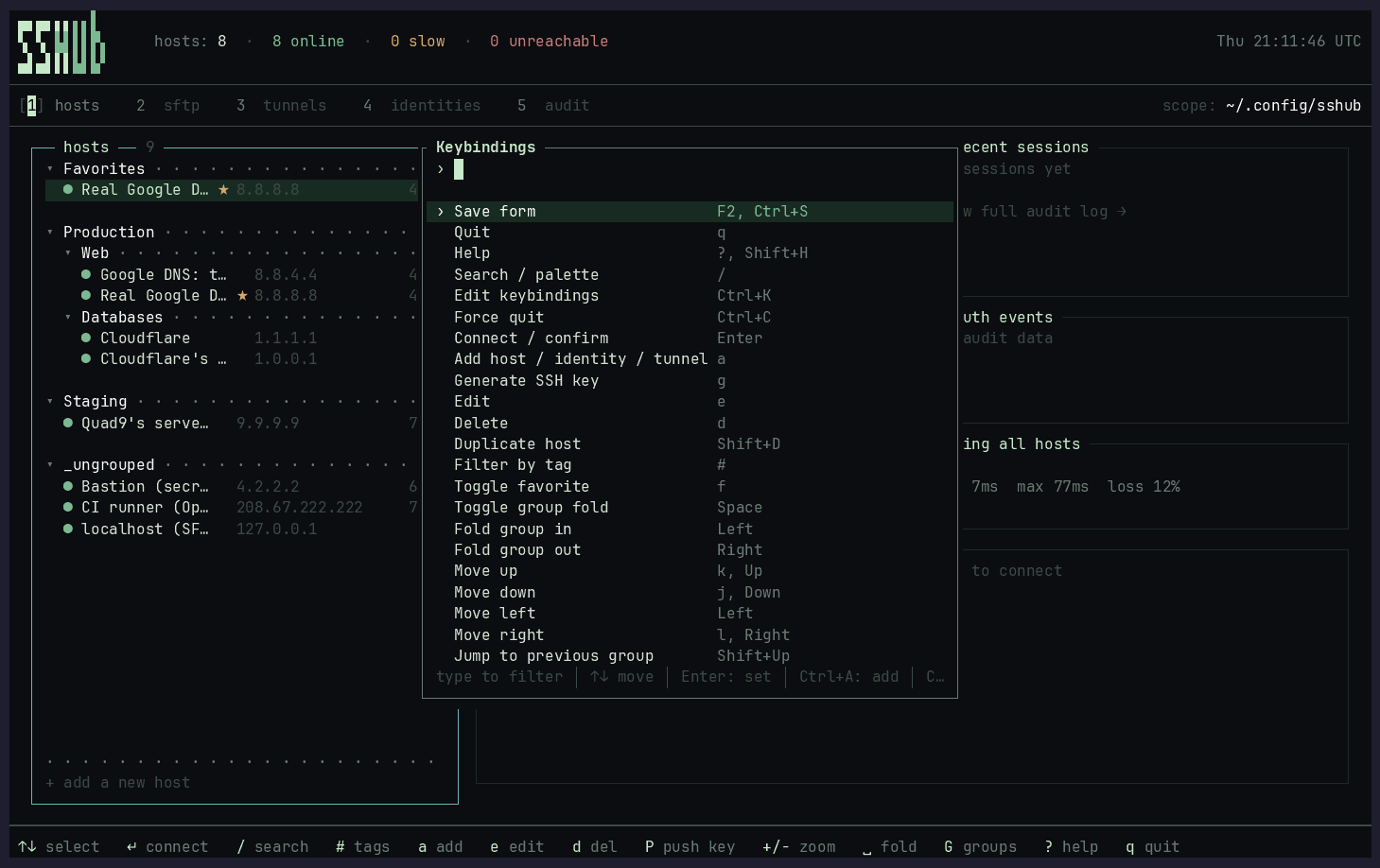
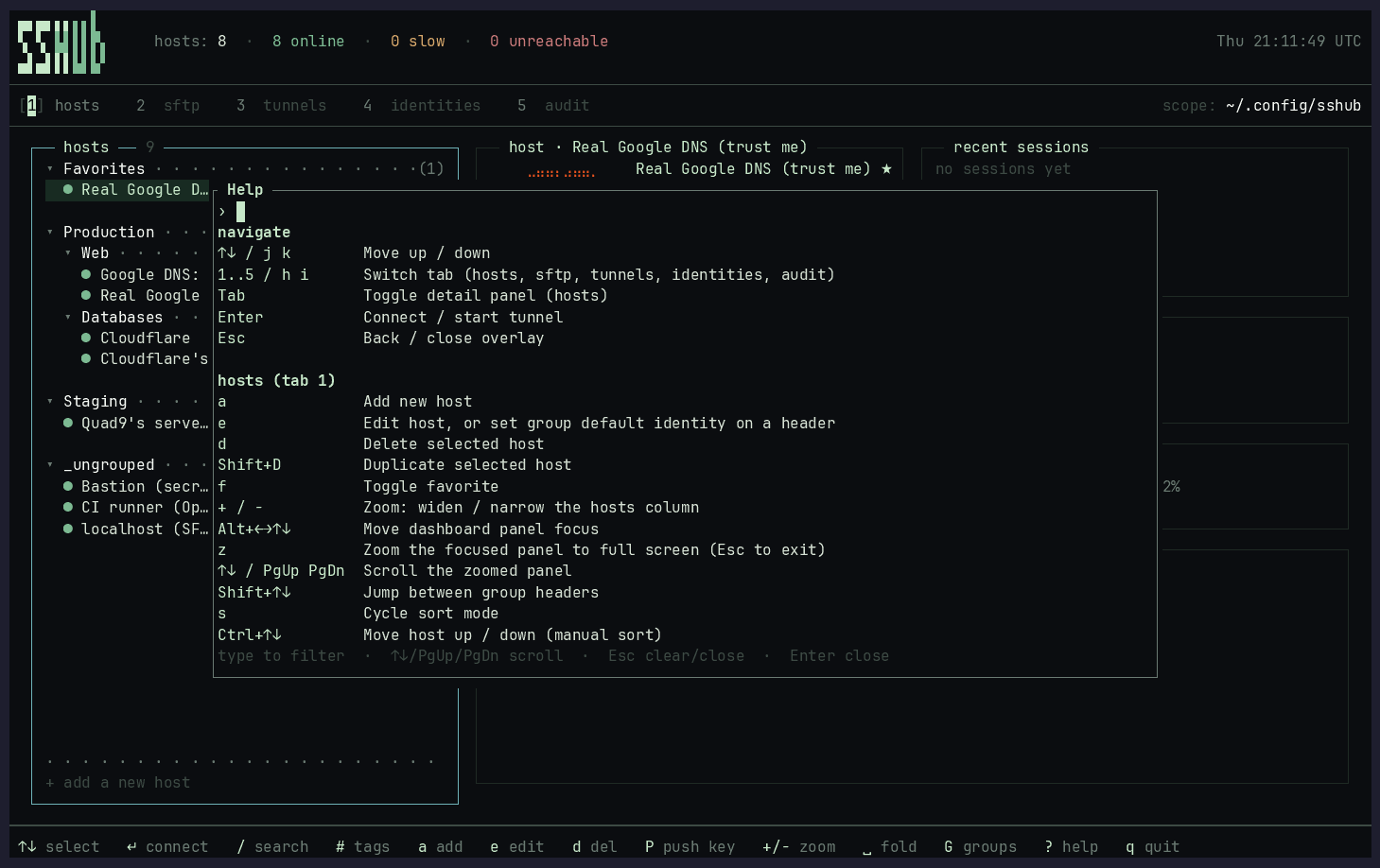
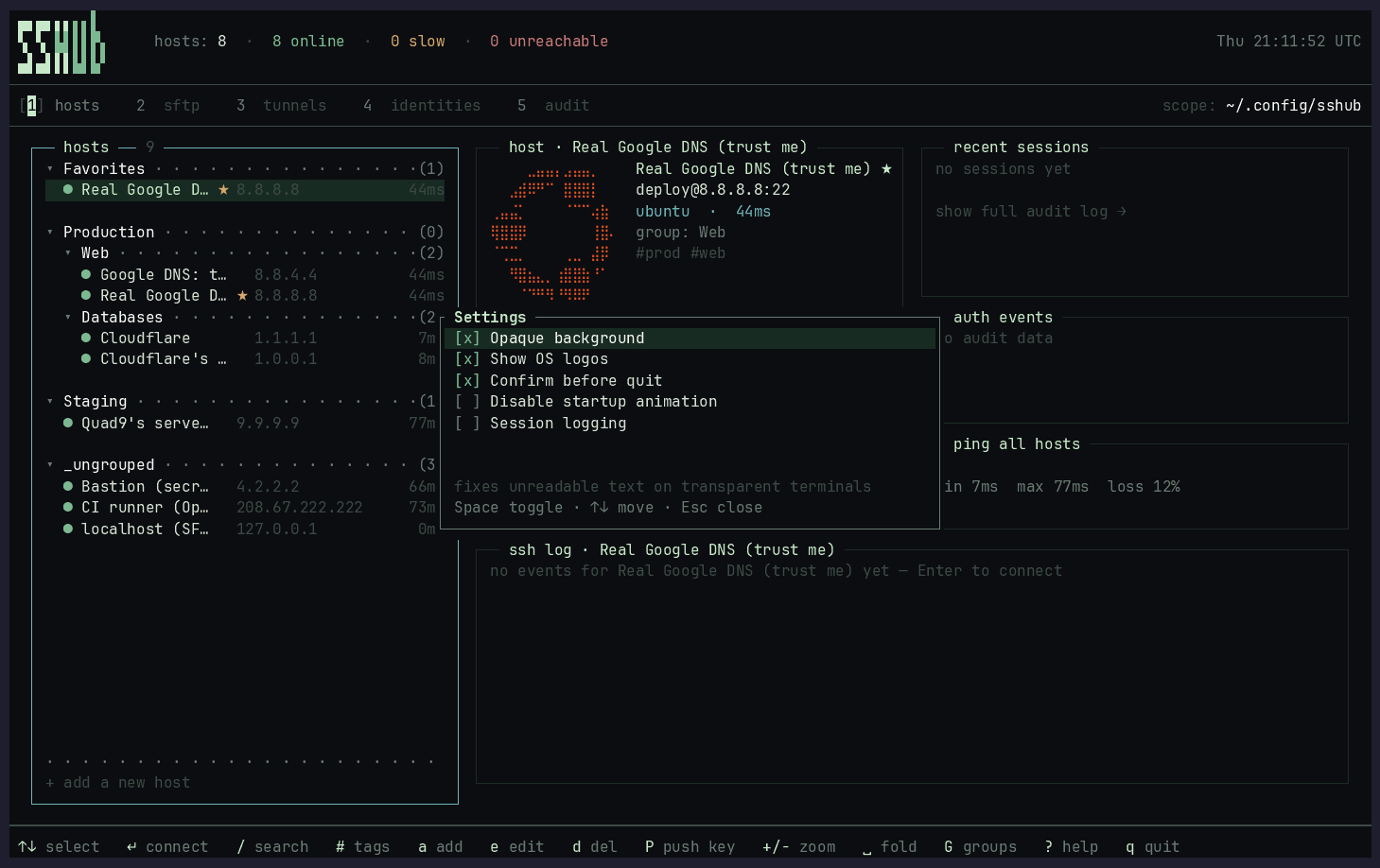
The settings overlay (Ctrl+H) — make SSHub's own surfaces or the remote grid transparent, toggle OS logos, quit confirmation, and the startup animation:
- Embedded SSH sessions — connect opens an in-TUI PTY; detach with Ctrl+D and return to the dashboard while SSH keeps running; multiple session tabs
- Hosts — browse, search, and connect. Fuzzy search with
/, multi-tag AND filter with#, favorites, nested groups, manual sort order - SFTP file transfer — a dual-pane browser with a staged transfer queue: navigate both sides, queue uploads and downloads (files or whole folders, transferred recursively), and run them with a progress bar. Files can be staged while the queue runs. The left pane is your local filesystem by default, or point it at a second server with
o(Osends it back to local) to move files between two hosts — relayed through a local temp file, since SSH has no server-to-server copy. Manage files in place too: delete (d), new folder (n), rename/move (R), and change permissions (M, octal chmod) - OS auto-detection — on first connect a background probe detects the remote distro and the host card renders its logo (Braille art in brand colors), just like Termius
- Multiple groups & Favorites — a host can belong to several groups at once; a reserved Favorites group and a ★ marker in the list, toggled with
f - Tunnels — define and manage SSH tunnels (local/remote/dynamic SOCKS). Start, stop, and monitor from the TUI. Per-tunnel keep alive auto-starts on launch and reconnects dropped forwards with exponential backoff (configurable in
config.toml). - Keys — identity management with ssh-agent integration. Add/remove keys from agent, see loaded status
- Ad-hoc connect - in the fuzzy palette (
/), typing an unknown[user@]host[:port](IPv6 in brackets supported) that matches no saved host offers a "connect without saving" row; Enter opens an embedded ssh session to it. Input is validated and injection-safe (no leading-dash hosts; destination passed after--) - Local shell tab -
Ctrl+Shift+Topens a session tab running your login shell ($SHELL, else/bin/sh) with the same detach/close semantics as ssh tabs - Audit — log of all connection events with filtering by status (ok/fail) and time range (today/week/month); session connect events record the path to the session log when logging is enabled
- Session logging — opt-in capture of PTY session output to
~/.local/share/sshub/profiles/<name>/logs/<host-dir>/(managed hosts use{name}-{id}; pure~/.ssh/configaliases without a launcher row may share a directory when sanitized names collide). Enable globally in Settings (Ctrl+H) or override per host (inherit/on/off). Logs capture everything echoed to the terminal, including passwords if they appear on screen. - Mosh transport — per-host
Transportfield in the host form (sshormosh). Embedded sessions usemoshwhen selected; tunnels and SFTP stay ssh-only. - Settings overlay (
Ctrl+H) — toggle session logging, let your terminal show through SSHub's own surfaces or through the remote grid (two separate switches, both off by default), toggle OS logos, quit confirmation, and the startup animation - Headless CLI — the whole inventory without the TUI: hosts, groups, identities, tunnels, one-shot SFTP, the audit log and themes, plus
sshub exec <host> -- <command>to run a single command on a saved host and get its output and exit code back (with the stored identity, credential and ProxyJump applied).--format jsonon any listing, stable exit codes, completions for bash/zsh/fish — see Headless CLI - Hybrid sources — hosts from
~/.ssh/config(read-only) and launcher-managed (full CRUD) merge without duplicates - Import/Export: import from
~/.ssh/config, Termius backups, PuTTY (a Windows regedit.regexport or a Unix~/.putty/sessionsdirectory), or mRemoteNG (confCons.xml); export managed hosts back to ssh config format. Only SSH sessions are imported (RDP/VNC/telnet entries are skipped), and encrypted mRemoteNG passwords are not decrypted (imported hosts carry no stored secret) - Hot reload — edits to
~/.ssh/configupdate the host list live via file watcher - Configurable keybindings — rebind any action via Ctrl+K; stored in
config.toml - Mouse support — click tabs, select rows, scroll panels, double-click to connect
From npm, prebuilt, no toolchain required:
npx sshub-tui              # run it without installing
npm install -g sshub-tui   # then just: sshub
The installed command is sshub; the package is sshub-tui because npm rejects
the bare sshub name as too close to the existing ssh2 and sshpk.
Prebuilt for Linux x64, macOS arm64 and macOS x64. The binary arrives as a platform-specific optional dependency, so nothing is compiled and nothing is fetched from outside the registry. Any other platform builds from source below.
From crates.io:
cargo install sshubRequires a Rust toolchain (edition 2021) and ssh in PATH.
On Linux, building also needs the D-Bus client library for the keyring (Secret Service) backend that stores host passwords and key passphrases:
# Debian/Ubuntu
sudo apt-get install -y libdbus-1-dev pkg-config
# Fedora
sudo dnf install -y dbus-devel pkgconf-pkg-config
# Arch
sudo pacman -S --needed dbus
Prebuilt binaries for Linux and macOS are attached to each GitHub release.
At runtime, a Secret Service provider (gnome-keyring, KWallet, …) is preferred for secure credential storage. If one is not running or unlocked (e.g. in WSL, Docker, or headless SSH sessions), SSHub will fallback to storing credentials in a local owner-only restricted file (credentials.json), notifying you in the status bar.
git clone https://github.com/Petyok/SSHub.git
cd SSHub
just install    # builds release binary + desktop entry + ~/.local/bin/sshub
Or build only:
just build
cp target/release/sshub ~/.local/bin/sshub # launch TUI
sshub --version # print version
sshub --dry-run # exit immediately (CI / scripts)
sshub --help # show options
sshub --profile work # launch named profile
sshub --manage-profiles # open profile picker# Wipe the launcher database — managed hosts, groups, identities, tunnels and
# the audit log. Irreversible, so it refuses unless you confirm. Your
# ~/.ssh/config (and the hosts imported from it) are left untouched.
sshub db purge --yes-i-am-stupid
# Target a profile from the TUI or any headless command.
sshub --profile work host list
sshub --profile personal audit list
sshub --profile work db purge --yes-i-am-stupidSSHUB keeps profile-owned data isolated. Each profile can select its own SSH
config source with [ssh].config_path; the default remains shared
~/.ssh/config. With one profile, startup remains silent;
with multiple profiles, the picker appears after the splash. The picker can
create, rename, and delete profiles, but switching profiles requires restarting
SSHUB. --profile NAME bypasses the picker. --manage-profiles opens it even
when only one profile exists. Press Esc in the picker to cancel startup.
Headless commands without --profile use the last-used profile and never open
the interactive picker.
Beyond the TUI, sshub exposes a full command-line interface for scripting and
automation: hosts, groups, identities, tunnels, SFTP, and the audit log, no
terminal UI required. sshub exec <host> -- <command> runs a single command on
a saved host and hands back its output and exit code, so a script gets the
stored identity, credential and ProxyJump without rebuilding the ssh command
line by hand. Add --format json to any listing or show command for
machine-readable output (plain text is the default). Exit codes are stable:
0 success, 1 operational failure, 2 usage or bad flags, and 124 when
exec --timeout kills the run (as timeout(1) does). Destructive commands
refuse to run without --yes.
# Hosts
sshub list                                  # list hosts (alias for `host list`)
sshub connect prod-web                       # open an SSH session to a host
sshub host show prod-web --format json       # host details as JSON
sshub host search web                        # fuzzy search
sshub host add --name prod-web --address 10.0.0.5 --port 22 \
    --username deploy --group prod --tags web,prod
sshub host delete --name prod-web --yes      # destructive: needs --yes

# Run a command on a host (scripted; exit code is the remote command's)
sshub exec prod-web -- systemctl is-active nginx
sshub exec prod-web -- 'tail -n 200 /var/log/nginx/error.log' > errors.log
echo "$payload" | sshub exec db-01 -- 'psql -f -'
sshub exec prod-web --timeout 30 --format json -- uptime

# Groups and identities
sshub groups                                 # list host groups
sshub group add --name prod
sshub identity add --name work --username alice --private-key ~/.ssh/id_ed25519
sshub identity agent-remove --name work      # ssh-add -d for the identity's key

# Tunnels
sshub tunnel list
sshub tunnel create --host prod-web --type local --local-port 8080 \
    --remote-host localhost --remote-port 80
sshub tunnel start 3                          # start detached (by id, label, or port)
sshub tunnel start 3 --foreground             # run in the foreground with keep-alive
sshub tunnel stop 3

# SFTP (one-shot, over a direct host)
sshub sftp ls prod-web /var/log
sshub sftp get prod-web /var/log/app.log ./app.log
sshub sftp put prod-web ./deploy.tar.gz /tmp/deploy.tar.gz
sshub sftp rm prod-web /tmp/deploy.tar.gz --yes

# Themes (see "Theming" below)
sshub theme list
sshub theme show aqua
sshub theme check ~/.config/sshub/themes/mine.toml

# Audit log
sshub audit list --status fail --days 7
sshub audit stats --days 7

# Inventory sync with ~/.ssh/config
sshub import                                  # import hosts from ssh config (--from ssh)
sshub import --from termius ./termius-export  # import a Termius export dir (L00t.csv)
sshub import --from putty                      # import PuTTY sessions (~/.putty/sessions)
sshub import --from putty ./sessions.reg       # or a Windows regedit .reg export
sshub import --from mremoteng ./confCons.xml   # import an mRemoteNG confCons.xml
sshub import --from putty --dry-run             # preview parsed hosts without writing
sshub sync                                    # refresh ssh_config rows
sshub export --stdout                         # print an ssh_config snippet

# Shell completions
sshub completions zsh > ~/.zsh/completions/_sshub
sshub completions bash
sshub completions fish
Run sshub <command> --help for a per-command usage block, or man sshub
after just install (preview the page without installing with just man). See
openwiki/workflows/cli.md for the full command tree.
Shell completions are installed automatically by just install (bash and fish
drop into auto-loaded dirs; zsh gets a sourced line appended to ~/.zshrc).
Run just install-completions to (re)install only the completions, or generate
one yourself with sshub completions bash|zsh|fish.
| Resource | Default path |
|---|---|
| Config | ~/.local/share/sshub/profiles/<name>/config.toml |
| Themes | ~/.local/share/sshub/profiles/<name>/themes/*.toml |
| Databases | ~/.local/share/sshub/profiles/<name>/{launcher,metadata}.db |
| Logs | ~/.local/share/sshub/profiles/<name>/logs/ |
| Tunnels | ~/.local/share/sshub/profiles/<name>/tunnels/ |
| State | ~/.local/share/sshub/state.toml |
| SSH config | ~/.ssh/config |
Override via environment variables: SSHUB_CONFIG_DIR, SSHUB_DATA_DIR,
SSHUB_SSH_CONFIG. Setting SSHUB_CONFIG_DIR or SSHUB_DATA_DIR selects
compatibility mode, using those directories verbatim and disabling profile
discovery. Legacy SSH_LAUNCHER_* variables remain supported.
Defaults below. Rebind any action with Ctrl+K (saved to config.toml). Press ? in-app for the full list.
| Key | Action |
|---|---|
1..5 |
Switch tab (hosts/sftp/tunnels/identities/audit) |
Tab |
Toggle detail panel |
Esc |
Back / close overlay |
Ctrl+K |
Keybind editor |
? |
Help screen |
q |
Quit |
| Key | Action |
|---|---|
Ctrl+T |
New session tab (host picker) |
Ctrl+Shift+T |
Local shell tab |
Ctrl+W |
Close session tab |
Ctrl+D |
Detach to dashboard (SSH keeps running) |
Ctrl+[ / Ctrl+] |
Previous / next session tab |
Ctrl+Shift+S |
Focus session from dashboard |
Alt+S |
Switch to an open session (searchable) |
| Key | Action |
|---|---|
j/k or arrows |
Navigate |
Enter |
Connect to host |
a |
Add host |
e |
Edit host / group identity |
d |
Delete host |
D |
Duplicate host |
f |
Toggle favorite |
s |
Cycle sort mode |
Alt+arrows |
Move dashboard panel focus |
z |
Zoom focused panel (Esc to exit) |
/ |
Fuzzy search |
/ + [user@]host |
Ad-hoc connect (unknown host, no save) |
# |
Filter by tags (AND) |
Shift+G |
Manage groups (nested) |
Shift+I |
Import from ssh config |
Shift+E |
Export to ssh config |
Shift+T |
Import from Termius |
Shift+P |
Push public key to host |
| Key | Action |
|---|---|
Enter |
Connect to host · enter directory (.. walks up) |
Tab |
Switch focus between the panes |
Backspace |
Up one directory |
← / → |
Stage the focused pane's selection toward the other |
c / u |
Run the queue / unstage the last transfer |
o / O |
Left pane to a second server / back to local files |
. |
Show / hide dotfiles in both panes (remembered) |
d |
Delete (recursive) |
n / R / M |
New folder / rename / chmod |
r |
Refresh both panes |
s |
Open an SSH session to this host |
/ |
Filter the focused pane |
Esc |
Disconnect, back to the picker |
| Key | Action |
|---|---|
a |
Add tunnel |
e |
Edit tunnel |
d |
Delete tunnel |
Enter |
Start / stop / cancel reconnect |
R |
Reconnect settings |
x |
Kill tunnel process |
| Key | Action |
|---|---|
a |
Add identity |
e |
Edit identity |
d |
Delete identity |
g |
Generate SSH key pair |
r |
Remove key from agent |
Shift+A |
Add key to agent |
Shift+P |
Push public key to host |
H |
Known hosts manager |
| Key | Action |
|---|---|
f |
Cycle filter (all / ok / fail) |
r |
Cycle range (all / today / week / month) |
SSHub's colours live in TOML theme files you can copy, edit and switch at
runtime. Five themes ship built into the binary — default, summer,
aqua, fire and high-contrast — and your own go in the
selected profile's themes/*.toml directory (or ~/.config/sshub/themes/ in
compatibility mode), where the file name is the theme's ID.
mkdir -p ~/.local/share/sshub/profiles/<name>/themes
sshub theme show aqua > ~/.local/share/sshub/profiles/<name>/themes/mine.toml
$EDITOR ~/.local/share/sshub/profiles/<name>/themes/mine.toml
sshub theme check ~/.local/share/sshub/profiles/<name>/themes/mine.toml
Select it in the TUI with Ctrl+H → Theme… → Enter: moving through the list
previews each theme on the whole interface, Esc rolls back, and Enter saves
appearance.active_theme to config.toml. Nothing else is written.
A theme sets any of three layers — your own [palette], the fixed 25-slot
[semantic] core, and per-role [components] overrides — plus named static
[gradients]. Everything you leave out is inherited from default, so
changing one semantic slot recolours everything that uses it. True Color
terminals get the colours as written. The embedded remote session keeps every
colour the remote chose itself; a theme only supplies the ground and the default
foreground the remote left unset.
Three headless commands, all without a TUI or a database:
| Command | What it does |
|---|---|
sshub theme list |
Every built-in and user theme with its state |
sshub theme show <id> [--resolved] |
The theme's source, or a fully resolved standalone export |
sshub theme check <file> |
Strict validation with file:line:column diagnostics |
Full guide: docs/theme-system.md — the file format,
colour values and simulated opacity, inheritance and "auto", gradient
directions and the perimeter rule, the complete role catalogue, every picker
key, the CLI exit codes, and two copy-pasteable example themes.
~/.local/share/sshub/profiles/<name>/config.toml in profile mode
(~/.config/sshub/config.toml in compatibility mode):
[session_logging]
enabled = false
max_file_bytes = 10485760   # rotate at 10 MiB
retention_files = 50        # keep newest 50 logs per host

[tunnel_reconnect]
max_attempts = 12           # 0 = unlimited retries
initial_delay_ms = 1000     # 1 s (R overlay edits delays in seconds)
max_delay_ms = 60000        # 60 s
stable_secs = 5             # uptime before a spawn counts as up
jitter_ratio = 0.25

[clipboard]
relay_from_pty = true # let apps inside a session copy to your clipboardjust build # release binary
just test # all tests (unit + smoke + e2e + config)
cargo run -- --dry-run # quick sanity check| Level | Command | What it checks |
|---|---|---|
| Unit | cargo test |
Logic, parsers, fixtures -- no TTY |
| Smoke | cargo test --test smoke |
Binary starts, --help, --dry-run |
| E2E | cargo test --test e2e |
TUI scenarios via TestBackend |
| Config | cargo test --test config_load |
Config file creation and loading |
| Variable | Purpose |
|---|---|
SSHUB_CONFIG_DIR |
Override config directory |
SSHUB_DATA_DIR |
Override data/SQLite directory |
SSHUB_SSH_CONFIG |
Override SSH config file path |
SSHUB_DRY_RUN |
Exit immediately without TUI |
SSHUB_AUTO_QUIT |
1 = quit after first draw, q = send quit key |
Rust with ratatui + crossterm for the TUI, rusqlite (bundled SQLite) for storage, nucleo for fuzzy search, notify for file watching. No async runtime -- synchronous event loop with 50ms polling.
Made with dynamic workflows + adversarial-multimodel-reviews + cross-model-reviews. Models with commits, reviews, or blocked merges to their name, in order of appearance:
- Opus 4.8
- Opus 5
- Fable 5
- Composer 2.5
- Grok 4.5
- Qwen 3.8 Max
- GPT-5.6 Luna
AGPL-3.0-or-later — a copyleft license: forks and derivatives must stay open under the same terms. (Versions ≤ 0.3.1 were released under MIT.)
See CHANGELOG.md.