
Astur is a fast, free, open-source tiling window manager for Windows — Alt-drag window movement, nearest-corner resize, five tiling layouts, a per-monitor status bar, up to 10 virtual workspaces, and silky composited animations. Full edition adds a configurable app launcher + file search (Alt+Space), system menu (Alt+Shift+Space), desktop tools, settings GUI, and tray icon. A keyboard-driven, i3-style alternative to komorebi, GlazeWM, and PowerToys FancyZones on Windows 10 and 11.




Keywords: tiling window manager Windows · komorebi alternative · GlazeWM alternative · FancyZones alternative · i3 for Windows · Alt-drag windows · app launcher · file search · master-stack layout · Rust window manager
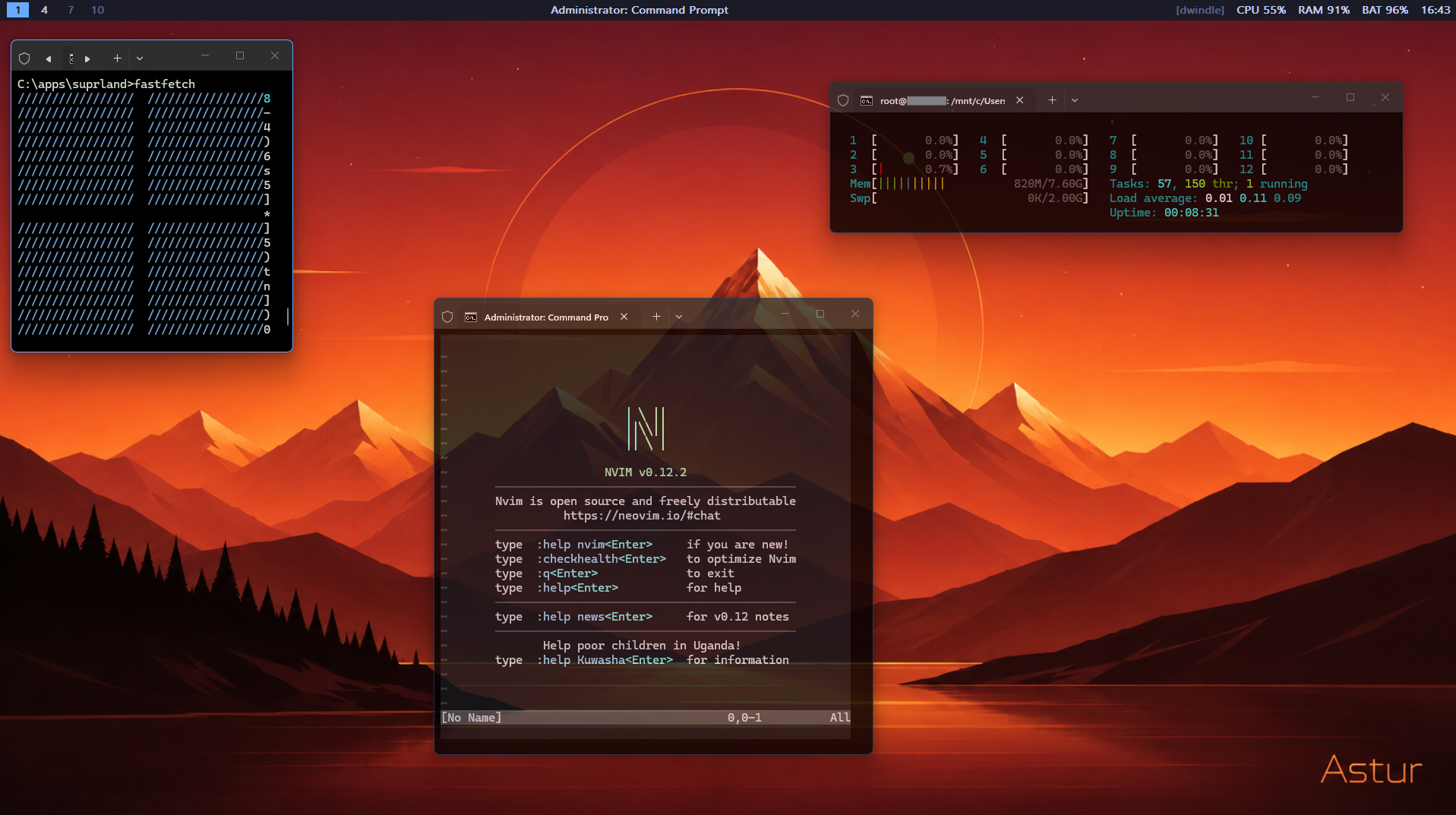
See it in motion: watch the demo clip on the website.
Astur comes in two editions from the same project:
| Astur Lite | Astur | |
|---|---|---|
| Format | single portable .exe, no install |
installer + tray app; WM-only portable option |
| Stop / control | console window (Ctrl+C) |
tray icon — Settings / Quit |
| Configuration | hand-edit .conf files |
settings GUI + .conf |
| RAM | ~1 MB, minimal | higher (launcher, search) |
| Tiling · Alt-drag · bar · workspaces · animations | ✓ | ✓ |
| App launcher + file search + calculator (Alt+Space) | — | ✓ |
| Power menu (Alt+Shift+Space) | — | ✓ |
| Bar widgets (volume · network · app buttons) + light/dark theme | — | ✓ |
| Optional switcher · scratchpad · clipboard · emoji · wallpapers · media · IPC | — | ✓ |
Astur Lite is the lean ~1 MB keyboard/console WM for power users who want text config. Astur is the friendlier, installable app — launcher, file search, power menu, tray, and a settings GUI — with the same motion polish and core tiling.
- Astur — download
Astur-Setup-2.1.2.exefrom the latest stable release and run it (per-user install, no admin, optional start-on-login), or grab the portableastur-windows-x64.exefrom the same release. The portable asset contains the full window manager but not the separateastur-settings.execompanion; use the installer for the Settings GUI. - Astur Lite — the minimal portable build from the
litebranch or pinned v1.0.1 release. One.exe, no install, console window.
No admin required. Running as admin lets it manage elevated windows (e.g. Task Manager) too.
- Alt + left-drag — move any window by clicking anywhere on it, no title bar needed
- Alt + right-drag — resize from the nearest corner (red bracket shows which corner)
- Tiling mode —
dwindle(spiral),master, equalcolumns, balancedgrid, or stackedmonocleacross up to 10 named/icon-labelled virtual workspaces - Status bar — a per-monitor bar with three fully configurable widget zones (left / center / right): workspace pills, focused title, app buttons (click to focus), clock, date, CPU, RAM, battery, network speed, and volume (scroll over it to adjust, click to mute). Scroll anywhere else on the bar to cycle workspaces, click a pill to switch. Optional floating rounded bar (margins + corner radius) and auto-hide (reveals on edge hover). Widget gaps, app labels/tooltips, stat labels, formats, icon-font glyphs, and media text are configurable.
- Animations — workspace switches animate with a composited overlay:
slide,spring(overshoot-and-settle, Hyprland-style),fade, oroff. Windows also glide between equal-sized tile slots, with pixels kept at their original size. Layouts that resize windows land directly, avoiding stretched text and a jump when the application repaints. New layouts or keyboard/mouse input cancel stale glides. Atanimation_msup to 250 (default 140) clicks pass straight through a running animation to those windows. A switch made while one is still sliding happens at once underneath it, and the overlay then reveals the result. - App launcher + file search (Astur) —
Alt+Spaceopens a fuzzy, MRU-ranked picker over installed apps (Start Menu and Store/UWP), custom commands/URLs, open windows, and indexed files. Optional prefix providers expose in-memory clipboard history and a curated emoji catalog. Inline calculator, configurable web fallback, file scope/excludes, result limit, placement, size, rows, font, colours, opacity, radius, icons, and mouse navigation are configurable.Tabshows Modified / Size / Path columns;Shift+Enterreveals a file;F5refreshes app/custom entries. - System menu (Astur) —
Alt+Shift+Spaceopens configurable Power and Setup categories with lock/sleep/hibernate/sign-out/restart/shutdown, settings, config, reload, restart-Astur, screenshot, and wallpaper actions. Order, width, icons, confirmation, custom categories, commands, URLs, and scripts are data-driven. - Desktop tools (Astur, opt-in) — workspace-aware Alt+Tab picker, Alt+Grave scratchpad, clipboard/emoji launcher providers, workspace-triggered wallpaper, media title widget, active-workspace/MRU persistence, and local named-pipe IPC.
- Settings GUI (Astur) — native editor for launcher, menus, desktop tools, layouts, appearance, navbar, widgets, rules, and key bindings. Saving applies live — window manager hot-reloads, no restart.
- Tray icon (Astur) — no console window; left-click for Settings, right-click for Settings / Quit.
- Light / dark theme (Astur) — the launcher and menus follow
theme = dark | light | auto(auto tracks the Windows app theme); optional experimental acrylic blur behind the popups. - High-DPI aware — per-monitor DPI v2. Tiles fill the whole work area at any display scale, and the bar, launcher and menus are scaled per monitor, so a 100% screen next to a 150% one both look right. Sizes in the config are logical pixels at 100%.
- Extras — coloured borders, unfocused dimming, focus-follows-mouse, rich exe/class/title window rules with workspace/monitor routing, arbitrary Alt chords, and live config hot-reload.
Left Alt is fully reserved as Astur modifier — apps never see it. Right Alt is untouched. Alt+Tab passes through by default; optional replacement uses Astur's workspace-aware picker.
| Shortcut | Action |
|---|---|
Alt + left-drag |
Move window |
Alt + right-drag |
Resize from nearest corner |
Alt + Space |
App launcher + file search (Astur) |
Alt + Shift + Space |
Power / system menu (Astur) |
Alt + T |
Toggle tiling mode on/off |
Alt + J / K |
Focus next / previous window |
Alt + Shift+J / Shift+K |
Swap window with next / previous |
Alt + arrows |
Focus window by direction (cursor follows) |
Alt + Shift + arrows |
Move window by direction (across monitors) |
Alt + H / L |
Shrink / grow master column (master layout) |
Alt + M |
Promote focused window to master |
Alt + F |
Toggle float for focused window |
Alt + W |
Close focused window |
Alt + Enter |
Launch terminal |
Alt + Shift+Enter |
Launch browser |
Alt + 1–9, 0 |
Switch to workspace 1–10 |
Alt + Shift + 1–9, 0 |
Move focused window to workspace |
Alt + Tab |
Windows switcher by default; optional Astur workspace-aware switcher |
Letter binds (J K H L M T F W) plus extra Alt/Shift/Ctrl chords are configurable
in %USERPROFILE%\.astur\astur.conf, along with workspace keys, gaps, layout,
borders, rules, launcher, menus, and desktop tools. Status bar uses navbar.conf
in same folder. Both files hot-reload on save.
Two files are created in %USERPROFILE%\.astur\ on first run, both fully
commented and hot-reloaded on save (about 0.1 s after the save). A reload
redoes only what the save changed: a colour edit does not re-tile or restyle
windows. The system menu's Reload (or IPC reload) always re-applies
everything, which also repairs any window left mis-styled:
astur.conf— workspaces/names/icons/wallpapers, five layouts, gaps, borders, focus, animations/easing, popup theme/geometry, launcher providers/custom entries, system actions, desktop tools, rich rules, persistence, IPC, and hotkeys.navbar.conf— bar placement/style, three widget zones, labels/formats/icons, app buttons/tooltips, stats, volume, network, media, floating mode, and auto-hide.
Save both as UTF-8. The window manager never overwrites a file it cannot read (a
UTF-16 "Unicode" save, or one locked mid-save): it keeps its current settings
(built-in defaults at startup), logs the error to astur.log, and tries again.
Full Astur ships astur-settings.exe to edit both files. .conf remains source
of truth; comments/layout survive saves. Structured records use ;; between rows
and | between fields. Prefix literal separators with backslash. Built-in icon names:
app browser calculator clipboard command file folder grid lock media power reload power-circle restart screenshot search settings setup signout sleep terminal wallpaper web window.
Requires Rust stable. The repo is a Cargo workspace.
git clone https://github.com/Page011/Astur
cd Astur
cargo build --release
# binaries: target/release/astur.exe + target/release/astur-settings.exe
cargo build --release -p astur builds core WM only. Settings menu then reports
missing companion instead of failing silently.
crates/astur is window manager, crates/astur-config shared config parser,
crates/astur-settings settings GUI. Minimal Astur Lite
lives on the lite branch (a single
crate, no workspace).
Use YASB's existing GlazeWM workspace widget with Astur's optional localhost
WebSocket server: live workspace indicators, app icons, click-to-switch and wheel
cycling, including per-monitor workspaces. Open Settings > YASB integration
to enable it, choose a port, and copy the widget configuration and example CSS.
Alternatively, set yasb_enabled = true in astur.conf and connect the widget
to ws://127.0.0.1:6123.
See setup and ready-to-merge YASB configuration.
Astur installs two low-level Windows hooks (WH_MOUSE_LL, WH_KEYBOARD_LL) that
intercept input before it reaches any application. Left Alt is swallowed so it never
triggers app menus or Alt shortcuts — only Astur sees it. Drag commands are queued to
the manager. Alt-drag moves and resizes the real window: no thumbnail, outline,
off-screen parking, or preview handoff. The manager samples the newest pointer
geometry at up to 120 Hz; repeated samples are skipped. Final drops run on the same
thread, preserving placement order. Tiling waits until an active drag ends.
Application repainting stays off the input hook. Tiles and live drag updates use
posted (SWP_ASYNCWINDOWPOS) moves,
so a re-tile finishes after the slowest app instead of after every app in turn, and
a busy app no longer holds up the next re-tile; async_window_pos = false in
astur.conf makes Astur wait for each app instead. Showing and hiding windows on a
workspace switch still waits for each app. File search queries the Windows Search
index off the input path, so typing stays responsive.
- Astur — right-click the tray icon → Quit (restores all windows, then exits).
- Astur Lite —
Ctrl+Cin the console window.
| Astur | komorebi | GlazeWM | FancyZones | |
|---|---|---|---|---|
| Master-stack tiling | Yes | Yes | Yes | No (zones only) |
| Alt-drag move/resize anywhere | Yes | No | No | No |
| Animation scope | Window glide + workspace slide/spring/fade | Movement (experimental) | Window movement | No tiling animation |
| App launcher + file search built in | Yes | No | No | No |
| Settings GUI | Yes | komorebi-gui companion |
Tray controls + config file | Yes |
| Single portable exe option | Yes (Lite; Full WM-only option) | No (multiple binaries) | No (installer) | Part of PowerToys |
| Virtual workspaces | Yes | Yes | Yes | Via Windows |
| Config file required to start | No | Yes | Yes | No |
| Language | Rust | Rust | Rust | C++ core / C# editor |
| Licence | Apache-2.0 | Komorebi 2.0 personal-use source licence | GPL-3.0 | MIT |
See the full comparison: Astur vs GlazeWM, komorebi & FancyZones.
Is Astur a komorebi or GlazeWM alternative? Yes — same master-stack tiling and workspace idea, plus Alt-drag move/resize, an app launcher with file search, and a power menu, with a single-exe (Lite) option and no required config file.
Does it work on Windows 11? Yes, on Windows 10 and 11, x64.
Do I need admin rights? No. Running as admin lets it manage elevated windows too.
Does it work with display scaling (125% / 150%)? Yes, from 2.1.3 on. Astur is per-monitor-DPI aware, including mixed-scale multi-monitor setups. (Earlier versions tiled into the top-left corner of a scaled screen — that was issue #5.)
Something is not working — what do I send? Run astur.exe --check in a
terminal. It prints and saves a short report (version, Windows build, DPI
awareness, every monitor and its scale, config paths). For more, set
log_level = info in astur.conf and attach
%USERPROFILE%\.astur�stur.log.
What's the difference between Astur and Astur Lite? See Editions — Lite is minimal ~1 MB console exe; Astur adds configurable launcher/search, system menu, tray, desktop tools, rich widgets/themes/rules, IPC, persistence, and settings GUI.
- Workspace wallpaper changes Windows global wallpaper through
SystemParametersInfoW; not independent per-monitor wallpaper. - Window glide and the slide's still-wallpaper backdrop draw from a cached copy of the wallpaper, re-rendered about 1.5 s after it, the display or the config changes (and once at startup). In that gap — e.g. right after a per-workspace wallpaper switch — windows place instantly instead of gliding and slides move the whole frame. Without Explorer (a replacement shell) that is always the case.
- Media widget reads titles from known player windows; no play/pause/skip controls or Windows media-session API yet.
- Persisted state stores active workspace indexes and launcher MRU, not window-to- workspace assignments across process restarts.
- Astur Alt+Tab replacement shows title/app-icon rows; live DWM thumbnails remain future work.
- Clipboard history is text-only, memory-only, and cleared when Astur exits.
Astur is created and maintained by Nigel.
Astur is an independent project, not affiliated with or endorsed by any other window manager. It is a clean-room Rust implementation for Windows. All trademarks belong to their respective owners.
Apache-2.0 — see LICENSE.