SCSE1224 – Advanced Programming
Semester 2, Session 2024/2025
Lecturer: Dr. Mohd Razak bin Samingan
Group: 2 – Section 03

| Name | Matric No. |
|---|---|
| Alfred Chin Zhan Hoong | A24CS0224 |
| Lee Ming Da | A24CS0317 |
| Gan Rui En | A24CS0249 |
| ZUO BOYU | A24CS4045 |
| Week | Date Range | Milestone | Description |
|---|---|---|---|
| 4 | 7–13 April | Proposal Preparation | - Form group and confirm topic - Draft system overview, function list, and class diagram |
| Initial Class Implementation | - Design classes: Customer, MenuItem, Food, Drink, Order, OrderItem, etc. |
||
| Basic Feature Integration | - Develop: menu display, item search, order placement, checkout, and receipt | ||
| File I/O & Admin Features | - Implement: save/load functionality, admin login, item CRUD, sales reporting | ||
| 5 | 14–20 April | Proposal Submission | - Submit CLI prototype and Java class structure |
| 13 | 9–15 June | Interim Submission | - Implementation of proposal - Submit updated project plan, timeline, class diagram, partial working code |
| 15 | 23–29 June | Testing & Finalization | - Finalize features, test system, debug - Submit video and final system |
Refer to the visual diagram showing class relationships and member access types.

| Icon | Description |
|---|---|
- |
private |
#  |
protected |
~  |
package-private |
+  |
public |
| Class | Description |
|---|---|
Customer |
Stores customer details (name, phone, address). Can view menus, order items, view receipts, and search items. |
Admin |
Manages the system. Default password: admin123. Can add/edit/delete menu items and view sales reports. |
Order |
Represents a customer's full order including order date, payment method, and receipt generation. |
OrderItem |
Details an item in an order, including quantity. |
Menu |
Collection of available items (food & drink), viewable by customers and managed by admin. |
MenuItem |
A base item with name, price, description, and category (food or drink). |
Food |
Inherits MenuItem, specific to food-type items. |
Drink |
Inherits MenuItem, specific to drink-type items. |
Welcome to the Java Restaurant System – a command-line interface (CLI) based food ordering system for customers and administrators.
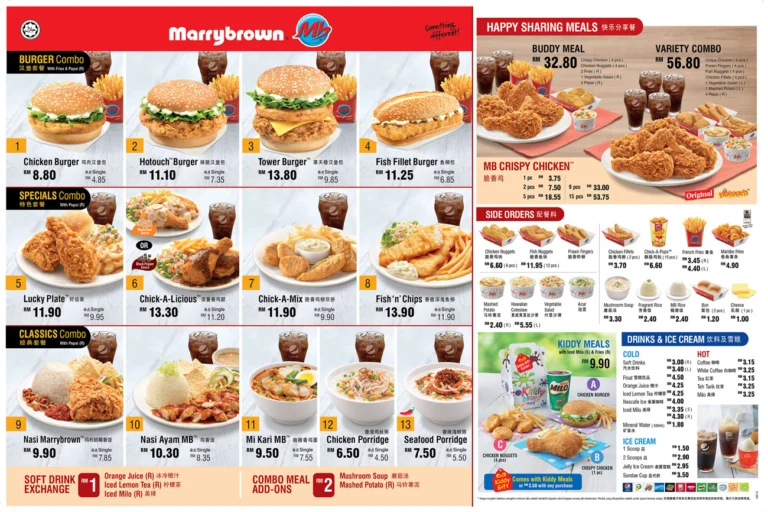
1. Chicken Burger (Single) (Food) - RM4.85
2. Lucky Plate (Combo) (Food) - RM11.90
3. White Coffee (Drink) - RM3.25
You will see this after launching the app:
Main Menu:
1. View Menu
2. Search Dish
3. Place Order
4. Checkout and Print Receipt
5. Admin Login (for Cashier Functions)
6. Exit
Input:
Please enter your choice (1–6): 1
Output:
--- Today's Menu ---
1. Chicken Burger (Single) (Food) - RM4.85
2. Lucky Plate (Combo) (Food) - RM11.90
3. White Coffee (Drink) - RM3.25
Input:
Please enter your choice (1–6): 2
Enter Dish Name to Search: coffee
Output:
Search Results:
1. White Coffee (Drink) - RM3.25
Input:
Please enter your choice (1–6): 3
Enter your name: Sarah Lee
Enter phone number: 019-1190089
Enter address: 210-L21, KTHO, UTM JB.
System displays menu. Then:
Enter dish numbers and quantities (e.g., 1x2,3x1): 1x1,2x2,3x1
Output:
Order Summary:
- Chicken Burger (Single) x1 = RM4.85
- Lucky Plate (Combo) x2 = RM23.80
- White Coffee x1 = RM3.25
Total: RM31.90
Input:
Please enter your choice (1–6): 4
Proceed to checkout? (Y/N): Y
Payment Method (Cash/Card/QR Pay/FPX Transfer): COD
Output:
Order ID: 1
Customer Name: Sarah Lee
Phone: 019-1190089
Address: 210-L21, KTHO, UTM JB.
Date: 2025-03-30
Time: 11:30 AM

Order Items:
1. Chicken Burger (Single) - 1 x RM 4.85
2. Lucky Plate (Combo) - 2 x RM 11.90
3. White Coffee - 1 x RM 3.25

Total Amount: RM 31.90
Payment Method: COD
Receipt saved to receipt_1.txt
Input:
Please enter your choice (1–6): 5
Enter Admin Password: admin123
Admin Menu:
1. Add Menu Item
2. Remove Menu Item
3. Edit Menu Item
4. View Sales Report
5. Logout
Example: View Sales Report (4)
Output:
--- Sales Report ---
Chicken Burger (Single) - Sold: 1
Lucky Plate (Combo) - Sold: 2
White Coffee - Sold: 1
Input:
Please enter your choice (1–6): 6
Output:
Exiting the Java Restaurant System. Goodbye!
receipt_1.txt,receipt_2.txt, ... stored in working directoryorders.serstores persisted orders
This repository is currently in the interim stage. Basic functionality and core class implementations are being finalized. Further improvements and testing will continue into Week 15.