This project provides an example of accessing a REST API and populating a table view with the results. The UI is unaware of the data source, data could be provided by a database, iCloud, local storage, REST API, or a combination of them. This is accomplished by putting all of these concerns behind a protocol. This app uses a protocol named PetService which provides a way to get a list of pets, and a way to get each pet’s veterinarian (vet).
protocol PetService: class {
    func pets(completion: @escaping ([PetJsonModel]?) -> Void)
    func vet(id: Int, completion: @escaping (VetJsonModel?) -> Void)
}
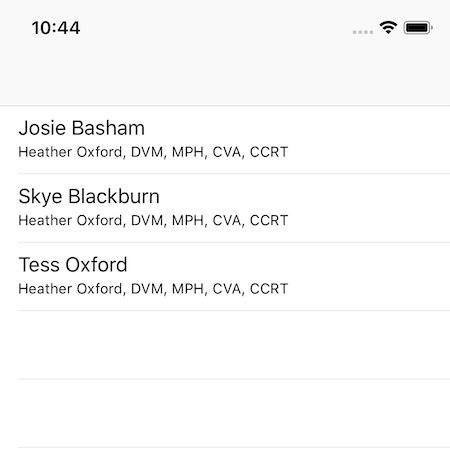
Each view model has a pet name and a vet name used to populate table rows.
The implementation of the PetService protocol knows that it's working with a REST API and what urls are required to access pet info and each pet’s vet info. The JSON models conform to the structure and types defined by the API service, these are often determined by someone else and out of our control. These are the models this app uses for the information returned by the API.
struct PetJsonModel: Codable {
    let firstName: String?
    let lastName: String?
    let vetId: Int?
}

struct VetJsonModel: Codable {
    let firstName: String?
    let lastName: String?
    let title: String?
}
APIs can change, especially during development. Each field is an optional so that if part of the data is unexpectedly missing the JSONDecoder won’t throw an exception. The JSONDecoder exceptions typically don’t have the information to determine the issue with the returned data's structure. Later, when creating view model from the JSON model we can use failing initializers and guard statements to provide feedback on missing fields as well as determine if the data is still useable.
As mentioned, the API urls are known. From the url we can make an async request for data. This is a very common task and warrants extending URL:
extension URL {
    func getData(completion: @escaping (Data?) -> Void) {
        var req = URLRequest(url: self)
        req.addValue("application/json", forHTTPHeaderField: "Content-Type")
        let dataTask = URLSession.shared.dataTask(with: req) { data, _, _ in
            completion(data)
        }
        dataTask.resume()
    }
}
Given a url, this gives us a way to get data asynchronously e.g.
url.getData { data in
    print(data)
}
Now we need a way to transform the data returned into JSON model. By extending Data:
extension Data {
    func decode<T: Codable>() -> T? {
        do {
            let decoder = JSONDecoder()
            let resource = try decoder.decode(T.self, from: self)
            return resource

        } catch {
            print(error.localizedDescription) // unhelpful error
        }
        return nil
    }

    // useful for debugging
    var asString: String { return String(decoding: self, as: UTF8.self) }
}
We can convert the data into any model that conforms to Codable e.g.:
let model: PetJsonModel? = data.decode()In our case, we want to get a list of pets from the API. By combining the previous extensions we now have a way to get the pet models from a url:
extension URL {
    func getModel<T: Codable>(type: T.Type, completion: @escaping (T?) -> Void) {
        var req = URLRequest(url: self)
        req.addValue("application/json", forHTTPHeaderField: "Content-Type")
        let dataTask = URLSession.shared.dataTask(with: req) { data, _, _ in
            guard let data = data else { completion(nil); return }
            let model: T? = data.decode()
            completion(model)
        }
        dataTask.resume()
    }
}
This gives us all we need to satisfy the PetService protocol for getting pet JSON models.
protocol PetService: class {
    func pets(completion: @escaping ([PetJsonModel]?) -> Void)
}
Note that the protocol is defined as a class allowing references of the service to be marked unowned or weak. The PetService implementation uses the extensions mentioned above to fetch and return an array of PetJsonModel:
final class PetServiceImplementation: PetService, RestHelper {

    let base = "https://wildflower-hidden-35037.v2.vapor.cloud/api"

    final func pets(completion: @escaping ([PetJsonModel]?) -> Void) {
        let url = URL("\(base)/pets")
        url.getModel(type: [PetJsonModel].self) { models in
            completion(models)
        }
    }
}
Consumers of the PetService can now access a list of pets without any knowledge of the data source type:
petService.pets { pets in
    print(pets)
}We now have a way to access pets from a remote API service. Unfortunately, the data returned is incomplete and not structured ideally for our UI. It’s common problem that fulfilling a view’s data requirements requires more than one type of JSON model. A view model should provide the minimum data required for a UIView to render itself in it’s current state. The UI requires that each table row show a pet name and a vet name and title, thus the view model is defined:
struct PetVetCellViewModel: Codable {
    let petName: String
    let vetNameAndTitle: String
}
We and we still need to use the pet's vetId to get the vet’s info. We can use the same approach we used to fetch the VetJsonModel as we did to fetch the PetJsonModel. The plan is to iterate over each pet and use it’s vetId to make a call to the API for the vet’s info. We have all the tools we need to do this, except we still need a way to know when all of the vet information has been returned - when this happens we’ll have all the information we need to create the view models to display the table view.
ViewModelBuilder is responsible for using the data service to fetch JSON models, the logic of the order that fetching needs to occur, formatting and localization required when combining the JSON models to form view models. The goal here is for the UI not to have to modify the view model. The pseudo code might read:
- Fetch all of the pets
- Wait till the pets are returned
- Iterate over each pet to get it’s vet info
- When the vet info is returned, use it and the pet info to create a new view model
- Wait until all vet requests have returned
- Combine the pet and vet JSON models into a list of view models
- Format and localize view model data
- Give the view models to the UI
Step 1 returns all of the pets at once, but step 3 sends 0 to N async requests out and we can’t proceed until all responses are returned as specified in step 4. We use DispatchGroup to handle this:
struct ViewModelBuilder {
    static func petVetTableCellViewModels(petService: PetService, completion: @escaping ([PetVetCellViewModel]) -> Void) {
        petService.pets { models in
            guard let pets = models else { completion([]); return }
            let group = DispatchGroup()
            var viewModels = [PetVetCellViewModel]()
            for pet in pets {
                if let vetId = pet.practitionerId {
                    group.enter()
                    petService.vet(id: vetId) { vet in
                        viewModels.append(ifNotNil: PetVetCellViewModel(pet, vet))
                        group.leave()
                    }
                }
            }
            group.notify(queue: .main) { [] in
                completion(viewModels)
            }
        }
    }
}
Each request for vet info is proceeded by group.enter(), and each response follwed by group.leave(). The newly arrived vet info is combined with the pet info to create a view model and it is appended to the viewModels array. When all of the requests/responces are completed group.notifiy() is called - this is point the list of view model is passed to the UI. It is crucial that the group.enter() and group.leave() calls match. I find the decoding logic insuring the requests/responces match is easier to reason about when it returns nil vs. throwing an exception.
The view or view controller has no idea about the view model formation, it just responds to the data being set with a reload.table e.g.
class ViewController: UIViewController: UITableViewDataSource {
    @IBOutlet weak var tableView: UITableView!
    var data: [PetVetCellViewModel]? {
        didSet { tableView.reloadData() }
    }
    func tableView(_ tableView: UITableView, numberOfRowsInSection section: Int) -> Int {
        return data?.count ?? 0
    }

    func tableView(_ tableView: UITableView, cellForRowAt indexPath: IndexPath) -> UITableViewCell {
        let cell = UITableViewCell(style: .subtitle, reuseIdentifier: "generic")
        cell.textLabel?.text = data?[indexPath.row].petName
        cell.detailTextLabel?.text = data?[indexPath.row].vetNameAndTitle
        return cell
    }
}
group.notifiy() allowed us to specify the main thread, if we hadn’t used a DispatchGroup then we’d need to specify the main thread e.g.:
    var data: [PetVetCellViewModel]? {
        didSet {
            DispatchQueue.main.async {
                self.tableView.reloadData()
            }
        }
}For simplicity, this example of ViewModelBuilder doesn’t implement code to handle when the user creates, updates, and or deletes data. The view model is responsible for data binding. The most common way this is dealt with is to use observers (e.g. KVO) or delegates. I typically prefer delegates but there are pros and cons to each approach, this is a topic for another time. Going forward I am excited about trying an Rx approach to observers using a project like Bond.