A visual representation illustrating a specific segment within the realm of generative AI.
You can find illustration for this project here, where the content is rendered using Markmap.
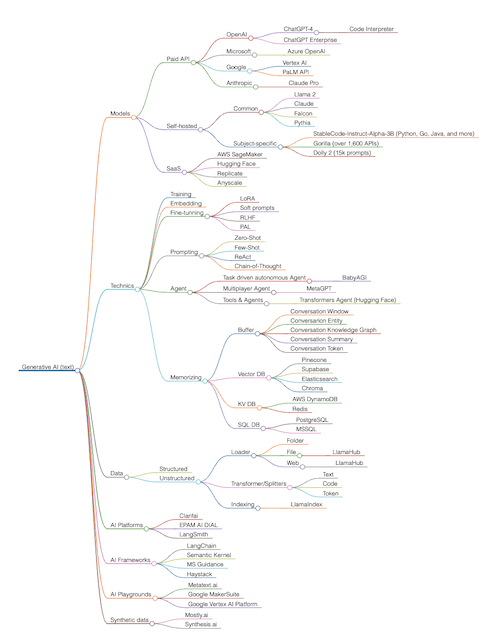
Feel free to contribute to this project by making changes to the src/mindmap.mm.md file, which is rendered via Markmap. Markmap is a combination of Markdown and mindmap. It parses Markdown content and extracts its intrinsic hierarchical structure and renders an interactive mindmap, aka markmap.
-
Clone the repository to your local machine:
git clone https://github.com/nmoskalev/ai-mind-map.git
-
Make changes to the
src/mindmap.mm.mdfile as needed. -
Preview your changes using the Markmap rendering by following the Markmap documentation.
-
Export your changes as html
-
Replace content of docs/index.html with your own autogenerated html markup
If you prefer working in Visual Studio Code (VSCode), you can use the Markmap extension to render and edit your mind map. Simply install the extension and open the src/mindmap.mm.md file in VSCode. You can find the Markmap extension in the Visual Studio Code Marketplace.
Happy contributing!