Ans: Different between HTML4 & HTML5.
| HTML4 | HTML5 |
|---|---|
| Html 4 is not a mobile friendly | Html5 is mobile friendly |
| Html4 is older version of html | Html5 is modern version of html |
| It is not supported any audio or video without flash player | It is supported to audio and video using audio and video tag and it’s control |
| Document declaration is to complicated and log statement | Document declaration is vary easy and to short |
| It’s not possible to drag and drop | It’s possible to use drag and drop |
| User Geolocation access not possible this version | Easy to access user Geolocation |
| Not allow to run javascript in browser | Allow to run javascript in browser |
Ans: Semantic Tag and its examples: Semantic tag means syntax refers to a very easy to understand tag. What is the meaning of this tag? And it is very clearly understandable to machines and humans. Some Semantic Tag Examples:
- Nav tag
- Aside tag
- Mark tag
- Section tag
- Summary tag
- Article tag
- Footer tag
- Header tag
- Figure tag, etc.
Section: Section sounds like a div, it’s used for wrapping different content in one section like, img, header, paragraph, anchor, etc.
Div: div tag is used for styling purposes of HTML documents and we use div for a division of a HTML Document.
Article: The article element represents a section of content that forms an independent part of a document or site; for example, a magazine or newspaper article, or a blog entry.
Nav: nav tag use for website navigation bar where some anchor tag group place for link to one page to another page.
Aside: some of the web site aside use for left or right content in main content, also aside represent left bar or right bar or side box in website.
Ans: First of all say meta tag has no closing tag, meta tag carries author name, expiry date, a list of keywords, document author etc. we can add one or more meta tags in html documents, we can use our Key words, descriptions, etc.
<meta name = "keywords" content = "HTML, Meta Tags, Metadata" />
Ans: block level elements are forced line break, inline elements are not to force line break; it uses her own content, inline-block elements left and right padding and margin support. Block level elements have no top and bottom padding or margin.
Ans: strong tag use for any content is specific for important in this document, b is without important text content is represent bold, <em>for tag semantically emphasises on the important word or section of words while <i> tag is just offset text conventionally styled in italic to show alternative mood or voice.
Ans: Attributes define HTML code and properties are created while html code rendering browser and its create DOM(Document object Model) tree and create nodes in elements it’s properties. Attributes defined by HTML and properties defined by DOM, attribute main role is initialise the properties, if properties initialise done then attribute main role is complete, attribute value is no change but properties value is changable.
Ans: Viewport is a HTML Viewing area in Device Screen, it’s mobile, desktop, laptop, tab screen, etc. viewport is make sure a whole html document is showing the user display.
Ans: Yes, we use this Audio and video tag in our html file. Audio and video tag has an ending tag present. Audio and video tag has nested with source tag if we provide any multimedia link with source then audio and video play this source multimedia in browser.
Ans: Hyperlink in html is href. Its use for anchor tag <a href=”Link”>content</a>. Hyperlink use for any kind of linking, linked navigation, reference, etc.
Ans: technically HTML Element is a collection of HTML tag first part, on the other hand html tag is single element, tag starting with <(angle bracket) and then uppercase letter of meaningful tag. Maximum tag has ending tag, html tag is case insensative.
| HTML Tag | HTML Element | HTML Attribute |
|---|---|---|
| HTML tags are used to hold the HTML element. | HTML element holds the content. | HTML attributes are used to describe the characteristic of an HTML element in detail. |
| HTML tag starts with < and ends with > | Whatever written within a HTML tag are HTML elements. | HTML attributes are found only in the starting tag. |
| HTML tags are almost like keywords where every single tag has unique meaning. | HTML elements specifies the general content. | HTML attributes specify various additional properties to the existing HTML element. |
Ans: charset is called HTML Characterset or HTML encoding. It’s use for page content showing properly in HTML document
Ans: Comments are used in an HTML document to make important notes and help developers mention any modification to be incorporated afterward. They are not displayed in the browser when the code is executed. A comment is always written in between the ‘—‘ symbol at the beginning and end of the angular brackets.
Ans: We use the <a> tag, along with referencing through the use of the # symbol, to create several links to different sections within the same web page.
Ans: Flex is a one dimensional Layout system. So many items simultaneously stand
after one by one in row wise or column wise Flex layout.
Different between Flex and grid layout system:
Grid:
- Grid Layout is Two Dimensional Layout
- Grid Layout is at the same time Row and column using
- Grid Layout use for Large scale application development.
Flex:
- Flex is one dimensional Layout
- Flex Layout is use one Row wise otherwise column wise
- Flex Layout is Suitable for small Application
16. Explain CSS position property? What are some differences between absolute position and relative position?
Ans: CSS Position property defines HTML Element in position of a document, it’s over left, right, top, bottom, middle and anywhere in the document.
absolute vs relative:
- Relative - the element is positioned relative to its normal position. Absolute - the element is positioned absolutely to its first positioned parent
- Relative position element taking space but absolute position not taking space
- Relative position not changing parent layout but absolute position changing parent layput
- Relative position no need to any parent element but absolute position need to be any element in relative parent.
Ans: Box model is box sizing any content, it’s overall element padding, margin, border, width and content mixing. Every box is composed of four parts (or areas), defined by their respective edges: the content edge, padding edge, border edge, and margin edge
Ans: Hover effect is pseudo class, it is used for if we mouse over any element then we customisable change showing this element and its call hover effect.
The :active selector is used to select and style the active link. A link becomes active when you click on it. The :active selector can be used on all elements, not only links.
Ans: CSS pseudo-class is a selector, only when the selector meets a certain condition. It’s starting colon(:) after adding pseudo classes.
Ans: there are some different type of selector in CSS
- Simple selector(select by element, id, class)
- Combinators selector(base on element)
- Descendant selector(space)
- Child selector(>)
- Adjacent siblings selector(+)
- General siblings selector(~)
- Pseudo-element selector
- Pseudo-classes selector
- Attributed base selector
Ans: different between Class selector and ID selector Id is only used when only one id is for the document and style, the other hand class is used for many elements.
- Id style sheet using style for starting hash(#) and then style element but class style sheet using style for starting dot(.) and then name and given style
- Then only different is ID is unique whole document is only one but Class is multiple whole document is same class multiple element use
Ans: Specificity is the algorithm used by browsers to determine the CSS declaration that is the most relevant to an element, which in turn, determines the property value to apply to the element.
Ans: A CSS preprocessor is a program that lets you generate CSS from the preprocessor's own unique syntax. A browser can only understand CSS, which at times may not be enough to write clean and reusable rules
Some benefit of Sass
- Easier to maintain code
- It will make css dry
- It will make css more organise
- It will save our time and so faster
Ans: pseudo elements are given to specific styles of specific parts of an element. Some pseudo element example:
- ::after
- ::before
- ::first-line
- ::first-letter
- ::marker
Ans: media queries to make the website responsive. We show different device to screen size for example if we develop a website for desktop version its any section 300px card row wise three card showing but if we change the device screen size like mobile this time 300px three card not showing in same row and it’s time arrive media Queries
Ans: given media queries reset font size to responsive another way to make font size responsive to view high or viewWidth on this font size. Basically the second one is more effective. It changes the font size and the screen size.
Ans: we can use css measuring units most like
- px(pixel),
- cm(centimeter),
- mm(millimeter),
- pt(picas) and
- pt(point), etc. to use absolute measurement.
Another measurement unit use for relative length like:-
- em(Relative to the font-size of the element),
- rem(relative to font-size of root element),
- vw(Relative to 1% of the width of the viewport),
- vh(Relative to 1% of the height of the viewport) and
- %(related to parent element)
Ans: difference between CSS Transform and CSS Transition? The Transform property in CSS moves or modifies the appearance of an element, whereas the Transition property seamlessly and gently transitions the element from one state to another.
Ans: So many options we can use horizontally and vertically center a div inside a div like:
- Using the Position, Top, Left, and Margin Properties,
- Using the Padding Property,
- Display Grid or Flex property,
- inner div width % and margin auto,
but most of the time using flex display in parent element within justify-content center and align-items center create center a div inside a div.
Ans: It makes every element in the document include the padding and border in the element’s inner dimension for the height and width computation.
Ans: The universal selector matches the name of any of the element types instead of selecting elements of a specific type:
* {
   color: green;
   font-size: 20px;
}
</style>
Ans: at first javascript is a high level language and interpreted language its need to compile line by line. Js code follow some step to execute
- Parse code: this step js code parse line by line and check syntax error and if no error then next step execute
- AST: if no error in parse step and this step code create structure called Abstract syntax tree
- Conversion to Machine code: AST structure create then js code convert to machine code and machine only understand machine language
- Machine code: when machine code is converted successfully by bytecode and machine code sent to the system and finally executes the machine code by system.
Ans: JavaScript has a runtime model based on an event loop, which is responsible for executing the code, collecting and processing events, and executing queued sub-tasks. The event queue is responsible for sending new functions to the stack for processing. It follows the queue data structure to maintain the correct sequence in which all operations should be sent for execution.
Ans:
Ans: javascript is single-threaded.
Ans: when something is executed synchronously we don’t move to finish or another execution to final result because of synchronous but when executed asynchronously we move to another task or don't wait for the final result before finishing the exicution. And javascript is Synchronous, single thread, event-driven, server side scripting language.
Ans: The source code is passed through a program called a compiler, which translates it into bytecode that the machine understands and can execute. In contrast, JavaScript has no compilation step. Instead, an interpreter in the browser reads over the JavaScript code, interprets each line, and runs it.
Ans: double equal(==) meaning of checking equality of the two variable values and triple equal(===) meaning of checking at the same time equality and same type of variable.
Ans: Callback function is a function that is passed to another function as an argument.
Ans: when we need to calculate or finish any task while waiting for another task or calculation depends on previous function return result this time we need to return from a function. Another case we return something from a function. The same functionality or task occurs in a different line. This time we use a reusable function and return something we need based on the function work.
Ans: Actually, functions return one value at a time but if we need to return a different type value, we use Array and this array returns from function.
Ans: Bind method use for if we need to any object function use to another Object for same purpose this time bind use,
const Rayhan={
    id: 121,
    name: "Nur Rayhan",
    salary: 50000,
    bonus : function(year){
        console.log(this)
        return (.05 * this.salary)/year
    }
}

const Chandan = {
    id: 223,
    name : "Chandan Ojha",
    salary: 70000
}

const chandanbonus = Rayhan.bonus.bind(Chandan)
chandanbonus(20)
The call() method is a predefined JavaScript method. It can be used to invoke (call) a method with an owner object as an argument (parameter). With call() , an object can use a method belonging to another object. Apply method Exactly same as the call method takes arguments separately. The apply() method takes arguments as an array
Ans: bind() method is one argument, call() method is multiple argument and Apply method is same as call() method but different is apply() method taking argument in an Array.
Ans: A closure is the combination of a function bundled together with references to its surrounding state. In other words, Closure means that an inner function always has access to the vars and parameters of its outer function, even after the outer function has returned. In JavaScript, closures are created every time a function is created, at function creation time.
Ans: In JavaScript, this keyword refers to an object. Which object depends on how this is being invoked.this is not a variable. It is a keyword. We cannot change the value of this.
Ans: Event Bubbling is a Method of event Propagation in which an element is nested to another element. And both elements have registered a handle to that event. We use the event.stopPropagation() method to stop event bubbling.
Ans:
Ans: Hoisting is the default behavior of JavaScript where all the variable and function declarations are moved on top. In simple words, we can say that Hoisting is a process in which, irrespective of where the variables and functions are declared, they are moved on top of the scope. The scope can be both local and global.
Ans: recursive function is a function which is called by itself repeatedly until it arrives at a result. Recursion is best applied when you need to call the same function repeatedly with different parameters from within a loop.
Ans: undefined vs Null
- Null is converted to zero(0) while performing primitive operation but undefine converted to NaN
- Null is intentionally absent from the value. And performing as a primitive data type but undefined is not present in a compiler, it's a global object.
- Null is an object but undefined is undefined.
Ans: primitive data type
- In javascript primitive data type is data there is no Function and Object there is 7 primitive data type
- String
- Number
- Boolean
- Null
- Bigint
- Undefine
- Symbol
- In javascript non-primitive data type is
- Object
- Array
- RegEx(Regular Expression)
Ans: in javascript DOM meaning is Document object Model. With help of DOM javascript access and change the HTML Element.
Ans: Of course Javascript is dynamic type because if we declare any variable and use String type but next use number or boolean or any other data still working because of javascript is dynamic type.
Ans: We need to know the type of variable just using the user defined method typeof(variableName) its return type of this VariableName.
Ans: 3030 because 10+20 will be 30. If there is a numeric value before and after +, it is treated as a binary + (arithmetic operator).
Ans: No, Java and JavaScript are the two different languages. Java is a robust, secured and object-oriented programming language whereas JavaScript is a client-side scripting language with some limitations.
Ans: By the help of try/catch block, we can handle exceptions in JavaScript. JavaScript supports try, catch, finally and throw keywords for exception handling.
Ans: ES6 is the modern version of javascript, which was released in 2015 and released by ECMA international, which is also known as ECMAScript 2015. Some advance features are adding ES6 which are not available in ES5 just like, variable declaration let or const, Arrow function, food of loop, etc
Ans: ES6 features are
- Default Parameter.
- Let const in variable declaration.
- Template Literal.
- Arrow Function.
- Destructure Assignment.
- Spread and rest syntax(...).
- Class.
- Modules for Import and export.
- Promise for asynchronous execution.
- Multiline string using backtick(`).
- Enhance Object literal for instantly quickly creating objects with properties inside the curly braces, etc.
Ans:
- var is global use but let and const are block use
- If we declare any variable with var its mean anywhere we use it but if we declare any let variable in scope without scope we don't use it.
- Const is to declare any constant value which never changes.
- Without any value we don’t declare const variables.
Ans: Use default parameter, when we declare a function with parameter but accidentally when call this function we don’t provide any argument this time function will show error, and this error handle solution is default parameter if we use any default parameter with value and function call without any argument it’s working.
Ans: Javascript Spread Operator is if we need to copy all the element of Array or key value pair of object we use Spread Operator, in javascript Spread operator is work by (...)three dot of and then previous Object or Array and copied to newOne with previous Value.
Ans: Object is an instance of a class. Class is a blueprint or template from which objects are created. Object is a real world entity such as a pen, laptop, mobile, bed, keyboard, mouse, chair etc. Class is a group of similar objects
Ans: Each object has a private property which holds a link to another object called its prototype. That prototype object has a prototype of its own, and so on until an object is reached with null as its prototype. By definition, null has no prototype, and acts as the final link in this prototype chain.
Ans: in inheritance javascript use, to create a class inheritance use the extend keyword and extend the another class function, variable object in this class.
Ans: the values of the actual parameters copy into the function’s formal parameters. It stores both types of parameters in different memory locations. Thus, if one makes any changes inside the function- it does not show on the caller’s actual parameters. and This method passes the address or location of the actual arguments to the formal arguments of any called function. It means that by accessing the actual argument’s addresses, one can easily alter them from within the called function. Thus, in Call by Reference,
Ans: Scope in JavaScript refers to the current context of code, which determines the accessibility of variables to JavaScript.
Ans: Javascript scope is accessibility of variables to javascript. Block scope is a variable to inner the function using let or var keyword, Global scope are those variables to declare to outside of Bl.
Ans:
Ans: A higher-order function is a function that takes a function as an argument and returns a function.
Ans: API is the acronym for Application Programming Interface, which is a software intermediary that allows two applications to talk to each other. API is a delivery of our message to another software or Server and server receives request, after request accepts and server sends response to user. Get vs Post
- GET method has a limited amount of data sent but POST method is not limited in sending data.
- GET method data sending with header but POST data is sent in body.
- GET request is not secured because data is exposed in URL bar but POST request is secured because data is not exposed in URL bar.
- GET request can be bookmarked but POST request cannot be bookmarked.
Ans: LocalStorage vs SessionStorage
- As it is not session-based, it must be deleted via javascript or manually but Session Storage is session-based and works per window or tab. This means that data is stored only for the duration of a session
- The storage capacity of local storage is 5MB/10MB but capacity of session storage is 5MB
- But the main difference of this storage is Local storage is lifetime storage when the user does not clear the data but Session storage is cleared by browser when browser closes.
Ans: cookies provide a very restrictive and small storage capacity of 4 kilobytes. cookies are somewhat similar to local storage as they are accessible from any window or tab. Cookies could also be accessed on the server. Whenever we request the back-end server, all the cookies are also sent along. So they are also used for tasks related to authentication.
Ans: OOP is used for Real world Entity. In this term OOP we will learn about Polymorphism, Data Binding, Inheritance etc. Simula is the first Object Oriented Programming Language. OOP we will learn more about those Concept;
- Class
- Object
- Inheritance
- Polymorphism
- Abstraction
- Encapsulation.
Ans: Array Vs LinkedList An array is a collection of elements of a similar data type but A linked list is a collection of objects known as a node where node consists of two parts, i.e., data and address
- Array elements store in a contiguous memory location but Linked list elements can be stored anywhere in the memory or randomly stored.
- Array works with a static memory but The Linked list works with dynamic memory.
- Array elements are independent of each other but Linked list elements are dependent on each other.
- Array takes more time while performing any operation like insertion, deletion but Linked list takes less time while performing any operation like insertion, deletion, etc.
Ans: Debug code of Javascript is the most important part of reducing the code smell, if any bug or Error is found in js code. We use two to three ways to find this debug: first one is Console log and second one is Debugger keyword and third one is breakpoint.
Ans: In javascript function declare any Parameter and Call this function with argument something happened in function then return result, but javascript higher order function we use function as an argument and return function as an Output.
const formalGreeting = () => {
    console.log("How are You?")
}
const casualGreeting = () => {
    console.log("What's up?")
}
const greeting = (type, greetFormal, greetCasual) => {
    if(type === 'casual'){
        casualGreeting();
    }else if(type === 'formal'){
        greetFormal();
    }
}
greeting('formal', formalGreeting, casualGreeting);
Ans: The four pillars of object-oriented programming are:
- Abstraction
- Encapsulation
- Inheritance
- Polymorphism
Ans: ReactJS is a Modern Javascript Library. It's a more efficient, declarative reusable component library for creating single page applications.
Advantage: Uses virtual DOM which is a JavaScript object. This will improve app performance. used on client and server side as well as with other frameworks.Component and data patterns improve readability, which helps to maintain larger apps. Reusable component, good for SEO friendly, etc
Disadvantage: ReactJS uses JSX. It's a syntax extension that allows HTML with JavaScript mixed together.ReactJS Covers only the UI Layers of the app and nothing else and also poor documentation.
Ans:
80. there are so many different javascript frameworks. Why will you use ReactJS for your application
Ans: One of the main benefits of using React js is the Reusable Component. Its saves time for developers and they don’t have to code rewrite of the same features. Deploy easy and also Compared to other frontend frameworks, the React code is easier to maintain and is flexible due to its modular structure. React comes with JSX, an optional syntax extension, which makes it possible to write its own components. Also fast rendering, React, compared to other frameworks, significantly reduces the page load time.
Ans: Virtual DOM means Virtual Document object Model, DOM is an interface that allows scripts to update the content, style, and structure of the document. Virtual DOM is a node tree similar to Real DOM that lists elements, content, and attributes as objects and properties. React render() method creates a node tree of react components.The only thing which is common for both is that they help with performance issues. Both create a separate instance of the Document Object Model; besides this, both concepts are different. Virtual DOM is creating a copy of the whole DOM object, and Shadow DOM creates small pieces of the DOM object which has their own, isolated scope for the element they represent.
Ans:
Ans: The key difference between props and state is that state is internal and controlled by the component itself while props are external and controlled by whatever renders the component.
- Props can be read only but state change can be asynchronous.
- Props can not be change but state can be change by this.state.
Ans: in reactjs pass data from parent to child component using props and child component receive data by using this.state
Ans: Change props if the parent component is possible but the child component where we receive props is not changeable.
Ans: Yes, it’s read only.
Ans: useState is a Hook that allows to have state variables in functional components. we pass the initial state to this function and it returns a variable with the current state value and another function to update this value. The React useState Hook allows us to track state in a function component. State generally refers to data or properties that need to be tracking in an application
Ans: Pass data 4-5 layer down is using Context API or Redux.
Ans: Context API in react js is a structure that is enabled to pass data to others components without using props drilling. The Context API can be used to share data with multiple components, without having to pass data through props manually.
Ans: Pass data 4-5 layer down is using Context API or Redux.
Ans: Props Drilling is data passing to top to bottom level component in reactjs, just like parents to children data passing.
Ans: Difference Between useEffect vs useState:
- useEffect is used for external Data loading but useState is used for loading data storing and changing state.
- useEffect has Dependency but useState has no dependency.
- useEffect no need to initialise but useState to need initialise.
Ans: first render in component loading data by useEffect and if we don’t have dependency useEffect load one time but if we set any dependency useEffect loading depends on this changing dependency. That is why we need any change in state in useEffect using dependency.
Ans: JSX stands for javascript XML, jsx is allowed to write code in reactjs. It’s easy to write HTML code in react. JSX allows us to write HTML elements in JavaScript and place them in the DOM without any createElement() and/or appendChild() methods. JSX converts HTML tags into react elements.
Ans: each react component has lifecycle monitoring change and update is maintain three stage
- Mounting: Mounting represents the rendering of the React component in the given DOM node.
- Update: Updating represents the re-rendering of the React component in the given DOM node during state changes / updates.
- UnMounting: Unmounting represents the removal of the React component.
Ans: Custom hook use for reducing the use of code reusability. Custom Hook is a JavaScript function which we create by ourselves, when we want to share logic between other JavaScript functions. It allows to reuse some pieces of code in several parts of the react app.
Here is and Example of Custom hook:
useFetch.js
import { useState, useEffect } from "react";
const useFetch = (url) => {
  const [data, setData] = useState(null);

  useEffect(() => {
    fetch(url)
      .then((res) => res.json())
      .then((data) => setData(data));
  }, [url]);
  return [data];
};
export default useFetch;
Home.js
import ReactDOM from "react-dom/client";
import useFetch from "./useFetch";
const Home = () => {
  const [data] = useFetch("https://jsonplaceholder.typicode.com/todos");
  return (
    <>
      {data &&
        data.map((item) => {
          return <p key={item.id}>{item.title}</p>;
        })}
    </>
  );
};
export default Home;
Ans: Some step taking can optimise a react application, describe hrer:
- use Stateless Components and React.PureComponent.
- Multiple Chunk Files.
- Dependency optimization.
- Use React.Fragments to Avoid Additional HTML Element Wrappers.
- Avoid Inline Function Definition in the Render Function.
- Avoid using Index as Key for map when calling any component.
- Spreading props on DOM elements
Ans:
Ans: Passing the data from the child to parent component is a bit trickier. In order to do this, We need to do the following steps:
- Create a callback function in the parent component. This callback function will get the data from the child component.
- Pass the callback function in the parent as a prop to the child component.
- The child component calls the parent callback function using props.
Ans: The best way to send 4 or more props to a child component is using spread operator or using React Context API or Redux state management Library.
Ans: Redux is a popularly known open-source JavaScript library that facilitates state management in applications. It is compatible with React, Vue, and Angular. However, it is most commonly used with React. Purpose of using Redux:-
- You have large amounts of application state that are needed in many places in the app.
- The app state is updated frequently
- The logic to update that state may be complex
Ans: React Native is a JavaScript framework for writing real, natively rendering mobile applications for iOS and Android. It’s based on React.
Ans: A higher-order component (HOC) is an advanced technique in React for reusing component logic. HOCs are not part of the React API, per se. They are a pattern that emerges from React’s compositional nature. a higher-order component is a function that takes a component and returns a new component. HOC.js
import React, {Component} from 'react';

export default function Hoc(HocComponent){
    return class extends Component{
        render(){
            return (
                <div>
                    <HocComponent></HocComponent>
                </div>

            );
        }
    }
}
App.js
import React, { Component } from 'react';
import Hoc from './HOC';

class App extends Component {
  render() {
    return (
      <div>
        <h2>HOC Example</h2>
        JavaTpoint provides best CS tutorials.
      </div>
    )
  }
}
App = Hoc(App);
export default App;
Ans: The return function is the cleanup function, or when the user leaves the page and the component will unmount. The array is the last part, and it is where you put the states that will update throughout the component's lifecycle.
Ans: Some step taking can optimise a react application, describe hrer:
- use Stateless Components and React.PureComponent.
- Multiple Chunk Files.
- Dependency optimization.
- Use React.Fragments to Avoid Additional HTML Element Wrappers.
- Avoid Inline Function Definition in the Render Function.
- Avoid using Index as Key for map when calling any component.
- Spreading props on DOM elements.
Ans: There are four main types of state you need to properly manage in React apps:
- Local state: local state would be needed to show or hide a modal component or to track values for a form component, such as form submission, when the form is disabled and the values of a form’s inputs.
- Global state: A common example of global state is authenticated user state. If a user is logged into our app, it is necessary to get and change their data throughout our application.
- Server state: Data that comes from an external server that must be integrated with our UI state. Server state is a simple concept, but can be hard to manage alongside all of our local and global UI states.
- URL state:
Ans: when the dependency array is empty, It simply means that the hook will only trigger once when the component is first rendered but The dependency array basically tells the hook to "only trigger when the dependency array changes". That’s why we inject dependency inside a useEffect hook.
Ans: React.memo() to prevent re-rendering on React function components.
Ans: Some disadvantages of Reactjs
- Lack of Proper Documentation: Due to the number of updates and new releases, there’s simply not enough time for writing complete documentation.
- JSX: Most people would consider JSX as an advantage, rather than a disadvantage, and yet, it may also be seen as an obstacle.
- Problem with seo: create-react-app is not good for SEO. why? create-react-app is a SPA(single page application). In a SPA, all necessary HTML, JavaScript, and CSS code is retrieved by the browser with a single page load or data added dynamically to the page based on certain actions.
Ans: React is performing one-way data Binding because of easy data sending from parent to child component using props but in rare cases we can send data from child to parent component but the process is lengthy. That’s why React performs well in Parent to child component data passing and its call one-way data binding.
Ans: Nodejs is an asynchronous event-driven JavaScript runtime, Nodejs is used for Javascript in ServerSide. Nodejs can do dynamic page content. it can create, open, read, write, delete, and close files on the server. Nodejs uses asynchronous programming.
Ans: JavaScript is a simple programming language that runs in any browser JavaScript Engine. Whereas Node JS is an interpreter or running environment for a JavaScript programming language that holds many excesses, it requires libraries that can easily be accessed from JavaScript programming for better use.
Ans: Nodejs is single threaded.
Ans: Node. js is based on an event-driven non-blocking I/O model.
Ans: npm is used for Node package manager. It will help Nodejs package install or uninstall and fix any error with nodeModules.
Ans: In two types of websites one is static website another is dynamic website, static website most of the time no need any database but dynamic website is needed to Database for showing large scale content. database, also called electronic database, any collection of data, or information, that is specially organized for rapid search and retrieval by a computer. Databases are structured to facilitate the storage, retrieval, modification, and deletion of data in conjunction with various data-processing operations.
Ans: main difference of SQL vs NoSQL:
- SQL databases are relational, NoSQL databases are non-relational.
- SQL databases use structured query language and have a predefined schema. NoSQL databases have dynamic schemas for unstructured data.
- SQL databases are vertically scalable, while NoSQL databases are horizontally scalable.SQL databases are table-based, while NoSQL databases are document, key-value, graph, or wide-column stores.
- SQL databases are better for multi-row transactions, while NoSQL is better for unstructured data like documents or JSON.
Ans: Nodejs is a Javascript runtime environment and javascript is not an Object Oriented Programming Language. NodeJS is an Asynchronous Programming Language. MongoDB is a distributed database which allows ad-hoc queries, real-time integration, and indexing efficiently. Moreover, MongoDB is open-source and perfect for frequently changing data. It also offers server-side data validation.
Ans: Database design can be generally defined as a collection of tasks or processes that enhance the designing, development, implementation, and maintenance of enterprise data management systems. The main objectives behind database designing are to produce physical and logical design models of the proposed database system. Defines the basic structure of the database i.e how the data will be stored in the database.Schema is same for the whole database.It is the overall description of the database.
Ans: In a client server architecture, a server's responsibility is always to serve its client. When a server fails to serve its client, we call it as server crashes or server down. This means when a server goes down or server crashes, the user connected to that server does not get access to that server and you may often find messages like “Server Not Found", "Server is not responding" and so on. There are several causes of this situation. This occurs when a hacker floods our network with traffic to ultimately disrupt the user and not allow them to access the content. The hacker is overloading the server with traffic, and thus, causing it to crash.
Ans: most of the website or Application API work with Server and client side middlemen. Client request to server serves something sending request to server, then server verifies this user, after successfully verifying this user and server serves the user response.
Ans: CRUD meaning of Creat, Read, Update and Delete. And it's the most basic Operation in the Database learning stage.
Ans: Difference between PUT and Patch: PUT request method creates a new resource or replaces a representation of the target resource with the request payload but PATCH is a method of modifying resources where the client sends partial data that is to be updated without modifying the entire data.
Ans: if we use JSON web token and Verify every API When API called by user then its secure.
Ans: Mongoose is an Object Data Modelling (ODM) library for MongoDB and Node.js. It manages relationships between data, provides schema validation, and is used to translate between objects in code and the representation of those objects in MongoDB.
Ans: Webpack is a tool that lets you compile JavaScript modules, also known as module bundler. Given a large number of files, it generates a single file (or a few files) that run your app.
Ans: first react render complete then if we need to change state then call this react life cycle method and it's call componentDidMount(). if we call this life cycle method and react re-render this class component and change the state.
Ans: In React, a stateful component is a component that holds some state. Stateless components, by contrast, have no state. Note that both types of components can use props. In the example, there are two React components. The Store component is stateful and the Week component is stateless.
Ans: Controlled component: Form data are handled by a React component. A Controlled Component is one that takes its current value through props and notifies changes through callbacks like onChange. A parent component "controls" it by handling the callback and managing its own state and passing the new values as props to the controlled component. You could also call this a "dumb component".
Uncontrolled components: form data are handled by the DOM itself. A Uncontrolled Component is one that stores its own state internally, and you query the DOM using a ref to find its current value when you need it. This is a bit more like traditional HTML.
// Controlled:
<input type="text" value={value} onChange={handleChange} />

// Uncontrolled:
<input type="text" defaultValue="foo" ref={inputRef} />
// Use `inputRef.current.value` to read the current value of <input>
Ans: Each component in React has a lifecycle which you can monitor and manipulate during its three main phases. The three phases are: Mounting, Updating, and Unmounting.
Mounting Mounting means putting elements into the DOM. React has four built-in methods that gets called, in this order, when mounting a component:
constructor()
getDerivedStateFromProps()
render()
componentDidMount()
The render() method is required and will always be called, the others are optional and will be called if you define them.
Updating The next phase in the lifecycle is when a component is updated. A component is updated whenever there is a change in the component's state or props.
React has five built-in methods that gets called, in this order, when a component is updated:
getDerivedStateFromProps()
shouldComponentUpdate()
render()
getSnapshotBeforeUpdate()
componentDidUpdate()
The render() method is required and will always be called, the others are optional and will be called if you define them.
componentDidUpdate
The componentDidUpdate method is called after the component is updated in the DOM.
Unmounting
The next phase in the lifecycle is when a component is removed from the DOM, or unmounting as React likes to call it.
React has only one built-in method that gets called when a component is unmounted:
componentWillUnmount()
The componentWillUnmount method is called when the component is about to be removed from the DOM.
Ans: Functional Requirements: These are the requirements that the end user specifically demands as basic facilities that the system should offer. All these functionalities need to be necessarily incorporated into the system as a part of the contract. These are represented or stated in the form of input to be given to the system, the operation performed and the output expected.
Non-functional requirements: These are basically the quality constraints that the system must satisfy according to the project contract. The priority or extent to which these factors are implemented varies from one project to other. They are also called non-behavioral requirements. They basically deal with issues like:
- Portability
- Security
- Maintainability
- Reliability
- Scalability
- Performance
- Reusability
- Flexibility
Ans: A software life cycle model (also termed process model) is a pictorial and diagrammatic representation of the software life cycle.
SDLC Step is
- Requirement Analysis
- Designing
- Implementation
- Verification/Testing
- Maintainance
Ans:
Waterfall Model
ধরুন আমাদের রিকোয়ামেন্টস ফিক্সড। আগামী ৪/৫ বছরেও রিকোয়ারমেন্ট চেইঞ্জ হবে না। আমরা এই রিকোয়ারমেন্ট অনুসারে প্রোডাক্ট বানাবো। এরপর ৪/৫ বছর পর যদি প্রয়োজন হয় আপডেট করবো। এই ধরণের প্রজেক্টের ক্ষেত্রে ওয়াটার ফল মডেল খুবই কার্যকরী।
 উপরের ছবি থেকে আমরা বিষয়টা বুঝতে পারবো। আমরা এতক্ষণ পর্যন্ত যা করলাম তা সব Requirements এর অন্তর্গত। এখন এই রিকোয়ারমেন্টস অ্যানালাইসিস করে কোন আর্কিটেকচার ইউজ করতে হবে, কিভাবে আর্কিটেক্ট করতে হবে, কোন সিস্টেম ডিজাইন ইউজ করতে হবে, কি কি চ্যালেঞ্জ আসতে পারে, কি কি constrains আসতে পারে, কিভাবে আমরা এই প্রব্লেমগুলোকে সলভ করতে পারি, কিভাবে আমরা টাইম কমিয়ে আনতে পারি এই সবগুলো Design এর আলোচ্য বিষয়। এরপর আমরা UI/UX করি, ফ্রন্টএন্ড ডেভেলপমেন্ট করি, ব্যাকএন্ড ডেভেলপমেন্ট করি, এপিআই বানাই সবকিছু Implementation এর অন্তর্গত। এরপর আমাদের বিভিন্ন টেস্টিং এর মধ্য দিয়ে যেতে হবে। লোড টেস্ট, একসেপ্টেন্স টেস্ট, সিকিউরিটি টেস্ট ইত্যাদি টেস্ট পাশ করলে এরপর আমাদের অ্যাপ্লিকেশন আমরা ডেপ্লয় করতে পারি। এসমস্ত টপিক Verification এর অন্তর্গত। অ্যাপ্লিকেশন বানালে অবশ্যই বাগ থাকবেই। এই বাগ ডিবাগ করা Maintanence এর অন্তর্ভুক্ত।
এই মডেলের একটা বিরাট প্রব্লেম আছে। প্রব্লেমটা হলো ধরেন রিকোয়ারমেন্টস অ্যানালাইসিস শেষ, সেই অনুযায়ী ডিজাইনও শেষ। ইমপ্লিমেন্টেশনের ৫০% শেষ। এখন ক্লায়েন্ট এসে এমন একটা চেইঞ্জের কথা বললো যে পুরো সিস্টেমই ব্রেক হয়ে গেলো। এমন হলে আবার প্রথম থেকে সবকিছু শুরু করতে হবে। আপনার এতদিনের কষ্ট সব মাঠে মারা গেলো।
Agile Model
 উপরের মডেলে যে সমস্যার কথা আমরা বলেছিলাম সে সমস্যা থেকে পরিত্রাণের উপায় হলো Agile Model। এখন প্রশ্ন হলো What is Agile Model. Agile model হলো এক ধরণের Water Fall Model. ওয়াটার ফল মডেলে আমরা যে কাজটা করি তা একটা লং টার্মের জন্য। ২/৩ বছরের জন্য। অপরদিকে Agile model হলো ১৫ দিন বা ৭ দিনের জন্য একটা ওয়াটার ফল মডেল। ৭ দিনের জন্য একটা রিকোয়ারমেন্ট থাকবে। সেই অনুযায়ী ডিজাইন, ইমপ্লিমেন্টেশন, ভেরিফিকেশন হবে। পরবর্তী ৭ দিন অন্য রিকোয়ারমেন্ট নিয়ে কাজ হবে। এভাবে চক্রটা চলতে থাকবে। যেমন আমাদের অ্যাপ্লিকেশনে ধরেন আমরা প্রথম ১৫ দিন লোকাল অথেনটিকেশন নিয়ে কাজ করবো। পরবর্তী ১৫ দিন রোল বেইজড এক্সেস কন্ট্রোল নিয়ে কাজ করবো। এভাবে চলতে থাকবে। এখন দুই মাস পর যদি ক্লায়েন্ট এসে বলে অথেনটিকেশনে ইমেইল দিয়ে করা হইসে। এখন সে ফোন নাম্বারও অ্যাড করতে চাইছে। যেহেতু আমরা আলাদাভাবেই অথেনটিকেশন নিয়ে কাজ করেছিলাম সুতরাং শুধু সেটাই চেইঞ্জ করলে হবে। বাকি কাজের উপর কোনো সমস্যা আসবে না। জাস্ট ওয়াটার ফল মডেলই একটা নির্দিষ্ট শর্ট টাইম পর পর।
Ans: An Operating System (OS) is an interface between a computer user and computer hardware. An operating system is a software which performs all the basic tasks like file management, memory management, process management, handling input and output, and controlling peripheral devices such as disk drives and printers.
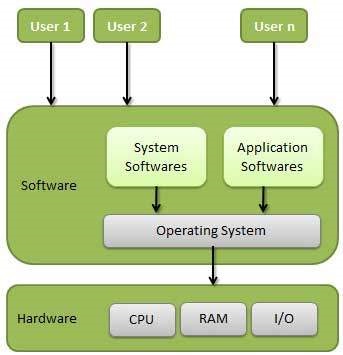
Ans: In computer science, Kernel is a computer program that is a core or heart of an operating system. It acts as a bridge between applications and data processing done at the hardware level. It is the central component of an OS.
function of Kernel:
- Device Management
- Memory Management
- Resource Management
- Accessing Computer Resources
Type of Kernel
- Microkernal Kernel
- Monolithic Kernel
- Hybrid Kernel
- Nano Kernel
- Exo-Kernel