
See your sound. Shape it. Send it anywhere.
AudioRouter is a visual audio router for Windows 11. Draw your audio on a canvas: plug a microphone into a noise gate, an EQ and a compressor, send the result to Discord, monitor it in your headphones and record it, all at once. Stream game audio from your gaming PC to your streaming PC over your home network. Every route is a picture you can read, and every setting is live.


Website · Download · Manual · Audio tools · Videos · For developers

- Download
AudioRouter_<version>_x64-setup.exefrom the latest release. It is the only file you need: the app, its audio engine, the command-line tool and the Stream Deck plugin are all inside. - Install it. It installs for your Windows account only and needs no administrator rights. Windows may warn that the installer is unsigned; choose More info, then Run anyway.
- Open AudioRouter and allow it to use your audio devices when you first press Play.
Requirements: Windows 11 x64. To send AudioRouter's sound into another app (Discord, OBS, a game's voice chat), install a virtual cable such as VB-Cable. You don't need one to route to your speakers or headphones.
- In Tools, add an Input device and an Output device.
- Select each one and choose the real device (your microphone, your headphones) in Properties.
- Drag from the input's orange connector to the output's blue connector. Add a Noise gate or Advanced EQ in between if you like.
- Press Play. Speak, watch the line light up, and adjust settings live.
- Press Save to keep the route. Session → Save to file… backs it up.
The manual walks through plugins, recording, application capture and two-PC streaming.
| Video | Watch |
|---|---|
| Full feature tour: tools, MCP and Stream Deck | Watch on YouTube |
| AudioRouter overview (2 minutes) | Watch on YouTube |
| Your first route | Watch on YouTube |
| Streaming audio between two PCs | Coming soon |
- One canvas instead of five control panels. Sources on the left, outputs on the right, processing in between. The lines show where sound flows and pulse with its level while it plays.
- Studio processing for your voice. Noise gate, denoise, de-hum, de-click, a 16-point parametric EQ, compressor, limiter, delay, pitch and more: 30+ built-in audio tools.
- Your VST plugins, safely. Load x64 VST2 effects (for example the free ReaPlugs) and qualified VST3 effects, and open a plugin's own editor while audio plays. Each plugin runs in its own process, so a crashing plugin cannot take your route down with it.
- One source, many destinations. Send a processed microphone to Discord, OBS, your headphones and a recorder at the same time. Mix several sources into one with the Mixer.
- Two-PC streaming built in. Network Send and Network Receive carry audio between computers on your home network, with no extra software. A shared pairing key stops other devices from injecting audio (it does not encrypt).
- Capture one application. Route just the game, just the browser or just Spotify instead of the whole desktop.
- Record while you route, with a recording library.
- Sessions you can switch and move. Keep several setups ("Streaming",
"Podcast", "Late-night gaming"), switch between them, and save one to a
single
.audiorouterfile to open on another PC. - Stream Deck keys for toggles, privacy mute, Play/Stop, session switching and recording. Install the plugin from the app's API tab; see Stream Deck controls.
- Private by design. No cloud, no account, no telemetry. AudioRouter never changes your Windows default devices or volumes, never switches to another microphone behind your back, and a failed effect on your voice path goes silent instead of leaking unprocessed audio.
- Scriptable. A local HTTP API, a command line, and an MCP server for AI assistants, all permission-controlled.
ChatGPT builds a voice route. With the optional MCP connection, ask ChatGPT to list saved sessions and create a microphone → Advanced EQ → CABLE-A and headphones route. See the setup steps, real request and resulting AudioRouter session.
Two PCs, one stream. The gaming PC mixes game audio with a cleaned-up microphone and sends the mix to the streaming PC, while you keep the game in your headphones.

The streaming PC receives it, trims the level, feeds OBS through a virtual cable, and keeps a backup recording. Light and high-contrast themes are available too.

Shape your voice precisely. The Advanced EQ has up to 16 points you drag on a live frequency-response curve, or type exactly.

| Goal | Route |
|---|---|
| Clean voice for Discord | Microphone → Noise gate → Denoise → EQ → Compressor → Output CABLE Input; pick CABLE Output as the microphone in Discord |
| Hear yourself while streaming | Split the same chain to your headphones |
| Podcast with a safety copy | Add a Recorder branch next to the live output |
| Game audio to a second PC | Gaming PC: Game → Network Send · Streaming PC: Network Receive → Output to OBS |
| Stream only the game | Application source (the game) → Volume → Output |
| Clear Rainbow Six Siege footsteps | See the Siege guide |
| Try an effect without risk | Toggle Bypass or Enabled on any tool while it plays |
- Website and manual: audiorouter.org, the basic manual and the in-depth user guide.
- Release notes: Releases page or GitHub Releases.
- Questions and ideas: ask in Discussions, or show the route you built.
- Problems: open an issue. In the app, the Logs tab has Open logs folder for the files to attach.
AudioRouter is an early preview. Known limits: the app and installer are not signed yet; clock drift between two different devices is not corrected (rare, regular clicks on very long sessions); clean-machine, upgrade and uninstall testing is still open. Releases use existing virtual cables such as VB-Cable. AudioRouter's own virtual cable is in development and not shipped yet. See distribution status for details.
AudioRouter is free and stays free. Its own virtual cable needs one thing money can buy: Windows only installs audio drivers that Microsoft has signed, and Microsoft requires an EV code-signing certificate for every driver submission, a few hundred dollars a year.
If AudioRouter is useful to you, sponsor it on GitHub. A $25 one-time contribution is the main ask; $5 a month helps with renewals. Sponsorships pay for the certificate and its renewals, and any balance goes to future renewals and project costs. Everyone gets the same free software; there are no paid features or priority support. Progress is shown on the Sponsors page, with an update once the certificate is bought.
AudioRouter is a Rust workspace (control plane, real-time engine, WASAPI audio, plugin host, storage, transport, CLI) plus a React/TypeScript interface in a Tauri desktop shell. It builds and runs on Windows 11 x64 only.
| Folder | What is in it |
|---|---|
crates/ |
Rust workspace: domain, control, engine, dsp, windows-audio, plugin-host, storage, transport, recording, protocol, cli, driver-helper |
src-tauri/ |
Desktop shell (window, tray, embedded backend, local HTTP API) |
ui/ |
React/TypeScript interface, unit tests (Vitest) and browser tests (Playwright) |
contracts/ |
Generated TypeScript API contracts and drift checks |
tools/streamdeck/ |
Stream Deck plugin |
drivers/ |
AudioRouter virtual cable driver (in development) |
site/ |
The audiorouter.org website, deployed by .github/workflows/pages.yml |
tools/release/ |
Release build, verification and draft-publication scripts |
docs/ |
Specifications, plans, evidence and operations guides |
Install on a Windows 11 x64 PC:
| Tool | Where | Notes |
|---|---|---|
| Visual Studio 2022 Build Tools | visualstudio.microsoft.com | Select Desktop development with C++ (MSVC and the Windows SDK) |
| Rust (rustup) | rustup.rs | rust-toolchain.toml pins 1.96.0; rustup installs it on the first build |
| Node.js | nodejs.org | 22 LTS or newer |
| Git | git-scm.com |
WebView2, which draws the interface, is already part of Windows 11. Then, in PowerShell:
git clone https://github.com/MrDesjardins/audiorouter.git
cd audiorouter

# The interface
npm.cmd ci --prefix contracts
npm.cmd ci --prefix ui
npm.cmd run build --prefix ui

# The app, its plugin worker and its command line, in one folder
$env:CARGO_TARGET_DIR = "$PWD\target\app"
cargo build --release --manifest-path src-tauri/Cargo.toml --features custom-protocol
cargo build --release -p audiorouter-plugin-host --bin audiorouter-plugin-worker
cargo build --release -p audiorouter-cli
The first build takes several minutes. The three programs end up in
target\app\release. To run them like an installed copy:
$app = "$env:LOCALAPPDATA\Programs\AudioRouter"
New-Item -ItemType Directory -Force $app | Out-Null
Copy-Item target\app\release\audiorouter-shell.exe, target\app\release\audiorouter-plugin-worker.exe, target\app\release\audiorouter-cli.exe $app
Start audiorouter-shell.exe from that folder. Run one copy of AudioRouter
at a time; close it before copying a new build over it. Sessions are stored
in %LOCALAPPDATA%\AudioRouter.
To build the installer exactly as a release does, use
tools\release\prepare-artifacts.ps1; see
release qualification.
CI (.github/workflows/ci.yml) runs on Windows for every push to main and
every pull request, and fails on any of these:
cargo fmt --all -- --check
cargo fmt --manifest-path src-tauri/Cargo.toml -- --check
cargo clippy --workspace --all-targets --all-features --locked -- -D warnings
cargo clippy --manifest-path src-tauri/Cargo.toml --all-targets --locked -- -D warnings
cargo test --workspace --locked
npm.cmd --prefix ui run format:check   # Prettier
npm.cmd --prefix ui run lint           # ESLint; warnings do not fail
npm.cmd --prefix ui test
npm.cmd --prefix ui run e2e   # Playwright in Edge, a separate CI job
Tests that need real audio devices are #[ignore]d; run them on a PC with
endpoints using cargo test -p audiorouter-windows-audio -- --ignored.
When dependencies change, a Linux job checks them against deny.toml
(RustSec advisories, licenses, crate sources) and runs
npm audit --omit=dev for ui, contracts and tools/streamdeck; run
cargo deny check and
cargo deny --manifest-path src-tauri/Cargo.toml check locally. Dependabot
proposes weekly grouped updates (.github/dependabot.yml). Actions and npm
minor/patch groups and Cargo patch groups merge themselves once CI passes
(dependabot-auto-merge.yml). Cargo minor and all major updates wait for a
person, because CI cannot run the live audio checks.
A nightly (and manual) quality.yml workflow reports Rust (cargo llvm-cov)
and UI (npm --prefix ui run test:coverage) coverage, runs a 20-minute
engine soak and times a fresh-install startup, with a trend table in the
job summary. Coverage is never a gate. Run the soak locally with
cargo run --release -p audiorouter-engine --example soak
(AUDIOROUTER_SOAK_SECONDS sets the duration; default 10).
The table is refreshed after successful coverage, engine soak and startup
runs on main. It links to the measured source commit and exact workflow run.
Coverage is informational: it measures test execution, not audio quality,
hardware compatibility, or release readiness. The badges above show current
CI and nightly quality workflow status, including failures.
Updated 2026-10-21 (UTC) from b4bbbef5 · quality run #39570183964.
| Check | Latest result |
|---|---|
| Rust workspace coverage | 78.3% (67318/85948) lines · 71.2% (5734/8058) functions · 80.1% (104124/130012) regions |
| Portable Rust coverage | 87.7% (36536/41659) lines · 86.6% (3265/3769) functions · 88.5% (56621/63954) regions |
| Desktop shell coverage | 56.8% (3539/6232) lines · 52.0% (326/627) functions · 57.2% (5631/9846) regions |
| UI (Vitest) coverage | 68.5% (5444/7947) lines · 65.7% (1743/2654) functions · 62.4% (5322/8533) branches |
| Engine soak | PASS · p99 123 µs, p99.9 175 µs per quantum · in-process heap 0.0 KiB · process heap 0.0 MiB · 17836735 quanta |
| Fresh-install backend readiness | 138 ms to first backend response on the hosted Windows runner; UI-ready time is not measured |
Historical performance (the last 90 successful runs; the full history is in
docs/quality-history.csv):

Format with cargo fmt --all and
cargo fmt --manifest-path src-tauri/Cargo.toml, and the UI with
npm --prefix ui run format (check it with npm --prefix ui run lint). To
format staged Rust and UI files automatically at commit time, run once per
clone:
git config core.hooksPath .githooks. More in
CONTRIBUTING.md.
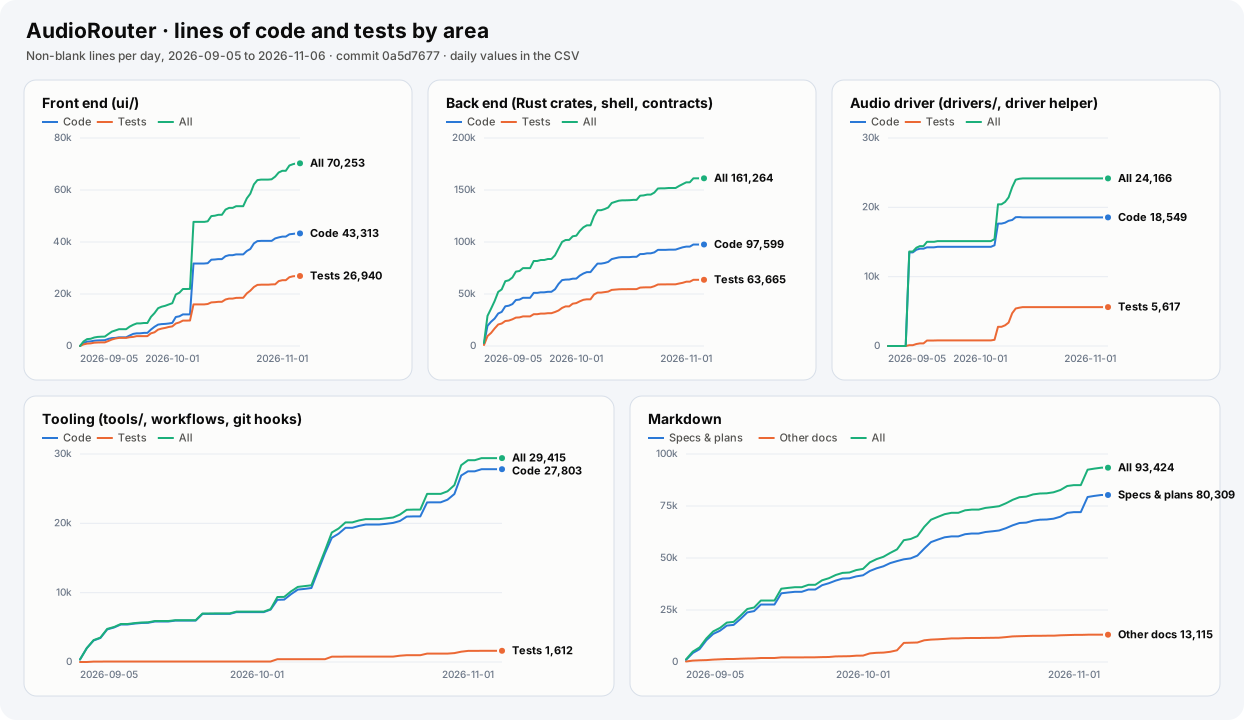
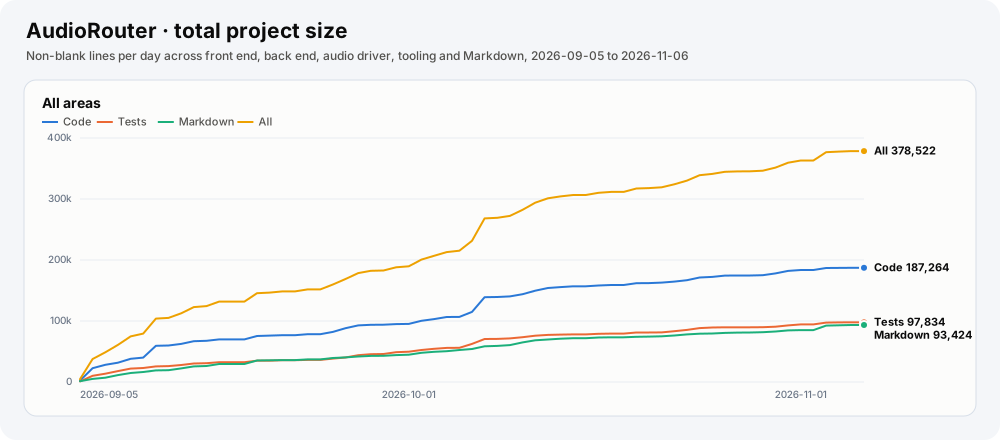
How the project has grown since its first commit, counted in non-blank
lines, one point per day. A daily workflow (code-size.yml) reads each day's
last commit on main and publishes the charts and the
daily numbers
on the code-stats-data branch.
- Front end:
ui/. Tests are*.test.*,ui/e2e/and the test harness pages. - Back end: the Rust crates, the desktop shell and the TypeScript API
contracts. Tests are
tests/folders,*_tests.rsfiles, the#[cfg(test)]modules inside source files andtests/acceptance/. - Audio driver:
drivers/and the driver helper crate. Tests are itstests/folder and the M03 acceptance scripts. - Tooling: the scripts and programs in
tools/(Stream Deck plugin, probes, VM, release and website scripts), the GitHub workflows and the git hooks. Tests are*.test.*files andtest/ortests/folders. - Markdown: specifications and plans (
docs/spec/,docs/plans/) against every other Markdown file. The generated API reference is left out.
The website and the examples are not counted.
Run it locally with
node tools/metrics/code-size.mjs update <history.csv> <out-dir> origin/main.
- Start here: the documentation index, the active plan and the specifications.
- AI agents: read AGENTS.md, the canonical agent
instructions (do not add a case-only
agent.mdcopy on Windows). Claude Code sessions format each edited Rust file automatically (.claude/settings.json). - API: API reference for the command line, JSON-RPC and MCP, and the local HTTP API.
- Plugins: plugin compatibility.
Only VST3 fixture and validator work needs the Steinberg VST3 SDK (building
the app does not):
powershell -ExecutionPolicy Bypass -File .\tools\m06-vst3-sdk\install.ps1(see SDK setup). - README screenshots: regenerate with
AUDIOROUTER_README_SHOTS=1andnpx playwright test e2e/readme-screenshots.pw.tsinui, aftercargo build --example e2e_backend -p audiorouter-control. - Website: edit
site/; changes deploy to audiorouter.org when they reachmain(see site/README.md).
Copyright (C) 2026 Patrick Desjardins.
AudioRouter is free and open-source software under the
GNU General Public License v3.0 only (GPL-3.0-only). You may use,
study, share and modify it. If you distribute AudioRouter or a modified
version, you must publish its complete source code under the same license.
Commercial licenses that allow use outside the GPL (for example, in a closed-source product) are available from the copyright holder; contact the maintainer through GitHub.
Releases up to and including 0.0.13 were published under the MIT License, and
those copies remain available under MIT. Third-party components keep their own
licenses: see THIRD-PARTY-NOTICES.txt in each release. The virtual audio
driver in drivers/audiorouter-virtual is derived from Microsoft sample code
and is a separate program under the Microsoft Public License
(drivers/audiorouter-virtual/LICENSE-MS-PL.txt).
Contributions are welcome under the terms in CONTRIBUTING.md.