






A modular teleoperation GUI for ROS 2 robots. Publishes geometry_msgs/Twist on any configurable topic, so it works out of the box with differential-drive robots, TurtleSim, TurtleBot3, and any platform that subscribes to cmd_vel-style topics.
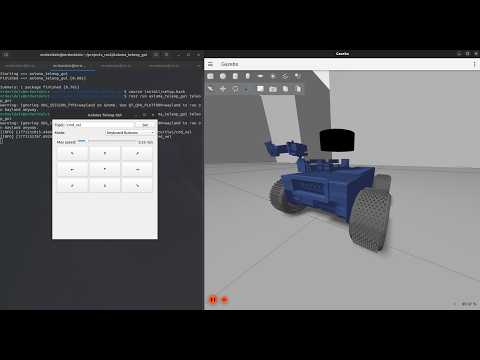
A 3x3 directional grid that mimics the teleop_twist_keyboard layout. Press a button to move, release to stop. A speed slider controls the maximum velocity.

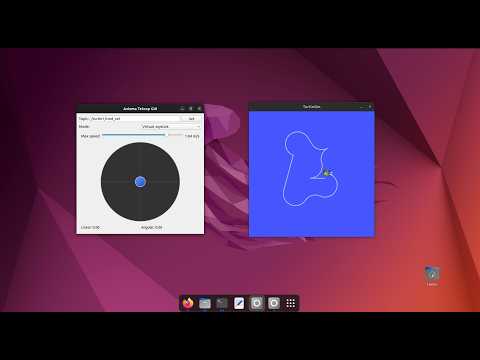
Drag the handle inside the circular pad to set linear and angular velocity at the same time. Distance from center controls speed. Release to stop. Numeric values are shown in real time.

Independent sliders for linear (-1.0 to 1.0 m/s) and angular (-3.0 to 3.0 rad/s) velocity, each with a spinbox for fine-tuning and an individual Reset button. A global STOP button zeros both axes instantly.

Prerequisites: ROS 2 Humble on Ubuntu 22.04, and PyQt5 (sudo apt install python3-pyqt5).
cd ~/your_ws/src
git clone https://github.com/MrDavidAlv/Axioma_teleop_gui.git
cd ~/your_ws
colcon build --packages-select axioma_teleop_gui
source install/setup.bashros2 run axioma_teleop_gui teleop_guiThe GUI starts with the topic set to cmd_vel. You can change the target topic at any time using the text field at the top of the window.
Open two terminals:
# Terminal 1 — launch turtlesim
ros2 run turtlesim turtlesim_node
# Terminal 2 — launch the GUI
ros2 run axioma_teleop_gui teleop_guiIn the GUI, change the topic to /turtle1/cmd_vel and click Set. Now you can drive the turtle with any of the three control modes.
| Axioma Robot (Gazebo) | TurtleSim |
|---|---|
 |
 |
axioma_teleop_gui/
├── package.xml
├── setup.py
├── setup.cfg
├── launch/
│   └── teleop_gui.launch.py
├── axioma_teleop_gui/
│   ├── main.py              # Entry point
│   ├── ros_node.py           # ROS 2 publisher node + threading
│   ├── main_window.py        # Main window layout and mode switching
│   └── widgets/
│       ├── keyboard_mode.py  # Mode 1
│       ├── joystick_mode.py  # Mode 2
│       └── slider_mode.py    # Mode 3
└── test/
    ├── test_copyright.py
    ├── test_flake8.py
    └── test_pep257.py
Two threads keep the GUI responsive while maintaining a steady 15 Hz publish rate:
| Main Thread (Qt) | Daemon Thread (ROS 2) |
|---|---|
QApplication.exec_() |
spin_once loop (50 ms timeout) |
| Widget events set velocity | Timer at 15 Hz publishes Twist |
| Writes protected by Lock | Reads protected by Lock |
Apache License 2.0 — see LICENSE for details.
Mario David Alvarez Vallejo — GitHub