
The application gives you the ability to search for and download popular icons for general and practical uses, with the ability to comment and publish them within the application.
First secreen the user will see and It is a welcome screen to explanation of the icons and logo ,then directs the user to either complete browsing as a visitor by click on "start" buteen" or go to "register" in the application.
A screen that displays a video for the user explaining the application section and its use.
If he choose directed to "register", the First Screen will sea the "login" screen appears, an option is at the bottom if you not have account، he will be directed to fill in his personal data to complete the registration.
Icons search screen, in the search field the name of the required icon is written, then a group of icons will appear and when selected, it will be directed to the loading screen and add the comment.
###- DownloadIcon : After heading to the download screen, you can now download the image and keep it or add a comment to it and send it to the your comment screen,and also has been added to the public screen for comments.
###- ownUserComment : On this screen, only the comments of the user who commented on the icons will appear on a separate page.
###- AllUsersComment : On this screen, all comments written by users of the application will show.
###- Logo : famous and popular icons will be displayed to the user.
-
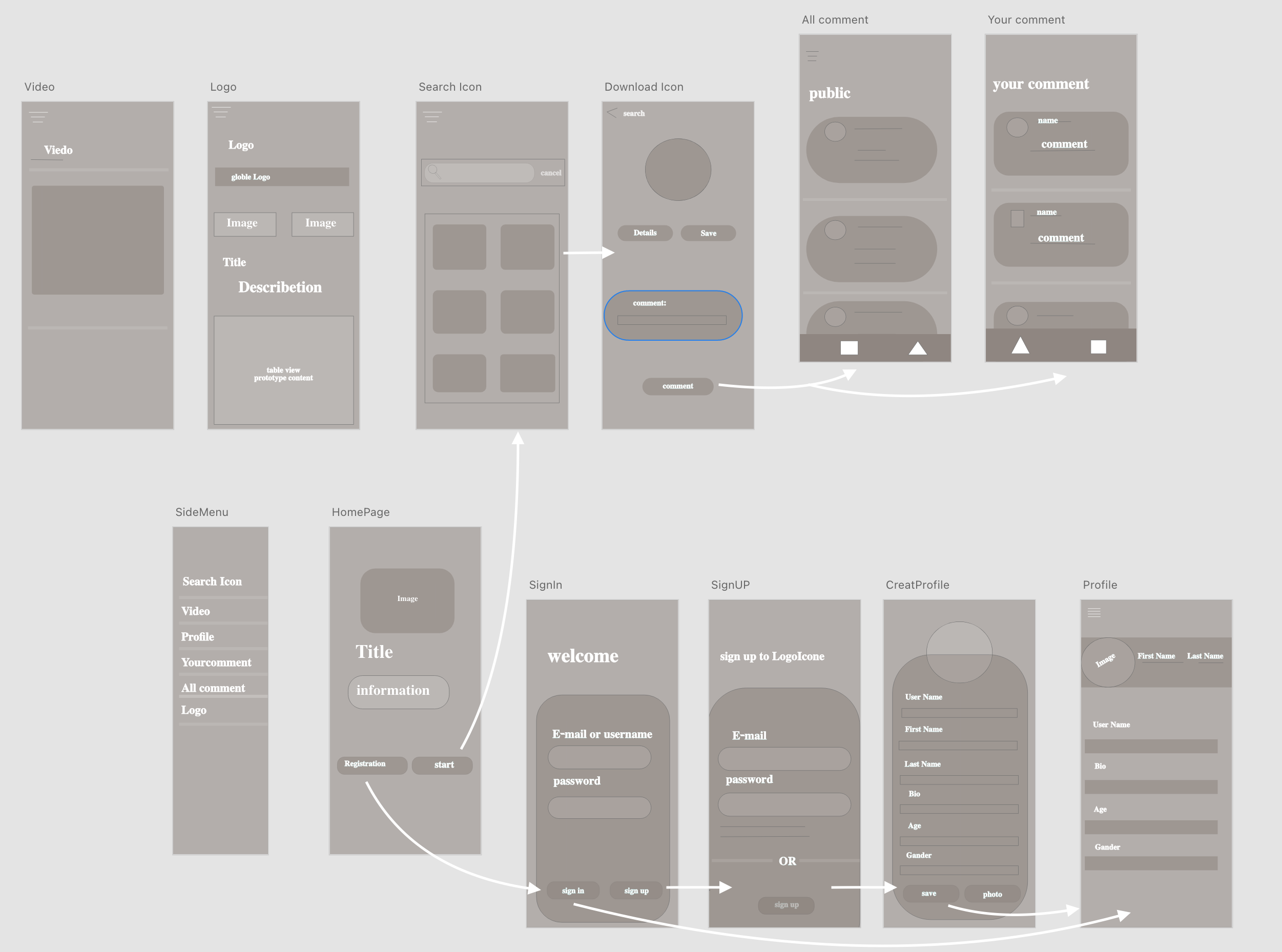
HomePage: This Screen will show the information of the icons section and the logos section will be displayed, and after viewing their content, you will have the choice between going to the registration screen or starting to go to the first sections of the application Search Icon.
-
SignIn : If you choose registration button on the home screen, you will head here to log in if you have a previous account, or choose a new registration to be directed to the new account creation screen , If you have an account, you will be directed to the profile screen.
-
signUp : When you choose to create an account, you will then be asked to go to the following information in completing the profile account.
-
CreatProfile : After completing the email registration,and password will be moved to here for completed username ,first &last Name ,age , bio and choees photo for Image Profile. than cliked on save boutten to go , Profile screen,
-
Profile : her will show all informaition you recorded it in creat Profile screen , you have sidmune to go to any section , or you can SignOut .
-
SearchIcone: first section in App, when you be home page if you choess Start butten ،You will be directed here to seatch about Icone . and when Icon show you can chooes one by cliked on it to moved you to Download Screen.
-
DownloadIcon: After Selected Icon you need in this secreen you con kknow name and save icon in your album and you can add comment to show it in two place own comment and all comment .
-
ownUserComment: her you can see you own commint and you can chooesit from sidmune
-
AllUsersComment: you can her sea All comment that uesrs writ it on app and you can switch butween hem by bar Controlle .
-
Logo: fro sidmune you can moved to logo to see Famous logo
-
Video: Explanation video of the application.
-
SideMenu : it contains to a :
-
SearchIcone.
-
Video.
-
Profile.
-
UserComment
-
AllUsersComment.
- auth.login(user)
- auth.signup(user)
- auth.creatProfile()
- auth.logout()
- auth.comment()
Icon2.mp4
##- Slides :
The application gives you the ability to search for and download popular icons for general and practical uses, with the ability to comment and publish them within the application.
First secreen the user will see and It is a welcome screen to explanation of the icons and logo ,then directs the user to either complete browsing as a visitor by click on "start" buteen" or go to "register" in the application.
A screen that displays a video for the user explaining the application section and its use.
If he choose directed to "register", the First Screen will sea the "login" screen appears, an option is at the bottom if you not have account، he will be directed to fill in his personal data to complete the registration.
Icons search screen, in the search field the name of the required icon is written, then a group of icons will appear and when selected, it will be directed to the loading screen and add the comment.
###- DownloadIcon : After heading to the download screen, you can now download the image and keep it or add a comment to it and send it to the your comment screen,and also has been added to the public screen for comments.
###- ownUserComment : On this screen, only the comments of the user who commented on the icons will appear on a separate page.
###- AllUsersComment : On this screen, all comments written by users of the application will show.
###- Logo : famous and popular icons will be displayed to the user.
-
HomePage: This Screen will show the information of the icons section and the logos section will be displayed, and after viewing their content, you will have the choice between going to the registration screen or starting to go to the first sections of the application Search Icon.
-
SignIn : If you choose registration button on the home screen, you will head here to log in if you have a previous account, or choose a new registration to be directed to the new account creation screen , If you have an account, you will be directed to the profile screen.
-
signUp : When you choose to create an account, you will then be asked to go to the following information in completing the profile account.
-
CreatProfile : After completing the email registration,and password will be moved to here for completed username ,first &last Name ,age , bio and choees photo for Image Profile. than cliked on save boutten to go , Profile screen,
-
Profile : her will show all informaition you recorded it in creat Profile screen , you have sidmune to go to any section , or you can SignOut .
-
SearchIcone: first section in App, when you be home page if you choess Start butten ،You will be directed here to seatch about Icone . and when Icon show you can chooes one by cliked on it to moved you to Download Screen.
-
DownloadIcon: After Selected Icon you need in this secreen you con kknow name and save icon in your album and you can add comment to show it in two place own comment and all comment .
-
ownUserComment: her you can see you own commint and you can chooesit from sidmune
-
AllUsersComment: you can her sea All comment that uesrs writ it on app and you can switch butween hem by bar Controlle .
-
Logo: fro sidmune you can moved to logo to see Famous logo
-
Video: Explanation video of the application.
-
SideMenu : it contains to a :
-
SearchIcone.
-
Video.
-
Profile.
-
UserComment
-
AllUsersComment.
- auth.login(user)
- auth.signup(user)
- auth.creatProfile()
- auth.logout()
- auth.comment()
Icon2.mp4
##- Slides :