Upload a photo of a single garment (or type a query). CLIP recognizes its type, color and style, and the app assembles a complete outfit by fetching matching items from the web.
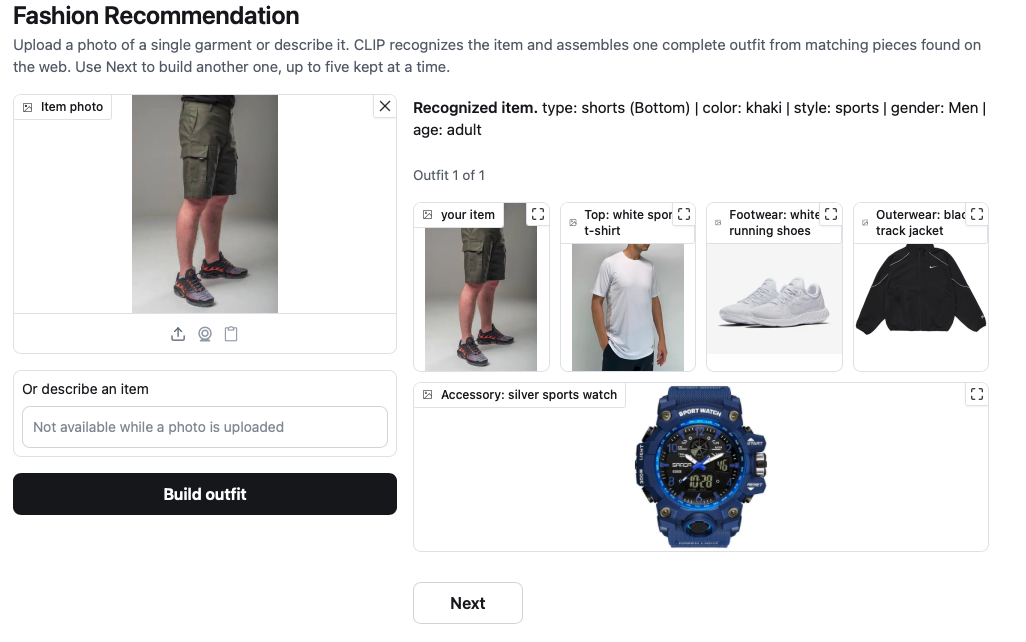
- Recognition. Exactly one input is used at a time: uploading a photo disables
the description field and vice versa. The input is encoded with CLIP
(
openai/clip-vit-base-patch32, zero-shot, no fine-tuning). A photo is first checked against the supported garment types and a set of everyday non-fashion subjects; if it holds no garment, it is rejected before any search runs. Then the garment type, color, style, gender and age (adult/kids) are inferred by comparing its embedding to text prompts; for text, they are parsed by keyword. - Assembly. From the recognized role, complementary slots are chosen (for a top: bottom, footwear, outerwear, accessory - never the same type). For each slot a query is built from a style-appropriate garment type and a harmonizing color (not a copy of the input color), scoped to the recognized gender and age, and matching product photos are fetched via DuckDuckGo image search (no key).
- Output. One outfit is shown at a time as a row of images: the input item plus one web image per slot. Next builds the following variant (a different set of garment types and colors), Previous goes back through the ones already built. Up to five are kept; after that, "I did not like anything" drops them and starts a new set from variants that have not been used yet.
There is no local dataset and no training: the model is used only for zero-shot recognition, and all recommended items come from the web.
python3 -m venv .venv
source .venv/bin/activate
pip install -r requirements.txt
python app.pydocker run --rm -p 7860:7860 flugmaschine/fashion-recommendation:latestOpen http://127.0.0.1:7860. Or use docker compose up to build and run locally.
| Variable | Purpose | Default |
|---|---|---|
VFR_MODEL |
CLIP model name | openai/clip-vit-base-patch32 |
VFR_HOST |
Server bind address | 127.0.0.1 (0.0.0.0 in Docker) |
VFR_PORT |
Server port | 7860 |
src/
  config.py     roles, outfit slots, per-slot type/color tables, vocabularies
  model.py      CLIP wrapper (image and text embeddings)
  analyze.py    input recognition: type / color / style / gender / age
  recommend.py  outfit assembly via DuckDuckGo image search
app.py          Gradio web UI
Dockerfile      CPU inference image