Repository navigation
Releases: MacNite/HiveHub
Release list
# HiveHub V0.6 — listen to a hive 🐝

HiveHub V0.6 adds a sense the hub did not have. A HiveInside node can now be
asked to record from inside the hive, and the audio comes back to your own
server and plays in the dashboard.
Everything else here is measured against that: the hub already reads the
microphone's levels — RMS, peak, five FFT bands — and those numbers are what
drive the acoustic insights. What they cannot do is tell you what a colony
actually sounds like. When an insight flags piping or a stress band, V0.6 lets
you go and listen.
How it works
Press Record in the dashboard and the request is queued for the hub. On its
next wake the hub connects to the HiveInside node over BLE, authenticates, and
the node streams raw 16 kHz PCM16 out of its microphone while the hub relays it
to the server as it arrives. The server writes it to disk as it lands and serves
it back as a WAV.
It is not instant. The hub deep-sleeps between measurements and only
collects commands when it wakes, so a recording appears within one reporting
interval — minutes, not seconds. The panel says "Waiting for the hub to wake"
for exactly that reason.
Three lengths are offered: 10, 30 or 60 seconds. Shorter is usually better —
it is enough to hear what an insight flagged, and a connected node neither
advertises nor samples, so that hive's readings pause for the length of the
session.
Only hives that actually have a HiveInside are offered. Nothing else on a hub
has a microphone you can listen to, and a request against a HolyIot or RuuviTag
could only fail a wake cycle later.
Raw PCM, streamed — and why
Both decisions came out of one measurement rather than an assumption. BLE
notification throughput from a HiveInside to an ESP32-C6 was measured at
137 kB/s (15 ms connection interval, 2M PHY, 251-byte PDUs). The microphone
produces 32 kB/s.
- No codec. Compressing would be fitting a pipe that is not full, and a lost
ADPCM packet corrupts every sample after it while a lost PCM packet is just a
hole. The wire format keeps aformatbyte with ADPCM reserved, so this can
change later without a protocol break. - Streamed, not buffered. The node holds about a second of audio, not a
whole clip — buffering 60 s would be 1.9 MB of static RAM on a part that also
runs a BLE stack.
The OTA relay's ~1.4 kB/s is not a counter-example: that path writes with
response and flushes flash inside the ATT callback, so it measures RRAM write
scheduling rather than the radio.
The panel
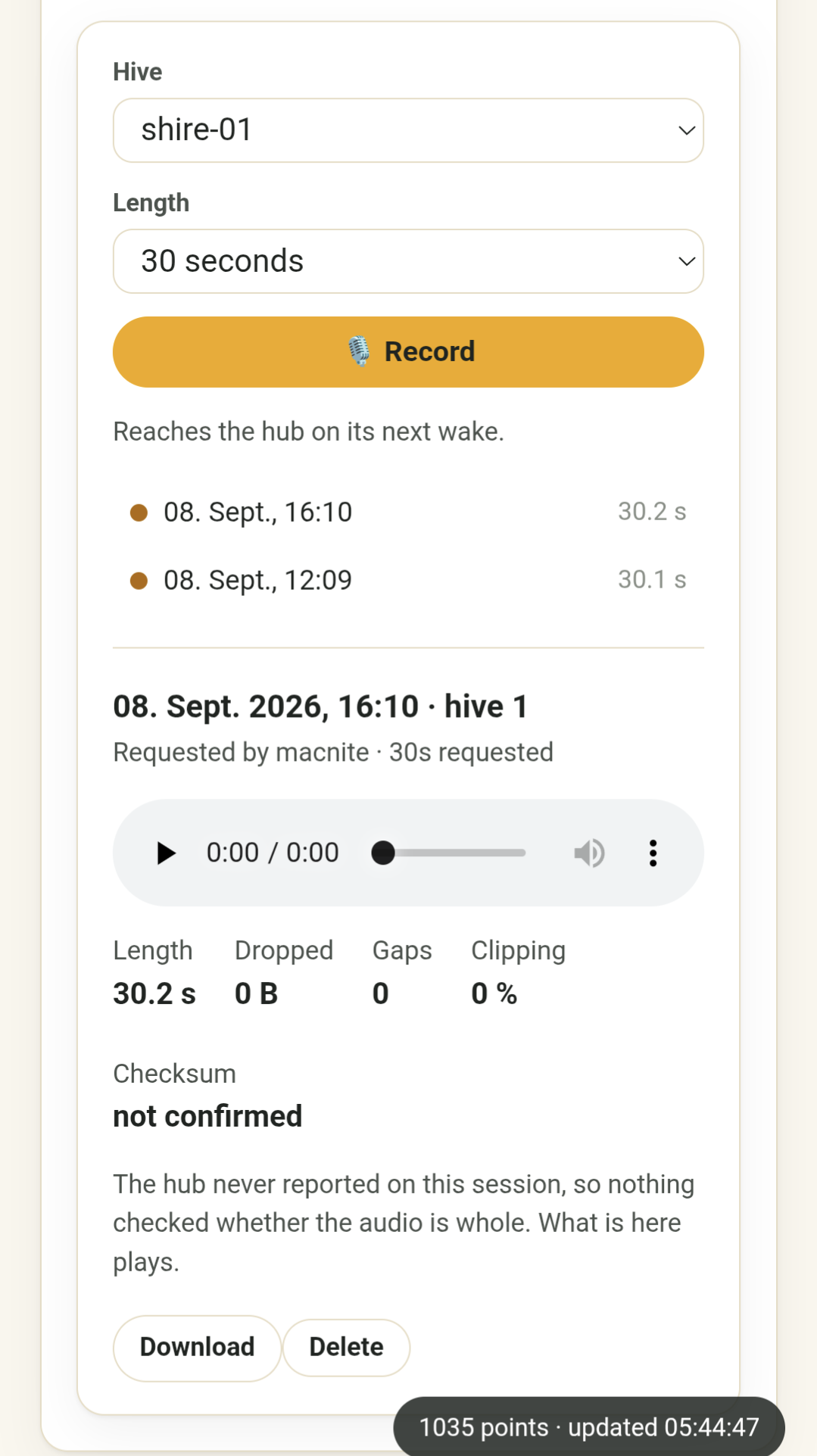
The Audio → Hive audio panel is split. Request controls sit in a left rail
above the list of sessions, newest first; selecting one gives the whole
remaining width to its player, its quality figures and a download button.
The quality figures — length, dropped, gaps, clipping, checksum — are shown
for every recording, not only broken ones. That is deliberate: a recording
with a hole in it plays as perfectly continuous sound, so an acoustic judgement
made on a splice is wrong in a way nothing later reveals.
The Checksum figure answers the only question a listener really has, in four
states rather than two, because the hub reports on a session twice and either
report can go missing:
| Shown as | What happened |
|---|---|
| verified | The hub's detailed report arrived and its checksum matched the bytes on disk |
| unverified | The report arrived, but the checksums disagree or none was sent |
| hub confirmed | No detailed report, but the hub's command result said the session succeeded |
| not confirmed | Neither arrived. The audio plays; nothing corroborates it |
Setting it up
1. A shared key on both devices
The node will not record without an authenticated request, and the hub will not
ask without a key. Both sides want the same 32 bytes in different notations,
so generate once and print both forms:
KEY=$(openssl rand -hex 32)
echo "HiveHub  secrets.h:  #define HIVEINSIDE_AUDIO_PSK_HEX \"$KEY\""
echo "HiveInside audio_secret.h:"
echo "$KEY" | sed 's/../0x&, /g' | fold -sw 48 | sed 's/^/\t/;s/ $//'
The hex line goes in firmware/include/secrets.h (gitignored); the C array goes
in the node's src/audio_secret.h. Nothing stores this key anywhere else, so
keep the output until both devices are flashed.
Both sides fail closed when the key is missing or all-zero. That is the
intended behaviour, not a bug to work around: the alternative is a microphone in
a garden that any BLE device in range can switch on.
FORCE_RESEEDis not involved. That flag only re-seeds the claim code into
NVS. The audio key is compiled in and read afresh at the start of every session,
so an ordinary flash or OTA is enough.
2. Mount the recordings volume
RECORDINGS_DIR (default /app/recordings) needs a volume. The rows describing
recordings live in the database and survive a container recreation — the files do
not, unless you mount them:
hivescale-api:
  environment:
    RECORDINGS_DIR: /app/recordings
  volumes:
    - /opt/hivescale/recordings:/app/recordings
Nothing prunes recordings. There is no retention sweep — a deliberate choice
— so the only thing between your disk and a season of audio is the delete button.
Budget about 1.9 MB per recorded minute.
3. Flash both sides together
The key is checked on every session, so between flashing one device and the other
audio fails with "authentication failed" while measurements keep working
normally. That asymmetry is the giveaway: if readings are fine and only listening
is broken, suspect the key before the radio.
HiveInside must be 0.6.2 or later. 0.6.0 and 0.6.1 speak the protocol
correctly but return a full-length recording whose first ~50 ms carry sound and
whose remainder is silence — and every counter reports it clean, because every
byte the node sent did arrive. See the HiveInside V0.6 notes.
Requesting a recording needs the admin role on the dashboard, or
owner/admin in HivePal. Listening to what already exists follows the usual
per-device roles.
Also in this release
- Remote AP mode, and calibration split into its own dashboard panel —
general settings and the whole per-scale calibration editor no longer share
one Save button. - Claim-code recovery from paired devices, plus a "Re-seed to HivePal"
button for a HiveHub that was removed there (#181). - Inspection masking now applies to MQTT state, so a hive being worked no
longer publishes misleading values to Home Assistant. - Inspection button wake detection fixed, and the reset-crossing RTC markers
moved to.rtc_noinitwhere they actually survive a reboot. - Dashboard metric cards carry a missed sensor reading forward rather than
blanking a hive when one GATT connection fails.
Component versions
| Component | Version |
|---|---|
| HiveHub release | V0.6 |
| Firmware | 0.30.0 |
| Server/backend | 0.5.1 |
| HiveInside node | 0.6.2 or later (required for audio) |
| Recommended hardware | XIAO ESP32-C6 Scale Module V0.4 |
Before upgrading
- The database schema updates itself on startup (migration
029_hive_recordings).
Nothing to run by hand. - Add the recordings volume before you record anything — otherwise the first
container recreation leaves a list of sessions whose audio is gone. - Audio is optional. Without a key configured, everything else in V0.6 works
exactly as before and the panel simply reports that no key is set.
Full details: Listening to a hive ·
API reference · issue
#71
HiveHub V0.5 — inspection mode and a button for the beekeeper 🐝
HiveHub V0.5 focuses on one important behavior change: on the recommended XIAO ESP32-C6, the external D2 pushbutton is now an inspection button.
The button previously opened the setup portal or triggered a factory reset. Those installation and recovery actions have moved to the XIAO’s on-board USER/BOOT button, freeing the external, weatherproofable button for something useful during normal work at the hive stand.
The important button change
After installing V0.5 firmware on a XIAO ESP32-C6, the external D2 button no longer opens setup mode or performs a factory reset.
The new assignments are:
| Button | New behavior |
|---|---|
| External D2 pushbutton | Press once to start inspection mode; press again to end it |
| On-board GPIO9 USER/BOOT button | Short press opens the setup portal; long press performs a factory reset |
The existing external button wiring does not need to change: use a normally-open momentary switch between D2 and GND. D2 remains configured with its internal pull-up.
The inspection button also works while the hub is in deep sleep. Pressing it wakes the hub and changes the inspection state immediately rather than waiting for the next scheduled measurement cycle. Holding the button still counts as a single toggle.
Important setup-button note
GPIO9 is also the ESP32-C6 boot-strapping pin. A normal press while the hub is running or sleeping performs the new setup-button action. However, holding USER/BOOT while powering up the board or pressing RESET enters the serial bootloader. That is normal ESP32-C6 behavior.
The legacy 30-pin ESP32 DevKit is unchanged: GPIO27 remains its setup/factory-reset button. That board has no dedicated physical inspection button, although inspection mode can still be controlled through the dashboard or API.
Inspection mode
Opening a hive can produce readings that are accurate but misleading as colony data: removing supers causes a sudden weight drop, opening the brood nest changes its temperature, and handling frames disturbs sound, vibration, and bee-counter measurements. Those changes can look like robbing, swarming, sensor failure, or another colony event.
Pressing the D2 button now marks that period as an inspection:
- The hub continues measuring and uploading.
- Hive-specific readings from the inspection are excluded from normal charts, insights, and alert evaluation.
- Ambient, battery, solar, connectivity, and other hub-level readings continue normally.
- No raw measurements are deleted; the original readings remain available in CSV and NDJSON exports.
- Dashboard charts identify inspection periods so gaps in hive data have a visible explanation.
- An optional note can be added later, for example “removed two supers” or “queen inspection.”
Inspection mode can also be started or stopped through Device & admin → Configuration → Inspection or through the API. A physical button press applies to the entire hub, while an API request may target particular hives.
Automatic timeout
A forgotten inspection must not hide hive data indefinitely. Inspection mode therefore ends automatically after a configurable timeout.
The default is 60 minutes. It can be changed per device under:
Device & admin → Configuration → General → Inspection timeout (min)
The allowed range is 1–1440 minutes. Both the hub and backend enforce the timeout, providing protection even if the hub loses power or connectivity during an inspection.
Component versions
| Component | Version |
|---|---|
| HiveHub release | V0.5 |
| Firmware | 0.25.0 |
| Server/backend | 0.4.0 |
| Recommended hardware | XIAO ESP32-C6 Scale Module V0.4 |
Before upgrading
If you currently use the external D2 button to open the setup portal or perform a factory reset, be aware that its behavior changes immediately after installing firmware 0.25.0:
- Use D2 to start and end inspections.
- Use the XIAO’s on-board USER/BOOT button for setup and factory reset.
- Do not hold USER/BOOT while resetting or powering on the board unless you intend to enter the serial bootloader.
- After updating the backend, verify the inspection timeout under Device & admin → Configuration → General.
For full details, see the inspection-mode documentation.
HiveHub V0.4 — in-hive nodes, over-the-air updates & data you can share 🐝
The fourth HiveHub release is about reach: reaching into the hive with a
proper wireless sensor node, reaching that node with firmware updates over the
air, and reaching out of the walled garden with backups and public charts.
Where V0.3 made the device flexible and robust, V0.4 makes the whole apiary —
hub, in-hive nodes and entrance counters — one system you can update, back up,
repair and publish from a single dashboard.
What is HiveHub?
HiveHub is an open-source, ESP32-based data collector for beehive sensors and
scales. One device gathers weight, temperature, humidity, sound, vibration,
entrance traffic, power state, and network state from up to 16 hives and sends
the readings to a self-hosted FastAPI + PostgreSQL backend, where they can be
viewed in HivePal or the built-in web
dashboard.
Highlights of this release
1. HiveInside is complete — including over-the-air updates
The in-hive sensor node is no longer a side project: HiveInside
is fully implemented, end to end, and shipping its own V0.1 release alongside
this one. HiveHub speaks to it at every level:
- Discovery & identity. HiveHub scans for nRF54LM20A HiveInside beacons
(hiveinside_nrf54) and reads the board identity and firmware version
straight out of the node's scan-response identity record — no connection, no
configuration. The dashboard's Status card lists every in-hive sensor with the
firmware it is actually running, and flags inline when a newer release exists. - Firmware relay over BLE (OTA) — done. HiveInside has no WiFi, so HiveHub
acts as the OTA relay: it streams the signed image from the backend
straight into the node's GATT OTA service, chunk by chunk, without ever
buffering the whole file. Nothing is committed on the node until size and
CRC-32 verify, so a dropped transfer always leaves it on its old image.
You pick a release in the dashboard, pick a node, and press go. - Relay gating and targeting. The relay is gated on version (a node
already on the target release is skipped) and can target any hive on the
device, not just the first. Per-node relay state is visible in the dashboard
while the transfer runs. - Diagnostics that survive a sealed hive. A deployed node has no console, so
the relay now surfaces the node's flash errno from the OTA STATUS read,
and the hub-side crash that used to kill a relay mid-transfer was diagnosed and
fixed. Firmware downloads are never gzipped, which was silently corrupting
relayed images.
The same relay machinery now also carries HiveTraffic (BeeCounter) firmware
over BLE GATT, so entrance counters update the same way in-hive nodes do.
HiveInside is now nRF54LM20A-only. The deprecated ESP32-C6 HiveInside was
removed from firmware, backend (migration 020_drop_hiveinside_c6) and frontend.
2. Your data is yours — backup, restore, and publish
- Download / backup & restore measurement data. The dashboard can hand you
every reading the server holds as a single NDJSON file and read it back in
later — the same format the ESP32 writes to its SD card, so a backup feeds
straight back through the existing Import SD card data path. Use it before
re-deploying the stack, to migrate a beekeeper onto their own server, or to
archive a device for analysis elsewhere. Admin-only, in the Admin section.
See docs/backup-restore.md. - Publish data — public chart embeds. An admin can publish a single chart
under an unguessable link with no login, ready to<iframe>into a club
page, blog or farm-shop site, with the same slice also available as JSON and
CSV.ENABLE_PUBLIC_EMBEDS=falseis a single server-side kill switch that
404s every published link without deleting anything. Migration
023_published_charts; see docs/publish-embed.md.
3. Pairing you can undo — and repair
Device pairing is now reversible and repairable. Previously, removing a
device in HivePal left it flagged as claimed with zero members: invisible to
everyone and impossible to re-claim, forever. Now the last member leaving
releases the device, there is an owner-only one-step release endpoint, the
claim endpoint distinguishes "no such code" (404) from "already claimed" (409),
and migration 022_release_orphaned_devices heals databases already stuck in
that state. On the firmware side a device notices it was un-paired on its next
upload and starts offering its claim code again by itself — re-pairing needs
no reflash and no factory reset. The dashboard also gained a real admin
Delete device (device plus its measurements, commands and config), guarded by
the claim code and a typed device ID.
4. Acoustics and vibration you can actually read
The Frequency-bands and Vibration pages were rebuilt around one shape: one
chart per hive, that hive's bands as the series, plotted over time — so a band
rising over a week and a one-day piping spike are both legible instead of
dissolving into a smear. Band labels now carry their Hz range
("Piping · 300–550 Hz"), the broadband vibration RMS sits in grey behind the
bands it totals, and Vibration got its own sidebar entry. The hive palette
was reordered for colour-vision accessibility (two hives that separated by
only ΔE 3.8 under deuteranopia now separate by ΔE 21.3, in both themes), and a
hive keeps its colour from the top-bar chip through every page.
5. Home Assistant discovery that matches the hardware
Each in-hive beacon now gets the entities it actually reports, announced per
entity as each field first arrives — instead of one fixed HolyIot-shaped list.
A HiveInside no longer gets a pressure entity it can never populate, and it does
get its cell voltage, firmware version and its on-board vibration and acoustic
FFT bands. HA discovery also reports the real in-hive sensor type per
beacon.
6. Commands, CI & reliability
- Commands recover instead of stalling. Abandoned commands are recovered
(migration021_device_command_attempts) and the 5-minute command poll is
gone — a device that dies mid-command no longer wedges the queue. - Flashable firmware images published from CI. The GitHub workflow now
builds and publishes ready-to-flash images; the dashboard's upload form
detects the target and version from the firmware filename, so a stamped
HiveInside artifact uploads with nothing typed in. - Field fixes. The NAU7802 front end is warmed before its AFE offset is
captured (better scale calibration),sd_okreports the real SD card
state, the relay's locate scan no longer faults inesp_timer_stop(), relay
CRC-32 is parsed unsigned, and dashboard tooltips stay inside the viewport. - Tests. New end-to-end suites cover the claim/release lifecycle against a
real PostgreSQL, data export, publishing, and the OTA relay version gate.
7. Wired BeeCounter retired
The wired I²C BeeCounter transport and its ingest fields are gone — entrance
counting is BLE-based (HiveTraffic) on all new builds.
Component versions in this release
| Component | Version | Location | Status |
|---|---|---|---|
| ESP32-C6 Scale Module PCB | V0.4 | pcb-design/scale module/esp32-c6/ (_V0_4-Scale_Module-.zip) |
✅ Recommended — tested and working |
| NAU7802 breakout PCB | v0.2 | pcb-design/NAU7802 breakout pcb/ (_v0_2_NAU7802_breakout_board-.zip) |
✅ Recommended — tested and working |
| Power Module PCB | V0.3 | pcb-design/power module/ |
|
| ESP32 30-pin Scale Module PCB | V0.3 | pcb-design/scale module/esp32 (30 pin)/ |
❌ Obsolete |
| HiveHub firmware | 0.24.13 | firmware/ (pio run -e xiao_esp32c6) |
✅ Current |
| Server (backend) | 0.4.0 | server/ + docker/ (reported by GET /health) |
✅ Current |
| HiveInside node (in-hive) | V0.1 / fw 0.4.7 | MacNite/HiveInside — Seeed XIAO nRF54LM20A Sense | ✅ Complete, incl. BLE OTA |
| Database schema | migrations through 023 | server/migrations/ |
✅ Applied automatically |
Recommended setup
- Fabricate/assemble the ESP32-C6 Scale Module (V0.4) — off-the-shelf modules on pin headers, no SMD soldering for the core build.
- Need more than 2 wired scales? Add the NAU7802 breakout PCB on the I2C expansion header (up to 16 scales).
- Flash the firmware with
pio run -e xiao_esp32c6and configure everything from the on-device provisioning portal. - Stand up the backend with Docker Compose (docs/docker-install.md) and claim the device in HivePal or the built-in dashboard.
- Add HiveInside V0.1 nodes inside the hives — they are found by passive scan, and from then on you update them over the air from the dashboard.
- Optionally enable the MQTT / Home Assistant bridge, e-mail / Web Push alerts and public chart embeds.
See pcb-design/README.md for board details and the
main README for the full setup guide.
Upgrade notes
- Migrations
020–023run automatically on first start of the new
backend.022releases devices your database is already carrying in the
orphaned "claimed with zero members" state; it touches no readings. - ESP32-C6 HiveInside nodes are no longer supported. Replace them with
nRF54LM20A HiveInside V0.1 nodes. - Wired BeeCounter ingest fields were retired — move to BLE HiveTraffic.
ENABLE_PUBLIC_EMBEDSdefaults to true; set it tofalseif you do not
want anyone on your server to be able to publish a chart.
Depreca...
# HiveHub V0.3 — sensor choice, Home Assistant & field-hardening 🐝
The third HiveHub release builds on V0.2 and focuses on flexibility and
robustness: pick the ambient sensor that fits your build, get every in-hive
module as its own Home Assistant device, and run the whole stack — device and
backend — with materially better field reliability and safer self-host defaults.
What is HiveHub?
HiveHub is an open-source, ESP32-based data collector for beehive sensors and
scales. One device gathers weight, temperature, humidity, sound, vibration,
entrance traffic, power state, and network state from up to 16 hives and sends
the readings to a self-hosted FastAPI + PostgreSQL backend, where they can be
viewed in HivePal or the built-in web
dashboard.
Highlights of this release
Configurable ambient sensor + a leaner default build. The single
device-level outside-hive sensor is now selectable at build time: SHT4x/SHT40
(default) or SHT3x for temperature + humidity, or a BME280 that
additionally reports barometric pressure (ambient_pressure_hpa). The three
drivers are mutually exclusive and guarded at compile time so a bad secrets.h
fails the build instead of fighting over the shared I2C read path. In the same
pass the wired DS18B20 in-hive stack became fully optional and OFF by
default — in-hive temperature usually comes from a BLE sensor now — so a stock
build no longer pulls in the 1-Wire libraries it isn't using. Both are exposed
in the in-browser secrets.h configurator.
Every in-hive module is its own Home Assistant device. The optional MQTT
bridge now publishes each in-hive module (HiveHeart, HolyIot/RuuviTag/HiveInside
beacons, wireless HiveScale) as a distinct Home Assistant device with its full
telemetry — temperature, humidity, pressure and vibration — via per-module
auto-discovery, and a wireless HiveScale's barometric pressure is surfaced
alongside its weight. See docs/mqtt.md.
Extended Device & admin status panel. The dashboard's device and admin
status views were expanded to show more of what each device is actually doing,
and the dead cellular-modem code path was removed so the panel reflects only the
transports HiveHub really uses.
Idempotent ingest, end to end. Re-delivering a cached measurement — after a
flaky upload, an SD-card replay, or a backend restart — no longer creates
duplicate rows: the backend de-duplicates on a stable measurement_id
(migration 019_measurement_id_idempotency) and the firmware's replay path was
made idempotent, including dropping a stale cache staging file on a full replay.
Your history stays clean no matter how many times a reading is retried.
Safer self-host defaults. The shipped Docker / Docker Compose deployment was
hardened against accidental direct network exposure (bind to localhost by
default, secure-by-default posture) and the shipped compose file was repaired so
docker compose up works out of the box. Combined with the existing rate-limit /
request-size DoS knobs, a default deployment is safe to stand up before you put
it behind TLS / a reverse proxy.
ESP32-C6 field reliability. A broad I2C reliability and data-integrity
refactor: all wired I2C sensors are now read before the radios start (with
WiFi modem-sleep disabled during the read), a wedged ESP32-C6 I2C-NG driver is
healed rather than losing the whole cycle, the ambient SHT4x read is hardened
against a stuck bus, the RTC time is captured before SD initialisation, and
repeated probes of an absent NAU7802 are suppressed. NimBLE-Arduino was bumped to
2.5.0 to fix HiveHeart GATT "no data", the provisioning portal now offers BLE
sensor dropdowns from a startup scan (with in-page rescan), and a device stays
claimable after a backend rebuild/restore.
Tunable deep-sleep from secrets.h. The wake / deep-sleep duty-cycle
settings can now be overridden from secrets.h, so off-grid duty cycles are a
build-time choice rather than a source edit.
Dashboard polish & accessibility. An Apply (approve & flash) button now
appears right after a firmware upload, and the dashboard gained keyboard access /
focus-management fixes and accessible names on its chart canvases.
Docs, CI & fixes. New and consolidated documentation (the MQTT bridge and
per-module HA discovery, a project-wide code/documentation/UX audit, a refreshed
README), a corrected beehivemonitoring GATT battery-voltage decode, and CI that
builds and runs the BLE-decoder host tests on every change.
Component versions in this release
| Component | Version | Location | Status |
|---|---|---|---|
| ESP32-C6 Scale Module PCB | V0.4 | pcb-design/scale module/esp32-c6/ (_V0_4-Scale_Module-.zip) |
✅ Recommended — tested and working |
| NAU7802 breakout PCB | v0.2 | pcb-design/NAU7802 breakout pcb/ (_v0_2_NAU7802_breakout_board-.zip) |
✅ Recommended — tested and working |
| Firmware | 0.24.2 | firmware/ (pio run -e xiao_esp32c6 / legacy -e esp32dev) |
✅ Current |
| Server (backend) | 0.3.0 | server/ + docker/ (reported by GET /health) |
✅ Current |
Recommended setup
- Fabricate/assemble the ESP32-C6 Scale Module (V0.4) — off-the-shelf modules on pin headers, no SMD soldering for the core build.
- Need more than 2 wired scales? Add the NAU7802 breakout PCB on the I2C expansion header (up to 16 scales).
- Flash the firmware with
pio run -e xiao_esp32c6and configure everything from the on-device provisioning portal. - Stand up the backend with Docker Compose (docs/docker-install.md) and claim the device in HivePal or the built-in dashboard. Optionally enable the MQTT / Home Assistant bridge and e-mail / Web Push alerts.
See pcb-design/README.md for board details and the
main README for the full setup guide.
Deprecation notes
- The ESP32 30-pin Scale Module (HX711/INMP441-based) is obsolete. Existing boards keep working and the
esp32devfirmware target remains, but no further board revisions are planned — use the ESP32-C6 Scale Module for new builds. - The separate Power Module is being discontinued: the C6 Scale Module carries its own buck-boost regulator and battery fuel gauge, so most builds can power it directly.
- The wired DS18B20 in-hive temperature stack is now OFF by default and the wired I2C BeeCounter transport has been removed — in-hive temperature and entrance counting are BLE-based on new builds.
# HiveHub V0.2 — spectrum, alerts & dashboard polish 🐝
The second HiveHub release builds on the tested-hardware foundation of V0.1 and focuses on getting more out of the data you already collect: acoustic FFT analysis from HiveHeart sensors, out-of-dashboard alert notifications, a much more capable web dashboard, and broader wireless-sensor support — including a brand-new nRF54 in-hive node.
What is HiveHub?
HiveHub is an open-source, ESP32-based data collector for beehive sensors and scales. One device gathers weight, temperature, humidity, sound, vibration, entrance traffic, power state, and network state from up to 16 hives and sends the readings to a self-hosted FastAPI + PostgreSQL backend, where they can be viewed in HivePal or the built-in web dashboard.
Highlights of this release
HiveHeart acoustic FFT. HiveHeart sensors now deliver a packed 16-band frequency spectrum, decoded end-to-end: the 16 relative levels are derived on read, exposed through the API (nested and flat shapes, with legacy rows reconstructed so old and new records match), and charted in the dashboard on their own dedicated relative-level axis — complete with a peak-frequency marker, semantic-band headings, a frequency-range x-axis and an Hz tooltip. An informational, self-baselining "acoustic" insight flags spectrum shifts per
hive. These FFT-Values are also integrated in insights.py.
Alert notifications (e-mail + Web Push). Colony insight alerts (swarm, robbing, winter risk, …) can now leave the dashboard the moment they fire, over two independent opt-in channels: SMTP e-mail and Web Push to any browser or the installable dashboard PWA (Android, desktop, iOS 16.4+). Both are off by default and fail-soft — a broken relay never affects ingest or alert history — and dispatch runs on a dedicated background worker with at-most-once, restart-safe delivery above a configurable minimum severity.
Dashboard UX overhaul. Every diagram (line and spectrum charts, in the built-in dashboard and the public website demo) gains:
- a per-chart data selector with clickable legend entries to toggle series on/off,
- editable y-axis range — click-to-edit min/max that pins and persists per chart, with a one-click reset, and
- a ⤓ CSV export that downloads exactly the data the chart currently shows.
The Battery & power panel additionally plots battery voltage against an independent secondary axis (so its narrow 3.7–4.2 V range is readable), and only renders the Solar cards/chart when INA219 data is actually present.
HiveTraffic on any hive. The wireless HiveTraffic entrance bee counter (BLE/GATT) is now registry-driven and can be paired to any hive up to the device maximum, instead of only hives 1–2. (The wired I2C counter still covers hives 1–2.)
New in-hive node: XIAO nRF54LM20A HiveInside. A beacon-only sensor node that broadcasts the same 26-byte frame as the ESP32-C6 HiveInside prototype, with board-matched OTA so a C6 image is never relayed to an nRF54 unit — and full flags-byte handling so an absent sensor reads as "absent" rather than 0 °C. The legacy ESP32-C6 node stays fully supported.
Field-reliability firmware fixes. ESP32-C6 user LED status heartbeat, recovery of a wedged I2C bus on boot, dropping of railed/empty scale readings with a reported scale_ok flag, and OTA downloads that tolerate a missing Content-Length header.
Docs & onboarding. A new "my device is not supported yet" guide (request support via a GitHub issue, plus an nRF Connect capture walkthrough), a reworked build-your-own guide, and expanded API/insights/notifications documentation.
Component versions in this release
| Component | Version | Location | Status |
|---|---|---|---|
| ESP32-C6 Scale Module PCB | V0.4 | pcb-design/scale module/esp32-c6/ (_V0_4-Scale_Module-.zip) |
✅ Recommended — tested and working |
| NAU7802 breakout PCB | v0.2 | pcb-design/NAU7802 breakout pcb/ (_v0_2_NAU7802_breakout_board-.zip) |
✅ Recommended — tested and working |
| Firmware | 0.23.11 | firmware/ (pio run -e xiao_esp32c6 / legacy -e esp32dev) |
✅ Current |
| Server (backend) | 0.1.0 | server/ + docker/ (reported by GET /health) |
✅ Current |
Recommended setup
- Fabricate/assemble the ESP32-C6 Scale Module (V0.4) — off-the-shelf modules on pin headers, no SMD soldering for the core build.
- Need more than 2 wired scales? Add the NAU7802 breakout PCB on the I2C expansion header (up to 16 scales).
- Flash the firmware with
pio run -e xiao_esp32c6and configure everything from the on-device provisioning portal. - Stand up the backend with Docker Compose (
docs/docker-install.md) and claim the device in HivePal or the built-in dashboard. Optionally enable e-mail / Web Push alerts (docs/notifications.md).
See pcb-design/README.md for board details and the main README for the full
setup guide.
Deprecation notes
- The ESP32 30-pin Scale Module (HX711/INMP441-based) is obsolete. Existing boards keep working and the
esp32devfirmware target remains, but no further board revisions are planned — use the ESP32-C6 Scale Module for new builds. - The separate Power Module is being discontinued: the C6 Scale Module carries its own buck-boost regulator and battery fuel gauge, so most builds can power it directly.
V0.1 — first release 🐝
HiveHub V0.1 — first release 🐝
HiveHub's first official release! All published PCBs are tested and working, the firmware runs stably in the field, and the self-hosted backend is feature-complete for day-to-day monitoring — time to draw a line and call it V0.1.
What is HiveHub?
HiveHub is an open-source, ESP32-based data collector for beehive sensors and scales. One device gathers weight, temperature, humidity, sound, vibration, entrance traffic, power state, and network state from up to 18 hives and sends the readings to a self-hosted FastAPI + PostgreSQL backend, where they can be viewed in HivePal or the built-in web dashboard.
Highlights of this release
- Tested hardware. Every PCB published in
pcb-design/has been fabricated, assembled, and verified working. - New recommended platform: ESP32-C6 + NAU7802. The compact Seeed XIAO ESP32-C6 Scale Module (V0.4) is now the recommended main controller. It reads 2 scales through its on-board NAU7802 24-bit I2C ADC and pairs with up to 18 BLE in-hive sensors. The NAU7802 breakout PCB (v0.2) expands a HiveHub to up to 16 wired scales (8× NAU7802 behind a TCA9548A mux) — or, populated with its own XIAO MCU, works as a standalone BLE scale sensor.
- Multi-hive firmware. A dynamic registry of up to 18 hives, each with one scale source (NAU7802, legacy HX711, or a BLE HiveScale) and one in-hive sensor, all configured from the on-device provisioning portal.
- Wireless in-hive sensors. HolyIot 25015, RuuviTag, HiveInside ESP32-C6, and beehivemonitoring.com HiveHeart/HiveScale over BLE/GATT — temperature, humidity, pressure, and vibration with no wiring.
- Robust field operation. Deep-sleep duty cycle, DS3231 RTC timekeeping, SD-card caching and backfill, OTA firmware updates with per-board images (
esp32/esp32-c6), and off-grid solar/battery telemetry (INA219, MAX17048). - Self-hosted backend. FastAPI + PostgreSQL with API-key device auth, HivePal integration, rule-based colony insights, backend load-cell temperature compensation, optional MQTT/Home Assistant bridge, and an optional built-in dashboard — deployed with Docker Compose.
Component versions in this release
| Component | Version | Location | Status |
|---|---|---|---|
| ESP32-C6 Scale Module PCB | V0.4 | pcb-design/scale module/esp32-c6/ (_V0_4-Scale_Module-.zip) |
✅ Recommended — tested and working |
| NAU7802 breakout PCB | v0.2 | pcb-design/NAU7802 breakout pcb/ (_v0_2_NAU7802_breakout_board-.zip) |
✅ Recommended — tested and working |
| Power Module PCB | V0.3 | pcb-design/power module/fabrication/ |
|
| ESP32 30-pin Scale Module PCB | V0.3 | pcb-design/scale module/esp32 (30 pin)/ (_V0_3-Scale_Module-.zip) |
❌ Obsolete — will be discontinued soon |
| Firmware | 0.23.7 | firmware/ (pio run -e xiao_esp32c6 / legacy -e esp32dev) |
✅ Current |
| Server (backend) | 0.1.0 | server/ + docker/ (reported by GET /health) |
✅ Current |
Recommended setup
- Fabricate/assemble the ESP32-C6 Scale Module (V0.4) — off-the-shelf modules on pin headers, no SMD soldering for the core build.
- Need more than 2 wired scales? Add the NAU7802 breakout PCB on the I2C expansion header (up to 16 scales).
- Flash the firmware with
pio run -e xiao_esp32c6and configure everything from the on-device provisioning portal. - Stand up the backend with Docker Compose (docs/docker-install.md) and claim the device in HivePal or the built-in dashboard.
See pcb-design/README.md for board details and the main README for the full setup guide.
Deprecation notes
- The ESP32 30-pin Scale Module (HX711/INMP441-based) is obsolete. Existing boards keep working and the
esp32devfirmware target remains, but no further board revisions are planned — use the ESP32-C6 Scale Module for new builds. - The separate Power Module will probably be discontinued: the C6 Scale Module carries its own buck-boost regulator and battery fuel gauge, so most builds can power it directly.