
Full-stack web apps in one Python file.
Server-rendered pages, a reactive UI compiled from Python, typed calls to your server, Models with migrations, forms, accounts and teams, live updates, background jobs, a UI kit with motion, installable and desktop apps, and one-command deploys, with no JavaScript toolchain.




Documentation · Try it in your browser · Examples · Changelog
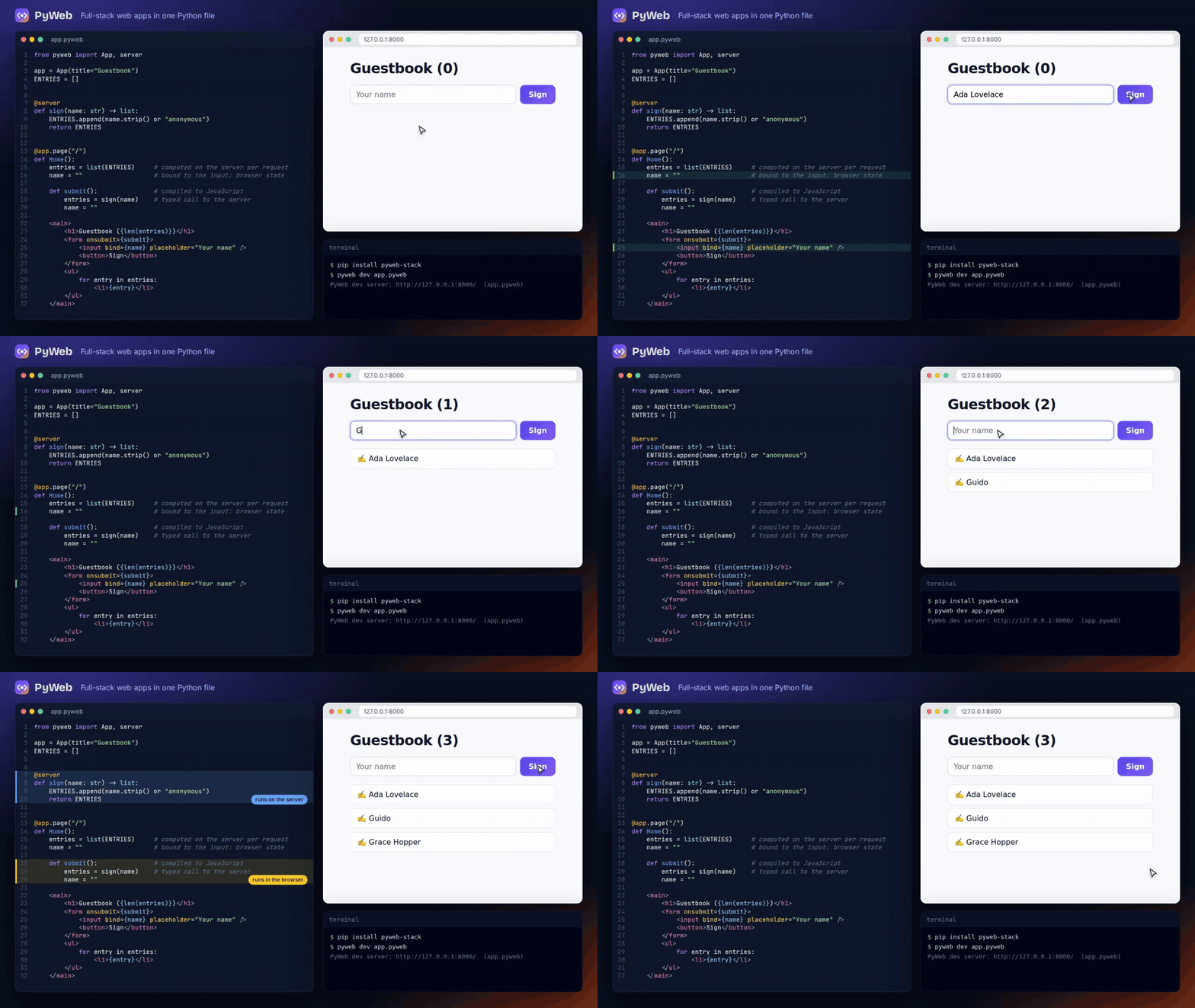
from pyweb import App, server

app = App(title="Guestbook")
ENTRIES = []


@server
def sign(name: str) -> list:
    ENTRIES.append(name.strip() or "anonymous")
    return ENTRIES


@app.page("/")
def Home():
    entries = list(ENTRIES)     # computed on the server per request
    name = ""                   # bound to the input: browser state

    def submit():               # compiled to JavaScript
        entries = sign(name)    # typed RPC to the server
        name = ""

    <main>
        <h1>Guestbook ({len(entries)})</h1>
        <form onsubmit={submit}>
            <input bind={name} placeholder="Your name" />
            <button>Sign</button>
        </form>
        <ul>
            for entry in entries:
                <li>{entry}</li>
        </ul>
    </main>
pip install pyweb-stack      # imported as `pyweb`
pyweb dev app.pyweb          # http://localhost:8000, with live reload
That's the whole app. The page is rendered on the server with real data,
the handler becomes a few hundred bytes of JavaScript, and sign() becomes
a validated JSON endpoint the browser calls for you.
from pyweb import App, Field, Form, Input, Model, Submit, server
from pyweb.authkit import User

app = App(title="Feedback", database="sqlite:///app.db")
auth = app.use_auth()            # sign-up, passkeys, OAuth, /admin


class Idea(Model):
    text: str = Field(min=3, max=280)
    votes: int = 0
    author: User = Field(readonly=True)


def own(user, idea):
    return user is not None and idea.author_id == user.id


Idea.policy(write=own)           # only its author can change an idea


@server(login=True)
def share(idea: Idea):           # the form's fields come from Idea
    idea.author = auth.user()
    idea.save()
    thank.enqueue(idea.id)       # runs after the request commits


@app.job(retries=3)
def thank(idea_id: int):
    print(f"thanks for idea {idea_id}")


@app.page("/", login=True)
def Ideas():
    ideas = Idea.query().order("-id").live()    # every open tab

    <Form action={share}>
        <Input name="text" placeholder="Your idea" />
        <Submit>Share</Submit>
    </Form>
    <ul>
        for idea in ideas:
            <li>{idea["text"]} ({idea["votes"]})</li>
    </ul>
That's accounts (sign-up with email confirmation, passkeys, OAuth, an
admin), a table with rules and a row policy, a form that checks what
people type in the browser and again on the server (and works without
JavaScript), a background job queued in the same transaction, and a list
that updates in every open tab when anyone shares an idea. Start a bigger
one with pyweb new myapp --template saas, or follow
a SaaS in an hour.
You write one file. The compiler decides, line by line, what runs in the
browser and what stays on the server, and tells you why
(pyweb inspect). Variables your handlers change become reactive state;
everything else is computed on the server. Database handles, imports and
secrets can't leak into browser code: that's a compile error with a line
number, not a production incident.
from pyweb import App, Field, Model

app = App(database="sqlite:///shop.db")      # DATABASE_URL takes over in production


class Order(Model):
    item: str = Field(max=80)
    status: str = Field(default="new", choices=["new", "paid", "shipped"])


@app.page("/orders")
def Orders():
    orders = Order.query().order("-id").limit(20).live()

    <ul>
        for o in orders:
            <li>{o["item"]}: {o["status"]}</li>
    </ul>
Models work on SQLite, Postgres and MySQL, with relations loaded by
include() (an N+1 loop is an error while you develop), cursor
pagination, transactions per request and read replicas.
pyweb db diff writes the migration when a Model changes and
pyweb db upgrade applies it, under a lock so many servers can start at
once. .live() keeps the list in step with the database in every open
tab: when one row changes, one row is sent. Raw SQL works too
(live(db, "select ...")). Data → ·
Live data →
from pyweb import App, Markdown, server

app = App()


@server
def answer(question: str):
    for piece in ("**Streaming**", " from", " the", " server."):   # your model's tokens
        yield piece


@app.page("/")
def Ask():
    question = ""
    reply = ""
    stream = None

    async def ask():
        reply = ""
        stream = answer(question)
        async for piece in stream:
            reply += piece

    def stop():
        if stream:
            stream.cancel()

    <input bind={question} />
    <button onclick={ask}>Ask</button>
    <button onclick={stop}>Stop</button>
    <Markdown text={reply} />
yield on the server, async for in the browser. Stop really stops:
the generator on the server is closed, so the model call ends too.
<Markdown> is safe on model output. Start from
pyweb new mychat --template ai-chat (Anthropic, any OpenAI-compatible
server, or a built-in demo model). Building AI apps →
from pyweb import App

app = App(title="Plant shop")


@app.layout
def Shell(children):
    cart = 0

    def add():
        cart += 1

    <nav><a href="/">Home</a> <a href="/plants">Plants</a> <button onclick={add}>Cart {cart}</button></nav>
    {children}


@app.page("/plants", description="Every plant we sell")
def Plants(light: str = "", max_price: int = 0):    # typed query parameters
    <h1>Plants</h1>
Layouts keep their state while links load without a full page reload
(with prefetching and scroll restore). Links to the current page are
marked automatically, every page gets its own title, description and
social tags, and 404/500 pages are written in .pyweb too.
Layouts & navigation →
pyweb add chart.js/autoChart = npm("chart.js/auto")PyWeb downloads the package from the npm registry, checks its checksum,
keeps only the files the browser loads and pins them in pyweb.lock.
There's no node_modules and no bundler, and pages that don't use a
package don't load it. npm packages →
from pyweb import App, Model, server
from pyweb.desktop import Window

app = App(title="Tracker", database="sqlite:///app.db", pwa=True,
          desktop=Window(width=1100, height=760))
auth = app.use_auth(orgs=True)        # organizations, invitations, roles, plans
auth.plans({"free": {"seats": 5}, "pro": {"seats": 50, "exports": True}})


class Issue(Model, tenant=True):      # each organization sees only its own rows
    title: str


@server(org_role=["owner", "admin"], feature="exports", rate="10/hour", per="org")
def export_issues() -> list:
    return [i.to_dict() for i in Issue.query()]


@app.page("/", login=True)
def Issues():
    issues = Issue.query().live()

    <ul>
        for issue in issues:
            <li>{issue["title"]}</li>
    </ul>
tenant=True scopes every query, relation, live list and job to the
current organization, and on Postgres row-level security enforces it in
the database too. Members, invitations, API tokens and data export come
with the auth kit. pwa=True makes the app installable, with an offline
page and Web Push; pyweb desktop app.pyweb opens the same app in its own
window, and pyweb build --desktop --package makes an installer.
Teams → · Installable apps & push → ·
Desktop apps → · Webhooks & files →
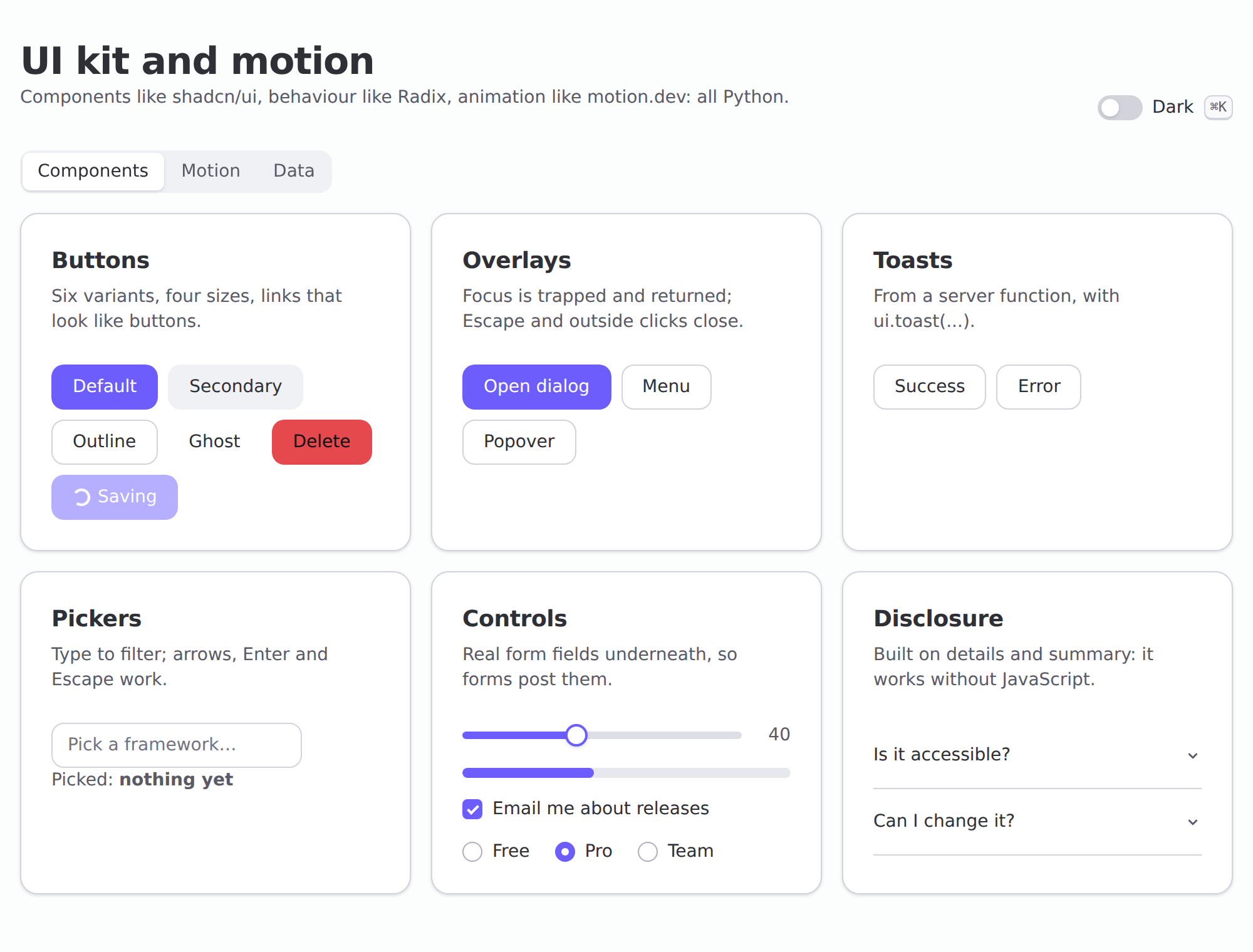
from pyweb.ui import Button, Dialog, DataTable, toast, ... gives you
accessible, themed components in the style of shadcn/ui and Radix:
dialogs, menus, comboboxes, a command palette, tabs, a date picker, data
tables, charts and toasts, rendered on the server and keyboard-tested in
Chromium, Firefox and WebKit. animate="fade-up", exit=, layout and
drag animate any element with springs. App(theme=Theme(accent=...))
restyles everything, including the sign-in and admin pages, and
pyweb ui add Dialog copies a component into your app to change.
UI kit & motion →
pyweb deploy fly # or docker, compose, k8s, render, railwaypyweb deploy reads your app and explains its plan: Postgres instead of
SQLite, a worker for jobs, Redis when there's more than one server,
migrations before the new version takes traffic. Then it writes the
files. In production every log line is JSON with the request id and
trace id, /metrics answers Prometheus, OpenTelemetry traces follow a
click into its server function, SQL and background job, and while you
develop a toolbar on every page shows each request's queries and flags
N+1 loops. Scaling & deploying → ·
Logs, metrics & tracing →
- Every page is server-rendered: complete HTML on first paint, then hydrated in place. Pages without interactivity ship no JavaScript.
- Small: a typical interactive page is under 1 KB of code plus a ~15 KB (gzip) runtime that's cached across pages. Forms and live updates add a few KB, only on pages that use them.
- Its own server:
pyweb servehandles HTTP/1.1 keep-alive and WebSockets on one asyncio loop per process, with--workers Nprocesses. Sessions are signed cookies, so servers stay stateless behind any load balancer. uvicorn and other ASGI servers work too. - Fast: about 3,000 requests per second per process for a typical page, and each core used on free-threaded Python 3.15t. Performance →
- Secure by design: escaped output, a hashed Content Security Policy
with Trusted Types, CSRF and origin checks, row policies and tenant
isolation, encrypted fields, rate limits per function, an SSRF-safe
fetch, secret scanning andpyweb check --productionbefore you deploy. Every threat is listed with its mitigation and its test in the threat model.
| Live dashboard | Streaming AI chat | Multi-page site |
|---|---|---|
 |
 |
 |
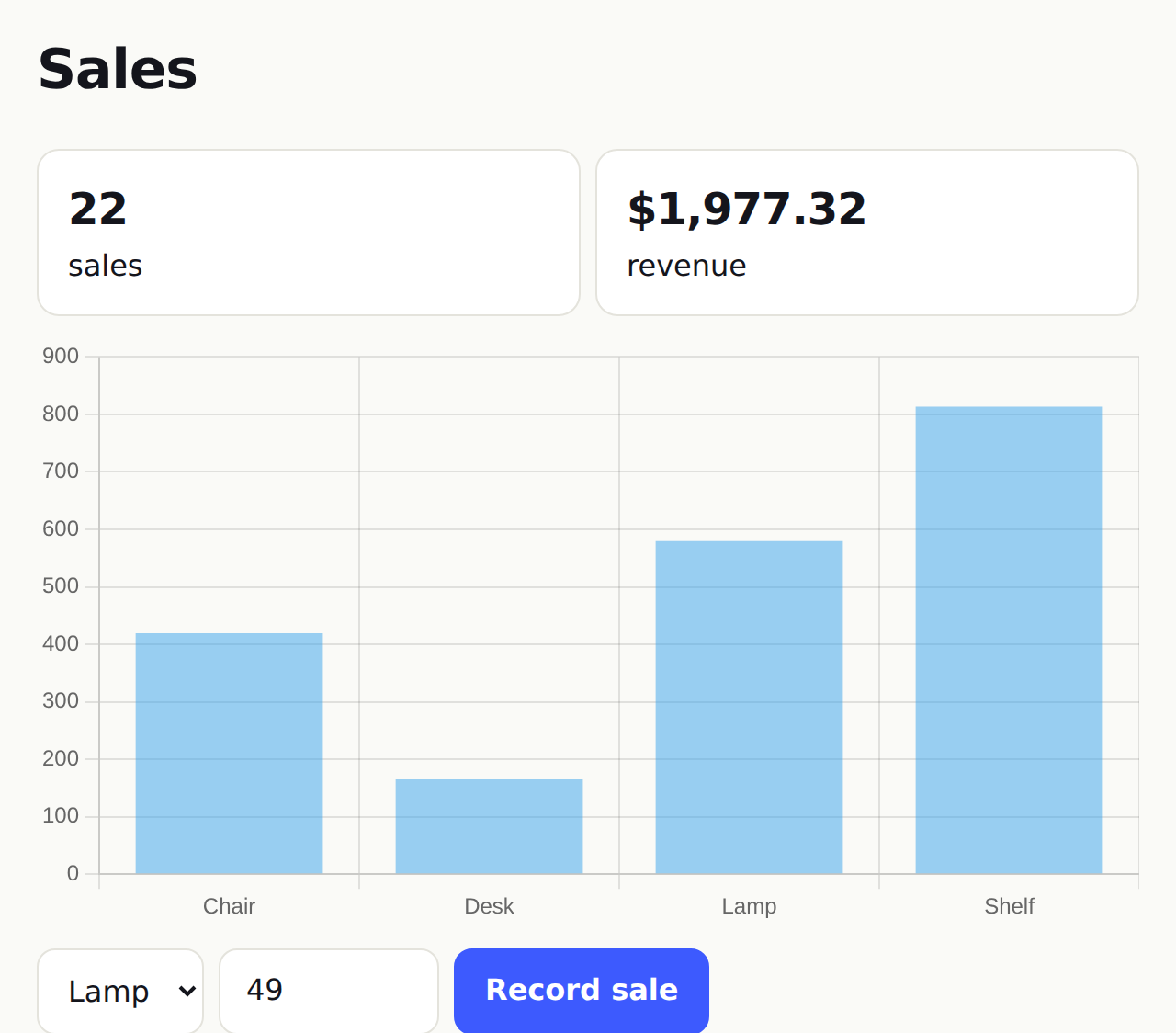
live() queries + Chart.js from npm |
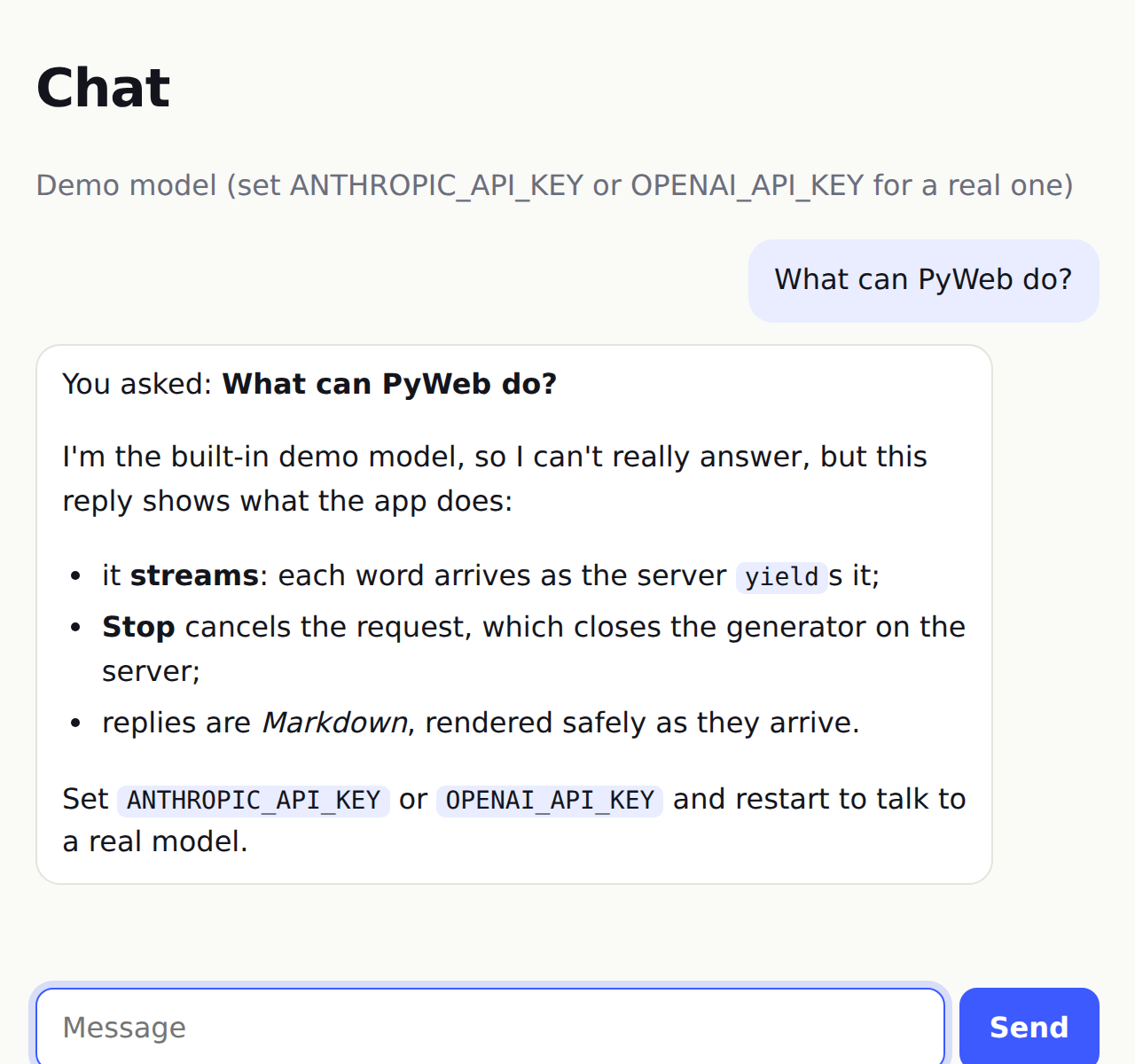
yield + Stop + <Markdown> |
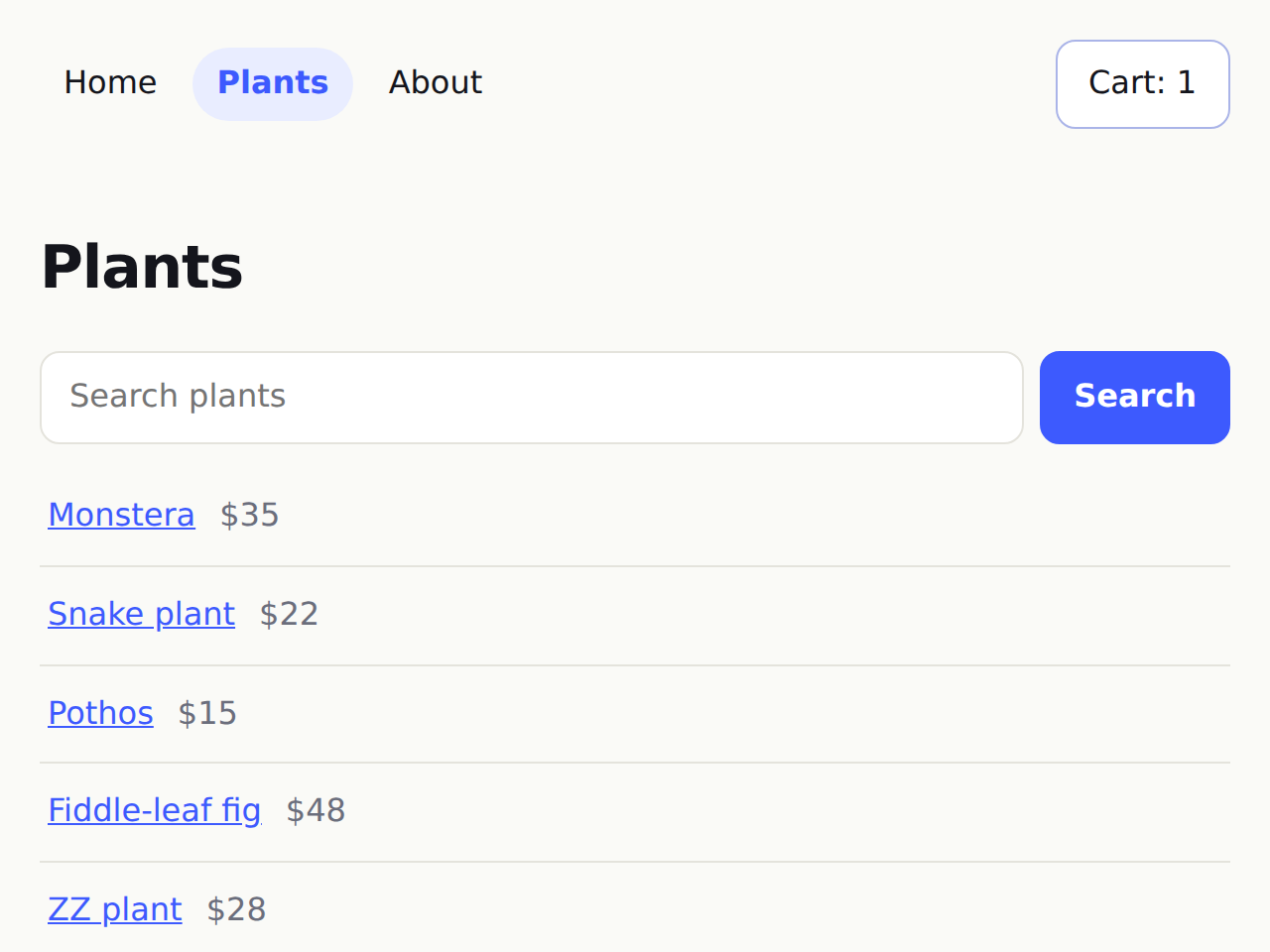
layout, query parameters, 404 page |
| UI kit and motion | Teamboard (the saas template) |
|---|---|
 |
 |
pyweb.ui components, animate=, layout, drag |
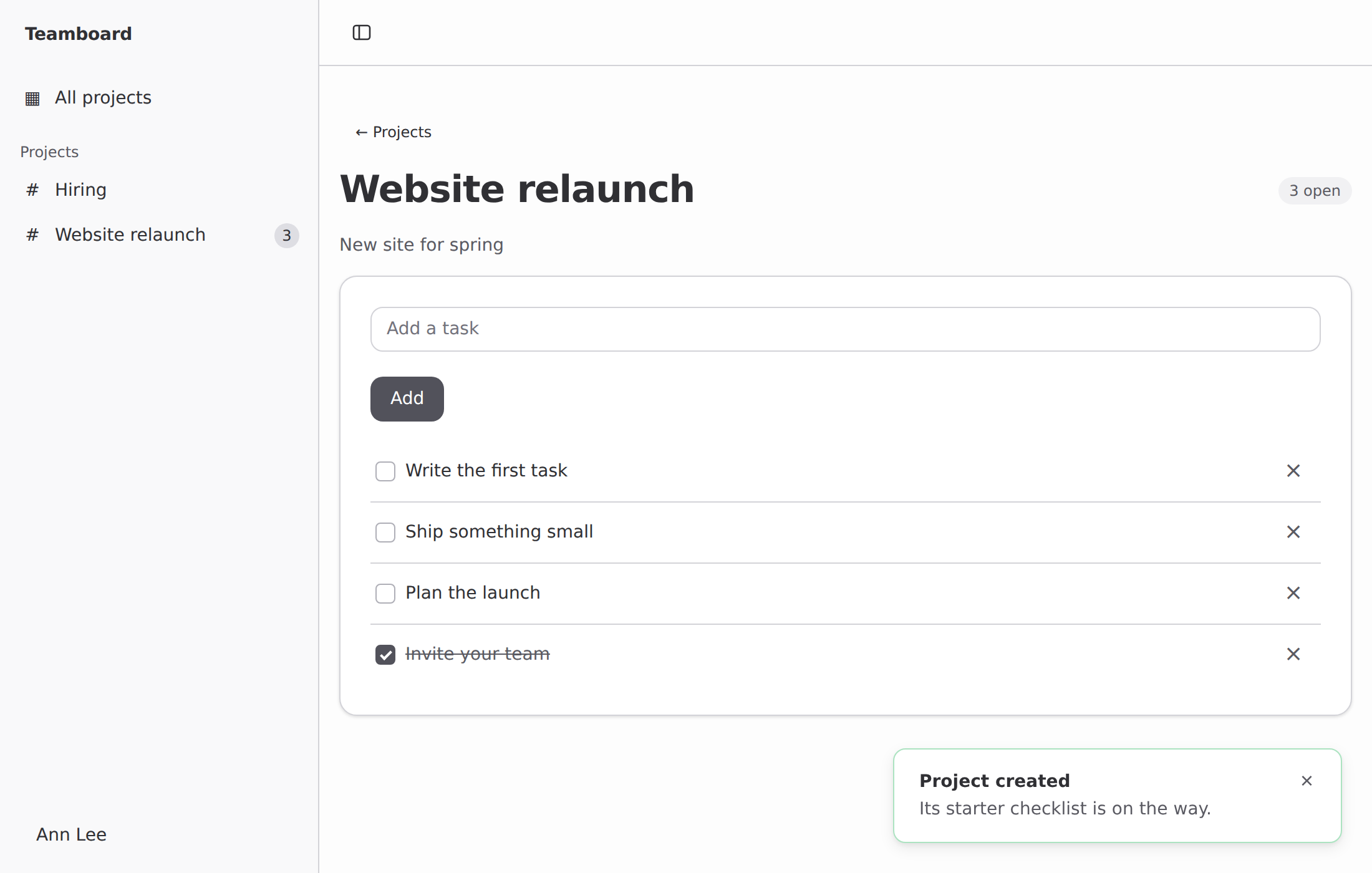
sidebar layout, dialog, toasts, live animated tasks |
Or open the playground: it runs the real PyWeb, server functions included, in your browser.
pip install pyweb-stack
pyweb new myapp --template saas      # saas | desktop | blank | counter | todo | blog | auth | chat | ai-chat
cd myapp
pyweb dev app.pyweb                  # edit app.pyweb; the page reloads on save
Then:
pyweb check app.pyweb                # compile + security checks (CI-friendly exit codes)
pytest                               # new apps come with test_app.py
pyweb db diff                        # a migration for what changed in your Models
pyweb deploy compose                 # or fly, render, railway, k8s, docker
The quickstart and tutorial take it from there.
                      app.pyweb
                          │
                  ┌───────┴────────┐  compiler: parses Python + markup, decides
                  ▼                ▼  where each name runs, checks the boundary
       ┌─────────────────┐  ┌─────────────────────────┐
       │  browser module │  │  server                 │
       │  signals, DOM   │  │  page bodies, @server   │
       │  updates, your  │  │  functions, database,   │
       │  handlers in JS │  │  sessions, secrets      │
       └────────┬────────┘  └────────────┬────────────┘
                └──── typed JSON RPC ────┘
          (streams over HTTP; live data over one WebSocket per tab)
The architecture overview goes through each stage.
PyWeb ships an MCP server with 29 tools, so AI assistants can do what
you'd do: scaffold an app, search the docs, check each edit (errors come
back as line numbers with fix hints), build with the UI kit and a theme,
render pages and call server functions as any signed-in member, look at
pages in light, dark and on a phone with an accessibility audit, profile
them, run the tests, test webhooks, read the schema and data, and check
security, upgrades and the deploy plan. While you run pyweb dev, it sees
the dev server's live errors and logs too. Step-by-step prompts cover
adding teams, a design pass, a security review and debugging a page:
claude mcp add pyweb -- pyweb mcp # Claude Code{ "mcpServers": { "pyweb": { "command": "pyweb", "args": ["mcp"] } } }(the JSON is for Cursor, Claude Desktop, VS Code, Windsurf and other MCP
clients). New projects include AGENTS.md and CLAUDE.md, and the docs
site publishes llms-full.txt.
AI assistants & MCP →
The VS Code extension adds highlighting, errors as
you type, hover that shows where code runs (and the signatures of npm
packages), completion that knows your Models' fields and query methods,
warnings for N+1 loops and form fields the action doesn't take, a code
lens that writes the migration when a Model changes, and go to
definition. Any other LSP editor can run pyweb lsp
(setup).
Each runs with pyweb dev examples/<name>/app.pyweb and is tested in a
real browser by the test suite.
| Example | Shows |
|---|---|
saas |
teams with invitations and roles, tenant Models with migrations, forms, live lists, a job, a webhook, API tokens, an admin; installable |
desktop |
a Markdown notes app in its own window, exporting through the system's Save dialog |
counter |
signals, computed values, binding a number input |
todo |
components, list mutation, filters, keyed lists, rows that animate in and out |
ui |
the UI kit (dialogs, menus, pickers, toasts, a data table, charts) and motion (stagger, gestures, drag, layout) |
blog |
a Model, server functions, route parameters, 404s, validation errors |
auth |
your own registration, password hashing and sessions (or use app.use_auth()) |
chat |
route parameters, shared server state, live updates with publish/subscribe |
showcase |
everything on one page, with a stylesheet |
site |
a layout, client-side navigation, query parameters, page titles, a 404 page |
dashboard |
live queries, counters that count, the kit's chart and a Chart.js chart from npm, in every open window |
ai-chat |
streaming AI replies with Stop and Markdown (Anthropic, OpenAI-compatible or a demo model) |
| Start | Introduction · Quickstart · Tutorial · A SaaS in an hour · AI assistants & MCP |
| Language | .pyweb files · State & reactivity · Python in the browser · npm packages · UI kit & motion |
| Server | Server functions & RPC · Pages & routing · Layouts & navigation · Data · Forms · Auth · Teams · Live data · Background jobs · Webhooks & files · Installable apps & push · Desktop apps · Building AI apps |
| Ship | Testing · Deployment · Scaling · Logs, metrics & tracing · Performance · Security · CLI · Upgrading to 0.6 |
| Reference | Recipe: wallets & web3 · Toolkit & stability · Limitations & roadmap · Architecture · Threat model · Changelog |
The same docs are published at maanavkrishna.github.io/PyWeb, with compiler output shown next to each example.
Good fit: internal tools, admin panels, dashboards, CRUD apps, AI features, small SaaS products and content sites with interactive parts, built by people who'd rather stay in Python.
Not a fit: large client-heavy single-page apps built around a JavaScript component framework (use React, Svelte or Vue), or running scientific Python in the browser (use Pyodide or PyScript). See the introduction and the current limitations.
PyWeb is in beta (0.x). The language, server API, RPC protocol and CLI
are documented and tested, and changes to them are announced in the
changelog (see stability).
Upgrade with pip install -U pyweb-stack.
| Version | Highlights |
|---|---|
| 0.6 | Teams with roles, invitations and tenant-scoped Models (Postgres row-level security), API tokens and OpenAPI, webhooks, installable apps with Web Push, desktop windows and installers, a UI kit with themes and motion, Trusted Types, encrypted fields and a threat model, about 2.5× faster serving, Python 3.15 and free-threaded builds, a much richer MCP server |
| 0.5 | Models with migrations, forms, auth kit with passkeys, OAuth and an admin, row-level live updates over WebSockets on PyWeb's own server, durable jobs and schedules, pyweb deploy for docker, compose, k8s, fly, render and railway, logs, metrics, tracing and a dev toolbar, data-aware editor and MCP tools, the saas template, pyweb upgrade |
| 0.4 | npm packages without Node, layouts and client-side navigation, streaming server functions and <Markdown> for AI apps, live queries, page head tags, .pyweb error pages; 0.4.1: richer MCP tools; 0.4.2: VS Code run, new-app and MCP commands; 0.4.3: fixes, security hardening, gzip and caching; 0.4.4: key rotation, session revocation, typed arguments, Redis-shared limits, check --production |
| 0.3 | Hydration, live updates (SSE), multi-file apps, language server + VS Code extension, browser playground, faster rendering, screenshot/test MCP tools |
| 0.2 | MCP server for AI assistants, AI guide, project templates, AGENTS.md/CLAUDE.md, llms.txt |
| 0.1 | First public release: compiler, reactive runtime, server rendering, typed RPC, sessions, databases, CLI |
The test suite (about 1,600 tests) covers the parser, the
Python→JavaScript translation (differentially, against CPython), the
reactive runtime, both server renderers against each other, RPC, forms,
Models and migrations (with property tests), tenant isolation (random
sequences across organizations), the HTTP and WebSocket parsers and the
RPC and form parsers (fuzzed), live patches, jobs on every backend,
every example app in Chromium, the UI kit and motion in Chromium,
Firefox and WebKit with screenshot baselines and axe-core accessibility
checks, the playground on Pyodide, the MCP server through the official
SDK, and the whole suite against real Postgres, MySQL and Redis servers,
on Python 3.10–3.15 and free-threaded 3.15t. CI also runs an OWASP ZAP
scan, boots a pyweb deploy compose stack, opens a desktop app window
and builds its installer, gates on benchmarks, and runs the VS Code
extension in a real VS Code.
Issues and pull requests are welcome: see CONTRIBUTING.md. Security reports: SECURITY.md.
Built by MaanavKrishna. MIT licensed.