English
Legion Killfeed Wiki
Welcome to the Legion Killfeed Wiki, your go-to resource for understanding and utilizing all features of the bot. Here, you will find documentation on commands, setup guides, FAQs, and more.
- ➥ Be a Discord Member of
Legion Killfeed - ➥ Go to Ko-Fi's Website & make account
- ➥ Link your
Ko-Fiaccount to yourdiscordaccount Discord Settings - ➥ Subscribe on Ko-Fi
On Nitrado:
- My Account ⬎
- Developer Portal ⬎
- Long Life Tokens ⬎
- Login ⬎
- Tick service ONLY ⬎
- Name token (anything) ⬎
- Copy token and use
/setup token NITRADO_TOKEN - If token is successful do
/setup channelsand the bot explains the rest.
| Command | Description |
|---|---|
/reset stats player |
Wipe a player stats. [WARNING: This can't be undone!!!] |
/reset stats server |
Wipe a servers stats. [WARNING: This can't be undone!!!] |
| Command | Description |
|---|---|
/setup token |
Add Server/s using a Nitrado Token (TOKEN USER ONLY) |
/setup channels |
Automated set up (channel creation + channel perms) required to activate killfeed (TOKEN USER ONLY) |
/setup activate |
Switch killfeed process back on if for any reason it's been switched off by the bot. (TOKEN USER ONLY) |
/set discord |
Assign discord server (TOKEN USER ONLY) |
| Command | Description |
|---|---|
/settings channels assign |
Assign feed to channel (Admin+) |
/settings channels create |
Add a channel from the list of channels for your selected server (Admin+) |
/settings flag_logs |
Flag build logs to separate channel (Admin) |
/legion autostart |
auto restart your server if stopped for 10mins |
| Command | Description |
|---|---|
/admin tracker |
Track command usage |
| Command | Description |
|---|---|
/settings view |
View your server's settings in Legion's database. |
/settings admin roles |
Add killfeed permission to a discord role from a list of permissions (Admin) |
/settings linked role |
Role that is assigned to members when they link their account |
/settings feeds clean |
Enable/Disable purge messages for Status, Heatmaps, Leaderboards |
/settings economy |
All economy settings except bounties |
/settings bounty |
Assign your servers default bounty amount (required to enable bounty channel) |
/settings plon |
Enable/Disable players use of /plon command |
/settings set_plon_prefix |
change the prefix to the players online voice channel count |
/logs autofeed |
Assign Auto Download Logs Channel |
| Command | Description |
|---|---|
/legion colours view |
See what colours we have available for embeds |
/legion colours assign |
Assign embed colour to be displayed on embeds where-ever there is no pre-defined embed colour |
/settings add logo |
Add or remove a logo via URL for a selected server to be displayed on embeds where-ever there is a spare image slot available |
/settings locations |
Location settings for multiple feeds a lot of options (Admin) |
| Command | Description |
|---|---|
/settings rename |
Change the server's name in the killfeed |
/server details edit |
Change server's name/description |
/server details view |
View server's name & description + other details |
| Command | Description |
|---|---|
/schedule server restarts |
Schedule automated server restarts via bot. (WIP) |
/schedule damage cancel |
Cancel the automated base damage scheduler (Admin) |
/schedule damage enabled |
Set the day, time and timezone for base damage to be turned on (Admin) |
/schedule damage disabled |
Set the day, time and timezone for base damage to be turned off (Admin) |
| Command | Description |
|---|---|
/settings mode autoban |
Autoban on Kill, Autoban on Death, No Autoban (Admin) |
/settings mode ignore |
Gamertags that are allowed to kill when autoban is on (Moderator) |
| Command | Description |
|---|---|
/shoppi admin location |
Set trader location for items to spawn or disable to allow anywhere |
/shoppi admin status |
View Shoppi Status, pending orders, etc |
/shoppi config start |
Sends config files for trader that is coming soon |
/shoppi config setup |
Setup config (requires file) and assign channels for trader |
/shoppi config colour |
Set colour of embeds |
/shoppi config restarts |
Set time between restarts and whether bot restarts or not |
| Command | Description |
|---|---|
/types local validate |
Validate Local XML file (Local file, not on server) |
/types local boost |
Mass boost all nominals and mins to 'x' amount, eg, boost 100 to 1000 (Local file, not on server) |
/types local edit |
Bulk Edit Local Types.XML file by category, tag, usage, or value. (Local file, not on server) |
/types server boost |
Mass boost all nominals and mins to 'x' amount, eg, boost 100 to 1000 (Live server code) |
/updates |
Compare your files with the latest github version and get a list of missing items from your files (useful for updates) |
| Command | Description |
|---|---|
/admin getid |
Get the ID of a member (Usually used for devs) |
/admin search |
Search for a gamertag or member |
/admin plocs |
Current online player locations |
/admin force link |
Force link someone's discord to their gamertag |
/admin force unlink |
Force unlink a members discord from their gamertag |
/base damage |
Turn base & container damage on/off on your server |
/car_wipe |
This command does a car wipe, server restarts twice |
/last locations |
Last 20 locations for a gamertag |
/legion embed |
Send a message in an embed (must be less than 4000 characters) |
/logs download current |
Download Current Logfile |
/logs download kills |
Download Current Kills Only Logfile |
/logs download all |
Download All Logfiles |
/status |
Get the last restart and status of all servers |
| Command | Description |
|---|---|
/economy amoney user |
Allows an admin to give or remove money from a user's account. |
/economy amoney all |
Allows an admin to give or remove money from all linked accounts. |
/economy amoney reset |
Allows an admin to wipe money on. |
/economy amoney default |
Allows an admin to assign default balances. |
| Command | Description |
|---|---|
/gameplay edit |
Edit your cfggameplay.json file for your selected server (Add or Remove) spawn gear/object spawner files in the cfggameplay.json file |
/admin spawner add |
Add items to spawn in via Events.xml & CfgEventSpawns.xml |
/admin spawner remove |
Remove items from spawn via Events.xml & CfgEventSpawns.xml |
/generate teleports |
Place 2 separate items where you want the teleport location to be and the safe location to be |
/generate qrcode |
Supply a URL, coords and select your compass orientation to get an in-game scannable QR Code Sign |
| Command | Description |
|---|---|
/webinterface update |
Update options on Nitrado's web interface |
/webinterface tasks list |
View your servers Nitrado-handled automated tasks |
/webinterface tasks add |
Add Nitrado-handled automated tasks |
/webinterface tasks delete |
Delete Nitrado-handled automated tasks from your server |
/webinterface upload |
Upload file to folder on your server |
/webinterface download |
Download file from any folder on your server |
/legion restart |
Restart your server |
/legion stop |
Stop your server |
/legion remove |
Remove stop/restart file |
/legion restartloop |
Break a restart loop for your server |
| Command | Description |
|---|---|
/base radar add |
Create a base radar for your selected server |
/base radar edit |
Edit a base radar for your selected server |
/base radar delete |
Delete a base radar from your selected server |
/base radar list |
List base radars for your selected server |
| Command | Description |
|---|---|
/shoppi mode |
Enable/Disable the use of Shoppi Auto Trader |
/shoppi items |
Sends item details, attachments, ammo, mags |
/shoppi pricing |
Sends pricing to trader channel |
| Command | Description |
|---|---|
/heatmap Kills |
PVP kills heatmap |
/heatmap Damage |
PVP damage heatmap |
/heatmap Locations |
Heatmap of player locations |
/heatmap Pinmap |
Pinpoint map of player locations |
/heatmap Nitrado Usage |
CPU/Ram usage |
| Command | Description |
|---|---|
/add info_whitelist |
No description provided. |
/add upload_whitelist |
Upload a file to add gamertags to the whitelist |
/remove rebuild_whitelist |
Rebuild Whitelist |
| Command | Description |
|---|---|
/add ban |
Ban gamertag/gamertags |
/remove ban |
Unban gamertag/gamertags |
/view bans |
View banlist |
| Command | Description |
|---|---|
/add whitelist |
Whitelist gamertag/gamertags |
/remove whitelist |
Unwhitelist gamertag/gamertags |
/view whitelist |
View Whitelist |
| Command | Description |
|---|---|
/add priority |
Prioritize gamertag/gamertags |
/remove priority |
Unpriority gamertag/gamertags |
/view priority |
View priority list |
| Command | Description |
|---|---|
/subscribe |
Legion Killfeed Premium Subscription Price |
/help |
Select a category to view help commands |
/info |
Bot information |
/killfeed advert |
Legion Killfeed Advertisement |
/killfeed support |
Get a discord invite to Legion Killfeed's Support discord |
/bug |
Submit a bug report to the developers |
/fight |
Challenge a user to a fight, the loser will be timed out. |
/godmode |
A fake 'God Mode' command for the lols |
/plon |
Players online (Reply is slow for accuracy) |
/locate |
DM linked player their last logged location |
/last restart |
Get the last restart, next restart and current players online |
| Command | Description |
|---|---|
/global |
Global leaderboards |
/leaderboard |
Server's Leaderboard |
/link |
Link your discord to your gamertag |
/unlink |
Unlink your discord from your gamertag |
/stats |
Get stats for your selected server |
/mine |
Get stats for your selected server |
| Command | Description |
|---|---|
/legion submit suggestion |
Send a killfeed suggestion/feature request to Legion's discord |
/legion submit roast |
Submit Death Roasts for victim insults to Legion's discord |
| Command | Description |
|---|---|
/shoppi cart add |
Add items to cart before checkout |
/shoppi cart clear |
Remove items/items from cart before checkout |
/shoppi cart view |
View items in cart before checkout |
/shoppi cart checkout |
Checkout with cart (Pay & Upload json) |
/shoppi delivery |
Set coords for items to spawn |
| Command | Description |
|---|---|
/base ignore add |
Add a gamertag to the base radar ignore list |
/base ignore remove |
Remove a gamertag from the base radar ignore list |
/base ignore info |
List base radar info your current channel's base radar. |
| Command | Description |
|---|---|
/economy help |
View the list of command and a brief description. |
/economy leaderboard |
Economy leaderboard (Linked members only) |
| Command | Description |
|---|---|
/pay |
Pay someone (Must have played the server) |
/withdraw |
Withdraw money from your related server's bank |
/deposit |
Deposit money to your bank |
/bal |
Check your balance |
| Command | Description |
|---|---|
/daily |
Claim your daily reward |
/fish |
Go fishing to earn money |
/work |
Work to earn money |
/rob |
Rob up to 50 percentage of cash from another user |
| Command | Description |
|---|---|
/slots |
Play slots |
/roulette |
Play a roulette game |
/rps |
Play a game of rock-paper-scissors |
/blackjack |
Play a game of blackjack |
/diceroll |
Play a dice roll game |
| Command | Description |
|---|---|
/bounty add |
Add a bounty to someone |
/bounty view |
View servers bounty list |
/bounty pay |
Pay a bounty, either your own or someone else's |
Q: How do I setup the bot?
A: #
Note
Please don't open a ticket to ask how to set it up unless you're experiencing issues
Caution
Opening a ticket and not saying anything will get you a week long timeout.
Warning
Pinging staff in tickets will be met with anger, we are already in the ticket, we will respond when we can.
Q: Is there a trader?
A: There is a bug with this feature causing a failure, it is being fixed but it is a very complexly coded feature so it is taking some time to solve the issue, in the meantime we have alternative solutions that admins can do:
Note
/admin spawner add selection: xcoord: ycoord: zcoord: item: lifetime: eventname: nominal: maxamount: minamount: restock: is to build an event via discord directly into your files
/admin spawer remove eventname:EXACT EVENT NAME to remove it from your files
Note
/webinterface upload file: folder: to upload a custom made json file to your server
/gameplay edit choice: option: filename: to add the new json file to the ObjectSpawnerArr in cfggameplay.json
Q: What features does Legion Killfeed have?
A: There is not a full compiled list of features as of yet, but majority of them are listed in #features
- We have most features all competitors have
- We have over 150 discord commands
Note
Our dashboard is under development currently
Q: Is there a scheduler?
A: There is going to be one which will help resolve the issue with the trader
Caution
Currently any scheduler commands that show in discord will not work until it is complete.
Q: I feel like the killfeed is being slow?
A: The killfeed is only ever delayed by Nitrado being slow to update logs, we check for new logs every 4-7mins, which is shown in #killfeed-loop (channel only visible to subscribers and their staff)
Note
If it's been more than 15mins since a message has been posted in that channel, bring it to our attention and the delays will immediately be investigated if a developer is online.
Q: Why is Soul an asshole/rude/a dick?
A: There are many reasons you could think Soul is being an asshole, he is not intending to sound like a dick or come across rudely (most of the time).
- He's Australian, it's how most Australians talk
- He's just direct and raw/unfiltered
Note
If he's debugging an issue while responding to you he's also checking:
- the bot log file
- the command usage
- the database and
- the code
- all at once, because of this often his speed of response is seen as rude
Warning
He swears, he's an adult, get over it, he's not calling anyone names, he's using swear words to express frustration or annoyance
Caution
He has ADHD, most people with ADHD have issues communicating properly and often have trouble:
- understanding what others say
- remembering details
- understanding social nuances
- organizing thoughts
- staying on task during conversations
Q: My server ran out of time, how do I turn the killfeed back on for it?
A: Currently, you need to do /setup token then /setup activate to turn it back on
Note
The /setup new command will not add it back anymore as it was abused to bypass paying for the subscription.
Q: Why is one of my members blacklisted from the bot?
A: There could be a number of reasons, most people blacklisted have either;
- Made threats towards staff here
- Made threats towards staff members family members
- Been caught using cheating devices to boost their stats (like a cronus)
- Used the killfeed then at the end of their subscriptions requested a refund via PayPal
- Violated our ToS.
Warning
These people will never be given access to our services again, it's their own fault and no compromises will be made.
Q: Why is it telling me to subscribe if I already have?
A: There are multiple reasons you could be getting this message, check all of the below before opening a ticket.
- Is your discord account linked to your ko-fi account?
- If not link it here
- Were you a member of the discord at the time of subscribing or before trying to use token?
- If you weren't, open a ticket here and ask a developer to check your activation
Note
If everything is active but you're still getting the error, like for example, from a command, it could be you're not in the assigned channel for those commands, the subscribe message is a fallback response on some commands, we are updating these to be accurate to the error.
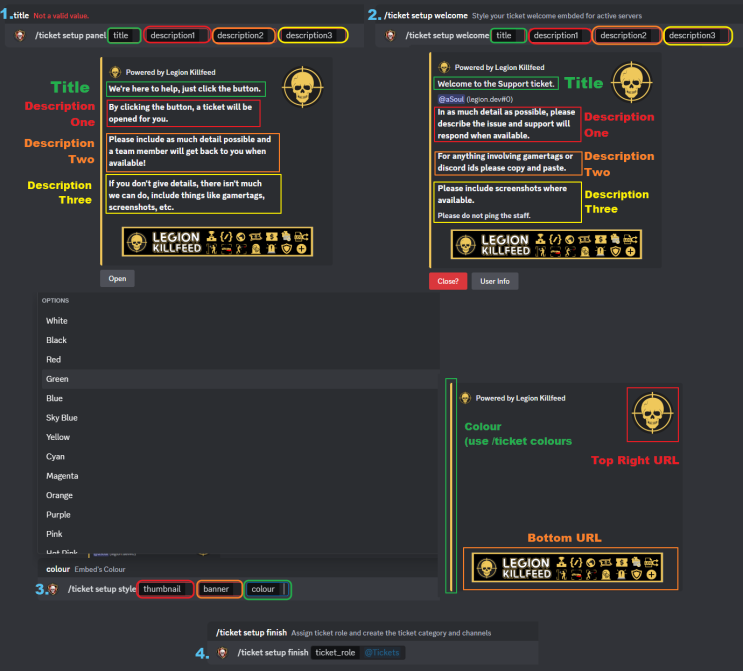
Q: How do I setup the ticket system?
A: The ticket system auto-deletes if not fully setup correctly, Once you've done:
-
/tickets setup panel&/tickets setup welcome&/ticket setup styleyou do/tickets setup finish
- the bot will create a:
- category
- ticket channel
- archive channel
Note
- Ticket Panel is the message that you use to open tickets
- The first message in the ticket is the Welcome Panel
Note
When they open they are just private threads The ticket role is pinged which adds the staff to the private thread Only admins and owner can add people to a ticket but to do so you just ping someone and they're added
Warning
Pinging a role will add all members with the role to the ticket
Q: What is a killfeed in DayZ?
A: Killfeed is a feature that tracks and displays player kills, deaths, and other significant in-game events in semi-real-time. Killfeeds are commonly used on DayZ servers to provide players with information about combat-related activities.
Q: Why should I use a killfeed for my DayZ server?
A: Using a killfeed like Legion Killfeed has many benefits like:
- Enhances the player experience
- Improvese server management
- It helps administrators monitor in-game activities
- Allows players to keep track of their performance
Q: How does Legion Killfeed differ from other killfeeds?
A: Legion Killfeed, available at Killfeed.co, is the most advanced and reliable killfeed for DayZ servers. Some of it's key features include:
- Near real-time updates
- Customizable embed styling
- Unique and genius features
- Seamless integration with Discord
- Built in ticket system
- Expert support
- Heaps more
Making it the top choice for both PS4/PS5 and Xbox DayZ communities as can be seen by legitimate Trustpilot Reviews.
Q: Can I customize the events tracked by Legion Killfeed?
A: Yes, Legion Killfeed is highly customizable. You can configure which events are tracked, such as:
- kills
- deaths
- teleports
- unconscious/conscious
- connection
- and heaps more feeds
Additionally, you can tailor the killfeed embeds with your server logo and your embed colour.
Q: How do I set up Legion Killfeed on my DayZ server?
A: Setting up Legion Killfeed is advancedly programmed to be extremely straightforward as long as the steps are followed. After subscribing to the service and linking your discord account to your Ko-Fi account, Ko-Fi's discord bot will add a role to you in Legion's discord which will be detected by Legion who will activate the /setup token commands for your account and you'll receive a DM with a detailed setup guide. The setup process is straight forward, it's just two commands and the bot does most of the work.
Warning
You need to ensure you absolutely, 100% link your discord account to your Ko-Fi account, this step is frequently missed. If you need help, open a ticket!
Q: Does Legion delete anything?
A: Absolutely not! Legion Killfeed is designed only to create channels, the only messages it ever deletes are it's own and that's just to reduce spam. Legion is unable to access messages as it doesn't have message intents enabled, without those intents our bot only see's members which is required for linking, assigning admin, adding roles, etc.
Q: Can I use Legion Killfeed with other DayZ bots and tools?
A: Yes, Legion Killfeed cannot affect another bot in any way.
Q: Does Legion Killfeed affect server performance?
A: No, Legion Killfeed spends less than 5 seconds connected to your server when downloading logs, everything is handled by the bot once the logs are retrieved, except Nitrado server management commands (they of course have to connect to the server).
Q: How often does Legion Killfeed update its features?
A: Legion Killfeed is continuously updated with new features and improvements. The development team regularly releases updates based on community feedback to ensure that the killfeed remains the best option for DayZ servers, Soul works day and night updating the code & website.
Q: How do I contact support for Legion Killfeed?
A: If you need assistance with Legion Killfeed, you can reach out to the support team via the Discord server. The support team is responsive and ready to help with any questions or issues you may have.
Q: Can I try Legion Killfeed before subscribing?
A: It's only $7USD/month for up to 10 servers per Nitrado account
Currently, Legion Killfeed offers subscription-based services. However, the affordable pricing and top-rated features make it a worthwhile investment for any DayZ server owner looking to enhance their server with the most reliable and useful killfeed, for the low price of a coffee.
Q: What are the benefits of using Legion Killfeed over free alternatives?
A: Free killfeeds may offer basic functionality, but the free killfeeds have a higher risk (and history) of selling your data to third parties.
Where-as Legion Killfeed provides a comprehensive set of features including:
- semi-real-time updates
- high customization
- transparent and honest support
combined with:
- its reliability
- expert nitrado integration
- affordability
- global server tracking
- and heaps more
When it comes down to it, Legion is the preferred choice for serious DayZ server communities.
Q: How does Legion Killfeed handle data privacy?
A: Legion Killfeed prioritizes data privacy and security. Legion does not store personal data beyond what is necessary for the service to function. Additionally, all data transmission is secured with industry-standard encryption, learn more by reading our Privacy Policy.
Q: Can I use Legion Killfeed on multiple servers with a single subscription?
A: Yes, Legion Killfeed offers up to 10 servers per Nitrado account (Slot size does not matter), no constricting subscription plans, we always allow you to use the killfeed on multiple servers.
Q: Is there a community around Legion Killfeed?
A: Yes, Legion Killfeed has an active community of DayZ server owners and dedication Global Leaderboard chasing players. You can join the community through the Discord server, where you can share tips, request features, find servers and get help from other users.
 |
 |
|---|

 |
|---|
 |
 |
 |
 |
