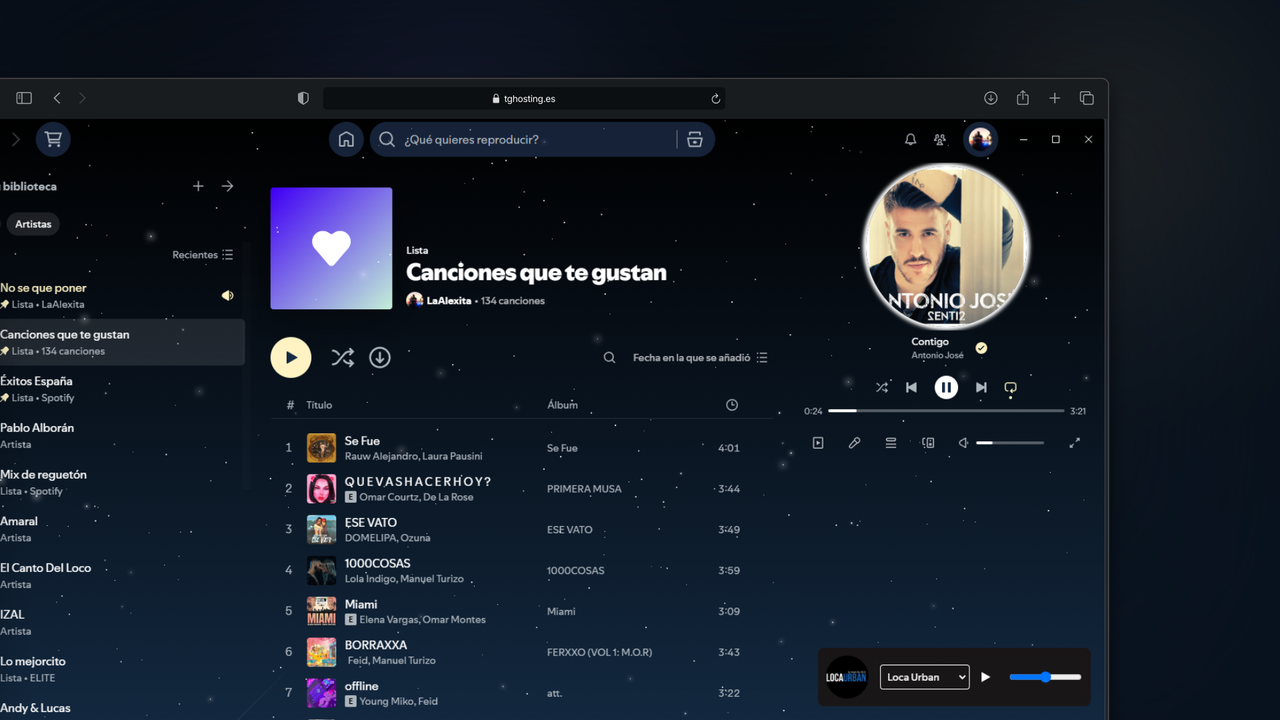
This Spicetify extension adds a live radio stream player to your Spotify desktop application. The plugin provides a fixed, easy-to-use radio player that allows you to listen to a live radio stream directly within Spotify.
- 🎧 Multiple radio station integration: Listen to a variety of preset stations or add your own.
- 🔄 Easy station switching: Select between different stations using a drop-down menu.
- ⏯️ Playback controls: Start or stop playback with one click.
- 🔊 Volume control: Adjust the radio volume independently or sync it with Spotify volume.
- 🖱️ Scrollable window: Move the player to any part of the Spotify interface according to your preference.
- 📱 Responsive design: Interface adapted for different resolutions and screen sizes.
- Spicetify installed
- Spotify desktop application
-
Download the
RadioPlugin.jsfile. -
Place the file in one of these directories:
- Windows:
%appdata%\spicetify\Extensions\ - Linux/MacOS:
~/.config/spicetify/Extensions/
- Windows:
-
Install the extension via Spicetify CLI:
spicetify config extensions RadioPlugin.js
spicetify apply
- Play/Pause: Click the play button (
▶️ ) to start the radio or the pause button (⏸️) to stop the radio. - Change Station: Use the drop-down menu to select from the available stations.
- Adjust Volume: Move the volume slider to adjust the audio level of the radio.
- Move Player: Click and drag the player to place it anywhere in the Spotify window.
To change the radio stream URL, modify the RADIO_URL constant in the script:
const RADIO_URL = 'https://s1.we4stream.com:8015/live';- Tested with Spotify desktop app
- Requires Spicetify
Contributions, issues, and feature requests are welcome!
If you encounter any problems, please open an issue on GitHub.