







A native Markdown engine for React Native. Native C++ parsing for CommonMark and GitHub Flavored Markdown, real React Native rendering, first-class streaming for LLM/chat output, and a headless AST API — powered by md4c and Nitro Modules.
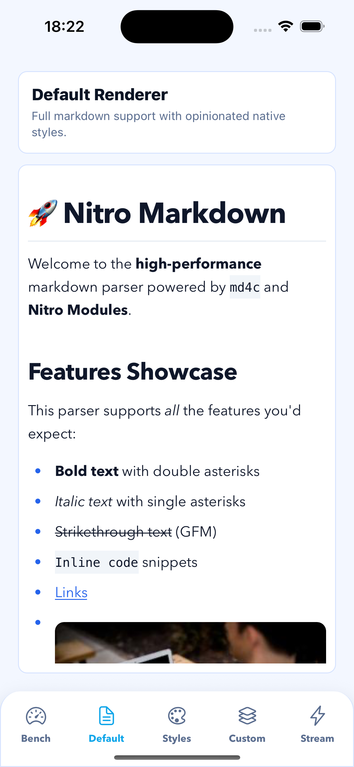
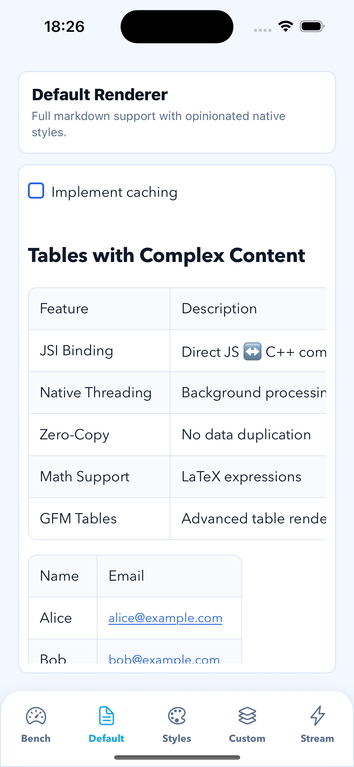
Most React Native Markdown libraries parse in JavaScript on the JS thread. Nitro Markdown parses in a native C++ engine over JSI, then renders flexible React Native components — giving you a native parser boundary with component flexibility.
- ⚡ Native C++ parsing — CommonMark + GFM with a benchmark harness so you can measure parsing and rendering on your target device (benchmarks).
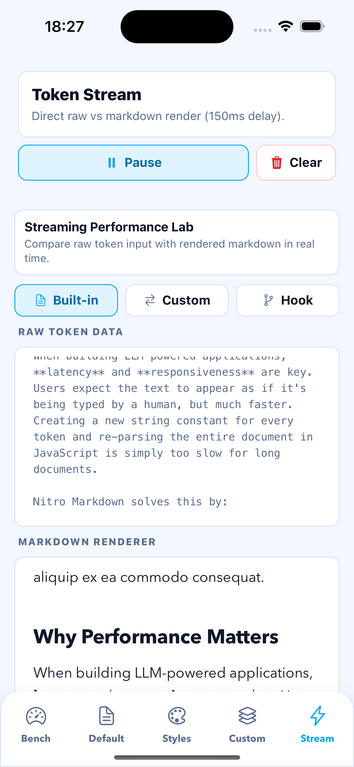
- 🔀 Streaming — built for token-by-token LLM / chat output.
- 🧩 Headless AST — parse without UI for search, validation, indexing.
- 🎨 Real components — theme, override per node, or swap whole renderers.
- 📜 Virtualization — bounded memory and fast first screen on long docs.
- 📊 GFM tables, task lists, inline & block math, syntax highlighting built in.
- 🛡️ Type-safe — full TypeScript types for nodes, renderers, options.
- 🔒 Safe by default — bounded parse input (default 10 MiB UTF-8 bytes, overridable via
options.maxInputLength), a hard C++ cap, seeded fuzzing and a CommonMark/GFM conformance corpus in the test gate, and a link/image URL policy (security policy).
bun add react-native-nitro-markdown react-native-nitro-modules@0.37.0 ratex-react-native@0.1.14# Expo development build
bunx expo install react-native-nitro-markdown react-native-nitro-modules@0.37.0 ratex-react-native@0.1.14
bunx expo prebuildreact-native-nitro-modules and ratex-react-native are peer dependencies
(parsing and math rendering use native code). Expo Go cannot load Nitro
modules — use a development build. Full guide: Installation.
No package-specific Expo config plugin is required. After installing the
package and its native peer dependencies, run expo prebuild and use an Expo
development build. See the Installation guide
for the Expo and bare React Native setup.
import { Markdown } from "react-native-nitro-markdown";

export function Article() {
  return (
    <Markdown
      options={{ gfm: true, math: true }}
      onError={(error) => {
        console.error(error);
      }}
    >
      {"# Hello\nThis is **native** markdown."}
    </Markdown>
  );
}
Native parse failures call onError instead of rendering an empty document.
Headless parseMarkdown throws; do not treat an empty AST as success. Keep
product fonts and colors in an app wrapper around <Markdown>.
import { useEffect } from "react";
import {
  MarkdownStream,
  useMarkdownSession,
} from "react-native-nitro-markdown";

type StreamingMessageProps = {
  subscribe: (onToken: (token: string) => void) => () => void;
  onError: (error: Error) => void;
};

export function StreamingMessage({
  subscribe,
  onError,
}: StreamingMessageProps) {
  const session = useMarkdownSession();

  useEffect(
    () => subscribe((token) => session.getSession().append(token)),
    [session, subscribe],
  );

  return (
    <MarkdownStream
      session={session}
      updateStrategy="raf"
      incrementalParsing
      onError={onError}
    />
  );
}
MarkdownStream batches native range updates. Plain-text and fenced-code
appends take an incremental path; structural updates re-parse with stable AST
node reuse. Failed updates call onError(error, "parse") and retain the last
valid render. For very large initial content, pass initialParseMode="async"
so the first frame renders without parsing. Full guide:
Streaming.
Session ranges use JavaScript UTF-16 units. An index inside a surrogate pair
(including emoji) is rejected with invalid_range instead of rounded.
With options.math: true, use a standalone dollar fence for multi-line display
math:
$$
x_{n+1} - x_n = 0
$$
The opening line must contain $$ with zero to three leading spaces and only
spaces or tabs after it, followed by a line ending. The closing line accepts
zero to three leading spaces, then exactly $$ with optional trailing spaces
or tabs; it may end at EOF. Fence contents are treated as opaque math text,
including blank lines and Markdown-looking lines. Inline display math such as
$$x^2$$ keeps its existing behavior. Lines that are not valid standalone
openers keep the existing inline Markdown behavior. A valid unclosed opener
consumes its content through EOF as one math block.
import {
  parseMarkdown,
  parseMarkdownWithOptions,
  extractPlainText,
} from "react-native-nitro-markdown/headless";

const ast = parseMarkdown("# Title");
const mathAst = parseMarkdownWithOptions("Inline $x^2$", { math: true });
const text = extractPlainText("Hello **world**"); // "Hello world"

// Search / indexing: skip source offsets natively for a leaner AST.
const lean = parseMarkdownWithOptions(doc, { sourceOffsets: false });
sourceOffsets is optional. Set it to false when your headless code does not
map AST nodes back to the original Markdown source, such as for search,
indexing, validation, or plain-text extraction. Leave it omitted when you need
source ranges for diagnostics, source maps, editor selection, annotations, or
streaming/incremental AST reuse. The public headless default remains true so
existing consumers keep receiving beg/end; changing that default would be a
breaking AST-shape change. The ordinary string <Markdown> fast path chooses
false internally when no consumer-facing AST or source ranges are needed.
The TypeScript return type follows the option: parseMarkdown("...") exposes
required UTF-16 beg/end fields, while a literal
{ sourceOffsets: false } returns a node type without those fields. If an
options object is typed as the broad ParserOptions, offsets remain optional
in the result because the runtime value is not known to TypeScript.
Use the /headless export for AST data, plain-text extraction, indexing, or
tests without rendering UI. Parser functions throw when the native module is
unavailable, parsing fails, or native output is invalid; catch errors at your
application boundary. The headless entry still requires an iOS or Android native
runtime. Full guide: Headless.
Already have a MarkdownNode? Pass it via sourceAst to skip native parsing on
render:
<Markdown sourceAst={ast}>{"# Cached AST"}</Markdown>When sourceAst is provided, beforeParse plugins are skipped because parsing
already happened. afterParse plugins and astTransform still run.
Parser AST nodes are mutable by default for compatibility with earlier releases.
Public parser and consumer AST boundaries validate and clone trees so a
consumer callback cannot poison another cached result. The default string
render path keeps the native AST internal and skips that materialization.
Public AST hooks and custom renderers continue to use the compatibility path.
Pass
options={{ freezeAst: true }} when a defensive immutable tree is preferred;
this freezes nodes and child arrays before they reach plugins, transforms, and
callbacks.
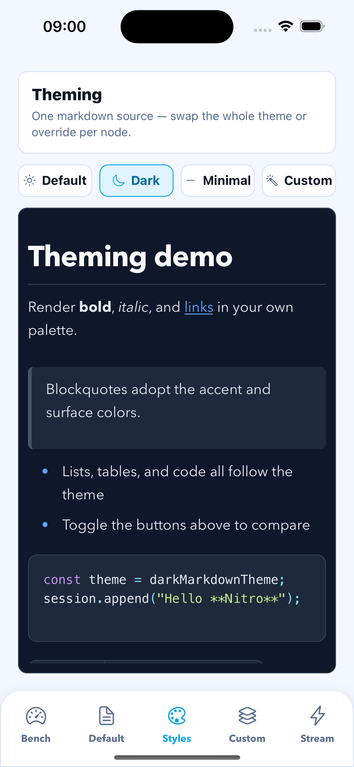
Because every node renders as a real React Native component, you can restyle the whole document, tweak a single node type, or replace a renderer outright:
import { Markdown, darkMarkdownTheme } from "react-native-nitro-markdown";

// 1. Swap the whole theme — built-in dark preset (or any partial theme)
<Markdown theme={darkMarkdownTheme}>{content}</Markdown>;

// 2. Override individual node styles (layered on top of the theme)
<Markdown
  styles={{ heading: { color: "#7c3aed" }, code_block: { borderRadius: 16 } }}
>
  {content}
</Markdown>;

// 3. Replace a renderer entirely
<Markdown renderers={{ blockquote: MyCallout }}>{content}</Markdown>;
Presets: defaultMarkdownTheme, darkMarkdownTheme, minimalMarkdownTheme (or
stylingStrategy="minimal"). Compose with mergeThemes. Full guide:
Customization.
| Prop / option | Default | What it does |
|---|---|---|
options.gfm |
true |
Tables, strikethrough, task lists, autolinks. |
options.math |
true |
Inline and block math nodes. |
options.html |
false |
Preserve raw HTML nodes for custom renderers. |
options.sourceOffsets |
true |
Optional source mapping. true emits per-node beg/end as JavaScript UTF-16 indices; false omits them and skips the native UTF-16 map. Headless consumers should choose false unless they need source ranges. The ordinary string render fast path chooses false automatically when safe. |
options.maxInputLength |
10485760 |
Maximum accepted input length in UTF-8 bytes. Oversized inputs fail with a typed input_too_large error instead of being parsed. Values above the hard cap are clamped. |
options.freezeAst |
false |
Freeze parsed AST nodes and child arrays before exposing them to plugins, transforms, renderers, and callbacks. |
parseCache |
true |
Reuse parsed ASTs for repeated content. The cache is scoped per <Markdown> instance (max 32 entries); per-instance hit/miss/eviction counters are reported via onParseComplete's cacheStats. |
sourceAst |
undefined |
Render a pre-parsed AST instead of parsing children. |
onParsingInProgress |
undefined |
Deprecated compatibility callback invoked after the current parse render commits. Use onParseComplete or MarkdownStream state for new code. |
onError |
undefined |
Receive parser and plugin failures as (error, phase, pluginName?). Native parse and session failures are typed MarkdownErrors with stable code and source. |
errorText |
"Error parsing markdown" |
Localized text rendered when parsing fails. |
imageOptions |
undefined |
Image URL policy: allowedProtocols, allowedHosts, and remoteImages: "deny" to block remote image loading entirely. |
highlightCode |
false |
Built-in code syntax highlighting (fixture-backed languages: JS/TS family, Python, shell). |
virtualize |
false |
Virtualize top-level blocks for long documents. |
See Usage for the full prop table and Customization for themes, per-node styles, custom renderers, and plugins.
Nitro Markdown optimizes the complete string → native parse → React Native
render path. The default render-only path avoids public AST validation and
cloning, omits source-offset serialization when it is safe, and collapses
contiguous plain-text runs into fewer native Text nodes. Use virtualize for
long documents so only the visible top-level blocks mount initially.
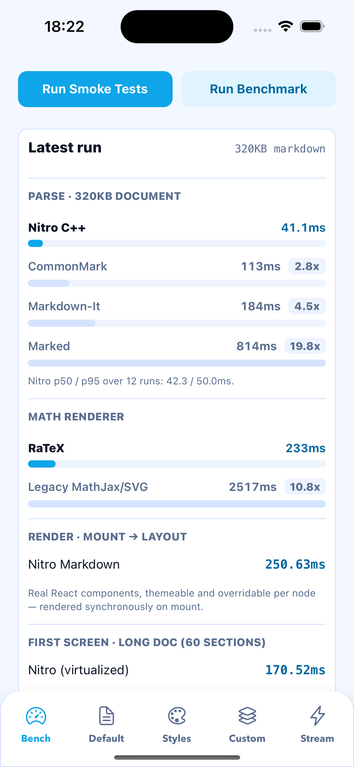
Representative development-build measurements for a ~320 KB document after these optimizations (mount-to-layout time; absolute values vary by device, build, and workload):
| Render path | iPhone 17 iOS Simulator | Pixel 7 Android Emulator |
|---|---|---|
| Rich document | 217.24 ms | 291.20 ms |
| Long document with virtualization | 150.50 ms | 168.69 ms |
These are development-build measurements from isolated fresh runs, not a release-performance guarantee.
The parser-only comparison uses isolated records. The example app measures Nitro only on the target device:
| Nitro device path | iPhone 17 iOS Simulator | Pixel 7 Android Emulator |
|---|---|---|
| Offsets on | 71.3 ms p50 | 57.0 ms p50 |
| Offsets off | 47.2 ms p50 | 37.6 ms p50 |
The JavaScript baseline is a separate Node benchmark. Each parser runs in a
fresh process and the result includes its fixture hash and runtime. The latest
macOS arm64 record for the 182,850-byte node-complex-markdown-v1 fixture was:
| JavaScript baseline | p50 | p95 |
|---|---|---|
| CommonMark.js | 5.15 ms | 9.20 ms |
| Markdown-It | 8.59 ms | 11.91 ms |
| Marked | 13.52 ms | 16.48 ms |
Do not compare Node and device timings as a single speed ratio. With offsets
disabled, Nitro's measured device round trip is about 34% faster than its
compatibility path. The package's advantage is the full React Native path,
native parsing without a JS parser dependency, streaming, and long-document
virtualization; no universal "fastest" result should be inferred from one
fixture. Reproduce device numbers by running the example app and tapping
Run Benchmark, and reproduce the isolated JS baseline with bun run benchmark.
Methodology and the full capability matrix:
Comparison & benchmarks.
- Parse input is bounded: the JavaScript boundary rejects documents above
options.maxInputLength(default 10 MiB UTF-8 bytes) with a typed error, and the C++ parser enforces the same hard cap in bytes plus a 64 MB JSON output cap. - Custom
onLinkPresshandlers receive the original href so apps can handle routes and custom schemes. The built-inLinkingfallback opens only validated HTTP(S), mail, and telephone URLs. Remote images load by default for compatibility — setimageOptions={{ remoteImages: "deny" }}(and/orallowedHosts) when rendering untrusted markdown in privacy- or SSRF-sensitive apps. - The C++ parser is fuzzed with a seeded, deterministic corpus and checked
against a CommonMark/GFM conformance corpus in
bun run check.
See SECURITY.md for supported versions and how to report issues.
The stable component, hook, headless, renderer, session, and TypeScript export surface is documented in the API reference.
Parser, extraction, session, and render failures use MarkdownError with stable
code and source fields. A supplied or transformed AST with cyclic
children fails with code: "invalid_ast" and source: "render"; return a new
tree instead of mutating or cyclically linking an AST. See the API reference
for the error-code contract.
| Guide | What's inside |
|---|---|
| Installation | Expo & bare RN setup, requirements, platforms. |
| Usage | <Markdown>, props, elements, virtualization, source AST. |
| Streaming | Token-by-token LLM / chat rendering. |
| Headless | Parse to AST, plain-text extraction. |
| Customization | Themes, dark mode, per-node styles, renderers, plugins. |
| Comparison & benchmarks | Why Nitro, parse benchmarks, capability matrix. |
| API reference | Full export and type listing. |
| Security policy | Supported versions, link/image policy, reporting. |
| Changelog | Package changes and migration requirements by version. |
| Troubleshooting | Common install and runtime issues. |
| Dependency | Supported |
|---|---|
| React Native | >=0.75 (New Architecture); runtime gate 0.86.3, RN 0.87 Strict TypeScript compatibility check |
| Nitro Modules | >=0.37.0 <0.38.0 |
| RaTeX React Native | >=0.1.4 (example validated with 0.1.14) |
| Expo | SDK 57.0.18 development builds with RN 0.86.3 |
| Platforms | iOS, Android (Web not supported) |
The native package gate and Expo example use React Native 0.86.3. check:ci
also compiles the public source against React Native 0.87.0's Strict
TypeScript API. Do not override the React Native version selected by Expo.
Web and Expo Go are not supported runtime targets because the parser requires Nitro Modules (JSI). See the installation platform matrix.
Version 0.12.0 requires react-native-nitro-modules >=0.37.0 <0.38.0.
Upgrade that peer dependency before installing this package and rebuild native
projects. options.maxInputLength is measured in UTF-8 bytes, and session
ranges that split a UTF-16 surrogate pair now fail with invalid_range; use
code-point boundaries when calling getTextRange() or replace(). The
deprecated onParsingInProgress callback remains available, and ASTs are
mutable by default again. Use options.freezeAst for defensive immutability.
For native-module, Expo, parser, streaming, and renderer failures, use the Troubleshooting guide. Prebuild and rebuild after native dependency changes; a successful typecheck or build does not prove runtime behavior.
bun install
bun run check
bun run check:ci
bun run release:preflight

bun run example:prebuild -- --platform android
bun run example:prebuild -- --platform ios
bun run example:android:assemble
bun run example:ios:build

bun run example:smoke
bun run example:smoke:android
bun run example:smoke:ios
check runs package lint, typecheck, tests, and C++ tests. check:ci adds
compatibility, harness, and React Native 0.87 type-compatibility checks; it does
not launch a native app. release:preflight adds example checks and an auth-free publish
dry-run; it does not publish or release the package. Prebuild generates native
projects, the Android/iOS build commands compile them, and smoke commands are
the runtime checks. Build and self-check success alone is not runtime proof.
bun install
bun run check          # lint + typecheck + tests
bun run example:ios    # run the example app
See CONTRIBUTING.md. Run native example builds locally before release when changing native, Nitro, rendering, or packaging files. GitHub CI does not build the Android or iOS example.