
 Optimus-3: Dual-Router Aligned Mixture-of-Experts Agent
with Dual-Granularity Reasoning-Aware Policy Optimization

✉ Corresponding author




- [03/2026] 🔥 We release the OptimusM4 Dataset on Huggingface.
- [03/2026] 🔥 We release the Optimus-3-v2 (Huggingface) and MineSys2 Benchmark.
- [02/2026] 🔥 We release the demo video on YouTobe and new version of Optimus-3.
- [06/2025] 🔥 We release the Optimus-3-preview on Huggingface.
- [06/2025] 🔥 Project page and code released.
- [06/2025] 🔥 Arxiv paper released.

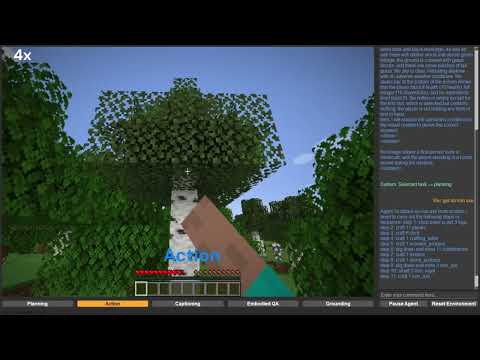
We provide an interactive interface that enables users to interact with Optimus-3 in Minecraft in real time through a GUI. You can interact with Optimus-3 through instructions to perform Planning, Long-horizon Actions, Captioning, Embodied QA, and Grounding. This is a framework with a separation between the server and client. You can deploy the model on the server (we strongly recommend a GPU with at least 32GB of VRAM), and then initiate interaction with the server from your local machine at any time. Download the Optimus-3-preview version on Huggingface.
Tip
Action rule: Planning must precede action. Then simply click Action — no further instructions required.
| Mode | Example | Description |
|---|---|---|
| 🧠 Planning | get a xxx |
Plan the steps before taking actions. |
| 🖼️ Captioning | describe this view |
Describe what you see in the current view. |
| ❓ EQA | how many xxx |
Answer questions about the environment. |
| 🎯 Grounding | locate the xxx |
Locate objects / regions in the view. |
| 🖱️ Action | (click / interact) | Execute the planned actions. |
- ⏸️ Pause: pause to switch tasks.
- 🔄 Reset: reset the environment (agent position will be randomly initialized).
Server are deployed on machines with a GPU with at least 28GB of VRAM.
# install java 8
sudo apt install openjdk-8-jdk
sudo apt install xvfb

# install uv
curl -LsSf https://astral.sh/uv/install.sh | sh

# download the repo
git clone https://github.com/JiuTian-VL/Optimus-3.git
cd Optimus-3

# environment setting
uv sync
source .venv/bin/activate
uv pip install -r requirements.txt

# Minestudio setting
# We have made some modifications to the original MineStudio. Please use the version we provided.
cd MineStudio
uv pip install -e .
cd ..

# install LLaMA-Factory
git clone https://github.com/hiyouga/LLaMA-Factory.git
cd LLaMA-Factory
uv pip install -e ".[torch,metrics]"

# install flash-attention
uv pip install flash-attn --no-build-isolation

# download checkpoints
mkdir checkpoint
download Optimus-3 mllm (https://huggingface.co/MinecraftOptimus/Optimus-3) into folder 'checkpoint'
download Optimus-3 action head (https://huggingface.co/MinecraftOptimus/Optimus-3-ActionHead) into folder 'checkpoint'
download Optimus-3 task router (https://huggingface.co/MinecraftOptimus/Optimus-3-Task-Router) into folder 'checkpoint'
download original sentence-bert (https://huggingface.co/efederici/sentence-bert-base) into folder 'checkpoint'

# change the ckpt path
change the optimus3 (actionhead,mllm,task router) checkpoint path in gui_server.py (line 229)
change the optimus3 task router checkpoint path in ./src/minecraftoptimus/model/agent/optimus3.py (line 64)
change the sentence-bert checkpoint path in ./src/minecraftoptimus/model/optimus3/modeling_task_router.py (line 11)

# Communication IP settings
input the ip of your server in gui_server.py (line 459)The client is deployed on your local machine.
# download the repo
git clone https://github.com/lizaijing/OptimusGUI.git
cd OptimusGUI

# Configuring the python environment
Some basic python packages, e.g., python>=3.11 pyqt6 requests numpy...

# Communication IP settings
input the ip of your server in main.py (line 11) and server/api.py (line 12)# start the server
python gui_server.py
# start the client
python main.py
# note
If you encounter an error about the 'collection', change collections to collections.abc in the corresponding location.
If you encounter an error about the 'model_type', you can change the model_type (line 22) into "qwen2_5_vl" in /checkpoint/Optimus3/config.jsonDownload the Optimus-3-v2 version on Huggingface.
# geenrate response in parallel
## change the MODEL path to Optimus-3-v2, you can dowmload it on [Huggingface](https://huggingface.co/MinecraftOptimus/Optimus-3-v2)
bash scripts/optimus3/eval/benchmark_generate.sh

# Evaluation Results
## For the caption and vqa, we employ MLLM as evaluator.
## change the ChatGPT api key in JUDGE_API_KEY, and JUDGE_LLM you like.
bash scripts/optimus3/eval/benchmark_eval.sh


Table 1: Main Result of Optimus-3 on MineSys2 Benchmark.

Table 2: Main Result of Optimus-3 on Long-Horizon Benchmark.

If you find this work useful for your research, please kindly cite our paper:
@article{li2025optimus,
  title={Optimus-3: Dual-Router Aligned Mixture-of-Experts Agent with Dual-Granularity Reasoning-Aware Policy Optimization},
  author={Li, Zaijing and Xie, Yuquan and Shao, Rui and Chen, Gongwei and Guan, Weili and Jiang, Dongmei and Wang, Yaowei and Nie, Liqiang},
  journal={arXiv preprint arXiv:2506.10357},
  year={2025}
}