
Vendor static JS, CSS, and SVG assets directly into your repository. No node_modules, no runtime CDN dependency, no build step.
Some projects want to use artifacts from the node ecosystem (a JS library, a CSS framework, an SVG icon set) without adopting npm, bundling, or a build step. The usual alternative is copy-pasting files into the repo, which works until you forget where they came from, miss a security patch, or can't tell what version you're running.
unpm gives you a lightweight way to declare your dependencies, verify their integrity (via SHA-256 locked files fetched from jsdelivr), and find out when updates are available or vulnerabilities have been discovered in assets you've vendored.
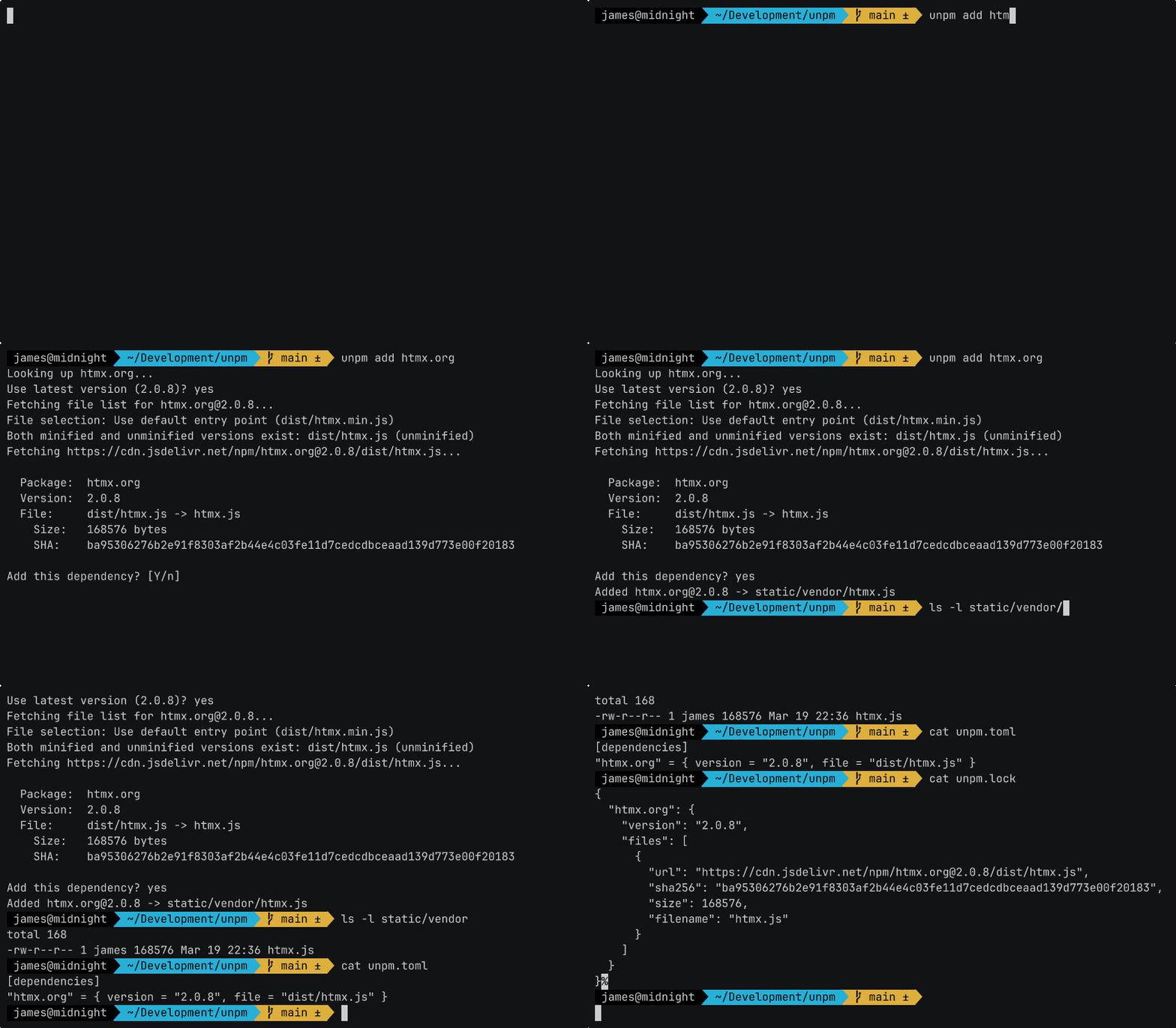
curl --proto '=https' --tlsv1.2 -fsSL https://raw.githubusercontent.com/JamesGuthrie/unpm/main/install.sh | shOr download a prebuilt binary from releases, or build from source:
cargo install unpm# Add a package (interactive)
unpm add htmx.org
# Add with a specific version
unpm add htmx.org@2.0.7
# Add a GitHub-hosted package
unpm add gh:answerdotai/fasthtml-js
# Fetch all vendored files
unpm install
# Verify integrity and scan for CVEs
unpm checkFiles are vendored into static/vendor/ by default. Configure in .unpm.toml:
output_dir = "assets/vendor"
canonical = true # remove untracked files from output dir (default)Dependencies are declared in unpm.toml:
[dependencies]
htmx.org = "2.0.7"
idiomorph = { version = "0.7.2", file = "dist/idiomorph.js" }
"gh:answerdotai/fasthtml-js" = { version = "1.0.12", file = "fasthtml.js" }
uplot = { version = "1.6.31", files = ["dist/uPlot.min.js", "dist/uPlot.min.css"] }
Short form uses the package's default entry point. Extended form allows specifying a file path within the package, or files for multiple files. You can also set a custom url (single file only) or a list of CVEs to ignore:
[dependencies]
lodash = { version = "4.17.21", file = "lodash.min.js", ignore-cves = ["GHSA-x5rq-j2xg-h7qm"] }
file and files are mutually exclusive.
| Command | Description |
|---|---|
unpm add <package[@version]> |
Add a dependency (interactive) |
unpm install |
Fetch all dependencies |
unpm check |
Verify integrity, CVEs, and freshness |
unpm list |
List all dependencies and their files |
unpm outdated |
Show dependencies with newer versions available |
unpm update [package[@version]] |
Update one or all dependencies (same major) |
unpm remove <package> |
Remove a dependency |
Interactive flow: select version, pick files from the package (multi-select), confirm.
Non-interactive mode:
unpm add htmx.org --version 2.0.7 --file dist/htmx.min.js

# Add multiple files from the same package
unpm add uplot --version 1.6.31 --file dist/uPlot.min.js --file dist/uPlot.min.css
Running add on an existing package appends the new files to it.
Runs four checks per dependency (integrity checks run per file):
- Lockfile SHA -- vendored file matches the hash recorded at add time
- CDN SHA -- vendored file matches the hash jsdelivr currently reports (independent second source)
- CVE scan -- no known vulnerabilities via OSV.dev
- Freshness -- whether newer versions are available
Output is grouped by category (Integrity, Vulnerabilities, Outdated). Only problems are printed.
unpm check --allow-vulnerable    # ignore CVEs
unpm check --fail-on-outdated # treat outdated deps as errorsUpdates dependencies within the same major version by default. For multi-file dependencies, all files are updated atomically -- if any file fails to fetch at the new version, none are updated.
If a newer major version exists but can't be installed, unpm tells you:
htmx.org: 1.9.12 held back (2.0.7 available, use --latest to update across major versions)
unpm update                   # update all (same major version)
unpm update --latest          # update all to latest, crossing major versions
unpm update htmx.org          # update one dependency (same major)
unpm update htmx.org@3.0.0 # pin to an explicit versionThe version in unpm.toml is the exact version that gets installed — there are no version ranges or specifiers. When you run unpm update, it upgrades to the latest version within the same major version (e.g. 1.9.12 → 1.9.14, but not 1.9.12 → 2.0.0). This keeps updates safe by default, since major version bumps typically indicate breaking changes.
To update across major versions, use unpm update --latest or specify the version explicitly with unpm update package@version.
unpm supports two package sources, both resolved via jsdelivr:
- npm --
unpm add htmx.org - GitHub --
unpm add gh:user/repo
Package names must be exact. No fuzzy matching or alias resolution -- this prevents typosquatting attacks.
- SHA-256 integrity -- every vendored file is hashed and locked. Tampering is detected on
checkandinstall. - CDN cross-checking --
checkverifies vendored files against jsdelivr's independently computed hashes, not just the hash from first download. - CVE scanning -- queries the OSV.dev vulnerability database for each package/version.
- No post-install scripts -- unpm vendors static files only. No code execution, no transitive dependencies.
- Exact package names -- no fuzzy resolution.
unpm add htmxfails;unpm add htmx.orgsucceeds. - Reviewable diffs -- both
unpm.tomlandunpm.lockare committed to the repo, making dependency changes visible in PRs.
Add to your CI workflow to verify vendored dependencies on every push:
- uses: JamesGuthrie/unpm@mainThe action downloads the unpm binary and runs unpm check. It exits non-zero on SHA mismatches or known vulnerabilities. The binary version is independent of the action ref — use the version input to pin a specific binary version.
| Input | Description | Default |
|---|---|---|
allow-vulnerable |
Allow known vulnerabilities | false |
version |
unpm version to use | latest |
name: Verify vendored deps
on: [push, pull_request]

jobs:
  check:
    runs-on: ubuntu-latest
    steps:
      - uses: actions/checkout@v6
      - uses: JamesGuthrie/unpm@main