


A Vencord / Equicord plugin that shows every profile badge instead of collapsing the extras behind a +n chip.
Discord's newer profile badge list only renders the first few badges and hides the rest behind a counter (for example +3). Clicking it opens a popout with the remaining badges. This plugin removes that cap so the whole row is rendered inline.
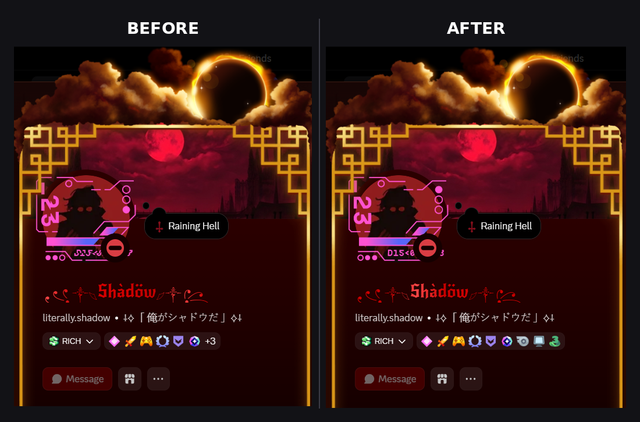
| Before | After |
|---|---|
6 badges + +3 |
all 9 badges |
The hidden badges are never rendered into the DOM, so CSS cannot reveal them. The cut happens in the badge list component, which slices the list when an experiment flag is on. This plugin patches that check so the slice and the overflow count are skipped.
Windows only. Open PowerShell and run:
irm https://raw.githubusercontent.com/ItzMeShadow999/showAllBadges/main/install.ps1 | iexThe installer will:
- Ask whether you use Vencord or Equicord.
- Install Git, Node.js and pnpm through winget if they are missing.
- Clone the client, or use a source folder you already have.
- Download the plugin into
src/userplugins/showAllBadges/. - Close Discord, build, inject, enable ShowAllBadges and relaunch Discord.
Press Ctrl+R in Discord if the plugin does not show up right away.
For unattended runs, set SAB_CLIENT (vencord or equicord), SAB_DIR (source folder) and SAB_YES=1 before running the command.
ShowAllBadges is a user plugin. You need a Vencord development setup.
- Clone Vencord and go into the folder.
- Put this plugin at
src/userplugins/showAllBadges/index.ts. - Build and inject:
pnpm install pnpm build pnpm inject - Restart Discord and enable ShowAllBadges in Settings > Plugins.
For Equicord, put it in src/userplugins/showAllBadges/ in the Equicord source and build the same way.
In the badge list module, Discord computes:
let M = v && !j,
    P = M ? Math.max(D.length - d.k9, 0) : 0;
When M is true the list is cut to d.k9 badges and P becomes the +n count. The plugin patches M to false, so nothing is cut and P stays 0. Discord then renders the normal full rows.
The patch targets the UserProfileBadgeListRows module and matches on structure, not variable names, since Discord's minified names change between builds.
- Your own profile still shows the edit pencil. That is controlled by a separate flag and is untouched.
- If Discord reworks the badge list, the patch may stop matching. Vencord will log a patch failure in the console. Open an issue with the console output.
GPL-3.0-or-later. See LICENSE.