


A Vencord and Equicord plugin that gives you a custom profile badge image, description, and styling with hover tooltips, a click popup, badge rotation ("My Badges"), presets, and packs. Bundled with UserBoard, a sidebar button that opens a full in-app dashboard for managing everything without leaving Discord.
▸ Two versions exist. This branch (
main) is the Dashboard version. If you want zero DOM injection and pure Vencord BadgeAPI, use the React branch. The installer below can set up either one.

- Custom profile badge: image, description, and color/shape/animation styling
- Multiple badges per user with one active at a time ("My Badges" rotation)
- Presets and importable/exportable badge packs
- Dedicated sidebar dashboard (black-themed) for managing badges without opening Discord's settings
- Account verification: badge writes require a session token proving you own the account
- Badge data synced through a small Cloudflare Worker + KV backend, with server-side rate limiting
- One-line installer for Vencord and Equicord (Windows)

Open PowerShell and run:
irm https://raw.githubusercontent.com/ItzMeShadow999/CustomBadges/main/install.ps1 | iexThe installer walks you through everything:
- ◆ Pick your client: Vencord or Equicord
- ◆ Pick your version: Dashboard (
main) or React (CustomBadges-React) - ◆ Installs Git, Node.js LTS and pnpm if they are missing (via winget)
- ◆ Asks whether you already have the client built from source
- Yes: you enter the path to your folder. The repo root, its
srcfolder, orsrc\userpluginsall work. Your existing repo is left alone, onlysrc\userplugins\customBadgesis added. - No: you choose where to clone it (blank uses the default folder in your user profile)
- Yes: you enter the path to your folder. The repo root, its
- ◆ Downloads the plugin files with a live progress line
- ◆ Closes Discord, runs
pnpm installandpnpm buildquietly (one live log line and a spinner, full log only if something fails) - ◆ Runs
pnpm inject(you pick your Discord install in the prompt), or skips it if you already injected - ◆ Enables CustomBadges in your client settings and relaunches Discord
After it finishes, open the plugin settings and click Verify Discord Account to get your session token (see Account Verification).
Set any of these environment variables in the same PowerShell window before running the installer:
| Variable | Values | What it does |
|---|---|---|
CB_CLIENT |
vencord or equicord |
Skips the client menu |
CB_VARIANT |
main or react |
Skips the version menu (main is the dashboard version) |
CB_DIR |
a folder path | Clone location, or your existing source build |
CB_YES |
1 |
No prompts, closes Discord automatically |
Example:
$env:CB_CLIENT='equicord'; $env:CB_VARIANT='react'; irm https://raw.githubusercontent.com/ItzMeShadow999/CustomBadges/main/install.ps1 | iex- Windows 10 or 11 with PowerShell 5.1 or newer. macOS and Linux users should use the manual steps below.
wingetis needed only if Git or Node.js are missing.pnpm injectis the client's own interactive installer, so you still choose your Discord install there.- The banner uses true color. If your console is too narrow or does not support it, a plain title or basic colors are used instead.
- Read the script before running it: install.ps1

$\Huge{\color{#FFB6C1}\textsf{Manual Installation (click to expand)}}$

Follow the steps below to install the plugin manually.
1. Clone the Vencord repo & pnpm install
git clone https://github.com/Vendicated/Vencord
cd "YOURPATHHERE"
pnpm install
2. Locate your Vencord userplugins folder in \Vencord\src
- If the folder doesn't exist, create it.
3. Create a new folder inside userplugins called customBadges
Copy every file from this project into it, keeping the same structure:
userplugins/customBadges/
├── index.tsx
├── native.ts
└── dashboard/
    ├── types.ts
    ├── bridge.ts
    ├── button.ts
    ├── buttonRegistry.ts
    ├── dashboardView.ts
    ├── html.ts
    └── wireSettings.ts
▸ For the React branch, copy only
index.tsxandnative.ts. There is nodashboard/folder.
4. Rebuild Vencord
- Source build: run
pnpm build(ornpm run build), thenpnpm injectif you haven't already injected Vencord into your Discord client. - Installer-based build with plugin auto-detection: just restart Discord after copying the files in.
5. Enable the plugin
Open Discord → Vencord Settings → Plugins, find CustomBadges, and enable it.
6. Restart Discord
Ctrl/Cmd+R

$\Huge{\color{#FFB6C1}\textsf{Manual Installation: Equicord (click to expand)}}$

Equicord is Vencord-based, so CustomBadges installs the exact same way. Just point the clone at Equicord's repo instead of Vencord's.
1. Clone the Equicord repo & pnpm install
git clone https://github.com/Equicord/Equicord
cd "YOURPATHHERE"
pnpm install
2. Locate your Equicord userplugins folder in \Equicord\src
- If the folder doesn't exist, create it.
3. Create a new folder inside userplugins called customBadges
Copy every file from this project into it, keeping the same structure:
userplugins/customBadges/
├── index.tsx
├── native.ts
└── dashboard/
    ├── types.ts
    ├── bridge.ts
    ├── button.ts
    ├── buttonRegistry.ts
    ├── dashboardView.ts
    ├── html.ts
    └── wireSettings.ts
▸ For the React branch, copy only
index.tsxandnative.ts.
4. Rebuild Equicord
- Source build: run
pnpm build(ornpm run build), thenpnpm injectif you haven't already injected Equicord into your Discord client. - Installer-based build with plugin auto-detection: just restart Discord after copying the files in.
5. Enable the plugin
Open Discord → Equicord Settings → Plugins, find CustomBadges, and enable it.
6. Restart Discord
Ctrl/Cmd+R
| Feature | Dashboard (main) |
React (CustomBadges-React) |
|---|---|---|
| Badge rendering | DOM injection via MutationObserver |
Vencord BadgeAPI (React) |
| Tooltip | Custom fixed-position tooltip | Vencord native tooltip |
| Click popup card | Yes | Removed |
| Dashboard UI | Full-page panel in the DM sidebar | Removed |
| Files | index.tsx + native.ts + dashboard/* |
index.tsx + native.ts only |
| Settings UI | Settings tab and dashboard | Single Vencord settings tab |

- Open the plugin's settings tab in Vencord Settings to set your badge image, description, and style, or
- Use the new dashboard button added to your DM sidebar. It opens a full-page dashboard where you can set your badge, switch between saved badges, import/apply presets, import a badge pack from a URL, or generate your own pack to share.
- Your badge is stored server-side (keyed to your Discord user ID) so it follows you across devices as long as the plugin is installed and enabled.
Publishing, switching, or deleting a badge requires proving you own the Discord account you're doing it as:
- Click Verify Discord Account in settings. This opens your browser to the worker's
/auth/startpage. - Confirm you're signed in as the right account and follow the prompt there.
- Copy the code it gives you back and paste it into the Session Token field in settings.
That token is what authorizes every write from then on (sent as a Bearer header). Reading badges (yours or anyone else's) never required it and still doesn't. The token doesn't expire on its own; if a publish/switch/delete ever fails with an auth error, just re-verify and paste a fresh code. The token field itself is masked once you click away, so it's not left sitting in plain text in your settings.
If you ever lose track of your token, or think someone else got hold of it, hit Revoke Your Token. This immediately kills that token server-side (on every device using it), and you'll need to verify again to get a new one.
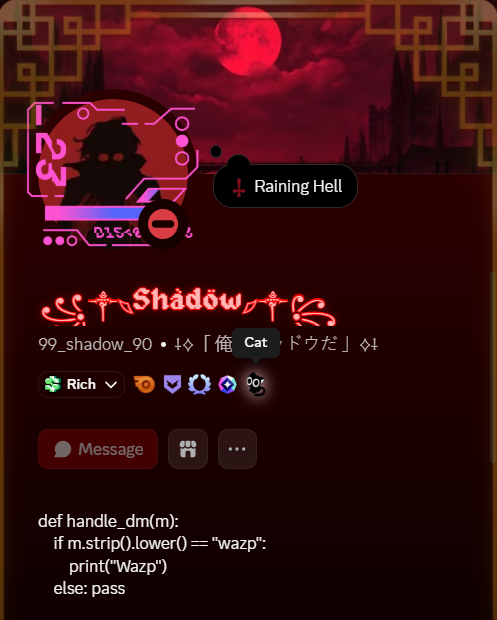
1. Hover: shows the badge tooltip
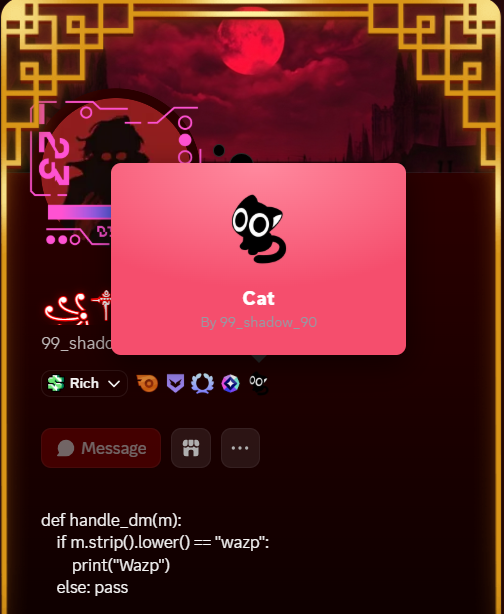
2. Click: opens the full badge popup card

The worker.js + wrangler.toml in this project deploy to Cloudflare
Workers with a KV namespace for badge storage. If you want to run your own
instance instead of using the default endpoint:
wrangler kv namespace create BADGES_KSand put the resulting id intowrangler.toml.wrangler deploy.- Point the plugin at your worker by passing your own
apiBasewherenative.ts's functions are called.

- Account verification (session tokens): badge writes (set / switch / delete) now require a verified session token instead of being trusted on
userIdalone. - Dashboard gets its own opening/closing animation and no longer hides Discord's real UI to render itself.
- Standalone dashboard is now feature-complete with the Vencord settings tab: tooltip/popup/owner-tag/mutual-guild toggles that previously only existed in Discord's native Settings are now wired into the dashboard too.
- Badge Pack Sharing Guidelines panel, in both the Vencord settings tab and the standalone dashboard, with a CRT power-off close animation.
- Session token input with an animated letter → dot masking effect.
- Layout fix: dashboard content no longer has a large dead gap on the left/right.
- Added
authHeaders()/requireSessionToken()helpers. setBadge,setActiveBadge,deleteBadgenow take asessionTokenargument and send it as aBearerauth header; each throwsNOT_VERIFIEDif no token is present.- Added
revokeOwnToken(): callsPOST {apiBase}/self/revoketo invalidate the current session token.
DashboardBridgeinterface extended withverifyAccount,revokeSessionToken,switchToBadge,deleteBadgeSlotso the standalone dashboard can call them (previously these lived only inindex.tsxand weren't exposed to the dashboard).
- Mounting strategy changed: the wrapper now mounts on
<body>and is pinned over the main content area withposition: fixed+getBoundingClientRect(), instead of being appended insidemainAreawith its siblings hidden viadisplay: none. Discord's message list and everything else underneath now keeps rendering normally the whole time. This is what fixed the blank-pane bug on close. - Added a
resizelistener + lightsetIntervalpoll to reposition the wrapper if Discord's own layout shifts (sidebar/member-list toggle) without aresizeevent. - Open/close animation: wrapper fades and scales in on open (
opacity 0→1,scale(0.97)→scale(1), slighttranslateY), and now animates back out on close instead of being removed instantly.restoreDefaultView()waits ~200ms before actually detaching it. Reopening mid-close cancels the pending removal.
- New
shieldicon (used for the Account Verification section). - New Account Verification section: Verify / Revoke buttons + session token field.
- New session token input styling: text is painted transparent over a real
<input>, with a per-character overlay that morphs each letter into a masking dot on blur (and back on focus), including scroll-sync so it stays aligned once the token overflows the field width. - New preference toggle switches in the dashboard itself (tooltip, popup, owner tag, append Vencord tag, hide own badge, restrict to mutual servers). Previously these only existed in Discord's native Settings tab.
- New
ub-btn-danger-solid/ub-btn-linkbutton styles. - New Badge Pack Sharing Guidelines panel (
#ub-guidelines-panel+ backdrop): format spec, pack-size note, content rules, submission steps, and a "Got it" close button. Closes with a CRT-style power-off collapse + flash instead of a plain fade. - Layout fix:
.contentSection_b6bcee/.content_b6bcee(Discord's own settings classes) were inheriting centering meant for a page that sits next to a nav sidebar; since the dashboard doesn't render that sidebar, this left a large empty gap on the left (and right) of the cards. Now forced flush-left and full-width.
- Added
wireSwitch()/setSwitchValue()generic toggle wiring, used for all the new dashboard preference switches. - Added the session-token masking logic:
buildTokenChars(),setTokenMasked(),syncOverlayScroll(),escapeHtml(). - Added
openGuidelines()/closeGuidelines()for the new guidelines panel (open resets and restarts the transition so it can be reopened right after closing; close waits out the 340ms CRT animation before clearing state). - Added
updatePopupLockState(): disables the popup/owner-tag controls when badge mode is"vencord"(Vencord Classic mode can't support the click-to-view popup). - Added
renderMyBadgesList().
describeBadgeApiError()now handles theNOT_VERIFIEDerror kind.- New settings entries:
verifyAccount(opens{apiBase}/auth/startvia Discord OAuth, identify scope only),sessionToken,revokeToken. - New
verifyDiscordAccount()andrevokeSessionToken()functions. - New
SessionTokenInputandRevokeTokenButtonReact components (Vencord settings tab equivalent of the dashboard's token field/masking behavior). switchToBadge()anddeleteBadgeSlot()are nowexported and passsettings.store.sessionTokenthrough tosetActiveBadge/deleteBadge.setBadgecall site updated to pass the session token.- Added
renderJsonHighlighted(): simple JSON syntax highlighter (keys/strings/numbers/literals/punctuation) used when previewing a pack's JSON. - Added
PackGuidelinesModalcomponent: the Vencord-settings-tab version of the guidelines panel, same CRT power-off close animation. - "Make Pack" button extracted into its own
MakePackButtoncomponent; badge pack action buttons grouped intoBadgePacksButtonsRow.
dashboard/button.ts, dashboard/buttonRegistry.ts, dashboard/types.ts: no differences.

This plugin is built for and depends on Vencord, which is licensed under the GNU General Public License v3.0 (or later). In keeping with that, this plugin is also distributed under GPL-3.0-or-later.
That means: you're free to use, study, modify, and share this plugin, but if
you distribute a modified version, you must also make its source available
under the same license. See the full license text at
https://www.gnu.org/licenses/gpl-3.0.html, or the LICENSE file in this
project for the standard notice.
This is a third-party plugin and isn't affiliated with, endorsed by, or supported by Discord Inc. Use of client modifications is against Discord's Terms of Service. Use at your own risk.

- Found someone using this plugin to display NSFW, hateful, or otherwise abusive badge content? Please report it. Don't just block and move on.
- Something broken or not working as expected?
- Check the FAQs first. Your issue may already be answered there.
- If it's not covered, ask in the issues help chat.
- To report a bug, abuse, or a badge that violates the rules, use the Reports chat.
- Join the server here: https://discord.gg/PUYaka9Hy8
- You can optionally tag Shadow in the relevant channel for visibility. Please don't send DMs, they're most likely filtered out and won't be seen.