Kubernetes manifests for the AI Task Platform, managed via Argo CD using a GitOps workflow.
Every change pushed to this repository is automatically detected and applied to the cluster.


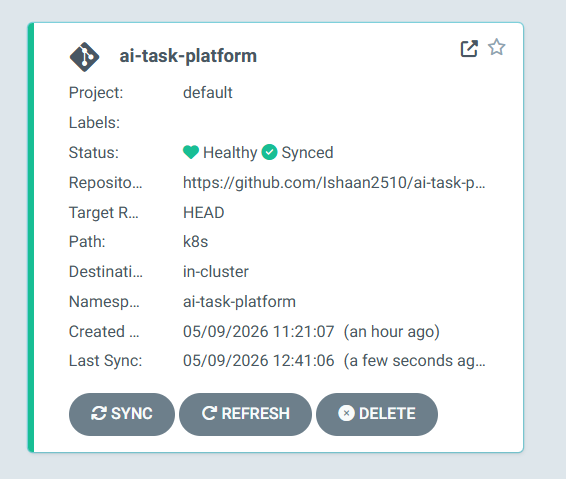
The Argo CD application is configured with auto-sync, prune, and selfHeal all enabled. Any drift between the running cluster state and the manifests in this repository is automatically corrected without manual intervention. Image tags in the deployment manifests are updated automatically by the CI/CD pipeline in the application repository on every push to main.
ai-task-platform-infra/
├── k8s/
│   ├── namespace.yaml
│   ├── backend/
│   │   ├── configmap.yaml
│   │   ├── secret.yaml
│   │   ├── deployment.yaml
│   │   └── service.yaml
│   ├── frontend/
│   │   ├── deployment.yaml
│   │   └── service.yaml
│   ├── worker/
│   │   └── deployment.yaml
│   ├── mongodb/
│   │   ├── deployment.yaml
│   │   ├── service.yaml
│   │   ├── secret.yaml
│   │   └── pvc.yaml
│   ├── redis/
│   │   ├── deployment.yaml
│   │   └── service.yaml
│   └── ingress/
│       └── ingress.yaml
└── argocd/
    └── application.yaml
To apply all manifests to a running Kubernetes cluster in order:
kubectl apply -f k8s/namespace.yaml
kubectl apply -f k8s/mongodb/
kubectl apply -f k8s/redis/
kubectl apply -f k8s/backend/
kubectl apply -f k8s/worker/
kubectl apply -f k8s/frontend/
kubectl apply -f k8s/ingress/kubectl create namespace argocd
kubectl apply -n argocd -f https://raw.githubusercontent.com/argoproj/argo-cd/stable/manifests/install.yamlAccess the UI after all pods reach Running state:
kubectl port-forward svc/argocd-server -n argocd 8080:443Get the initial admin password:
kubectl get secret argocd-initial-admin-secret -n argocd -o jsonpath="{.data.password}" | base64 --decodeRegister the application with Argo CD:
kubectl apply -f argocd/application.yamlAll platform resources deploy into the ai-task-platform namespace. The Argo CD Application manifest creates this namespace automatically via the CreateNamespace=true sync option, so no manual namespace creation is required before applying the application manifest.
The worker Deployment runs 2 replicas by default. Each replica independently calls brpop on the Redis queue, and Redis guarantees that any given task ID is delivered to exactly one worker. Scaling requires no coordination changes. To scale imperatively:
kubectl scale deployment worker --replicas=4 -n ai-task-platformTo scale declaratively, update the replicas field in k8s/worker/deployment.yaml and push. Argo CD detects the change and applies it automatically.
Each deployment manifest references a specific image tag in the format ishaan102/ai-task-platform-{service}:{sha} where {sha} is the 7-character Git commit SHA from the application repository build that produced it. The CI/CD pipeline in ai-task-platform updates these tags automatically on every push to main and commits the changes here, which Argo CD then applies to the cluster.
The Nginx Ingress Controller routes traffic to services within the ai-task-platform namespace. All requests to /api are forwarded to the backend service on port 5000. All other requests are forwarded to the frontend service on port 80. Install the Nginx Ingress Controller before applying the ingress manifest:
kubectl apply -f https://raw.githubusercontent.com/kubernetes/ingress-nginx/controller-v1.12.0/deploy/static/provider/cloud/deploy.yaml| Repository | Purpose |
|---|---|
| ai-task-platform | Application source code, Dockerfiles, CI/CD pipeline |
| ai-task-platform-infra | This repo — Kubernetes manifests, Argo CD config |
Built by Ishaan Goswami — CS undergrad, PDEU + IIT Madras