Expo module for on-device LLM inference. Wraps Apple Foundation Models (iOS 26+) and Gemini Nano via ML Kit (Android).
| Platform | Requirement |
|---|---|
| iOS | iOS 26+ with Apple Intelligence enabled. Loads on iOS 16.4+ without crashing (returns notEligible). Host project must target iOS 16.4+. |
| Android | Device with Gemini Nano support (Pixel 8+, Galaxy S25+). Model may require download. |
| Expo SDK | 52+ (peer requirement). Tested against SDK 56 and SDK 57 (React Native 0.86). |
npm install expo-local-llmThis module requires iOS 16.4+ as a compile target. Expo SDK 56+ defaults to 16.4 (the same as the module's floor), but if you're on an older SDK or have customized the deployment target, raise it via expo-build-properties:
npx expo install expo-build-propertiesIn app.json, add the plugin with the deployment target:
{
  "expo": {
    "plugins": [
      [
        "expo-build-properties",
        { "ios": { "deploymentTarget": "16.4" } }
      ]
    ]
  }
}
Then prebuild:
npx expo prebuild --cleanIf your project targets an iOS version below 16.4, you'll hit
compiling for iOS X.Y, but module 'ExpoLocalLlm' has a minimum deployment target of iOS 16.4at build time. (Apple Intelligence itself still requires iOS 26+ at runtime — the 16.4 floor is just for compilation; the module returnsnotEligibleon iOS 16.4–25.)
import { useLocalLLM } from 'expo-local-llm';

function Chat() {
  const {
    availability,
    isGenerating,
    streamedText,
    error,
    respond,
    streamResponse,
    cancelStream,
    downloadModel,
    downloadProgress,
  } = useLocalLLM({
    instructions: 'You are a helpful assistant.',
  });

  // Methods are undefined when module is unavailable (optionality pattern)
  if (!streamResponse) {
    return <Text>On-device LLM not available</Text>;
  }

  const handleSend = async (prompt: string) => {
    // Streaming — updates streamedText live, resolves with the final text
    const text = await streamResponse(prompt);

    // Or non-streaming:
    // const response = await respond(prompt);
  };

  return (
    <View>
      <Text>Status: {availability}</Text>
      {isGenerating && <Text>{streamedText}</Text>}
    </View>
  );
}import { useLocalLLM } from 'expo-local-llm';
function WeatherChat() {
const { streamResponse, streamedText, activeToolCalls, error } = useLocalLLM({
instructions: 'You are a helpful weather assistant.',
tools: [
{
name: 'getWeather',
description: 'Get the current weather for a city',
parameters: {
city: { type: 'string', description: 'The city name' },
},
handler: async (args) => {
const res = await fetch(`https://api.example.com/weather?city=${args.city}`);
return JSON.stringify(await res.json());
},
},
],
});
return (
<View>
{activeToolCalls.length > 0 && (
<Text>Using {activeToolCalls.map((c) => c.toolName).join(', ')}...</Text>
)}
<Text>{streamedText}</Text>
</View>
);
}iOS 26+ uses Apple's constrained decoding (DynamicGenerationSchema) — output is guaranteed to be
a structurally-valid JSON object matching the schema. Android falls back to instruction-based
guidance.
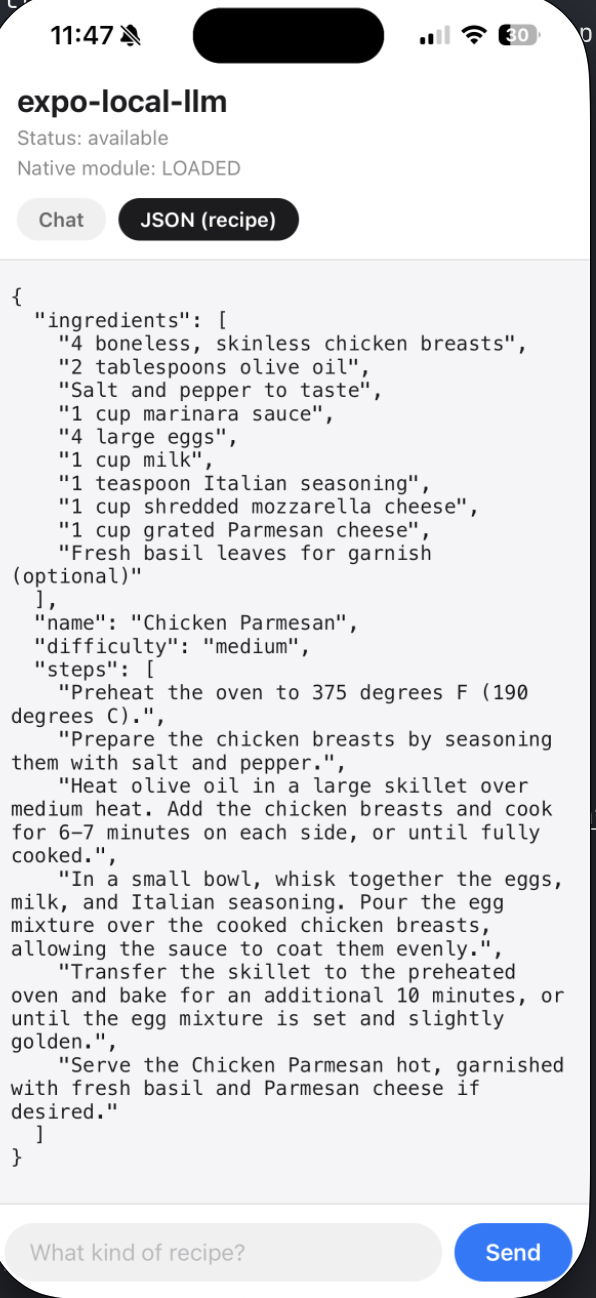
Real device output: the model fills in a recipe schema with difficulty constrained to easy | medium | hard. The streaming demo lives at example/App.tsx.
const { respond } = useLocalLLM({
  responseFormat: 'json',
  schema: {
    name: { type: 'string', description: 'Recipe name' },
    ingredients: {
      type: 'array',
      items: { type: 'string' },
      description: 'List of ingredients',
    },
    steps: {
      type: 'array',
      items: { type: 'string' },
      description: 'Cooking steps',
    },
    difficulty: {
      type: 'string',
      enum: ['easy', 'medium', 'hard'],
    },
  },
});

const recipe = JSON.parse(await respond('Give me a pasta recipe'));
For one-shot structured calls (classification, extraction) where you don't want conversation
history accumulating between calls, use generate() instead of a session:
import { generate } from 'expo-local-llm';

const json = await generate('Classify this message: "how was my sleep?"', {
  instructions: 'Classify what the message asks for.',
  responseFormat: 'json',
  schema: { topic: { type: 'string', enum: ['sleep', 'heart', 'none'] } },
});
Streaming with a schema yields progressively-filled snapshots via streamedJSON (the current
partial as a JSON string) and streamedObject (the parsed value):
const { streamResponse, streamedObject } = useLocalLLM({
  responseFormat: 'json',
  schema: { /* ... */ },
});

await streamResponse('Give me a pasta recipe');
// streamedObject updates as the model fills in fieldscreateLLMSession validates the schema before crossing to native and throws SchemaInvalidError
with per-field paths if anything is malformed (missing items, enum on the wrong type, unknown
type, etc.). You can also call validateSchema() directly when building schemas at runtime:
import { validateSchema } from 'expo-local-llm';

const result = validateSchema(mySchema);
if (!result.ok) {
  for (const err of result.errors) {
    console.warn(`${err.path}: ${err.message}`);
  }
}| Option | Type | Description |
|---|---|---|
instructions |
string |
System instructions for the session |
options.temperature |
number |
Sampling temperature |
options.maxTokens |
number |
Max output tokens (capped at 256 on Android; maps to maximumResponseTokens on iOS) |
options.topK |
number |
Top-K sampling (maps to .random(top:) on iOS) |
tools |
ToolDefinition[] |
Tools the model can invoke (iOS 26+ only) |
toolTimeout |
number |
Seconds before an unresolved tool call times out (default 30) |
responseFormat |
"text" | "json" |
Set to "json" for structured JSON output |
schema |
Schema |
Schema for structured output (used with responseFormat: "json") — see Structured Output section |
includeSchemaInPrompt |
boolean |
iOS 26+: include the schema definition in the prompt. Default true. Set false when you've front-loaded few-shot examples. |
| Property | Type | Description |
|---|---|---|
availability |
ModelAvailability |
Current model status |
isGenerating |
boolean |
Whether a generation is in progress |
streamedText |
string |
Accumulated text from current text stream |
streamedJSON |
string |
Current partial JSON from a schema-driven stream |
streamedObject |
unknown |
Parsed value of streamedJSON (or null before any partial) |
downloadProgress |
number | null |
Download progress 0-1 (Android only) |
error |
string | null |
Last error message |
activeToolCalls |
ActiveToolCall[] |
In-flight tool calls ({ callId, toolName }) |
respond |
(prompt: string) => Promise<string> |
Non-streaming generation. undefined when unavailable. |
session |
LLMSession | null |
The native session object. null when unavailable. |
streamResponse |
(prompt: string) => Promise<string> |
Streaming generation (updates streamedText). Resolves with the final text at stream end, or the partial text if cancelled; rejects on stream failure. undefined when model not available. |
cancelStream |
() => Promise<void> |
Cancel the active stream. Actually stops inference (not just token delivery); the pending streamResponse promise resolves with the partial text. undefined when unavailable. |
reset |
() => void |
Clear the conversation transcript, keeping instructions/tools/schema/options. Also cancels any in-flight stream. undefined only when there is no session. |
downloadModel |
() => Promise<void> |
Trigger model download (Android). undefined when unavailable. |
One-shot stateless generation — creates a session, responds once, and releases it. Takes the
same config as useLocalLLM/createLLMSession. Use it for classification or extraction
calls where conversation history between calls is unwanted. Throws when the module or model
is unavailable (check ExpoLocalLlmModule.getAvailability() first if you need to gate).
'available' | 'notEnabled' | 'notReady' | 'notEligible' | 'downloadRequired' | 'downloading' | 'unknown'
| Concern | iOS | Android |
|---|---|---|
| System instructions | Native LanguageModelSession(instructions:) |
Prepended in prompt text |
| Output tokens | ~4K context, generous output | 256 max |
| Model availability | Built-in to OS | May need download |
| Session history | Native session maintains it | ConversationHistory class |
| Streaming | AsyncSequence |
Kotlin Flow |
- Only one active stream at a time. Events are not scoped to session ID.
- Android: Gemini Nano SDK is in beta. API surface may change — not yet validated on device.
- iOS: Apple's Foundation Model may refuse certain categories of prompts (e.g. personal health data interpretation) due to built-in safety guardrails.
- Methods (
respond,streamResponse,cancelStream) are only defined whenavailability === 'available'. - Tool calling is iOS 26+ only. Android will throw at session creation if tools are passed.
- Structured output on Android uses instruction-based JSON guidance. iOS 26+ uses constrained
decoding via
DynamicGenerationSchema.
This is built as an Expo Module, not a bare React Native library. Here's why:
expo installand go — no manual Xcode/Gradle linking, nopod installsurprises. Works withnpx expo prebuildand managed workflow out of the box.- SharedObject lifecycle —
LLMSessionextends Expo'sSharedObject, which handles native memory management, event subscriptions, and cleanup automatically when the JS object is garbage collected. In bare RN you'd wire this yourself withNativeEventEmitterand manual release calls. - Class DSL — the native module exposes
LLMSessionas a first-class JS object with instance methods (session.respond(),session.streamResponse()) rather than flat module-level functions with session IDs. This is an Expo Modules API feature that doesn't exist in the classic RN bridge. - Cross-platform parity — Expo's Kotlin DSL mirrors the Swift DSL, so the iOS and Android modules have the same structure. Adding Android tool calling later means implementing the same interface, not building a separate bridge.
If you're on bare React Native without Expo, this module won't work — you'd need
to add expo-modules-core as a dependency or use a different library.
React Native AI (formerly @callstack/ai)
is a Vercel AI SDK-compatible collection of on-device AI primitives, modularized
into per-backend packages: @react-native-ai/apple, @react-native-ai/llama,
@react-native-ai/mlc, and — new as of July 2026 — @react-native-ai/adk, which
wraps Google's Agent Development Kit to run on-device Gemini Nano (or cloud
Gemini) on Android. It covers text generation, tool calling, embeddings,
transcription, and speech synthesis.
expo-local-llm takes a narrower approach:
expo-local-llm |
React Native AI | |
|---|---|---|
| Surface | React hook (useLocalLLM) and a native session object |
Vercel AI SDK provider (generateText, streamText, embed, transcribe, speech) |
| iOS model | Apple Foundation Models (system-provided) | Apple Foundation Models, Llama (via llama.rn), MLC LLM |
| Android model | Gemini Nano (system-provided) | Gemini Nano (via ADK/ML Kit GenAI), cloud Gemini, Llama, MLC |
| Capabilities | Text generation, tool calling, constrained JSON output | Text, tool calling, embeddings, transcription, speech synthesis, image input (ADK) |
| Structured output | Constrained decoding on iOS; instruction-based on Android | JSON mode via responseMimeType on ADK (no schema constraints); MLC on iOS |
| Model management | None — the OS handles it | Built-in for Apple/ADK; download/prepare for Llama/MLC |
| Bundle size impact | Near zero | Depends on which provider you install + model weights (ADK pulls in Google GenAI libraries) |
| DevTools | None | AI SDK Profiler via Rozenite (OpenTelemetry spans) |
| Install path | One expo install, autolinks |
Per-package install; ADK needs New Architecture, minSdkVersion 26, and packaging excludes |
| Dependencies | None | Vercel AI SDK (v6 as of v0.12) and per-provider runtimes |
Choose expo-local-llm if you want the simplest path to on-device LLM in
an Expo app and are happy using whatever model the OS provides (Apple Foundation
Models on iOS, Gemini Nano on Android). There's nothing to configure, no weights
to bundle, and it works on both platforms with a single install.
Choose React Native AI if you need any of:
- Vercel AI SDK compatibility (drop-in replacement for cloud-LLM apps)
- Capabilities beyond text generation (embeddings, transcription, speech synthesis, image input)
- Specific models (Llama 3.2, Phi-3, Mistral, Qwen) on either iOS or Android
- A cloud Gemini fallback behind the same API as on-device Gemini Nano
- AI SDK Profiler DevTools for tracing
The biggest change since June 2026: React Native AI's @react-native-ai/adk
package closed the Android gap — it now offers system-provided Gemini Nano too,
with tool calling and multimodal input. The remaining differences are setup
weight (ADK requires New Architecture, minSdkVersion 26, and Gradle packaging
tweaks vs. a single expo install here) and API shape (Vercel AI SDK functions
vs. a React hook with a session object).
- PulseID — Heart rate camera
- Teamfit Tactics — TFT fitness
Using this library? Open a PR to add your app.
MIT