
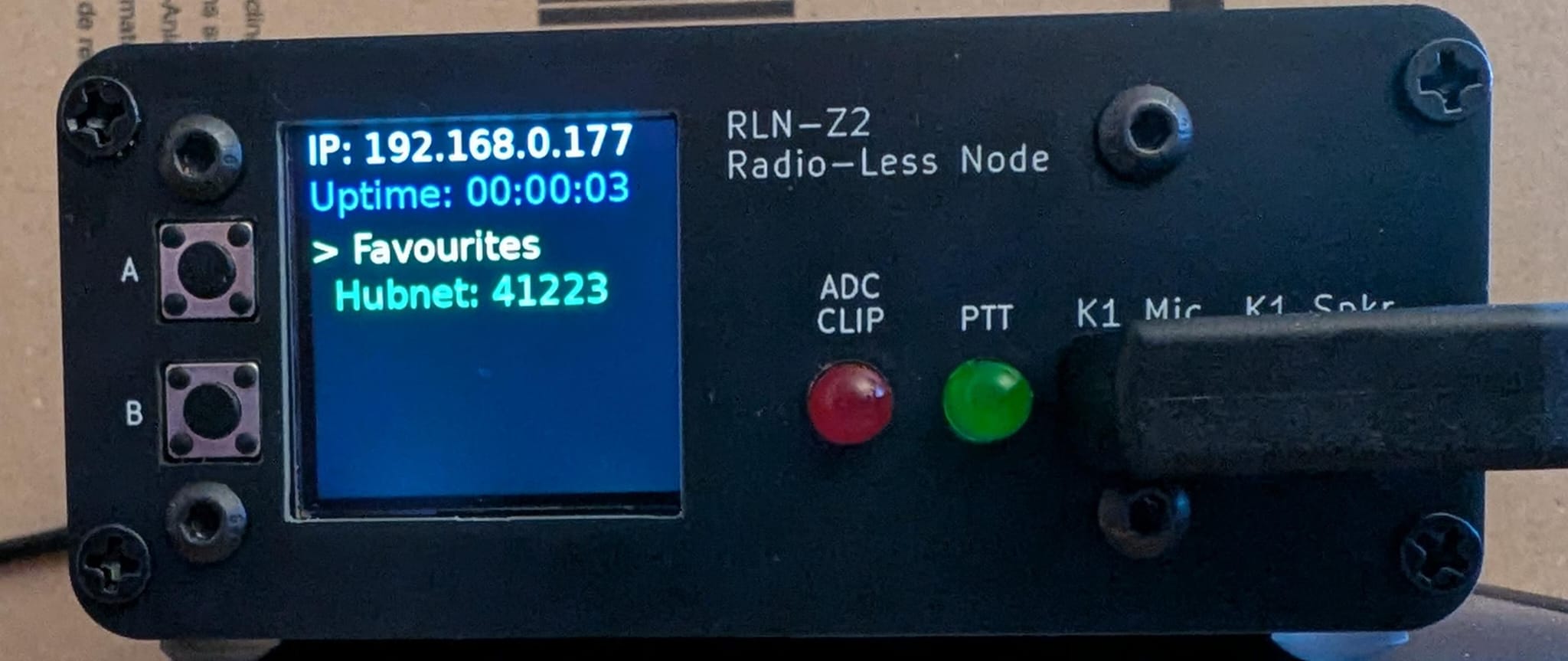
A Python display driver for Raspberry Pi with an Adafruit Mini PiTFT (ST7789 240×240). Shows IP, uptime, connected nodes, and a favourites menu, with two-button navigation for connecting and disconnecting AllStarLink nodes.
NEW: Simple install instructions on my website https://g1lro.uk/?p=848
This release is a major performance rewrite focused on UI responsiveness.
The SPI transfer to the screen (~38ms per frame) previously blocked everything — buttons felt sluggish because the loop couldn't read input while the screen was updating. The display now renders in a dedicated background thread. Button presses register instantly regardless of what the screen is doing.
Pressing Button B to connect or disconnect a node used to freeze the display for 1–3 seconds while waiting for Asterisk. It now shows "Connecting NodeName..." or "Disconnecting 12345..." immediately, and the Asterisk command runs in the background. The screen updates again as soon as it completes.
The main loop runs at 50 Hz (20 ms sleep) instead of the previous effective rate, so button presses are detected up to 5× faster.
The display now only refreshes when something actually changes — on a button press, or every 5 seconds for the periodic data refresh. Previously it refreshed every second unconditionally.
IP address and uptime are now read using native Python (socket, /proc/uptime) instead of spawning shell subprocesses. This removes two process launches per second from the old code.
- Node name lookup — connected nodes are looked up in
astdb.txtfor their callsign, falling back to favourites labels or "Node". - Total linked node count — displayed at the bottom of the main screen.
- Safe shutdown — hold both buttons for 2 seconds to initiate a clean
shutdown -h nowwith an on-screen message.
- Real-time display: IP address, uptime, connected AllStarLink nodes (up to 3), favourites menu (up to 6 nodes).
- Button controls:
- Button A — cycle through selections.
- Button B — connect / disconnect nodes, enter favourites mode, or exit.
- Both buttons held 2 s — safe shutdown.
- Automatic updates: display refreshes on button press or every 5 seconds.
- Favourites: load node names and numbers from
~/favourites.txt.
- Raspberry Pi (tested on Raspberry Pi OS, Debian-based).
- Adafruit Mini PiTFT or equivalent ST7789-based 240×240 display.
- Also available from AliExpress
- Wiring (standard on this model):
- CS: GPIO CE0 (pin 24)
- DC: GPIO D25 (pin 22)
- Backlight: GPIO D22 (pin 15)
- Reset: not connected
- SPI: MOSI (pin 19), SCLK (pin 23)
- Buttons: GPIO D23 (pin 16) = Button A, GPIO D24 (pin 18) = Button B.
- AllStarLink / Asterisk installed and running.
- Python 3
- Raspberry Pi OS or similar (Debian-based)
- AllStarLink with Asterisk
- SPI interface enabled (handled by the install script)
-
Clone the repository:
sudo apt update sudo apt install git git clone https://github.com/G1LRO/ASL-Display.git cd ASL-Display -
Make the install script executable and run it:
chmod +x installdisplay.sh
./installdisplay.sh
The script installs dependencies, creates a virtual environment, enables SPI, and sets up a systemd service.
-
Edit your favourites file (
~/favourites.txt):58175 ← your node number on line 1 Hubnet,41223 FreeSTAR,63061 -
Reboot:
sudo reboot
- Node number: first line of
~/favourites.txt. - Favourites: subsequent lines in
Name,NodeNumberformat, up to 6 entries. - Version: edit
VERSION = "1.75"near the top ofdisplay_driver.py.
sudo systemctl status display_driver.service
sudo systemctl restart display_driver.service
sudo systemctl stop display_driver.service
journalctl -u display_driver.service -b- Blank display: check SPI (
lsmod | grep spi_bcm2835) and service logs. - Asterisk errors: test with
sudo asterisk -rx "rpt lstats <node>". - Font missing: check
/usr/share/fonts/truetype/dejavu/DejaVuSans.ttfexists. - Quick hardware test (save as
test_display.py):A red screen confirms hardware is wired correctly.#!/usr/bin/env python3 import digitalio, board from adafruit_rgb_display import st7789 from PIL import Image, ImageDraw cs_pin = digitalio.DigitalInOut(board.CE0) dc_pin = digitalio.DigitalInOut(board.D25) spi = board.SPI() disp = st7789.ST7789(spi, cs=cs_pin, dc=dc_pin, rst=None, baudrate=24000000, width=240, height=240, x_offset=0, y_offset=80) image = Image.new("RGB", (240, 240)) draw = ImageDraw.Draw(image) draw.rectangle((0, 0, 240, 240), fill=(255, 0, 0)) disp.image(image, 180)
Creative Commons Attribution-NonCommercial 4.0 International (CC BY-NC 4.0). Portions based on Adafruit code are under MIT. Retain all copyright notices in modifications or distributions.
- Inspired by Adafruit's RGB display examples.
- Developed by G1LRO for non-commercial ham radio use.
- Website: g1lro.uk
Contributions welcome — open an issue or submit a pull request.