
Stable version(>=1.0.0); Recommended version (>=2.0.0)
Some simple methods for operating object as json in an easy way





🚀 OnlineParser: https://froguard.github.io/funny/treeString
-
1.treeify(jsonObj1) or
$ jts ./path/1.json(cmd line) convert a jsonObj to a tree-like string to print out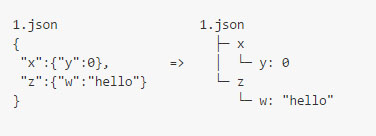
$ jts -dor$ j-tree-str -dconvert a file directory to tree string, and some diy in github-issues by diy-theme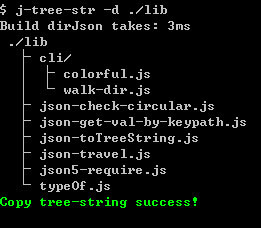
-
2.convert directory to json obj and tree-structure-string
-
3.jtls show directories like cmd ls, but in a tree string like
-
4.Simple none dependencies, except use cli (need copy-paste, yargs)
-
5.Cross platform nix(linx,mac-Osx) and windows, support for multiple browsers(IE9+)
-
6.travelJson(jsonObj,cb) Safe recursive walk of a jsonObj,even though obj is circular!
-
7.getValByKeyPath(jsonObj,'x.y.z.1.2') <=> jsonObj.x.y.z[1][2]
-
8.checkCircular(obj) check the obj,and return some useful info
$ npm install json-toy -g
$ jtls
convert a json to tree string,you can set options like space(hoz and vert),need output val,root name,max depth in convert directory.
and there is two ways to use:
-
use
treeify(jsonObj,options)to convert json to tree-string -
use cmd line $ jts (or j-tree-str) your/json/file.json (Recommend)
A tree string convert from string which typed in cmd line
$ jts '{a:1,b:{d:2},e:3,}'
$ jtls
ROOT
│
├─ a: 1
│
├─ b
│ │
│ └─ d: 2
│
└─ e: 3
A tree string convert from my package.json
$ jts ./package.jsonor
$ json-treeify ./package.json ./
├─ .gitignore
├─ .npmignore
├─ .travis.yml
├─ bin /
│ └─ json-treeify.js
├─ coverage /
│ ├─ coverage.json
│ ├─ lcov-report /
│ │ ├─ base.css
...
└─ webpack.config.js
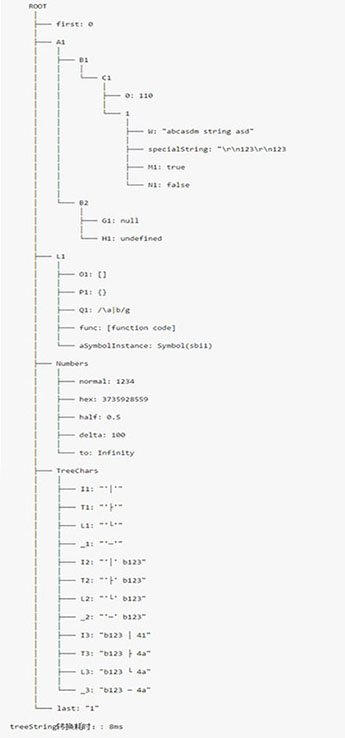
treeify(jsonObj),support multiple primitive type
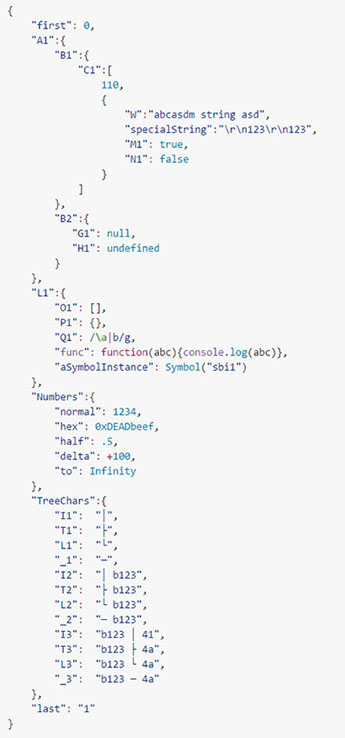 =>
=> 
Online Parser: https://froguard.github.io/funny/treeString
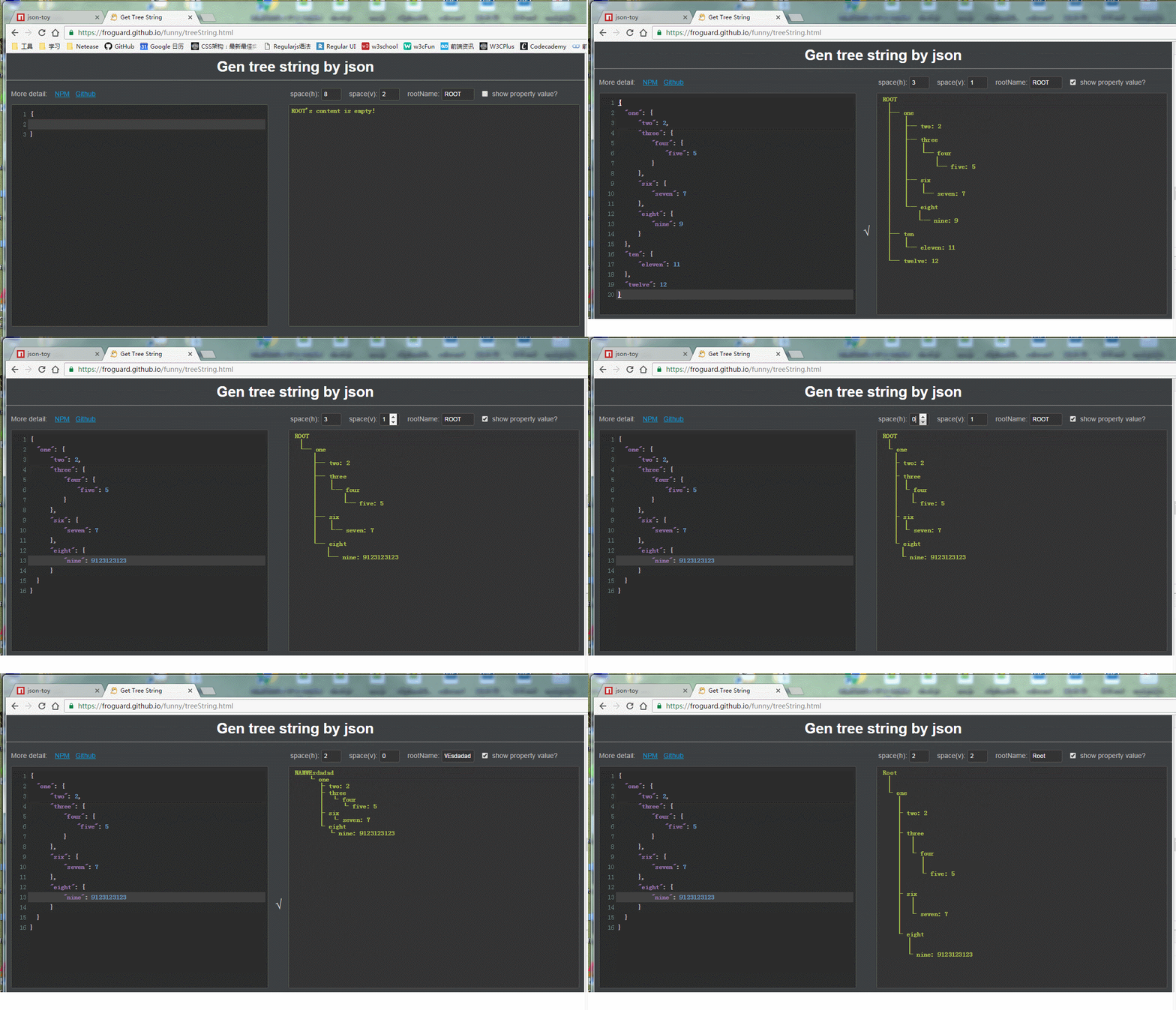
let jt = require('json-toy');
let jsonObj = {
  x: {
    y: {
      z: 'hello,world!',
    },
    w: [0, 1, 2, ['a', 'b', 'c']],
  },
};
console.log(jt.getValByKeyPath(jsonObj, 'x.y.z')); // "hello,world!"
console.log(jt.getValByKeyPath(jsonObj, 'x.w.3.1')); // "b"
If property name include '.' like 'a.b.c'
{
  "a.b.c": 1
}
You can get it by a trans char set
• ←→ .
jt.getValByKeyPath(jsonObj, 'a•b•c'); // ←→ jsonObj["a.b.c"]and & ←→ &
{
  "•": 1,
  "&": 2,
  "&": 3
}jt.getValByKeyPath(jsonObj, '&bull;'); // ←→ jsonObj["•"]
jt.getValByKeyPath(jsonObj, '&amp;'); // ←→ jsonObj["&"]
jt.getValByKeyPath(jsonObj, '&'); // ←→ jsonObj["&"]A safe travel method to recursive walk of a obj,even though a circular obj.
function doTravel(key, value, { keyPath, type, isSpreadable, depth }) {
  //let parentPropObj = this;
  console.log(`keyPath = '${keyPath}'\
      ,\nkey = '${key}'\
      ,\ntype = ${type}\
      ,\nisSpreadable = ${isSpreadable}\
      ,\ndepth = ${depth}\
      ,\nvalue = ${JSON.stringify(value, null, 2) || String(value)}`);
}
let keyPathsArr = jt.travelJson(jsonObj, doTravel, 'jsonObj');let json = {
a: {
b: {
c: 1,
},
},
d: {
e: {
f: 2,
},
},
};
json.d.e.g = json.d.e;
json.d.e.h = json;
let res = jt.checkCircular(json);
// console.log(res);you can get some useful information from res:
{
  "isCircular": true,
  "circularProps": [
    {
      "keyPath": "ROOT.d.e.g",
      "circularTo": "ROOT.d.e",
      "key": "g",
      "value": "[Circular->ROOT.d.e]"
    },
    {
      "keyPath": "ROOT.d.e.h",
      "circularTo": "ROOT",
      "key": "h",
      "value": "[Circular->ROOT]"
    }
  ]
}// use just only in node
let travelDir = require('json-toy/lib/cli/walk-dir');
let dirJson = travelDir('./', {
exclude: {
file: /(Thumbs\.db|\.DS_store)/g,
directory: /(\.git|\.svn|\.idea|node_modules|bower_components)/g,
outExcludeDir: true, // need output exclude directory
},
});
console.log(JSON.stringify(dirJson, null, 2));{
"css": {
"reset.css": "file"
},
"img": {
"btn.png": "file"
},
"js": {
"lib": {
"lib.js": "file"
},
"main.js": "file"
},
"node_modules": {}, // options.exclude.outExcludeDir == true
"package.json": "file",
"test.js": "file"
}$ jts help-
$ jts xx.json: the distance in command-print-out: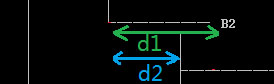
don't worry ,'d1' is equal to 'd2' actually, The reason why u've saw difference is that the char ' ' width is shorter than other chars in command prompt
-
copy-paste-feature,json-toy used system shell command line to exec copy,so you may get some string pre space char '' was removed by sys. if you paste in a *.js file.like this
  1.json
    │
    ├─ w
    │   │
    │   └─ x
    │       │
    │       └─ y: 1
    │
    └─ w2
    │
    └─ xxx: 1
eh...You'd better paste in a text file like _.md or _.txt or others ext
  1.json
    │
    ├─ w
    │   │
    │   └─ x
    │       │
    │       └─ y: 1
    │
    └─ w2
        │
        └─ xxx: 1