Skip to content

Only check for valid phone number in the deposit bank account flow - #97801

Merged
puneetlath merged 4 commits into
mainfrom
vit-removeUSNumberRequirement
Aug 10, 2026
Merged

Only check for valid phone number in the deposit bank account flow#97801
puneetlath merged 4 commits into
mainfrom
vit-removeUSNumberRequirement

Conversation

@mountiny

@mountiny mountiny commented Aug 4, 2026

Copy link
Copy Markdown
Contributor

Explanation of Change

The phone number step in the deposit bank account flow validated the number twice. It ran isValidPhoneNumber() on the number with the country code appended, and it also ran isValidNANPPhone() on the E.164 formatted number.

isValidNANPPhone() only accepted numbers that parse to a North American Numbering Plan region: US, PR, GU, VI, AS, MP, and CA. This is the international deposit account flow, so the account holder can live anywhere. A user with a valid number such as +44 20 7123 4567 saw Please enter a valid phone number and could not finish the step.

This PR keeps isValidPhoneNumber() as the only phone check in the step. It uses libphonenumber's possible check, so it accepts a valid number from any country and still rejects malformed input.

isValidNANPPhone() is removed from ValidationUtils because this step was its only caller. The genuinely US only callers, in the EnablePayments wallet flows and the USD ReimbursementAccount flow, use isValidUSPhone() and are unchanged.

Widening the step exposed a second bug in the update flow, which renders the same step. UpdatePersonalBankAccountPage normalized the phone with parsePhoneNumber().number.significant, which strips the calling code. That was harmless while the step guaranteed +1, because significant then yields exactly the 10 NANP digits. Once any country is accepted, +442071234567 becomes 2071234567 and the backend reads it as a NANP number. The add flow already sent E.164, so the two flows disagreed on the format of the same companyPhone field.

Both flows now send E.164 through the shared formatE164PhoneNumber() helper. The helper appends the country code first, which matters because the form draft holds whatever the user typed and that can have no calling code.

Changed files:

  • src/pages/AddPersonalBankAccountPage/substeps/PhoneNumberStep.tsx — drop the isValidNANPPhone() check and the E.164 formatting it needed.
  • src/pages/settings/Wallet/UpdatePersonalBankAccountPage.tsx — send E.164 instead of the national significant number, matching the add flow.
  • src/libs/ValidationUtils.ts — remove isValidNANPPhone() and its export.
  • tests/unit/ValidationUtilsTest.ts — replace the isValidNANPPhone describe block with an isValidPhoneNumber block covering US, CA, GB, and AU numbers plus malformed input.
  • tests/unit/LoginUtilsTest.ts — add a formatE164PhoneNumber describe block.

Fixed Issues

$ #97806
PROPOSAL:

Tests

  1. Log in to any account.
  2. Go to Account > Wallet.
  3. Tap Add bank account > Make payments
  4. Continue to the phone number step.
  5. Enter a UK phone number, +44 20 7123 4567.
  6. Verify that no error appears and the step continues to the next page.
  7. Go back to the phone number step.
  8. Enter a US phone number, +1 201 867 5309.
  9. Verify that no error appears and the step continues to the next page.
  10. Go back to the phone number step.
  11. Enter a Canadian phone number, +1 416 555 1234.
  12. Verify that no error appears and the step continues to the next page.
  13. Go back to the phone number step.
  14. Enter an invalid number, 123.
  15. Verify that the field shows Please enter a valid phone number and the step does not continue.
  16. Go back to the phone number step.
  17. Enter letters, abcdefg.
  18. Verify that the field shows Please enter a valid phone number and the step does not continue.
  19. Complete the rest of the flow and verify that the bank account is added.
  20. Reopen the flow and verify that the saved phone number is shown in E.164 format.
  21. Go to Account > Wallet and tap a personal bank account that is missing information, to enter the update flow.
  22. Continue to the phone number step.
  23. Enter a UK phone number, +44 20 7123 4567, and finish the flow.
  24. Open the network tab, find the UpdatePersonalBankAccountInfo request, and verify that companyPhone is +442071234567 and not 2071234567.
  25. Repeat steps 21 to 23 with a US phone number, 201 867 5309, and verify that companyPhone is +12018675309.
  26. Run npm run test -- tests/unit/ValidationUtilsTest.ts tests/unit/LoginUtilsTest.ts and verify that both suites pass.
  • Verify that no errors appear in the JS console

Offline tests

  1. Turn off the network connection.
  2. Go to Account > Wallet > Add bank account > Get reimbursed.
  3. Continue to the phone number step.
  4. Enter a UK phone number, +44 20 7123 4567.
  5. Verify that no error appears and the step continues, because the validation runs on the client and needs no network call.
  6. Enter an invalid number, 123.
  7. Verify that the field still shows Please enter a valid phone number.
  8. Turn the network connection back on.
  9. Verify that the step keeps the value entered while offline and the flow continues.

QA Steps

  1. Log in to any account.
  2. Go to Account > Wallet.
  3. Tap Add bank account > Make payments
  4. Continue to the phone number step.
  5. Enter a UK phone number, +44 20 7123 4567.
  6. Verify that no error appears and the step continues to the next page.
  7. Go back to the phone number step.
  8. Enter an Australian phone number, +61 2 5550 1234.
  9. Verify that no error appears and the step continues to the next page.
  10. Go back to the phone number step.
  11. Enter a US phone number, +1 201 867 5309.
  12. Verify that no error appears and the step continues to the next page.
  13. Go back to the phone number step.
  14. Enter an invalid number, 123.
  15. Verify that the field shows Please enter a valid phone number and the step does not continue.
  16. Complete the flow with a valid phone number.
  17. Verify that the bank account is added and the phone number is saved.
  18. Go to Account > Wallet and tap a personal bank account that is missing information, to enter the update flow.
  19. Continue to the phone number step.
  20. Enter a UK phone number, +44 20 7123 4567, and finish the flow.
  21. Verify that the bank account updates without an error and the saved phone number still starts with +44.
  22. Repeat steps 18 to 20 with a US phone number, 201 867 5309.
  23. Verify that the bank account updates without an error and the saved phone number starts with +1.
  • Verify that no errors appear in the JS console

PR Author Checklist

  • I linked the correct issue in the ### Fixed Issues section above
  • I wrote clear testing steps that cover the changes made in this PR
    • I added steps for local testing in the Tests section
    • I added steps for the expected offline behavior in the Offline steps section
    • I added steps for Staging and/or Production testing in the QA steps section
    • I added steps to cover failure scenarios (i.e. verify an input displays the correct error message if the entered data is not correct)
    • I turned off my network connection and tested it while offline to ensure it matches the expected behavior (i.e. verify the default avatar icon is displayed if app is offline)
    • I tested this PR with a High Traffic account against the staging or production API to ensure there are no regressions (e.g. long loading states that impact usability).
  • I included screenshots or videos for tests on all platforms
  • I ran the tests on all platforms & verified they passed on:
    • Android: Native
    • Android: mWeb Chrome
    • iOS: Native
    • iOS: mWeb Safari
    • MacOS: Chrome / Safari
  • I verified there are no console errors (if there's a console error not related to the PR, report it or open an issue for it to be fixed)
  • I followed proper code patterns (see Reviewing the code)
    • I verified that any callback methods that were added or modified are named for what the method does and never what callback they handle (i.e. toggleReport and not onIconClick)
    • I verified that comments were added to code that is not self explanatory
    • I verified that any new or modified comments were clear, correct English, and explained "why" the code was doing something instead of only explaining "what" the code was doing.
    • I verified any copy / text that was added to the app is grammatically correct in English. It adheres to proper capitalization guidelines (note: only the first word of header/labels should be capitalized), and is either coming verbatim from figma or has been approved by marketing (in order to get marketing approval, ask the Bug Zero team member to add the Waiting for copy label to the issue)
  • If a new code pattern is added I verified it was agreed to be used by multiple Expensify engineers
  • I followed the guidelines as stated in the Review Guidelines
  • I tested other components that can be impacted by my changes (i.e. if the PR modifies a shared library or component like Avatar, I verified the components using Avatar are working as expected)
  • If any new file was added I verified that:
    • The file has a description of what it does and/or why is needed at the top of the file if the code is not self explanatory
  • If a new CSS style is added I verified that:
    • A similar style doesn't already exist
    • The style can't be created with an existing StyleUtils function (i.e. StyleUtils.getBackgroundAndBorderStyle(theme.componentBG))
  • If new assets were added or existing ones were modified, I verified that:
    • The assets are optimized and compressed (for SVG files, run npm run compress-svg)
    • The assets load correctly across all supported platforms.
  • If the PR modifies code that runs when editing or sending messages, I tested and verified there is no unexpected behavior for all supported markdown - URLs, single line code, code blocks, quotes, headings, bold, strikethrough, and italic.
  • If the PR modifies a generic component, I tested and verified that those changes do not break usages of that component in the rest of the App (i.e. if a shared library or component like Avatar is modified, I verified that Avatar is working as expected in all cases)
  • If the PR modifies a component related to any of the existing Storybook stories, I tested and verified all stories for that component are still working as expected.
  • If the PR modifies a component or page that can be accessed by a direct deeplink, I verified that the code functions as expected when the deeplink is used - from a logged in and logged out account.
  • If the PR modifies the UI (e.g. new buttons, new UI components, changing the padding/spacing/sizing, moving components, etc) or modifies the form input styles:
    • I verified that all the inputs inside a form are aligned with each other.
    • I added Design label and/or tagged @Expensify/design so the design team can review the changes.
  • I added unit tests for any new feature or bug fix in this PR to help automatically prevent regressions in this user flow.
  • If the main branch was merged into this PR after a review, I tested again and verified the outcome was still expected according to the Test steps.

Screenshots/Videos

Android: Native

Not yet tested — needs manual QA.

Android: mWeb Chrome

Not yet tested — needs manual QA.

iOS: Native

Not yet tested — needs manual QA.

iOS: mWeb Safari

Not yet tested — needs manual QA.

MacOS: Chrome / Safari

Not yet tested — needs manual QA.

@codecov

codecov Bot commented Aug 4, 2026

Copy link
Copy Markdown

Codecov Report

✅ Changes either increased or maintained existing code coverage, great job!

Files with missing lines Coverage Δ
src/libs/ValidationUtils.ts 60.24% <ø> (+1.08%) ⬆️
...rsonalBankAccountPage/substeps/PhoneNumberStep.tsx 0.00% <0.00%> (ø)
.../settings/Wallet/UpdatePersonalBankAccountPage.tsx 0.00% <0.00%> (ø)
... and 709 files with indirect coverage changes

@mountiny
mountiny requested a review from ZhenjaHorbach August 4, 2026 16:20
@mountiny

mountiny commented Aug 4, 2026

Copy link
Copy Markdown
Contributor Author

@codex review
@MelvinBot review

@chatgpt-codex-connector

Copy link
Copy Markdown

Codex Review: Didn't find any major issues. What shall we delve into next?

Reviewed commit: 6098cfc11a

ℹ️ About Codex in GitHub

Codex has been enabled to automatically review pull requests in this repo. Reviews are triggered when you

  • Open a pull request for review
  • Mark a draft as ready
  • Comment "@codex review".

If Codex has suggestions, it will comment; otherwise it will react with 👍.

When you sign up for Codex through ChatGPT, Codex can also answer questions or update the PR, like "@codex address that feedback".

@MelvinBot

Copy link
Copy Markdown
Contributor

Review — LGTM ✅

The change is clean, minimal, and correct. It strictly loosens validation: the phone step previously required a number to pass both isValidPhoneNumber() and the NANP-only isValidNANPPhone(), so any non-+1 number (like +44 20 7123 4567) was wrongly rejected. Dropping the NANP gate fixes the international-deposit bug reported in #97806 without introducing new false negatives — every number that validated before still validates.

Verified:

  • isValidNANPPhone is fully removed (definition, export, and unit tests) and has no remaining references anywhere in src/tests.
  • The restored formatE164PhoneNumber import is genuinely used — it formats the value on submit at PhoneNumberStep.tsx:66, so it's not dead code.
  • Validation and submit stay consistent — both route the raw input through appendCountryCode() before parsing.
Two things worth confirming (neither a blocker)
  1. Backend acceptance of non-NANP numbers. The client no longer blocks international numbers, but this is the key product assumption to confirm: the reimbursement/deposit backend must actually accept and store an international phone number for this personal bank account. If anything downstream still assumes a US/NANP number, a UK/AU number could pass the client and fail server-side. This is a backend/product check, not a code defect I can verify here.

  2. possible vs valid. isValidPhoneNumber uses libphonenumber's .possible, which only checks plausible length — not that the number is an assignable line. So a right-length-but-invalid-prefix number can pass. That's consistent with how NewDot validates phone numbers elsewhere (e.g. login), so it's an accepted tradeoff rather than a regression from this PR.

Optional: no unit test was added for the widened behavior (the removed tests covered NANP). A one-line assertion that isValidPhoneNumber('+442071234567') is true would lock in the fix at the util level.

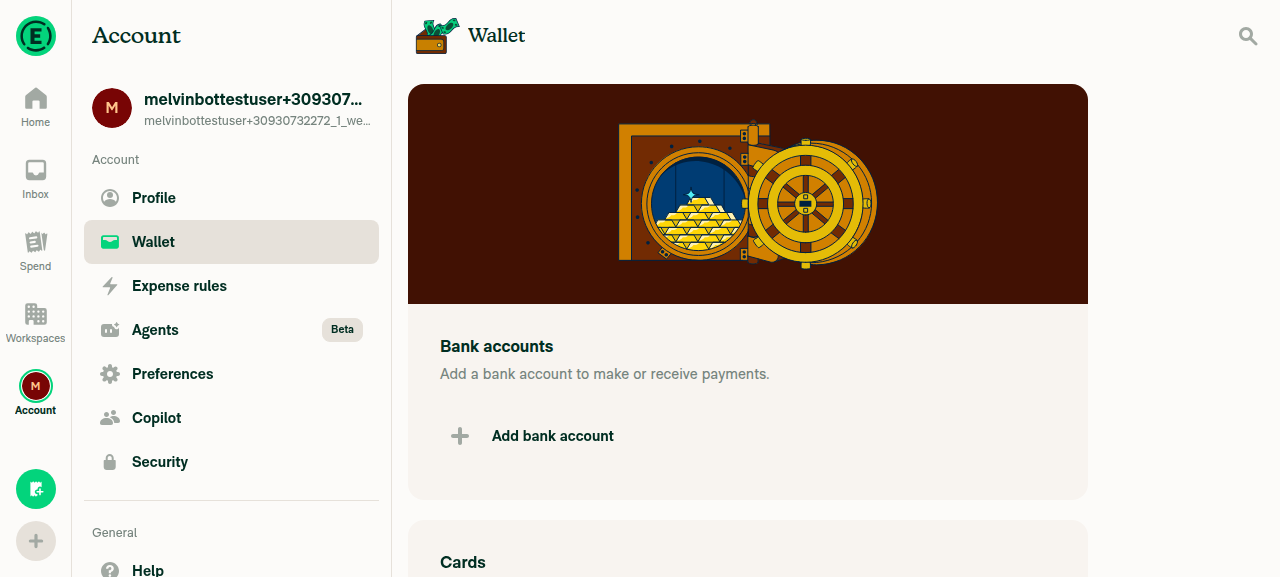
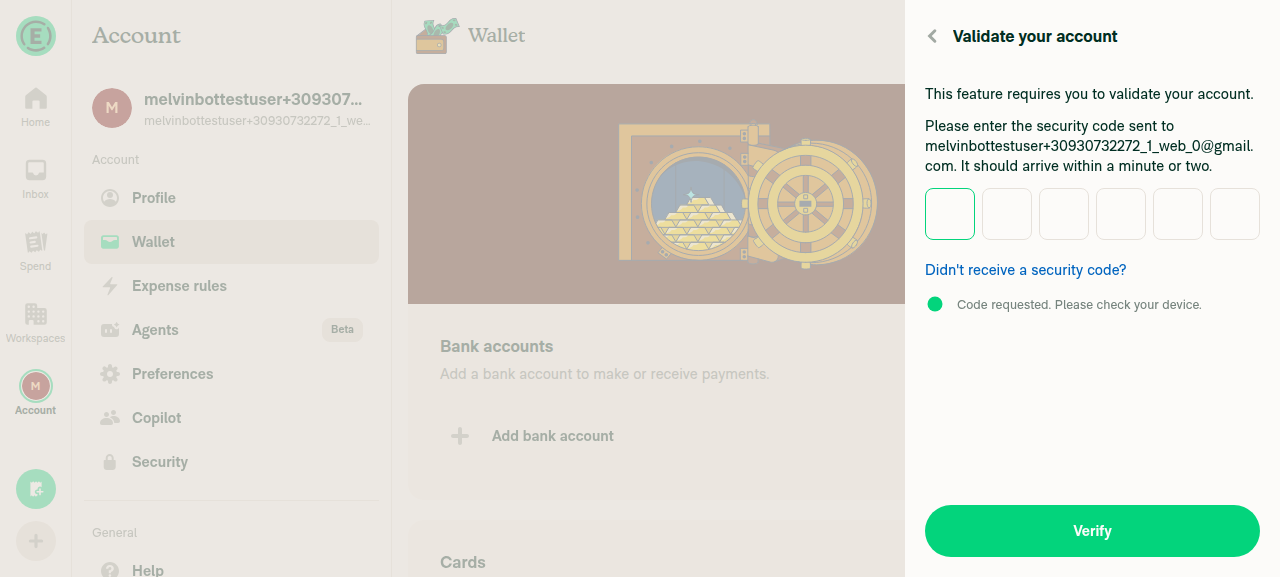
In-app verification: I attempted to exercise the flow on web, but the tester was blocked before the phone step — Add bank account triggers a "Validate your account" email security-code wall that the test session can't clear (an environment limitation, not a PR issue). So the UK-accepted / 123-rejected checks in the test plan still need manual QA.

Evidence

Wallet page with Add bank account button

Wallet page with Add bank account button

Validate your account security-code wall blocking the flow

Validate your account security-code wall blocking the flow

@mountiny
mountiny marked this pull request as ready for review August 6, 2026 19:26
@mountiny
mountiny requested review from a team as code owners August 6, 2026 19:26
@melvin-bot
melvin-bot Bot requested review from heyjennahay and luacmartins and removed request for a team August 6, 2026 19:26
@melvin-bot

melvin-bot Bot commented Aug 6, 2026

Copy link
Copy Markdown

@luacmartins Please copy/paste the Reviewer Checklist from here into a new comment on this PR and complete it. If you have the K2 extension, you can simply click: [this button]

luacmartins
luacmartins previously approved these changes Aug 6, 2026

@luacmartins luacmartins left a comment

Copy link
Copy Markdown
Contributor

Choose a reason for hiding this comment

The reason will be displayed to describe this comment to others. Learn more.

LGTM

@ZhenjaHorbach

ZhenjaHorbach commented Aug 7, 2026

Copy link
Copy Markdown
Contributor

Reviewer Checklist

  • I have verified the author checklist is complete (all boxes are checked off).
  • I verified the correct issue is linked in the ### Fixed Issues section above
  • I verified testing steps are clear and they cover the changes made in this PR
    • I verified the steps for local testing are in the Tests section
    • I verified the steps for Staging and/or Production testing are in the QA steps section
    • I verified the steps cover any possible failure scenarios (i.e. verify an input displays the correct error message if the entered data is not correct)
    • I turned off my network connection and tested it while offline to ensure it matches the expected behavior (i.e. verify the default avatar icon is displayed if app is offline)
  • I checked that screenshots or videos are included for tests on all platforms
  • I included screenshots or videos for tests on all platforms
  • I verified that the composer does not automatically focus or open the keyboard on mobile unless explicitly intended. This includes checking that returning the app from the background does not unexpectedly open the keyboard.
  • I verified tests pass on all platforms & I tested again on:
    • Android: HybridApp
    • Android: mWeb Chrome
    • iOS: HybridApp
    • iOS: mWeb Safari
    • MacOS: Chrome / Safari
  • If there are any errors in the console that are unrelated to this PR, I either fixed them (preferred) or linked to where I reported them in Slack
  • I verified proper code patterns were followed (see Reviewing the code)
    • I verified that comments were added to code that is not self explanatory
    • I verified that any new or modified comments were clear, correct English, and explained "why" the code was doing something instead of only explaining "what" the code was doing.
    • I verified any copy / text that was added to the app is grammatically correct in English. It adheres to proper capitalization guidelines (note: only the first word of header/labels should be capitalized), and is either coming verbatim from figma or has been approved by marketing (in order to get marketing approval, ask the Bug Zero team member to add the Waiting for copy label to the issue)
  • If a new code pattern is added I verified it was agreed to be used by multiple Expensify engineers
  • I verified that this PR follows the guidelines as stated in the Review Guidelines
  • I verified other components that can be impacted by these changes have been tested, and I retested again (i.e. if the PR modifies a shared library or component like Avatar, I verified the components using Avatar have been tested & I retested again)
  • If a new component is created I verified that:
    • A similar component doesn't exist in the codebase
    • All props are defined accurately
    • The component has a clear name that is non-ambiguous and the purpose of the component can be inferred from the name alone
    • The only data being stored in the state is data necessary for rendering and nothing else
    • The component has the minimum amount of code necessary for its purpose, and it is broken down into smaller components in order to separate concerns and functions
  • If a new CSS style is added I verified that:
    • A similar style doesn't already exist
    • The style can't be created with an existing StyleUtils function (i.e. StyleUtils.getBackgroundAndBorderStyle(theme.componentBG)
  • If the PR modifies code that runs when editing or sending messages, I tested and verified there is no unexpected behavior for all supported markdown - URLs, single line code, code blocks, quotes, headings, bold, strikethrough, and italic.
  • If the PR modifies a generic component, I tested and verified that those changes do not break usages of that component in the rest of the App (i.e. if a shared library or component like Avatar is modified, I verified that Avatar is working as expected in all cases)
  • If the PR modifies a component related to any of the existing Storybook stories, I tested and verified all stories for that component are still working as expected.
  • If the PR modifies a component or page that can be accessed by a direct deeplink, I verified that the code functions as expected when the deeplink is used - from a logged in and logged out account.
  • If the PR modifies the UI (e.g. new buttons, new UI components, changing the padding/spacing/sizing, moving components, etc) or modifies the form input styles:
    • I verified that all the inputs inside a form are aligned with each other.
    • I added Design label and/or tagged @Expensify/design so the design team can review the changes.
  • For any bug fix or new feature in this PR, I verified that sufficient unit tests are included to prevent regressions in this flow.
  • If the main branch was merged into this PR after a review, I tested again and verified the outcome was still expected according to the Test steps.
  • I have checked off every checkbox in the PR reviewer checklist, including those that don't apply to this PR.

Screenshots/Videos

Android: HybridApp
2026-08-10.12.15.57.mov
Android: mWeb Chrome
2026-08-10.12.09.39.mov
iOS: HybridApp
2026-08-10.12.15.57.mov
iOS: mWeb Safari
2026-08-10.12.09.39.mov
MacOS: Chrome / Safari
2026-08-10.12.01.34.mov

@ZhenjaHorbach

ZhenjaHorbach commented Aug 7, 2026

Copy link
Copy Markdown
Contributor

I suppose we have a mismatch here

UpdatePersonalBankAccountPage.tsx:22 imports the same step, then formats the saved E.164 value at UpdatePersonalBankAccountPage.tsx:200-201:

const parsed = parsePhoneNumber(rawPhone, {regionCode: CONST.COUNTRY.US});
const phoneNumber = parsed.number?.significant ?? '';

significant strips the calling code. That was harmless while isValidNANPPhone() guaranteed +1 (there it yields exactly the 10 NANP digits). Now +442071234567 is sent as 2071234567, +4915112345678 as 15112345678 silently, and the backend reads them as NANP

I think we need to use parsed.number?.e164, or strip only when parsed.regionCode === CONST.COUNTRY.US. The add flow already sends E.164 (AddPersonalBankAccountPage/index.tsx:135), so the two flows currently disagree on the format of the same companyPhone field

@ZhenjaHorbach

Copy link
Copy Markdown
Contributor

And about these steps

  1. Tap Add bank account > Get reimbursed.
  2. Continue to the phone number step.
  3. Enter a UK phone number, +44 20 7123 4567.

Get reimbursed + UK doesn't require a phone number
So I suppose it's better to use Tap Add bank account > Make payments here to not confuse QA 😅

The update flow stripped the calling code with parsePhoneNumber().number.significant,
so a UK number was sent as 10 bare digits and the BE read it as NANP. Reuse
formatE164PhoneNumber() so this flow matches the add flow.
@mountiny

mountiny commented Aug 7, 2026

Copy link
Copy Markdown
Contributor Author

Good catch, you are right. Fixed in 82c600e.

I went with formatE164PhoneNumber() rather than parsed.number?.e164 directly. e164 alone is not enough here, because FormProvider writes each input to the draft as the user types, and PhoneNumberStep only writes the E.164 value on submit when shouldSaveDraft is true. So rawPhone can be raw text with no calling code, such as 020 7123 4567, and parsing that without a country code hint gives nothing useful. formatE164PhoneNumber() runs appendCountryCode() first, so it handles that case as well as the already E.164 case. It is also exactly what the add flow calls at AddPersonalBankAccountPage/index.tsx:135, so both flows now agree on the format.

It also upgrades legacy values. A stored companyPhone of 2018675309 from an older submission now goes out as +12018675309 rather than round tripping as bare digits.

Added coverage for both helpers, since removing isValidNANPPhone took the only phone format tests in this area with it:

  • formatE164PhoneNumber in tests/unit/LoginUtilsTest.ts
  • isValidPhoneNumber in tests/unit/ValidationUtilsTest.ts, covering US, CA, GB, and AU plus malformed input

There is a related backend limitation on the same field that this PR does not touch: https://github.com/Expensify/Expensify/issues/669521

@mountiny

mountiny commented Aug 7, 2026

Copy link
Copy Markdown
Contributor Author

@ZhenjaHorbach can you check again please?

@ZhenjaHorbach

Copy link
Copy Markdown
Contributor

@ZhenjaHorbach can you check again please?

Will check on the weekend or on Monday morning!

expect(parsedPhone).toBe('+12345678901');
});
});
describe('formatE164PhoneNumber', () => {

Copy link
Copy Markdown
Contributor

Choose a reason for hiding this comment

The reason will be displayed to describe this comment to others. Learn more.

Minor comment
But strange that we don't have empty lines before describe in this test file

@ZhenjaHorbach

Copy link
Copy Markdown
Contributor

But overall changes look good!

@melvin-bot
melvin-bot Bot requested a review from puneetlath August 10, 2026 10:21
@melvin-bot

melvin-bot Bot commented Aug 10, 2026

Copy link
Copy Markdown

@puneetlath Please copy/paste the Reviewer Checklist from here into a new comment on this PR and complete it. If you have the K2 extension, you can simply click: [this button]

@puneetlath
puneetlath merged commit 1139e32 into main Aug 10, 2026
37 of 40 checks passed
@puneetlath
puneetlath deleted the vit-removeUSNumberRequirement branch August 10, 2026 17:12
@OSBotify

Copy link
Copy Markdown
Contributor

✋ This PR was not deployed to staging yet because QA is ongoing. It will be automatically deployed to staging after the next production release.

@github-actions

Copy link
Copy Markdown
Contributor

🚧 puneetlath has triggered a test Expensify/App build. You can view the workflow run here.

@OSBotify

Copy link
Copy Markdown
Contributor

🚀 Deployed to staging by https://github.com/puneetlath in version: 9.4.52-0 🚀

platform result
🕸 web 🕸 success ✅
🤖 android 🤖 success ✅
🍎 iOS 🍎 cancelled 🔪

@MelvinBot

Copy link
Copy Markdown
Contributor

Help site review — no docs changes required

I reviewed the changes in this PR against the help site files under docs/articles, and no updates are needed.

Why: This PR is a bug fix. The deposit bank account phone number step was incorrectly rejecting valid non‑US/Canada numbers (it ran isValidNANPPhone() on top of isValidPhoneNumber()), and the update flow was stripping the calling code before sending companyPhone. The fix widens validation to accept any valid international number and sends E.164 consistently.

The relevant help article, Connect-a-Personal-Bank-Account.md, already describes the intended behavior:

  • It states personal bank accounts are supported in 190+ countries.
  • It refers to the phone number field generically ("Enter or update your name, address, and phone number to match your bank account details") with no US-only restriction.

I also grepped all of docs/articles for any US-only phone requirement (US phone, NANP, north american, phone number must, etc.) and found nothing. So this change brings the code in line with what the docs already document — there is no user-facing feature, workflow, label, or requirement change to document.

Since no changes are required, I did not open a draft help site PR.

@mountiny, please confirm you agree no help site update is needed. If you'd like a doc change anyway (e.g. to explicitly call out international phone support on the deposit flow), let me know and I'll open a draft PR.

@IuliiaHerets

Copy link
Copy Markdown

Hi @mountiny. QA team failed this PR on iOS with an original issue. Step 23 fails: "Please enter a valid phone number" message appears when entering +442071234567

1786465218554.97801-iOS-2.mp4

cc @puneetlath @luacmartins

@mountiny

Copy link
Copy Markdown
Contributor Author

@MelvinBot can you check this flow #97801 (comment) and investigate why the phone number is not accepted?

@MelvinBot

Copy link
Copy Markdown
Contributor

TL;DR: The PR's validation change is correct — a cleanly-entered +442071234567 passes the shared client check. The merged, passing test ValidationUtilsTest.ts:609 asserts exactly isValidPhoneNumber('+442071234567') === true. So the QA error means the string that actually reached the validator in the update flow was not a clean +442071234567.

⚠️ I could not reproduce live (the web test session came up blank — infra issue) or open the attached video (media tooling is blocked in my environment), so the root-cause below is my best-supported read from the code rather than a live repro. The "it's client-side / clean input passes" part is verified; the exact mechanism is a hypothesis to confirm against the video.

Investigation details

1. The error is client-side validation, not the backend.
The message "Please enter a valid phone number" is common.error.phoneNumber, raised by the step's own validate in PhoneNumberStep.tsx:36-47. A backend rejection would instead surface addPersonalBankAccount.updatePersonalInfoFailure (BankAccounts.ts:283). So the block happened before submit, inline on the field.

2. A clean +44… passes that validator.
isValidPhoneNumber only checks libphonenumber's possible, and appendCountryCode leaves a +-prefixed number untouched. Confirmed by the merged tests: GB +442071234567true and AU +61255501234true (ValidationUtilsTest.ts:609-613). The same validate runs in both the add and update flows, which is why the add-flow QA steps for +44… passed.

3. Leading hypothesis for why only the update flow failed.
The update-flow phone step pre-fills the field from the stored personal phone: defaultPhoneNumberdefaultValue. On iOS, tapping into a pre-filled field puts the cursor at the end and typing appends rather than replaces, so the validated value becomes something like 2018675309+442071234567 — two + / wrong length → possible = false → the exact error. The fresh add flow starts from an empty field, so the same validator passed there. This also fits the "failed on iOS" report, since mobile text editing appends by default.

To confirm / fix:

  • Check the video for what the field actually contained when the error appeared — a clean +442071234567, or a concatenated string.
  • If concatenated: normalize/clear the update-flow phone prefill (or select-all on focus) so editing replaces rather than appends.
  • If it truly was a clean +442071234567 on iOS: that would point to a native-only parse difference and needs an iOS repro, since the shared JS validator provably accepts it.

Next Steps: Reply with @MelvinBot <feedback> to refine this analysis.

@mountiny

Copy link
Copy Markdown
Contributor Author

@MelvinBot Yeah looks like it was correct +442071234567
image

@ZhenjaHorbach

Copy link
Copy Markdown
Contributor

Looks like we have different inputs for the phone number in the bank account flow😅
Because I tested using this

Снимок экрана — 2026-08-12 в 19 12 20

@MelvinBot

Copy link
Copy Markdown
Contributor

Good catch — and ZhenjaHorbach is right, this is a different screen than the one this PR changed. My earlier "concatenated input" guess was wrong; scrap it.

The screenshot is the USD business bank account flow, not the personal deposit flow this PR fixed. The title "What's your company's phone number?" is businessInfoStep.enterYourCompanyPhoneNumber and the error "Please enter a valid phone number" is bankAccount.error.phoneNumber — both belong to PhoneNumberBusiness.tsx, which validates with isValidUSPhone(companyPhone, true)US-only, by design. So +442071234567 is correctly rejected there.

This PR never touched that screen — and deliberately so. The PR description says the "genuinely US only callers … the USD ReimbursementAccount flow, use isValidUSPhone() and are unchanged." A USD business bank account requires a US phone; international business accounts go through the separate NonUSD flow.

The screen this PR actually fixed is the personal deposit step titled "What's your phone number?" (AddPersonalBankAccountPage/substeps/PhoneNumberStep.tsx), which now uses isValidPhoneNumber and accepts +442071234567 (proven by the merged test at ValidationUtilsTest.ts:609).

Bottom line: this isn't a regression from PR — QA validated the wrong screen (the "company's phone number" business step). To validate this PR, test the deposit step titled "What's your phone number?" (Wallet → Add bank account → Get reimbursed → personal deposit), not the "What's your company's phone number?" business step. If you also want the USD business flow to accept non-US numbers, that's a separate change and a separate discussion.

@OSBotify

Copy link
Copy Markdown
Contributor

🚀 Deployed to production by https://github.com/roryabraham in version: 9.4.52-11 🚀

platform result
🕸 web 🕸 success ✅
🤖 android 🤖 success ✅
🍎 iOS 🍎 success ✅

Bundle Size Analysis (Sentry):

@mountiny

Copy link
Copy Markdown
Contributor Author

Ah right.. @IuliiaHerets can you please make sure to retest with the international flow?

@mountiny

Copy link
Copy Markdown
Contributor Author

The screenshot is the USD business bank account flow, not the personal deposit flow this PR fixed. The title "What's your company's phone number?" is businessInfoStep.enterYourCompanyPhoneNumber and the error "Please enter a valid phone number" is bankAccount.error.phoneNumber — both belong to PhoneNumberBusiness.tsx, which validates with isValidUSPhone(companyPhone, true) — US-only, by design. So +442071234567 is correctly rejected there.

@trjExpensify in this US business bank account, should we allow non-USD phone numbers as well?

@IuliiaHerets

Copy link
Copy Markdown

@mountiny, steps 1-18 are now a pass, but we are unable to check steps 19-20 because the bank account is in Verifying status. Checking this PR was especially difficult for us because of vague test steps.
Do we need to follow any preconditions and use specific test data?

Retest-97801-2.mp4
Retest-97801-1.mp4

@trjExpensify

Copy link
Copy Markdown
Contributor

@trjExpensify in this US business bank account, should we allow non-USD phone numbers as well?

Good question. I'll defer to @joekaufmanexpensify on that for US VBBAs

@joekaufmanexpensify

Copy link
Copy Markdown
Contributor

Yeah, I'm not aware we need to restrict this at all. Couldn't find any backend restriction that requires a US phone number here. It seems like it's only required on the client side.

@trjExpensify

Copy link
Copy Markdown
Contributor

Great, works for me then!

Sign up for free to join this conversation on GitHub. Already have an account? Sign in to comment

Labels

None yet

Projects

None yet

Development

Successfully merging this pull request may close these issues.

9 participants