Skip to content

[Payment due @huult] [NO QA] Add Amount debited and Amount reimbursed filters, columns and sorting - #97708

Merged
madmax330 merged 23 commits into
Expensify:mainfrom
ishpaul777:ishpaul/655933-fx-filters-and-columns
Aug 13, 2026
Merged

[Payment due @huult] [NO QA] Add Amount debited and Amount reimbursed filters, columns and sorting#97708
madmax330 merged 23 commits into
Expensify:mainfrom
ishpaul777:ishpaul/655933-fx-filters-and-columns

Conversation

@ishpaul777

@ishpaul777 ishpaul777 commented Aug 3, 2026

Copy link
Copy Markdown
Contributor

Explanation of Change

A cross-border reimbursement moves two amounts: the company is debited in the currency it settles in, and the employee is credited in the currency of their deposit account. #97167 shows those on withdrawal groups in the reconciliation dashboard. This adds them as filters and as columns on expense reports.

  • Two new numeric filters, Amount debited and Amount reimbursed, sitting next to Total and behaving like it: equal to, greater than, less than, and a range. Query syntax is amountDebited / amountReimbursed, with amount-debited / amount-reimbursed as the readable form used in saved searches and URLs.
  • Two new optional columns of the same names in the expense report view, each rendered in the currency stored alongside its amount rather than the report's own currency, and each sortable by clicking its header or picking it from Sort by.

Decisions worth a look:

  • A column is hidden unless a loaded row carries both the amount and its currency, so a workspace that never pays across borders does not gain two permanently empty columns. Amounts are never displayed without their currency, since the two sides are denominated differently and neither matches the row's own currency.
  • Sorting ranks the amounts as recorded, without converting between currencies, which is what the backend does and what Total already does. So a report settled in one currency can rank above a report worth more in another, and reports with no conversion sort first ascending and last descending.
  • A column that is being sorted by stays visible even when nothing on the page fills it. Ascending puts the reports without that amount first, so a first page of domestic reports would otherwise drop the column and take both its header and its Sort by entry with it, leaving the sort applied with no way to change it.
  • The new keys are placed ahead of amount in the parser grammar, otherwise amount matches first and swallows amountDebited as amount followed by stray text.
  • Neither the filters nor the columns are offered on an expense search. A payment pays a whole report, so an expense has no amount of its own on either side, and a per-expense column would repeat its report's conversion on every row next to that expense's own amount, reading as though the expense itself had been converted. This matches total, which is also absent from the expense filter menu.

Needs Expensify/Auth#23431, which accepts the two filter keys and the two sort keys. Stacked on #97167, so only eleven commits belong to this PR, and one of those - "Restore the currency formatter the cross-border payment messages use" - is the same fix as #97723, carried here only so this branch can typecheck until that lands on main.

Fixed Issues

$ https://github.com/Expensify/Expensify/issues/655933
PROPOSAL: N/A, internal

Tests

Requires a workspace whose reports were paid with a currency conversion, since Auth records these amounts on the payment. Locally that means a workspace on a Corpay withdrawal account paying a member whose deposit account is in another currency, with at least one report left unconverted for comparison.

  1. Open Search and switch the type to Expense reports.
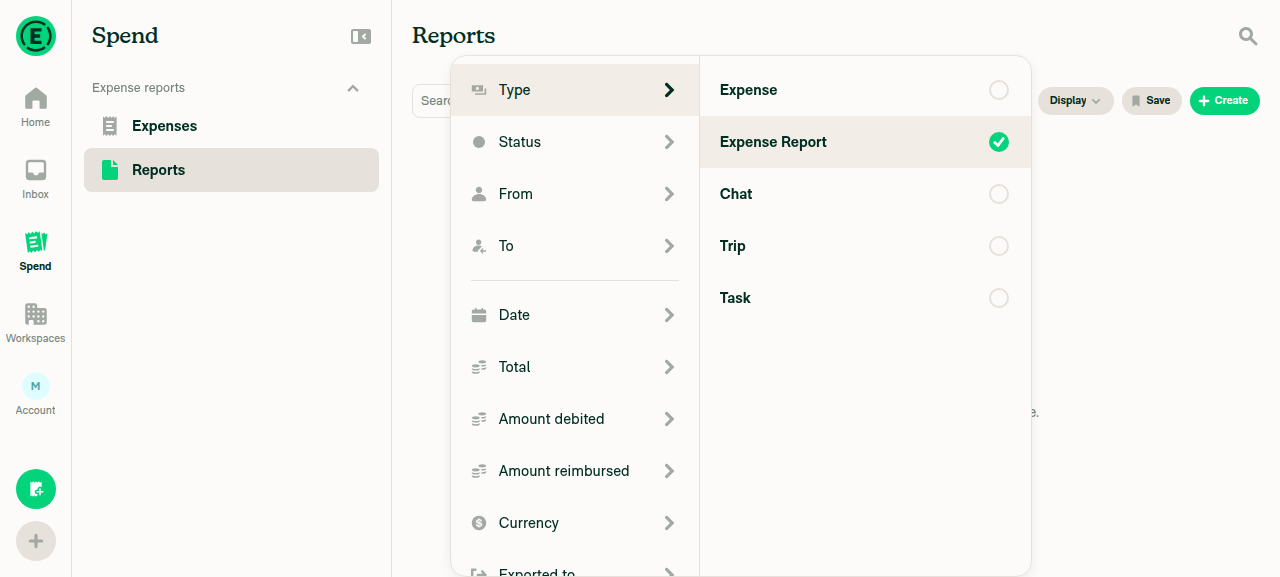
  2. Open the filters, confirm Amount debited and Amount reimbursed appear next to Total, and set Amount debited to equal to the debited amount of one of the converted reports.
  3. Verify only that report is returned, and that the readable query in the search bar reads amount-debited:<value>.
  4. Change the filter to greater than a value between the two converted reports. Verify only the larger one is returned, and that the report which was never paid across borders is returned by neither.
  5. Repeat steps 2 to 4 with Amount reimbursed. Verify it ranks the reports independently of Amount debited, since the two sides are in different currencies.
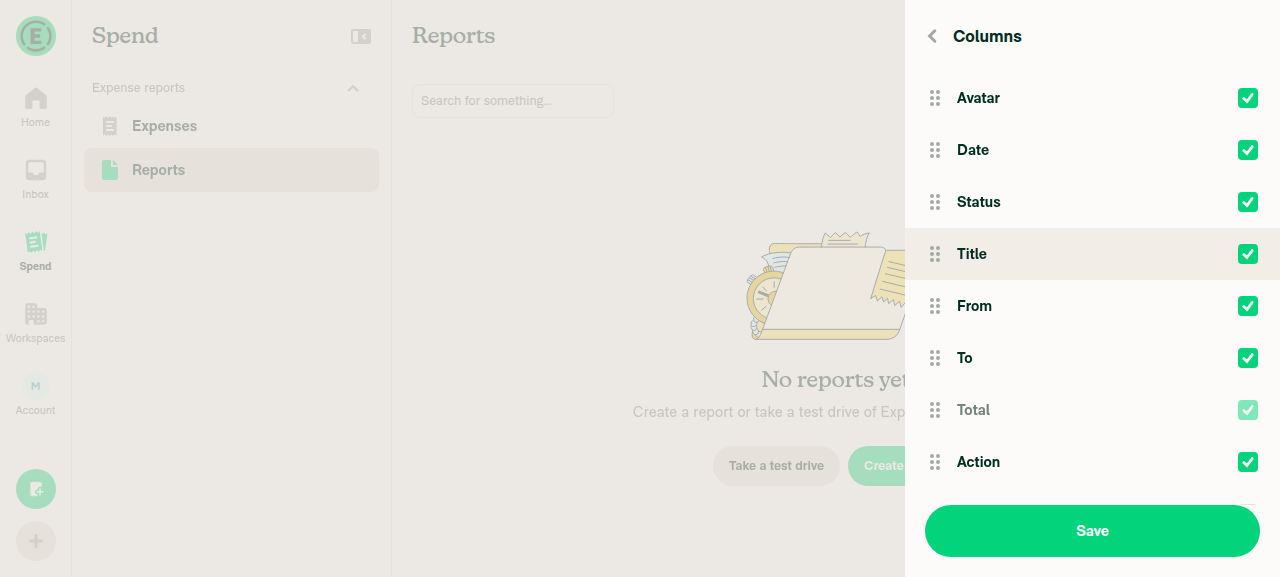
  6. Open the column picker and enable Amount debited and Amount reimbursed. Verify each converted report shows its amount in its own currency, and that the report that was never converted shows blank cells rather than a zero.
  7. Click the Amount debited header. Verify the reports reorder by that amount, that clicking again reverses them, and that the report which was never converted sits at the top ascending and the bottom descending. Repeat on Amount reimbursed and verify it produces a different order, since the two sides are in different currencies.
  8. With Amount debited as the active sort, narrow the search so the page holds only reports that were never converted. Verify the column and its header stay put rather than disappearing, and that Sort by still lists it so the sort can be changed.
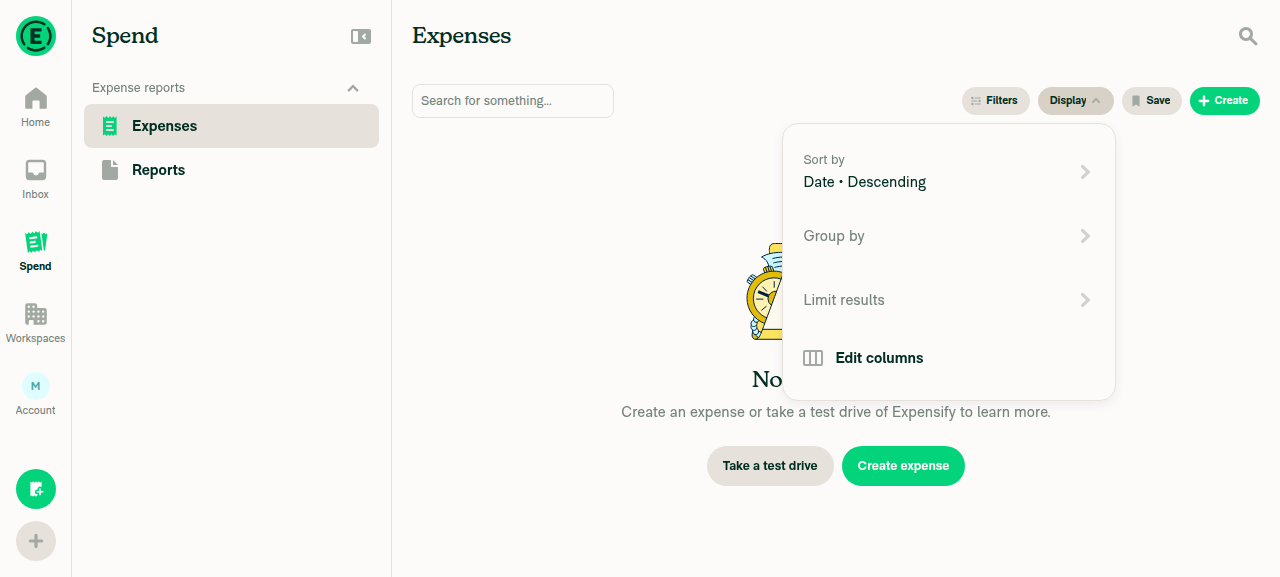
  9. Switch the type to Expenses. Verify neither filter is offered in the filter menu and neither column is offered in the column picker, and that switching type with either filter applied drops it from the query rather than sending it to the server.
  10. Open a workspace that has never paid across borders. Verify neither column appears in the picker, so no empty columns are added.
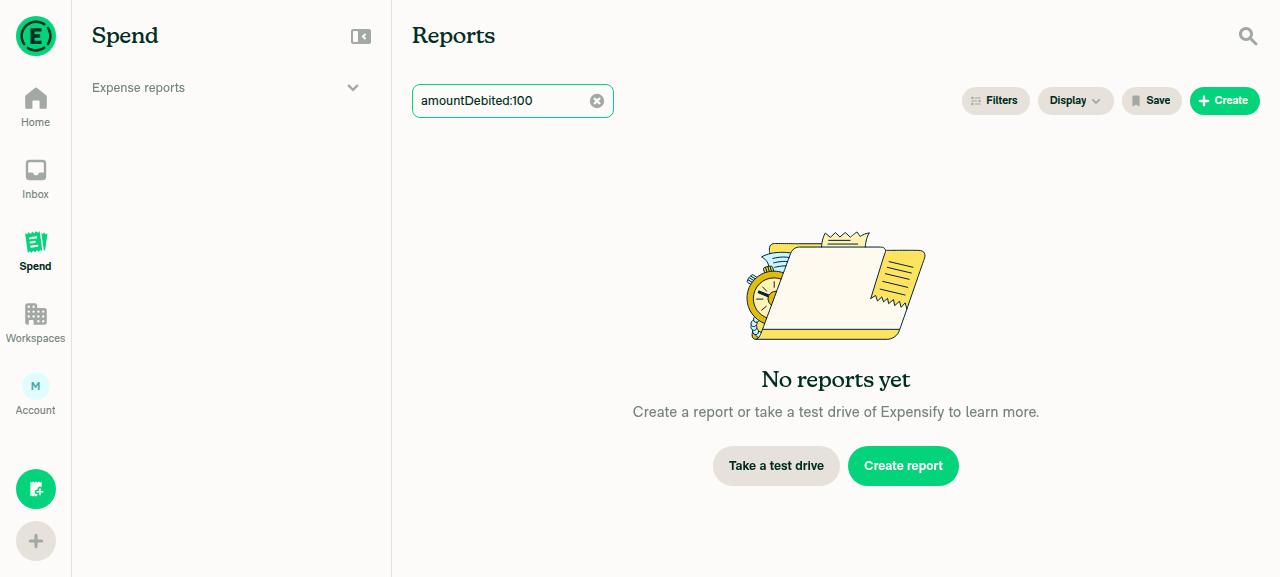
  11. Type amountDebited:100 directly into the search bar and verify it parses as a filter chip rather than as free text, then reload the page and verify the filter survives in the URL.
  • Verify that no errors appear in the JS console

Offline tests

Search results come from the server, so with no connection the list keeps showing the last loaded results. Applying either filter offline shows the offline indicator and no results change until the connection returns, the same as every other search filter. Column selection is local, so enabling or disabling the two columns works offline against already-loaded rows.

QA Steps

Same as Tests, on a workspace configured for global reimbursement whose reports have been paid across borders.

  • Verify that no errors appear in the JS console

PR Author Checklist

  • I linked the correct issue in the ### Fixed Issues section above
  • I wrote clear testing steps that cover the changes made in this PR
    • I added steps for local testing in the Tests section
    • I added steps for the expected offline behavior in the Offline steps section
    • I added steps for Staging and/or Production testing in the QA steps section
    • I added steps to cover failure scenarios (i.e. verify an input displays the correct error message if the entered data is not correct)
    • I turned off my network connection and tested it while offline to ensure it matches the expected behavior (i.e. verify the default avatar icon is displayed if app is offline)
    • I tested this PR with a High Traffic account against the staging or production API to ensure there are no regressions (e.g. long loading states that impact usability).
  • I included screenshots or videos for tests on all platforms
  • I ran the tests on all platforms & verified they passed on:
    • Android: Native
    • Android: mWeb Chrome
    • iOS: Native
    • iOS: mWeb Safari
    • MacOS: Chrome / Safari
  • I verified there are no console errors (if there's a console error not related to the PR, report it or open an issue for it to be fixed)
  • I followed proper code patterns (see Reviewing the code)
    • I verified that comments were added to code that is not self explanatory
    • I verified that any new or modified comments were clear, correct English, and explained "why" the code was doing something instead of only explaining "what" the code was doing.
    • I verified any copy / text that was added to the app is grammatically correct in English. It adheres to proper capitalization guidelines (note: only the first word of header/labels should be capitalized), and is either coming verbatim from figma or has been approved by marketing (in order to get marketing approval, ask the Bug Zero team member to add the Waiting for copy label to the issue)
  • If a new code pattern is added I verified it was agreed to be used by multiple Expensify engineers
  • I followed the guidelines as stated in the Review Guidelines
  • I tested other components that can be impacted by my changes (i.e. if the PR modifies a shared library or component like Avatar, I verified the components using Avatar are working as expected)
  • If a new CSS style is added I verified that:
    • A similar style doesn't already exist
    • The style can't be created with an existing StyleUtils function (i.e. StyleUtils.getBackgroundAndBorderStyle(theme.componentBG))
  • If new assets were added or existing ones were modified, I verified that:
    • The assets are optimized and compressed (for SVG files, run npm run compress-svg)
    • The assets load correctly across all supported platforms.
  • If the PR modifies code that runs when editing or sending messages, I tested and verified there is no unexpected behavior for all supported markdown - URLs, single line code, code blocks, quotes, headings, bold, strikethrough, and italic.
  • If the PR modifies a generic component, I tested and verified that those changes do not break usages of that component in the rest of the App (i.e. if a shared library or component like Avatar is modified, I verified that Avatar is working as expected in all cases)
  • If the PR modifies a component related to any of the existing Storybook stories, I tested and verified all stories for that component are still working as expected.
  • If the PR modifies a component or page that can be accessed by a direct deeplink, I verified that the code functions as expected when the deeplink is used - from a logged in and logged out account.
  • If the PR modifies the UI (e.g. new buttons, new UI components, changing the padding/spacing/sizing, moving components, etc) or modifies the form input styles:
    • I verified that all the inputs inside a form are aligned with each other.
    • I added Design label and/or tagged @Expensify/design so the design team can review the changes.
  • I added unit tests for any new feature or bug fix in this PR to help automatically prevent regressions in this user flow.
  • If the main branch was merged into this PR after a review, I tested again and verified the outcome was still expected according to the Test steps.

Screenshots/Videos

Android: Native
Android: mWeb Chrome
iOS: Native
iOS: mWeb Safari
MacOS: Chrome / Safari

@melvin-bot

melvin-bot Bot commented Aug 3, 2026

Copy link
Copy Markdown

Hey, I noticed you changed src/languages/en.ts in a PR from a fork. For security reasons, translations are not generated automatically for PRs from forks.

If you want to automatically generate translations for other locales, an Expensify employee will have to:

  1. Look at the code and make sure there are no malicious changes.
  2. Run the Generate static translations GitHub workflow. If you have write access and the K2 extension, you can simply click: [this button]

Alternatively, if you are an external contributor, you can run the translation script locally with your own OpenAI API key. To learn more, try running:

npx ts-node ./scripts/generateTranslations.ts --help

Typically, you'd want to translate only what you changed by running npx ts-node ./scripts/generateTranslations.ts --compare-ref main

@codecov

codecov Bot commented Aug 3, 2026

Copy link
Copy Markdown

Codecov Report

✅ Changes either increased or maintained existing code coverage, great job!

Files with missing lines Coverage Δ
src/CONST/index.ts 94.85% <ø> (ø)
src/components/Search/SearchTableHeader.tsx 49.43% <ø> (ø)
src/hooks/useAdvancedSearchFilters.ts 97.50% <ø> (ø)
src/hooks/useSearchBulkActions.ts 60.09% <100.00%> (+0.18%) ⬆️
src/libs/DebugUtils.ts 69.07% <100.00%> (+0.25%) ⬆️
src/libs/SearchAutocompleteUtils.ts 63.10% <100.00%> (+0.39%) ⬆️
src/libs/SearchQueryUtils.ts 87.59% <100.00%> (+40.70%) ⬆️
src/selectors/Report.ts 75.71% <ø> (+0.71%) ⬆️
src/types/form/SearchAdvancedFiltersForm.ts 100.00% <100.00%> (ø)
src/types/utils/whitelistedReportKeys.ts 100.00% <ø> (ø)
... and 6 more
... and 293 files with indirect coverage changes

@ishpaul777 ishpaul777 changed the title Add Amount debited and Amount reimbursed filters and columns [NO QA]Add Amount debited and Amount reimbursed filters and columns Aug 3, 2026
A payment pays a whole report, so an expense has no debited or reimbursed
amount of its own to show or filter on.
Sorting ascending puts the reports without that amount first, so an all-domestic
first page would drop the column, taking the header and the Sort by option with it.
The currency list refactor removed the bare convertToDisplayString these three
call sites relied on, leaving main unable to typecheck.
@ishpaul777 ishpaul777 changed the title [NO QA]Add Amount debited and Amount reimbursed filters and columns [NO QA] Add Amount debited and Amount reimbursed filters, columns and sorting Aug 3, 2026
@ishpaul777

Copy link
Copy Markdown
Contributor Author

@huult wanna review this one, you reviewed a related PR recently? Backend is not merged yet but will be soon, let me know if you are interested i will assign you

@ishpaul777

Copy link
Copy Markdown
Contributor Author

@MelvinBot review

@huult

huult commented Aug 6, 2026

Copy link
Copy Markdown
Contributor

Yes, thank you

@huult

huult commented Aug 6, 2026

Copy link
Copy Markdown
Contributor

@ishpaul777 please assign this PR to me

@ishpaul777
ishpaul777 requested a review from huult August 6, 2026 15:21
@ishpaul777

Copy link
Copy Markdown
Contributor Author

Thank you! Assigned you still keeping it draft until backend merge feel free to start reviewing early

@MelvinBot

Copy link
Copy Markdown
Contributor

Review — LGTM overall ✅

Clean, well-scoped, and it mirrors the existing amount-filter patterns (total / purchaseAmount) at every touch point — AMOUNT_FILTER_KEYS, FILTER_TO_SYNTAX_KEY, ALLOWED_TYPE_FILTERS, the parser grammar, the sort-property map, and the column-picker gating. The tricky bits are all covered by unit tests (parser accepts both spellings, currency-independent sort with the non-converted reports pinned to the empty end, and column visibility incl. the sorted-but-empty case). I didn't find any blocking code issues.

Web verification (dev NewDot)

  • Expense reports — filters show Amount debited / Amount reimbursed next to Total, and both appear in the column picker.
  • Expenses — neither filter nor column is offered. ✅ (matches the design and total)

Screenshots attached in the following comment.

Note

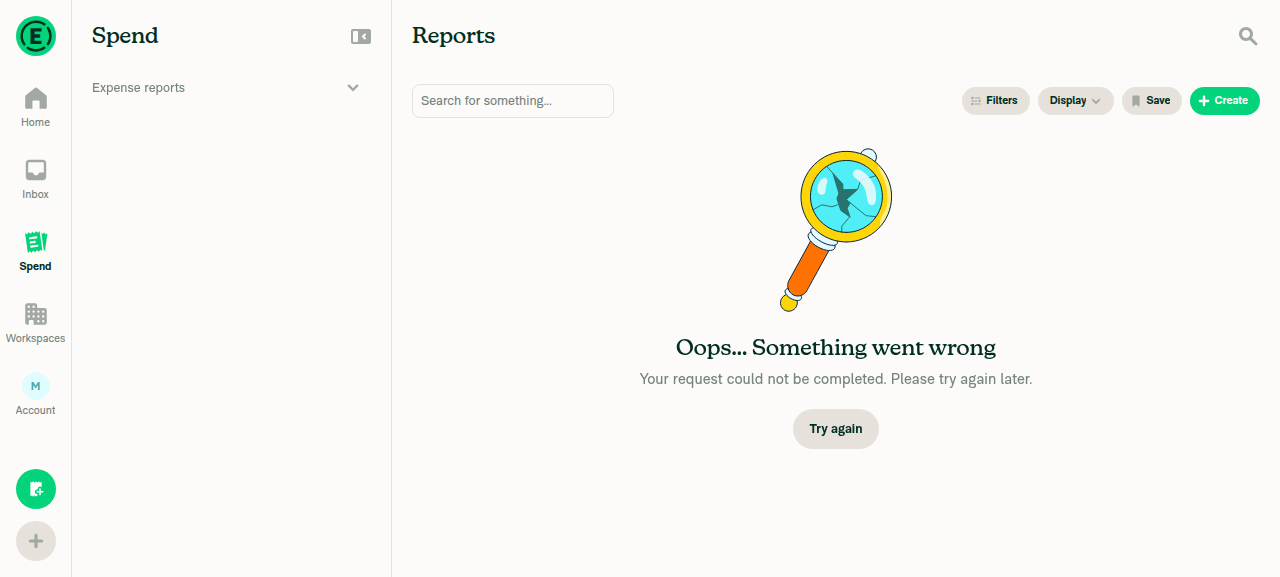
I could not verify the end-to-end typed-syntax path (test step 11: amountDebited:100 → chip → results) on dev, because the dependent Auth PR you linked isn't deployed there, so the server rejects the filter and the search shows the generic error screen. That's expected in this environment, and the parser change itself is proven by the passing SearchQueryUtilsTest case ("conversion amount filters parse from either spelling of the key"). Worth a final manual confirmation of step 11 once the Auth change is live.

CI

The red checks are not code failures — test (jobs 2/4/8) and spellcheck failed with GitHub Actions infra errors (Service Unavailable / "Failed to resolve action download info"); the unit-test shards that actually ran (jobs 1/3/5/6), typecheck, Oxfmt, and React Compiler Compliance all pass. checklist / Check independent approval are the usual human gates. A re-run should clear the infra flakes.

Two minor, non-blocking notes
  1. The sorted-column "stay visible" rule is broader than the comment suggests. SearchUIUtils.ts:6058 sits after the reportCustomColumns.has(column) guard, so if (column === sortBy) return true; also keeps submitterUserID / submitterPayrollID / orderDealNumbers sticky when they're the active sort — not just the two conversion columns the adjacent comment describes. This looks like a harmless (arguably good) generalization, just flagging it since the comment frames it as conversion-specific.

  2. A genuinely-zero converted amount is indistinguishable from "absent." SearchUIUtils.ts:6003-6008 and the row renderer both use !!debitedAmount && !!debitedCurrency, so an amount of 0 hides the column / blanks the cell. Fine for a real cross-border payment (never 0), and it's consistent with the currency guard — just noting the edge.

@MelvinBot

Copy link
Copy Markdown
Contributor

Web verification screenshots

Expense reports — filters (Amount debited / Amount reimbursed next to Total)
Filters panel Expense reports with Amount debited/reimbursed near Total

Expense reports — column picker (both columns offered)
Column picker for Expense reports offering both new columns

Expenses — column picker (neither column offered)
Column picker for Expenses type lacks the new columns

Typed-syntax path on dev (errors because the dependent Auth change isn't deployed here — expected)

amountDebited:100 typed:
amountDebited:100 typed in search bar

After submit (generic error screen — server rejects the not-yet-deployed filter):
Error after submitting amountDebited:100 on dev

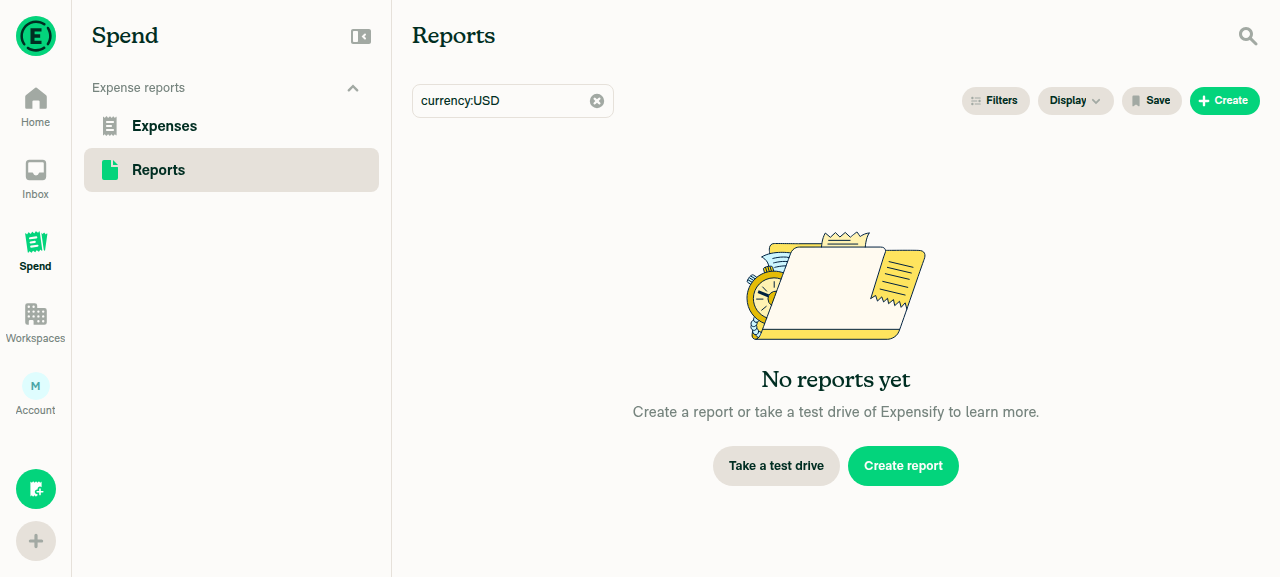
Baseline currency:USD submits fine, confirming the search itself works:
Baseline currency:USD works without error

@chatgpt-codex-connector chatgpt-codex-connector Bot left a comment

Copy link
Copy Markdown

Choose a reason for hiding this comment

The reason will be displayed to describe this comment to others. Learn more.

💡 Codex Review

Here are some automated review suggestions for this pull request.

Reviewed commit: 40c3e79177

ℹ️ About Codex in GitHub

Your team has set up Codex to review pull requests in this repo. Reviews are triggered when you

  • Open a pull request for review
  • Mark a draft as ready
  • Comment "@codex review".

If Codex has suggestions, it will comment; otherwise it will react with 👍.

Codex can also answer questions or update the PR. Try commenting "@codex address that feedback".

Comment thread src/libs/SearchUIUtils.ts Outdated
Comment thread src/CONST/index.ts
getColumnsToShow keeps the sorted column even with no values to show, so the CSV
export has to pass the sort key too or it drops a column the view still shows.

@JmillsExpensify JmillsExpensify left a comment

Copy link
Copy Markdown
Contributor

Choose a reason for hiding this comment

The reason will be displayed to describe this comment to others. Learn more.

Part of an existing product initiative.

@huult

huult commented Aug 12, 2026

Copy link
Copy Markdown
Contributor

I’ll review this PR today.

I’ll review this PR tmr.

@quinthar quinthar removed the #convert label Aug 13, 2026
@huult

huult commented Aug 13, 2026

Copy link
Copy Markdown
Contributor

Reviewer Checklist

  • I have verified the author checklist is complete (all boxes are checked off).
  • I verified the correct issue is linked in the ### Fixed Issues section above
  • I verified testing steps are clear and they cover the changes made in this PR
    • I verified the steps for local testing are in the Tests section
    • I verified the steps for Staging and/or Production testing are in the QA steps section
    • I verified the steps cover any possible failure scenarios (i.e. verify an input displays the correct error message if the entered data is not correct)
    • I turned off my network connection and tested it while offline to ensure it matches the expected behavior (i.e. verify the default avatar icon is displayed if app is offline)
  • I checked that screenshots or videos are included for tests on all platforms
  • I included screenshots or videos for tests on all platforms
  • I verified that the composer does not automatically focus or open the keyboard on mobile unless explicitly intended. This includes checking that returning the app from the background does not unexpectedly open the keyboard.
  • I verified tests pass on all platforms & I tested again on:
    • Android: HybridApp
    • Android: mWeb Chrome
    • iOS: HybridApp
    • iOS: mWeb Safari
    • MacOS: Chrome / Safari
  • If there are any errors in the console that are unrelated to this PR, I either fixed them (preferred) or linked to where I reported them in Slack
  • I verified proper code patterns were followed (see Reviewing the code)
    • I verified that comments were added to code that is not self explanatory
    • I verified that any new or modified comments were clear, correct English, and explained "why" the code was doing something instead of only explaining "what" the code was doing.
    • I verified any copy / text that was added to the app is grammatically correct in English. It adheres to proper capitalization guidelines (note: only the first word of header/labels should be capitalized), and is either coming verbatim from figma or has been approved by marketing (in order to get marketing approval, ask the Bug Zero team member to add the Waiting for copy label to the issue)
  • If a new code pattern is added I verified it was agreed to be used by multiple Expensify engineers
  • I verified that this PR follows the guidelines as stated in the Review Guidelines
  • I verified other components that can be impacted by these changes have been tested, and I retested again (i.e. if the PR modifies a shared library or component like Avatar, I verified the components using Avatar have been tested & I retested again)
  • If a new component is created I verified that:
    • A similar component doesn't exist in the codebase
    • All props are defined accurately
    • The component has a clear name that is non-ambiguous and the purpose of the component can be inferred from the name alone
    • The only data being stored in the state is data necessary for rendering and nothing else
    • The component has the minimum amount of code necessary for its purpose, and it is broken down into smaller components in order to separate concerns and functions
  • If a new CSS style is added I verified that:
    • A similar style doesn't already exist
    • The style can't be created with an existing StyleUtils function (i.e. StyleUtils.getBackgroundAndBorderStyle(theme.componentBG)
  • If the PR modifies code that runs when editing or sending messages, I tested and verified there is no unexpected behavior for all supported markdown - URLs, single line code, code blocks, quotes, headings, bold, strikethrough, and italic.
  • If the PR modifies a generic component, I tested and verified that those changes do not break usages of that component in the rest of the App (i.e. if a shared library or component like Avatar is modified, I verified that Avatar is working as expected in all cases)
  • If the PR modifies a component related to any of the existing Storybook stories, I tested and verified all stories for that component are still working as expected.
  • If the PR modifies a component or page that can be accessed by a direct deeplink, I verified that the code functions as expected when the deeplink is used - from a logged in and logged out account.
  • If the PR modifies the UI (e.g. new buttons, new UI components, changing the padding/spacing/sizing, moving components, etc) or modifies the form input styles:
    • I verified that all the inputs inside a form are aligned with each other.
    • I added Design label and/or tagged @Expensify/design so the design team can review the changes.
  • For any bug fix or new feature in this PR, I verified that sufficient unit tests are included to prevent regressions in this flow.
  • If the main branch was merged into this PR after a review, I tested again and verified the outcome was still expected according to the Test steps.
  • I have checked off every checkbox in the PR reviewer checklist, including those that don't apply to this PR.

Screenshots/Videos

Android: HybridApp
Android: mWeb Chrome
Screen.Recording.2026-08-14.at.00.45.12.mov
iOS: HybridApp
iOS: mWeb Safari
Screen.Recording.2026-08-14.at.00.47.18.mov
MacOS: Chrome / Safari page-2026-08-13T17-18-24-227Z page-2026-08-13T17-18-44-784Z page-2026-08-13T17-19-16-319Z page-2026-08-13T17-19-27-764Z page-2026-08-13T17-19-52-916Z page-2026-08-13T17-21-42-487Z page-2026-08-13T17-25-00-958Z page-2026-08-13T17-27-44-694Z page-2026-08-13T17-28-16-173Z page-2026-08-13T17-28-36-014Z page-2026-08-13T17-29-13-658Z page-2026-08-13T17-29-32-123Z
Screen.Recording.2026-08-14.at.00.39.38.mov

Comment thread src/libs/SearchUIUtils.ts Outdated
Comment on lines +6116 to +6117
// The column the results are sorted by has to stay, even with nothing to show in it. Both the header and the
// Sort by option come from this list, so dropping it would leave the sort applied with no way to change it.

Copy link
Copy Markdown
Contributor

Choose a reason for hiding this comment

The reason will be displayed to describe this comment to others. Learn more.

@ishpaul777 Can we shorten this comment? I don’t think we need such a long comment here.

Copy link
Copy Markdown
Contributor Author

Choose a reason for hiding this comment

The reason will be displayed to describe this comment to others. Learn more.

done

Comment thread src/libs/SearchUIUtils.ts Outdated
[CONST.SEARCH.TABLE_COLUMNS.TO]: 'formattedTo' as const,
[CONST.SEARCH.TABLE_COLUMNS.TOTAL]: 'total' as const,
// Both the backend page selection and this local sort rank the amounts as stored, without converting between
// currencies, so a report can outrank one that is worth more in another currency.

Copy link
Copy Markdown
Contributor

Choose a reason for hiding this comment

The reason will be displayed to describe this comment to others. Learn more.

Can we shorten this comment? I don’t think we need such a long comment here.

Copy link
Copy Markdown
Contributor Author

Choose a reason for hiding this comment

The reason will be displayed to describe this comment to others. Learn more.

done!

@huult

huult commented Aug 13, 2026

Copy link
Copy Markdown
Contributor

I’m having an issue building the native app with the VM backend, so I don’t think this change impacts the UI. We can go ahead.

@huult huult left a comment

Copy link
Copy Markdown
Contributor

Choose a reason for hiding this comment

The reason will be displayed to describe this comment to others. Learn more.

LGTM.

@melvin-bot melvin-bot Bot changed the title [NO QA] Add Amount debited and Amount reimbursed filters, columns and sorting [Payment due @huult] [NO QA] Add Amount debited and Amount reimbursed filters, columns and sorting Aug 13, 2026
@melvin-bot

melvin-bot Bot commented Aug 13, 2026

Copy link
Copy Markdown

🎯 @huult, thanks for reviewing and testing this PR! 🎉

A payment issue will be created for your review once this PR is deployed to production.
E/E issue linked to the PR - https://www.github.com/Expensify/Expensify/issues/655933.

If payment is not needed (e.g., regression PR review fix etc), react with 👎 to this comment to prevent the payment issue from being created.

@madmax330
madmax330 merged commit 6764a1e into Expensify:main Aug 13, 2026
41 of 44 checks passed
@OSBotify

Copy link
Copy Markdown
Contributor

✋ This PR was not deployed to staging yet because QA is ongoing. It will be automatically deployed to staging after the next production release.

@OSBotify

Copy link
Copy Markdown
Contributor

🚀 Deployed to staging by https://github.com/madmax330 in version: 9.4.54-0 🚀

platform result
🕸 web 🕸 success ✅
🤖 android 🤖 success ✅
🍎 iOS 🍎 success ✅

@MelvinBot

Copy link
Copy Markdown
Contributor

Yes — help site changes are required, and I've opened a draft PR for them.

This PR adds two new report-level search filters/operators (Amount debited and Amount reimbursed), so the public search-operators article needed the new syntax. The other UI additions (columns/sorting) are out of scope for that article, which documents operators only.

Draft help-site PR: #98687 — adds amount-debited: and amount-reimbursed: to the report operators list in Use Search Operators to Filter and Analyze, next to total:.

What I verified
  • Query keys and readable forms from the code: amountDebited/amount-debited and amountReimbursed/amount-reimbursed, both applied to the Expense reports type only.
  • UI labels verified against the live web app — switching Search to Expense reports and opening Filters shows Total, Amount debited, and Amount reimbursed as adjacent rows in that order.

Filters panel for Expense Reports search type showing Total, Amount debited, and Amount reimbursed filter rows
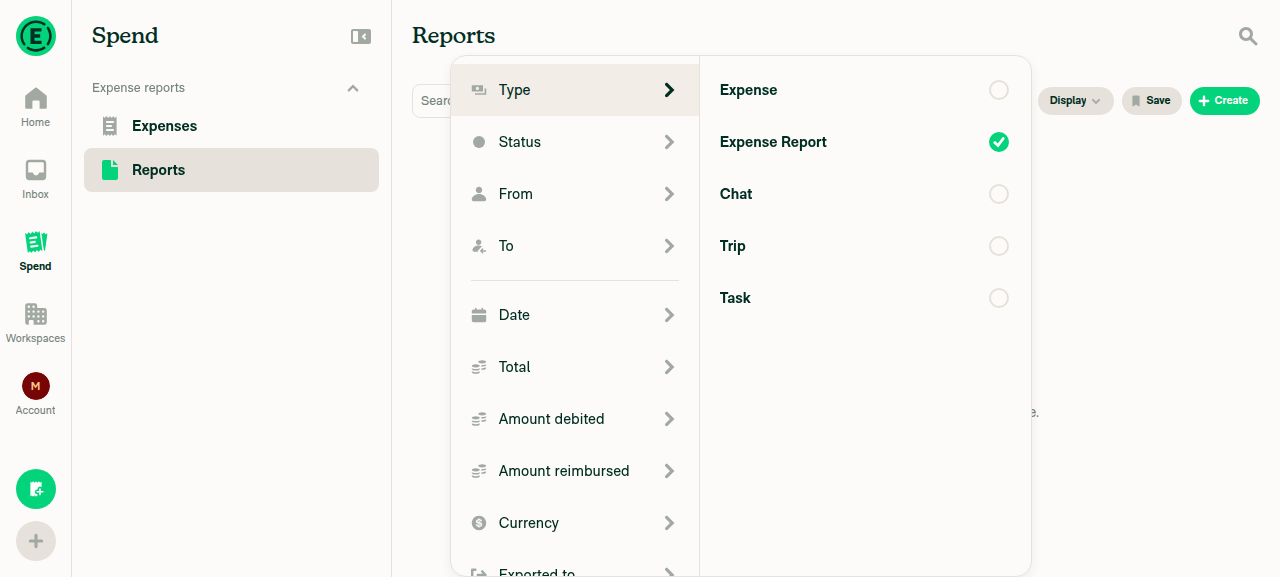
Filters panel for Expense Reports search type showing Total, Amount debited, and Amount reimbursed filter rows

@ishpaul777, please review the linked help site PR and confirm it reflects the current behavior. Then mark the linked help site PR Ready for review

@OSBotify

Copy link
Copy Markdown
Contributor

🚀 Deployed to production by https://github.com/Beamanator in version: 9.4.54-4 🚀

platform result
🕸 web 🕸 success ✅
🤖 android 🤖 success ✅
🍎 iOS 🍎 success ✅

Bundle Size Analysis (Sentry):

@melvin-bot

melvin-bot Bot commented Aug 18, 2026

Copy link
Copy Markdown

🤖 Payment issue created: #98812

Sign up for free to join this conversation on GitHub. Already have an account? Sign in to comment

Labels

None yet

Projects

None yet

Development

Successfully merging this pull request may close these issues.

7 participants