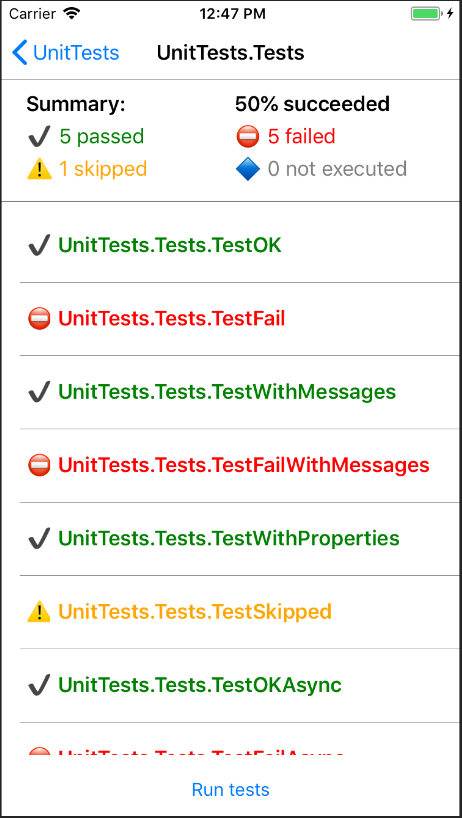
A cross-platform .NET Standard compilation of the MS Test Adapter, a .NET MAUI Unit Test Runner, and a console app to automate testing on devices.
This isn't "just another test framework". This is all based on the Microsoft MSTest Framework, so that your unit tests will run and behave the exact same way as your .NET Unit Tests. This allows you to reuse your MSTest code and run it on iOS, Android devices and on Catalyst for MacOS.
MSTestX is used to help test the ArcGIS Maps SDK for .NET.
- Uses the same asserts and test attributes from MSTest.Framework NuGet package
- Supports automation from commandline
- Supports generating a TRX Report identical to those
VSTest.Console.exegenerates for easier integration into existing reporting systems.
- Inside your solution, create a new blank .NET MAUI Project.
- Add "MSTestX.UnitTestRunner" NuGet package.
- Delete
AppShell.xaml,MainPage.xamlApp.xamland their code-behind files. - In
MauiProgram.csreplace.UseMauiApp<App>()with.UseMauiApp<MSTestX.RunnerApp>() - Add a unit test class with the following content:
using Microsoft.VisualStudio.TestTools.UnitTesting;

namespace MyUnitTestApp
{
    [TestClass]
    public class Tests
    {
        [TestMethod]
        [TestCategory("Simple Tests")]
        public void MyTest()
        {
            Assert.IsTrue(true);
        }
    }
}- Tests in other referenced projects in the same solution will be found as well. This is useful if you want to also run the tests outside .NET MAUI in a normal unit test project for instance.
- if you put your tests in a class library, the iOS app, will need to reference one of the types in the AppDelegate, or the compiler will strip out the unit test DLL (this isn't an issue if you use a shared project with tests).
- This is not a fork of MSTest. The submodules literally uses the code as-is from TestFX but compiled so it can run and be referenced by a .NET MAUI app.
MSTestX.Console is a dotnet tool that helps with deploying and running monitoring the unit test application, while outputting a TRX test report to the host machine.
Deploy and run the application:
dotnet build myproject.csproj -f net8.0-android
dotnet tool install --global MSTestX.Console --version 0.36.0
MSTestX.Console -apkpath path-to-app-signed.apk
or connect and launch an already installed app
MSTestX.Console -apkid [package id] -activity [activity name]
dotnet build myproject.csproj -f net8.0-ios -r ios-arm64
dotnet tool install --global MSTestX.Console --version 0.36.0
MSTestX.Console -apppath [path-to-generated .app application]
For a physical iOS device, pass application arguments after the first standalone --:
MSTestX.Console -apppath [path-to-generated .app application] -device [device identifier] -- --suite Smoke --display-name "Login flow" --quoted '"literal quotes"' --empty ""
The invoking shell tokenizes quoted values first. MSTestX.Console forwards every resulting argument after -- verbatim and in order, including repeated or dash-prefixed values, values containing spaces or literal quotes, and empty values. Quote or escape each value according to your shell.
Direct dotnet tool run callers must also provide dotnet's outer separator: dotnet tool run MSTestX.Console -- <console-options> -- <app-arguments>. MSTestX.Console owns and inserts CoreDevice's separate child-argument separator internally.
--TestAdapterPort and --AutoExit are reserved application arguments. MSTestX.Console always supplies them first to own the test connection and application lifecycle and rejects caller-supplied overrides, regardless of casing or whether the key uses one or two leading dashes.
Application-argument passthrough is supported only with physical Apple -apppath launches. It is rejected for Android, -remoteIp, and -waitForRemote. Mac Catalyst remains caller-launched and uses -remoteIp without passthrough.
With MacCatalyst you simply launch the app and connect to local-host using the -remoteIp parameter pointing to localhost, which will also work with any remote device running the unit test app.
dotnet build myproject.csproj -f net8.0-maccatalyst -r maccatalyst-arm64
dotnet tool install --global MSTestX.Console --version 0.36.0
open [path-to-generated .app application]
MSTestX.Console -remoteIp 127.0.0.1:38300
-logFileName <path to file>: The path of the TRX file that gets generated (defaults to current date/time).-filter <expression>or--filter <expression>: MSTest test case filter expression, for exampleTestCategory=SmokeorFullyQualifiedName~MyNamespace.-settings <path to file>: Path to an XML runsettings file. See Configure unit tests by using a .runsettings file for details.-deviceid <Android Device Serial Number>Android: If more than one device is connected, specifies which device to use-device <uuid|ecid|serial_number|udid|name|dns_name>iOS: The identifier, ECID, serial number, UDID, user-provided name, or DNS name of the device, if more than one device is connected.
Pass the VSTest filter expression directly to MSTestX.Console and quote it so the shell does not interpret characters such as &, |, or parentheses:
MSTestX.Console -remoteIp 127.0.0.1:38300 --filter 'FullyQualifiedName=MyTests.Basemaps.SwitchesPortal'
MSTestX.Console -remoteIp 127.0.0.1:38300 --filter 'TestCategory=Smoke&FullyQualifiedName~Basemaps'
The examples use POSIX shell quoting; use the equivalent quoting for your shell (for example, double quotes in Windows Command Prompt). A valid filter that matches no discovered tests runs zero tests and does not fall back to the full suite. For data-driven tests, FullyQualifiedName can match multiple unfolded rows that share the same name. Use Id=<discovered-test-guid> when one specific unfolded row must be selected.
run MSTestX.Console to get a list of all parameters.


Esri welcomes contributions from anyone and everyone. Please see our guidelines for contributing.
Copyright 2026 Esri
Licensed under the Apache License, Version 2.0 (the "License"); you may not use this file except in compliance with the License. You may obtain a copy of the License at
http://www.apache.org/licenses/LICENSE-2.0
Unless required by applicable law or agreed to in writing, software distributed under the License is distributed on an "AS IS" BASIS, WITHOUT WARRANTIES OR CONDITIONS OF ANY KIND, either express or implied. See the License for the specific language governing permissions and limitations under the License.
A copy of the license is available in the repository's LICENSE.txt file.