

Aura is a lightweight Pomodoro timer and focus HUD for Anki designed to help you maintain a steady study rhythm without distracting you from your cards.
It combines a minimal study timer, optional Focus Rhythm feedback, automatic study and break cycles, and a simple session summary in a small floating HUD.

A minimal focus HUD during an Anki review session
Aura stays in the background while you review your cards and provides the information you need without turning the review screen into a large dashboard.
During a session, Aura can display:
- Study timer
- Focus Rhythm
- Remaining cards
- Current study cycle
- Pause/resume controls
- Break status
When a study cycle ends, Aura can automatically start a short or long break and return to studying when the break is finished.
Aura includes an optional Focus Rhythm system that provides lightweight feedback about your review rhythm.
It can take into account:
- Again / Hard / Good / Easy answers
- Response time
- Answer consistency
- Custom answer weights
- Calibration
- Configurable sensitivity
- Warning thresholds
Focus Rhythm is optional and can be adjusted or disabled.
Aura can manage complete study and break cycles directly inside Anki.
A typical session can work like this:
- Study for the configured duration.
- Take a short break.
- Start the next study cycle.
- After the configured number of cycles, take a long break.
- Continue studying when the break ends.
Study and break durations can be customized in the settings.
Aura supports different ways to use the HUD depending on how much information you want visible.
The full HUD can show:
- Timer
- Focus Rhythm
- Rhythm indicator
- Cards remaining
- Session controls
Use Aura as a straightforward Pomodoro timer without Focus Rhythm tracking.
Choose which HUD elements you want to display.
This allows Aura to remain minimal whether you want only a timer or additional study feedback.

A small floating HUD designed to stay out of the way during review
The HUD is draggable and provides quick access to the most important session information without covering the card content unnecessarily.
Aura supports automatic short and long breaks as part of the Pomodoro cycle.
Breaks can be configured independently from the study duration, allowing you to create a study rhythm that fits your workflow.
You can also pause and resume an active session without losing its current state.
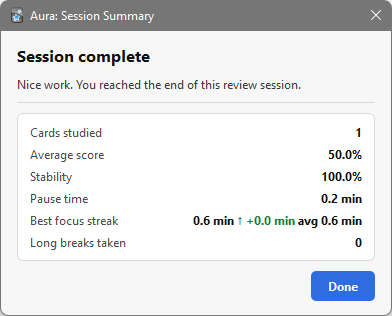
A simple summary after completing a study session
When a session ends, Aura provides a compact summary of the activity and Focus Rhythm information collected during the session.
The goal is to give useful feedback without turning Aura into a full statistics dashboard.
- Custom study duration
- Custom short break duration
- Custom long break duration
- Automatic study/break cycles
- Short and long breaks
- Break notifications
- Pause and resume
- Preserved session state
- Optional Focus Rhythm score
- Again / Hard / Good / Easy weights
- Response-time influence
- Calibration
- Adjustable sensitivity
- Warning thresholds
- Minimal floating HUD
- Live study timer
- Focus Rhythm indicator
- Remaining cards
- Draggable position
- Pause/resume controls
- Light and dark mode support
- Aura HUD mode
- Pomodoro Only mode
- Custom display mode
- Configurable HUD elements
- End-of-session summary
- Study cycle information
- Focus Rhythm information
- Lightweight session feedback
- Install Aura from AnkiWeb.
- Start reviewing cards normally.
- Aura starts the study session and displays the HUD.
- Use the timer and optional Focus Rhythm feedback during review.
- Pause the session whenever needed.
- Complete your configured study cycles.
- Take the scheduled short or long breaks.
- Continue reviewing when the break finishes.
- Review the session summary when you finish.
Install Aura directly from AnkiWeb:
https://ankiweb.net/shared/info/928234906
- Download the latest
.ankiaddonfile. - Open Anki.
- Go to Tools → Add-ons.
- Select Install from File.
- Select the downloaded Aura file.
- Restart Anki if required.
Aura is an Anki Desktop add-on.
Compatibility can depend on changes in Anki and Qt. If you encounter a problem after an Anki update, please report it through GitHub.
Bug reports, feature requests, and suggestions are welcome.
GitHub Issues:
https://github.com/Doummar/Aura/issues
When reporting a problem, please include:
- Anki version
- Operating system
- Aura version
- Steps to reproduce the problem
- Relevant error messages or screenshots
Aura is built around a simple idea:
Keep the timer and useful feedback visible without turning the review screen into another dashboard.
It is designed for users who want a lightweight Pomodoro timer inside Anki, with optional study-rhythm feedback and automatic breaks.
Aura works alongside Anki's existing review system rather than replacing it.
You may also be interested in these Anki productivity add-ons:
- FocusFlow — study activity, focus sessions, progress tracking, and statistics
- Focus Mode Suite — hide Anki interface elements for a more focused review workspace
- Minimalistic Typing Panel — a lightweight scratchpad for typing during reviews
- Minimalistic Drawing Panel — draw and write directly on Anki cards
MIT License
Copyright (c) 2026 Adel Aitah