

A terminal dashboard for ports, processes, and Docker containers.
Like htop but focused on network ports.


whosat is a terminal-based system monitor that answers one question: "who's sitting on that port?"
It scans all listening ports on your machine, groups them by process, enriches them with CPU/memory stats, and displays everything in a rich interactive TUI. Think of it as htop meets netstat — you get a live, searchable, themeable dashboard showing every port, the process behind it, and what resources it's consuming.
Whether you're debugging a port conflict, hunting down a runaway process, or just want a quick overview of what's running on your system — whosat gives you the answer in one command.
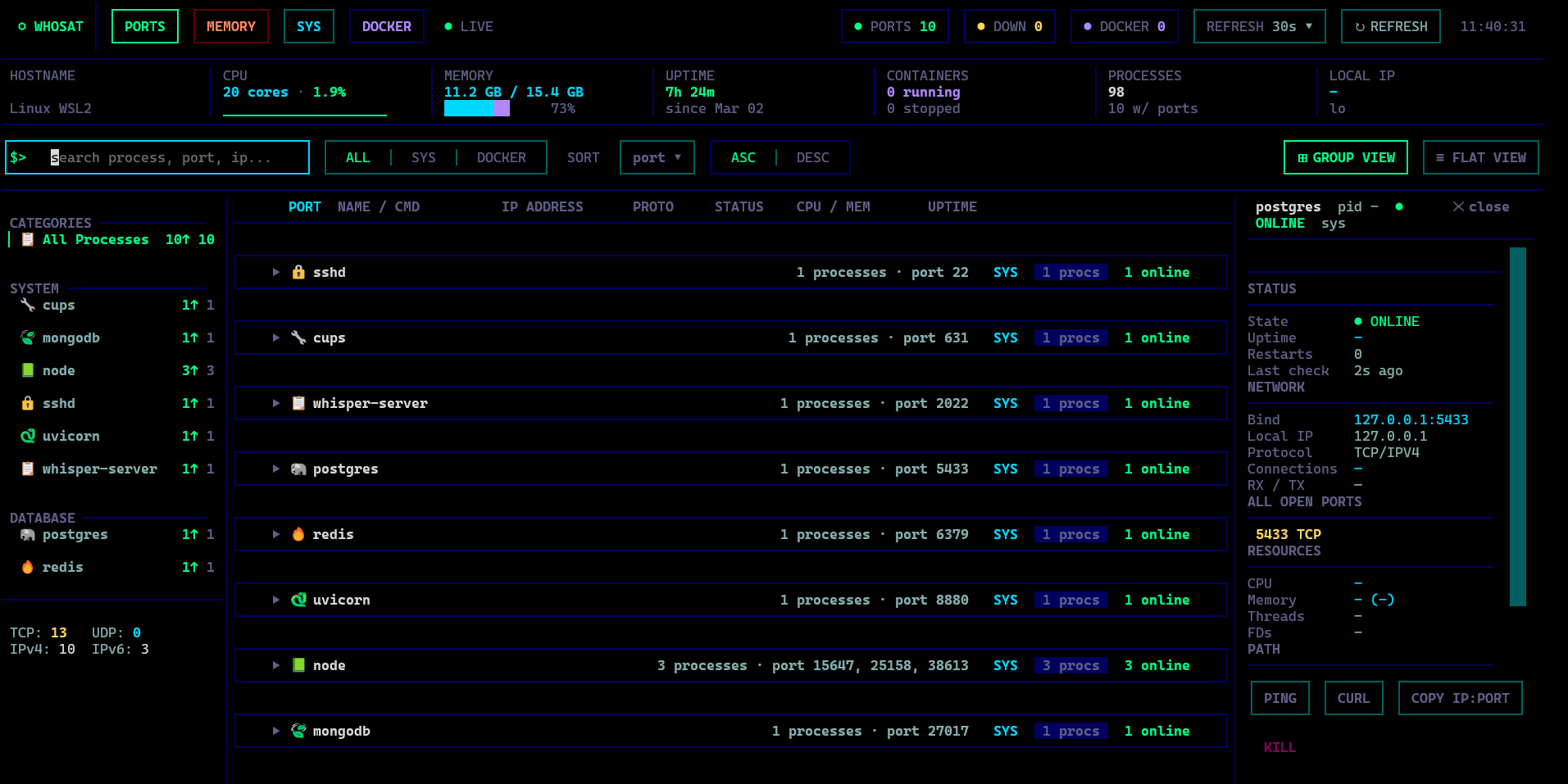
pip install whosatWith Docker support:
pip install 'whosat[docker]'whosatLaunch the full interactive TUI — live-updating, searchable, themeable.
# What's on port 3000?
whosat 3000

# Kill whatever is on port 8080 (finds parent process, kills the tree)
whosat kill 8080

# Force kill without confirmation
whosat kill 8080 --force

# List all ports in a table
whosat ls

# Sort by CPU usage, descending
whosat ls --sort cpu --desc

# JSON output — pipe to jq, use in scripts
whosat --json
whosat 3000 --json
whosat ls --json$ whosat 8880
🐍 :8880 → uvicorn (pid 7218) TCP/0.0.0.0 [ONLINE] cpu 0.1% mem 1.0 GB up 5h 8m user adwitiya
$ whosat ls
PORT NAME PID PROTO IP STATUS CPU MEM UPTIME
22 🔒 sshd - TCP 0.0.0.0 ● ONLINE - - -
3000 📗 node 12847 TCP 0.0.0.0 ● ONLINE 0.2% 115 MB 2h 8m
5432 🐘 postgres 1234 TCP 127.0.0.1 ● ONLINE 0.0% 42 MB 3d 2h
8880 🐍 uvicorn 7218 TCP 0.0.0.0 ● ONLINE 0.1% 1.0 GB 5h 8m
$ whosat kill 8000
🐍 python3 (pid 96365) on port 8000
Worker pid 96365 is a child of uvicorn (pid 96363)
Kill uvicorn (pid 96363)? [y/N] y
Sent SIGTERM to uvicorn (pid 96363)
- CLI Power —
whosat 3000for instant port lookup,whosat kill 3000to free a port,whosat lsfor a quick table,--jsonfor scripting - Smart Kill — Detects parent processes (uvicorn master, node supervisor) and kills the whole tree
- Port Conflict Detection — Warns about multiple PIDs on the same port or mixed bind addresses
- Port & Process Monitoring — See all listening ports with owning processes, CPU/memory usage, and uptime
- Memory View — System-wide process memory usage with GPU memory tracking (NVIDIA)
- Docker Integration — Optional container monitoring alongside system processes
- Group & Flat Views — Group processes by name or view as a flat list
- Detail Panel — Expand any process to see full network info, open ports, resource usage, and CPU sparkline
- Actions — Ping, curl, and kill processes directly from the TUI
- Live Refresh — Configurable auto-refresh (15s / 30s / 1m / 2m / off)
- Theming — 6 built-in themes (matrix, nord, dracula, tokyo-night, gruvbox, solarized)
- Search & Filter — Search by process name, port, or IP; filter by scope (system / docker)
- Keyboard Driven — Full keyboard navigation
- Cross-platform — Linux, macOS, and WSL2
| Key | Action |
|---|---|
1 / 2 |
Switch to Ports / Memory view |
Up / Down |
Navigate rows |
Enter |
Expand/collapse row + open detail panel |
Esc |
Close detail panel / modal / clear search |
/ |
Focus search |
R |
Refresh data |
G |
Toggle group/flat view |
K |
Kill selected process |
S |
Cycle scope (ALL / SYS / DOCKER) |
T |
Cycle theme |
Y |
Copy IP:PORT to clipboard |
Q |
Quit |
On first run, whosat creates ~/.whosat/config.toml with default categories and settings.
theme = "matrix"
refresh_interval = 30

[[categories]]
name = "python"
icon = "snake"
section = "System"
match = ["python3", "python", "uvicorn", "gunicorn", "celery"]

# Add your own:
# [[port_names]]
# port = 8020
# name = "My App"
# icon = "robot"- Python 3.10+
- Linux, macOS, or WSL2
- Optional: Docker SDK for container monitoring
- Optional: NVIDIA GPU for GPU memory tracking in memory view
MIT