The default windows-quick-list in Linux Mint's Cinnamon desktop environment felt like it was lacking a certain something. I decided to remedy this by adding some functionality I'd been missing.
Now, scrolling while the cursor is over the applet causes the workspace to switch. Middle clicking will toggle the desktop. To me, this feels much better.
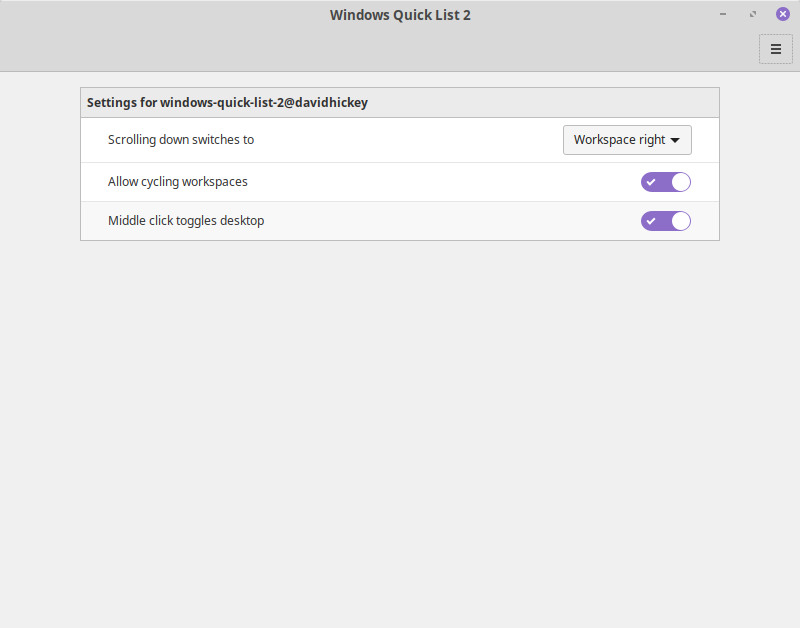
The applet is pretty configurable. You can control:
- The direction of workspace switching when you scroll
- Whether workspaces cycle (i.e. if you switch left when you're on the first workspace, do you switch to the last workspace?)
- Whether middle clicking shows the desktop or not
By default scrolling down switches right, workspaces cycle, and middle clicking will show the desktop.
I might at some point look into adding this to Cinnamon spices. For now though:
- Download the latest release from the releases tab. You want the first
.ziparchive, NOT one of the source code archives. - Then, extract the
.zipinto~/.local/share/cinnamon/applets/; you should end up with being able to findmetadata.jsonat~/.local/share/cinnamon/applets/windows-quick-list-2@davidhickey/metadata.json. - Then go to the Applets program in your Cinnamon settings and add Windows Quick List 2 to your panel, wherever you like. That's it! You're done. Note that you might have to log out and back in between steps 2 and 3.