


A command-line tool to spoof your network interface's MAC address on Linux systems.
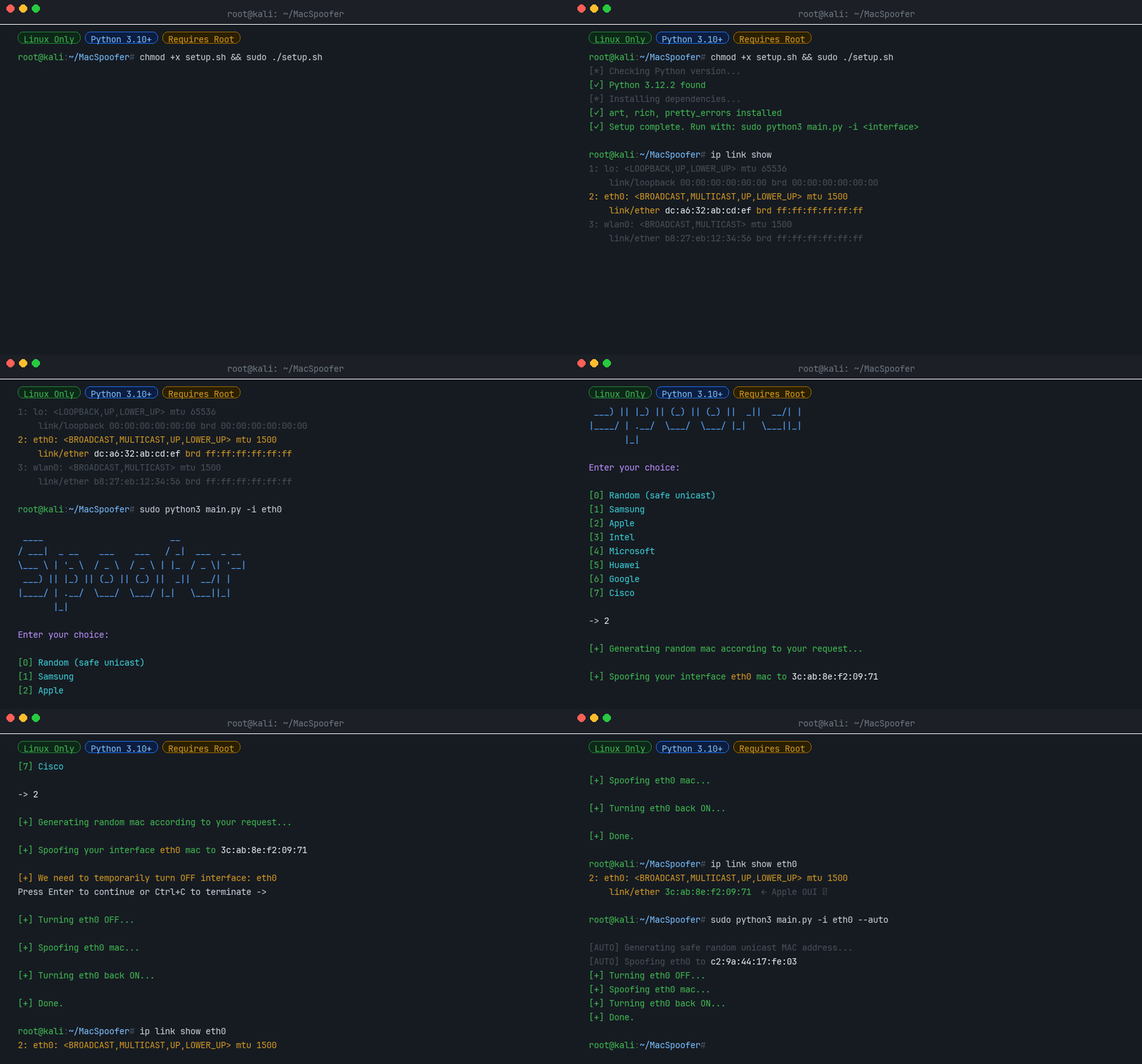
A Media Access Control (MAC) address is a unique identifier assigned to a network interface controller (NIC) for use as a network address in communications within a network segment. This identifier is used in most IEEE 802 networking technologies, including Ethernet, Wi-Fi, and Bluetooth.
Changing your MAC address can be useful for:
- Privacy - Prevent tracking across networks
- Testing - Simulate different network devices
- Bypassing restrictions - Some networks filter by MAC address
A MAC address is a 12-digit hexadecimal number (6 bytes), typically represented in colon-hexadecimal notation (e.g., 00:1A:2B:3C:4D:5E).
| Bytes | Name | Description |
|---|---|---|
| First 3 bytes | OUI (Organizationally Unique Identifier) | Identifies the manufacturer |
| Last 3 bytes | NIC (Network Interface Controller) | Device-specific identifier |
- 🎲 Random MAC generation - Generate safe, locally-administered unicast addresses
- 🏭 Vendor spoofing - Mimic devices from Samsung, Apple, Intel, Microsoft, Huawei, Google, or Cisco
- 🖥️ Interactive TUI - Easy to use text interface
- ⚡ Auto mode - Non-interactive operation for scripts
- 🔧 CI mode - Designed for automated testing pipelines
pip install macspooferchmod +x setup.sh
sudo ./setup.shEvery run of the MacSpoofer CI workflow builds the package and uploads the resulting wheel as a GitHub Actions artifact named macspoofer-wheel. To install a pre-release build:
- Open the relevant workflow run on the Actions tab.
- Download the
macspoofer-wheelartifact and unzip it. - Install the wheel with
pip:
pip install ./macspoofer-*.whlifconfig -a
# or
ip link showsudo -E macspoofer -i <interface>
# or
sudo -E python3 main.py -i <interface>sudo -E macspoofer -i <interface> --auto
# or
sudo -E python3 main.py -i <interface> --auto| Option | Description |
|---|---|
-i <interface> |
Network interface name (e.g., wlan0, eth0) [Required] |
--auto |
Non-interactive mode: generate and apply a random unicast MAC |
--ci |
CI mode: for automated testing |
--help |
Show help message and usage examples |
--version |
Show version information |
You can also use macspoofer as a Python library:
from macspoofer.utils.random_utils import generate_safe_unicast_mac

mac = generate_safe_unicast_mac()
print(mac) # e.g. "a6:3f:12:cb:90:01"from macspoofer.utils.vendors import VendorRegistry
# Total vendors in the database
print(VendorRegistry.vendor_count())
# Search by name (case-insensitive)
results = VendorRegistry.search("Raspberry")
print(results)
# Get OUI prefixes for a specific vendor
ouis = VendorRegistry.get_ouis_for_vendor("Apple")
print(ouis[:3]) # ['58:e6:ba', '8c:98:6b', ...]from macspoofer.spoofer import generate_mac_for_vendor
mac = generate_mac_for_vendor("Samsung")
print(mac) # e.g. "e4:7a:11:2f:c8:5d"import asyncio
from macspoofer.modules.interface import NetworkInterface
from macspoofer.spoofer import spoof_mac_address
from macspoofer.utils.random_utils import generate_safe_unicast_mac
async def main():
interface = NetworkInterface("wlan0")
mac = generate_safe_unicast_mac()
await spoof_mac_address(interface, mac, require_confirmation=False)
asyncio.run(main())© 2022-2026 Daniel Kirshner. All rights reserved.