
Share Files & Text Across Devices via QR Code - No Internet, No Login




Why This · Features · Architecture · Tech Stack · Quick Start · Installation · CLI Flags · API · Preview · Support · License
🌐 In 4 languages - 🇺🇸 EN · 🇮🇩 ID · 🇨🇳 CN · 🇯🇵 JP
Transferring files between devices on the same local network is unnecessarily difficult:
- Finding IP addresses and typing them manually on a phone is error-prone.
- Cloud storage or WhatsApp requires internet and an account.
- USB cables are overkill for quick, one-time file transfers.
Hour Share solves this: launch the CLI, scan the QR code, and share files or text instantly - password-protected and auto-expiring after 60 minutes.
| ⚡ Instant Connect | Scan QR, opens directly on your phone. No more typing IP addresses. |
| 🔒 Password Protected | Every bundle is secured with bcrypt password hashing. |
| 📱 No Internet Required | Works entirely over local Wi-Fi. Zero data leaves your network. |
| ⏰ Auto-Expire | Files and text delete automatically after 60 minutes. |
| Feature | Status | Description |
|---|---|---|
| QR Connect | ✅ | Scan from phone, opens directly in browser |
| File Upload | ✅ | Drag & drop or select files. 100 MB limit per file |
| File Download | ✅ | One-click download, password-gated |
| Text Share | ✅ | Paste text, code snippets, or links |
| Password Protection | ✅ | bcrypt per bundle and per group |
| Auto-Expire | ✅ | Background sweeper removes expired items every 60 minutes |
| Check Update | ✅ | CLI checks npm registry for newer version |
| Group Chat | ✅ | Real-time file and text sharing within a group |
| i18n (EN/ID/CN/JP) | ✅ | 4 languages toggle in the header |
| Dark/Light Mode | ✅ | Theme toggle in header, persistent preference |
| Auto Start | ✅ | OS-level auto-start (systemd / LaunchAgent / schtasks) |
| Layer | Technology |
|---|---|
| CLI | Node.js (vanilla, zero dependencies) |
| Backend | Python 3.10+, Flask 3, bcrypt, qrcode[pil], Pillow |
| Frontend | Vanilla HTML/CSS/JS (no build step), inline SVG icons |
| Storage | File-based JSON (no database) |
| Distribution | npm global package + GitHub repository |
| License | MIT |
hour-share/
├── bin/hourshare.js        # CLI: TUI menu, daemon spawn, auto-start
├── server.py               # Flask backend (file/text share, QR, auth, sweeper)
├── requirements.txt        # Python dependencies
├── templates/index.html    # Web dashboard (2-col grid, tabs, i18n, theme)
├── static/                 # Static assets (CSS/JS)
├── shared/                 # File storage + metadata JSON
│   ├── bundles/            # Uploaded file bundles (auto-expired)
│   └── groups/             # Group chat data
└── Auto-Start/             # OS service configs (systemd / LaunchAgent / schtasks)
Install the CLI globally (recommended):
npm install -g hourshare
hourshare- Run
hoursharein your terminal. - Select Start from the menu:
========================================
  Hour Share (v1.0.3)
  🚀 Server: http://localhost:10101
========================================
 ★ Start (Open in Browser)           ○ Stopped
 ☆ Auto Start (Disable)
 ☆ Check Update (Internet Require)
 ☆ Stop
 ☆ Exit
  ↑↓ navigate · Enter select · Esc/Ctrl+C exit
- Open the displayed local URL (like
http://localhost:10101or your local IP) in your browser on the same device, or scan the QR code from your phone. - Enter a password and share files or text. To receive, enter the same password.
Auto Start: Select Auto Start from the menu to launch the server at login.
Download from GitHub Releases or build from source:
git clone https://github.com/Curzyori/hour-share.git
cd hour-share
pip install flask bcrypt qrcode[pil] pillow
Requirements:
- Node.js >= 18
- Python 3.10+ (Linux, macOS, Windows)
- pip packages:
flask,bcrypt,qrcode[pil],pillow
hourshare                     # Interactive menu
hourshare --port 8080          # Custom port
hourshare --daemon             # Headless mode (no menu)
hourshare --help # Show help| Method | Path | Function |
|---|---|---|
GET |
/ |
Web dashboard |
GET |
/api/qr |
QR Code PNG |
POST |
/api/send |
Upload bundle (files + text + password) |
POST |
/api/receive |
Access bundle with password |
POST |
/api/group/join |
Join or create a group |
GET |
/api/group/{name}/info |
Group info |
POST |
/api/group/{name}/send |
Send to group |
GET |
/download/bundle/{id}/{filename} |
Download file (requires auth session) |
|
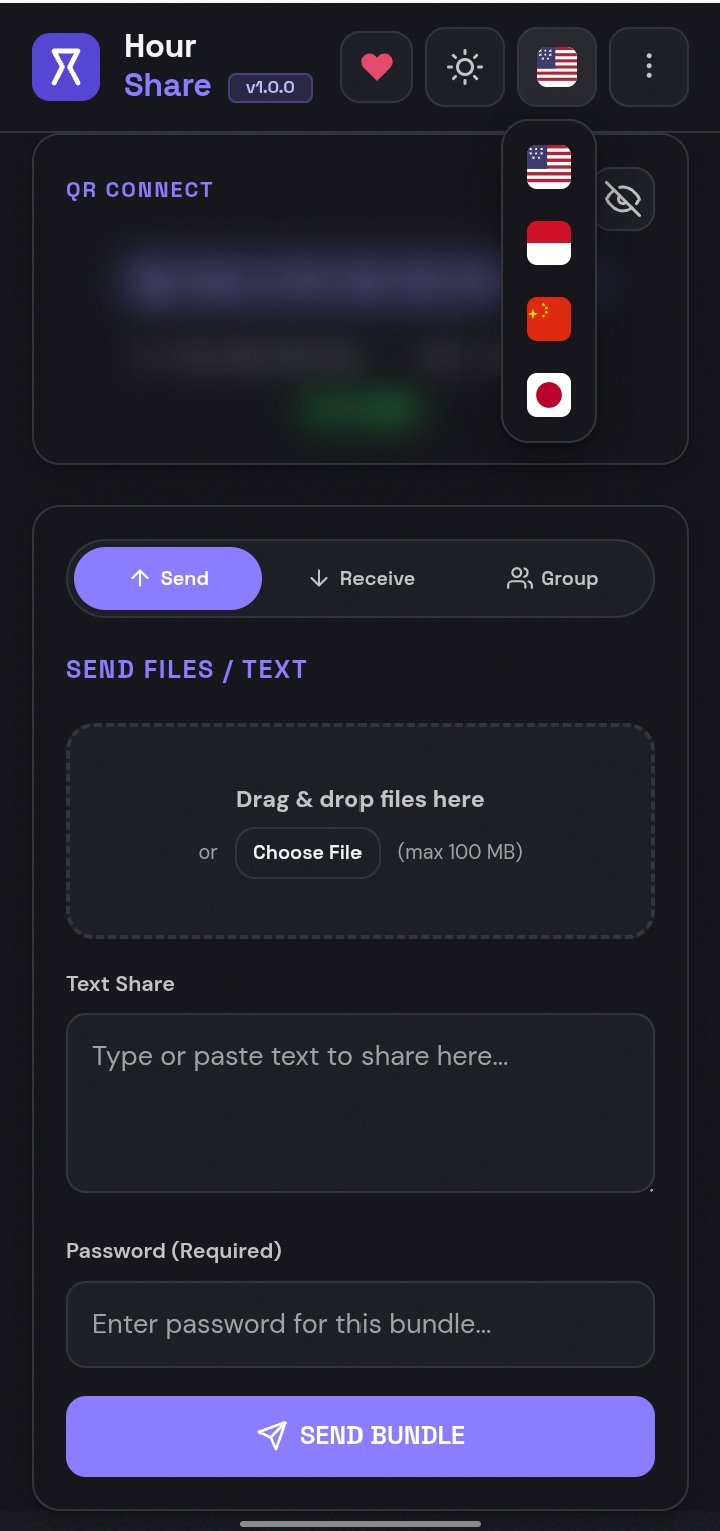 |
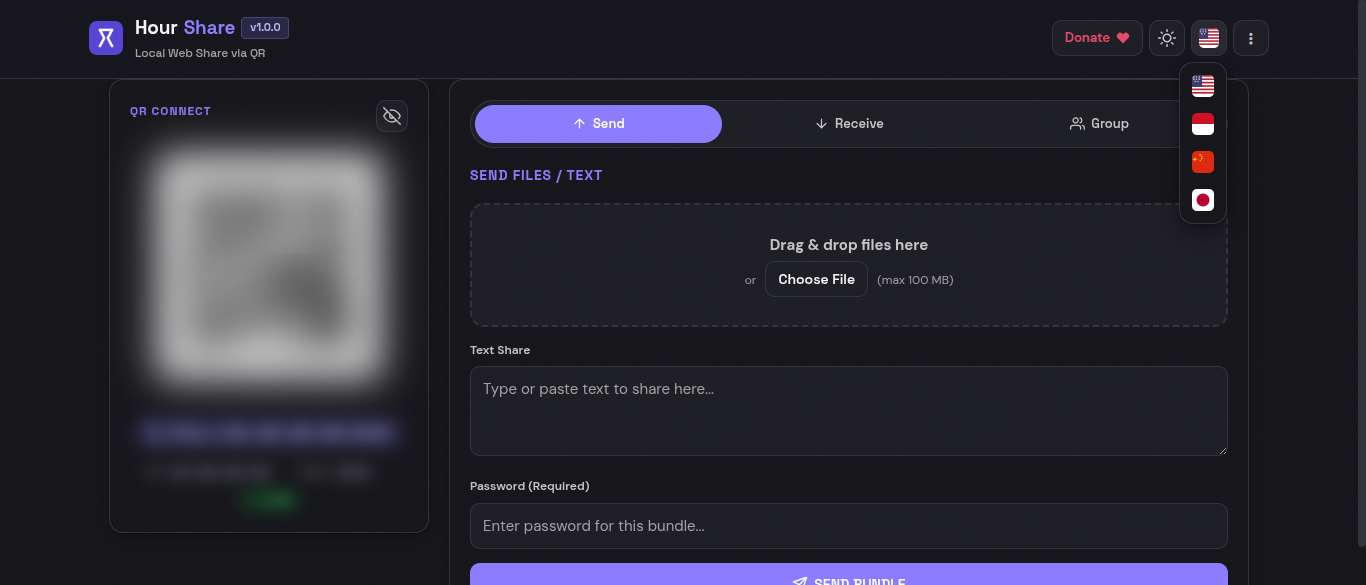
| Desktop: Send / Receive / Group tabs | Mobile: QR scan + tabbed panel |
If you find this project useful, please consider giving it a ⭐ Star or 🍴 Forking it to show support and keep me motivated to build more exciting open-source projects! Every single star and fork means a lot.
Your donations keep my projects free and open source. Every contribution matters, and your support helps me continue building exciting open-source projects in the future.
Support this project by buying me a coffee! 💝

This project is released under the MIT license - see LICENSE for full text.
Built with passion as the 21st Project of the 50 Projects Challenge by **@Curzyori**