This Project is a gentle introduction to Data Engineering in Python. Using an innovative drag-and-drop interface, users can ingest, clean, transform their data in re-usable Pipelines. The visual design interface allows users to conceptualize their Pipelines, and then Prophecy turns those visual designs into high-quality Python code. (Prophecy also supports Scala and SQL code). The code is committed to the user's git repository, and is therefore available to the user for versioning, deployment, and all the best software engineering practices. Prophecy is an end-to-end data engineering platform, so it covers committing, releases, testing, CI/CD, job scheduling, etc. Also, Prophecy integrates with most external processes in case you already have some or all of these items in place. Add your standard Pipelines to Prophecy and expand the number of business use cases your team can solve. Let Prophecy help organize your codebase and boost your productivity today!
In this Project, find several Pipelines including customers_orders, which introduces a few of Prophecy's out of the box Gems. Prophecy Gems are building blocks to enable the user to compose their data Pipelines according to their use cases. Try it yourself!
Orders are tracked by status, date, and amount. Join orders with the customer list to make sure packages get delivered and track purchase amount.
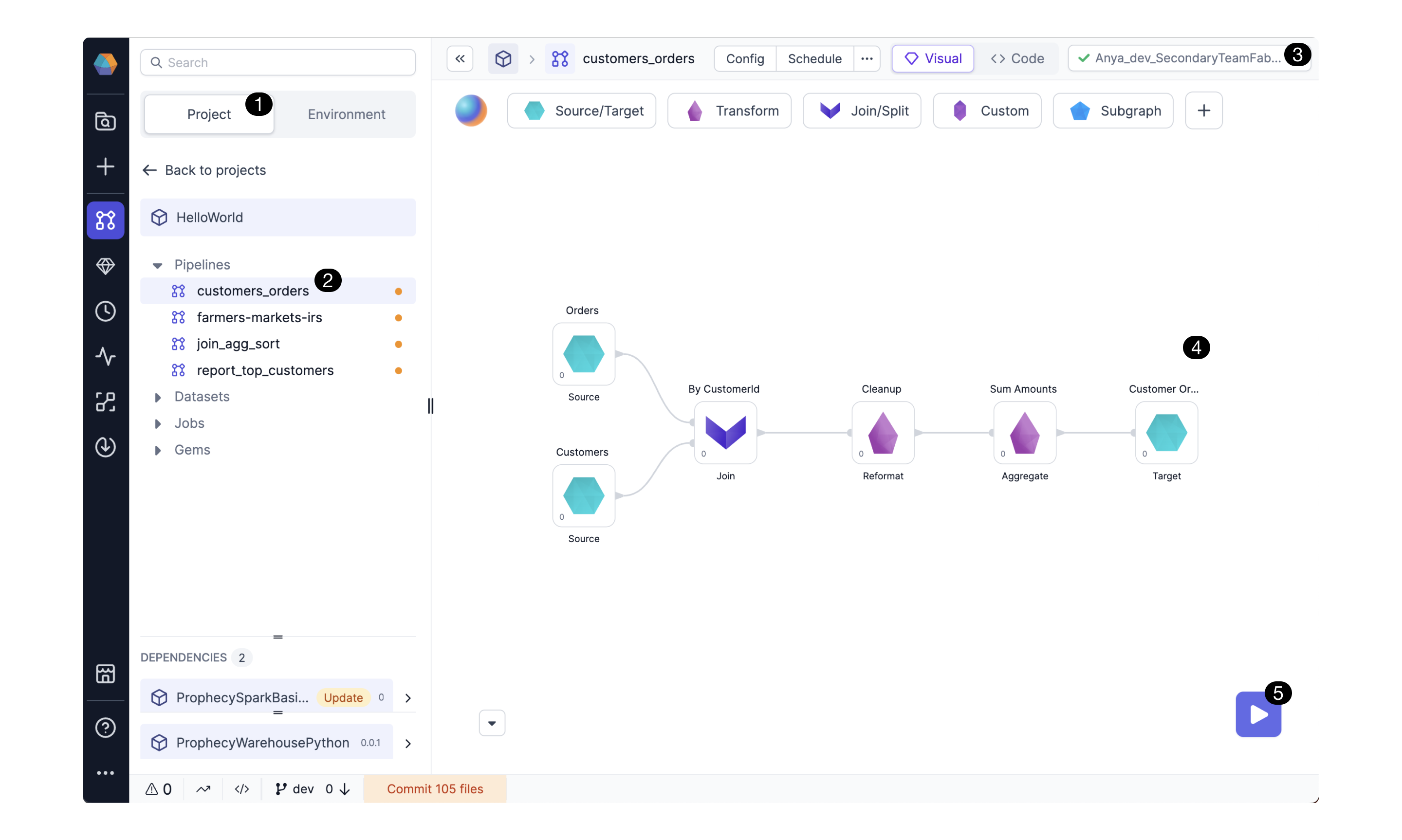
In the (1)Project Browser, click on the (2)customers_orders Pipeline. Attach a (3)computing cluster for executing the Pipeline. Explore the various (4)Gems, including sources for reading datasets, joins and aggregations for data wrangling, and targets for writing datasets to storage. (5)Run the Pipeline! You'll notice data previews appear at each step so you have insight on what's happening in the Pipeline.
The join_agg_sort Pipeline shows a small improvement to the customers_orders Pipeline, showing how easy it is to change a Pipeline's logic using the drag-n-drop transformation Gems.
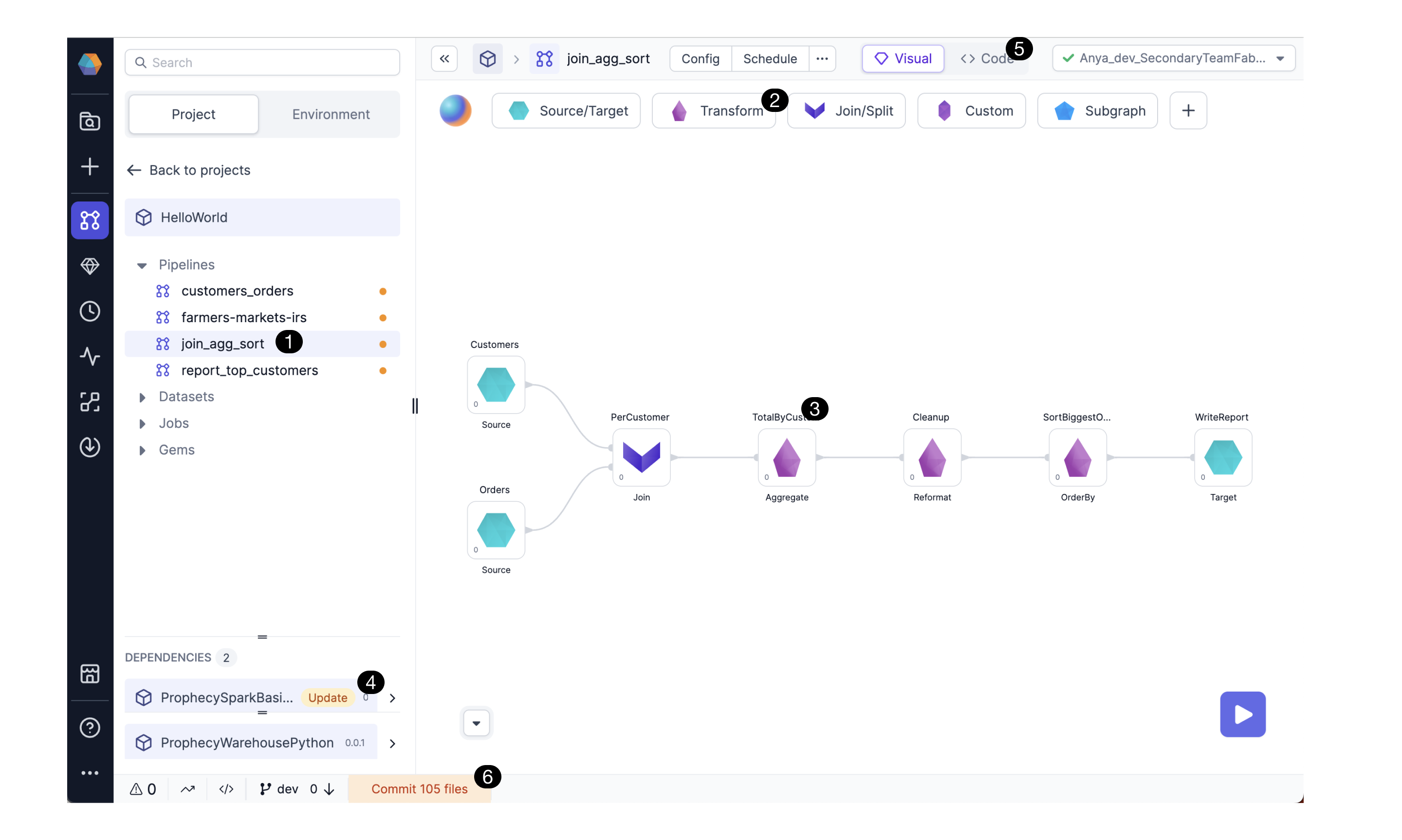 Click the (1)Pipeline name in the Project browser. Open the (2)Transform Gem drawer to see all the Gems provided by the SparkBasics package. The (3)Aggregate Gem has been added to the Pipeline and configured to calculate the total order amount grouped by customer. Open the Aggregate Gem to see how business logic can be configured visually. Notice the (4)SparkBasics package has been updated. Teams can create and share versioned packages with Pipelines, custom Gems and more. Here, the SparkBasics package contains a variety of Gems for all teams to use. Click Update to take advantage of more performant transformation code. For the code-savvy, click the (5)Code View to see the Project's codebase. This code will be committed to the repository when you click through the (6)commit and release process.
Next, consider report_top_customers, a simple Pipeline that generates reports for decision makers.
Prophecy pipelines are frequently used to build customized reports in dashboards, eg Databricks dashboards, scheduled to run weekly.
Try running the Pipelines, edit the aggregation expressions, or change the join type. View the data previews to see how the data changes with the updated aggregation or join. Toggle to the code view and notice that the changes made in the visual view are represented in the code view. Now commit your changes.
farmers-markets-irs is a more complicated example Pipeline that explores farmers markets and their locations across the US. This pipeline is handy for anyone who wants to do low-code data cleaning, eg handle null values, remove bad data, cast datatypes, etc. Get curious and join the farmer's market location data with a seemingly unrelated dataset, the IRS dataset. Classify which zip codes are high or low income, and discover which of those have farmers markets.
With Prophecy you can explore a variety of datasets and build just about any data engineering use case. If something is possible in Spark or SQL, you can do it with low-code on Prophecy.
In addition to Pipelines, the Project also contains Datasets and Jobs. So the Project is a conceptual way to organize the important business processes (Pipelines) with their associated input and output datasets, and the associated scheduled recurring jobs.
Released Projects can be shared with other teams as read-only packages - a great way to share business logic and company standards. Using a package is as easy as clicking Update.
Now you have a basic understanding of how Prophecy works. Check out Prophecy's documentation and Getting-Started guides here.. For more learnings, try Prophecy University. Feel free to reach out to us (contact.us@prophecy.io) any time for questions or feedback. We would love to hear from you and explore how we can help make your use case a success. Happy onboarding!