Repository navigation
FAQ
-
What kind of models can i import?
- You can import
.obj.stlor.plyfiles
- You can import
Please check the following:
- Is the virtual environment enabled? (indicated by the prefix
.venv-blenderin your console - Run
python --versionto check your Python version. It should be a3.10.xversion.
If it is not, upgrade your Python AND recreate the virtual environment. -
(Windows only)
Check if the folder3.3is present in the same folder as your Python exe (Install location). It shoud approximately look like this (see 3.3 at the top):
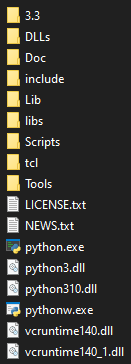
If it is not present, follow the setup instructions at https://github.com/garvita-tiwari/blender_render/wiki/Setup-bpy-on-Windows again, particularly step 2. - If it is still not working, try to do a reinstall: Delete the virtual env and follow the steps on the Wiki again.