Your terminal's memory.
Save, search, and execute code snippets in milliseconds.


Website · Quick Start · Commands · Demo · Configuration · Contributing
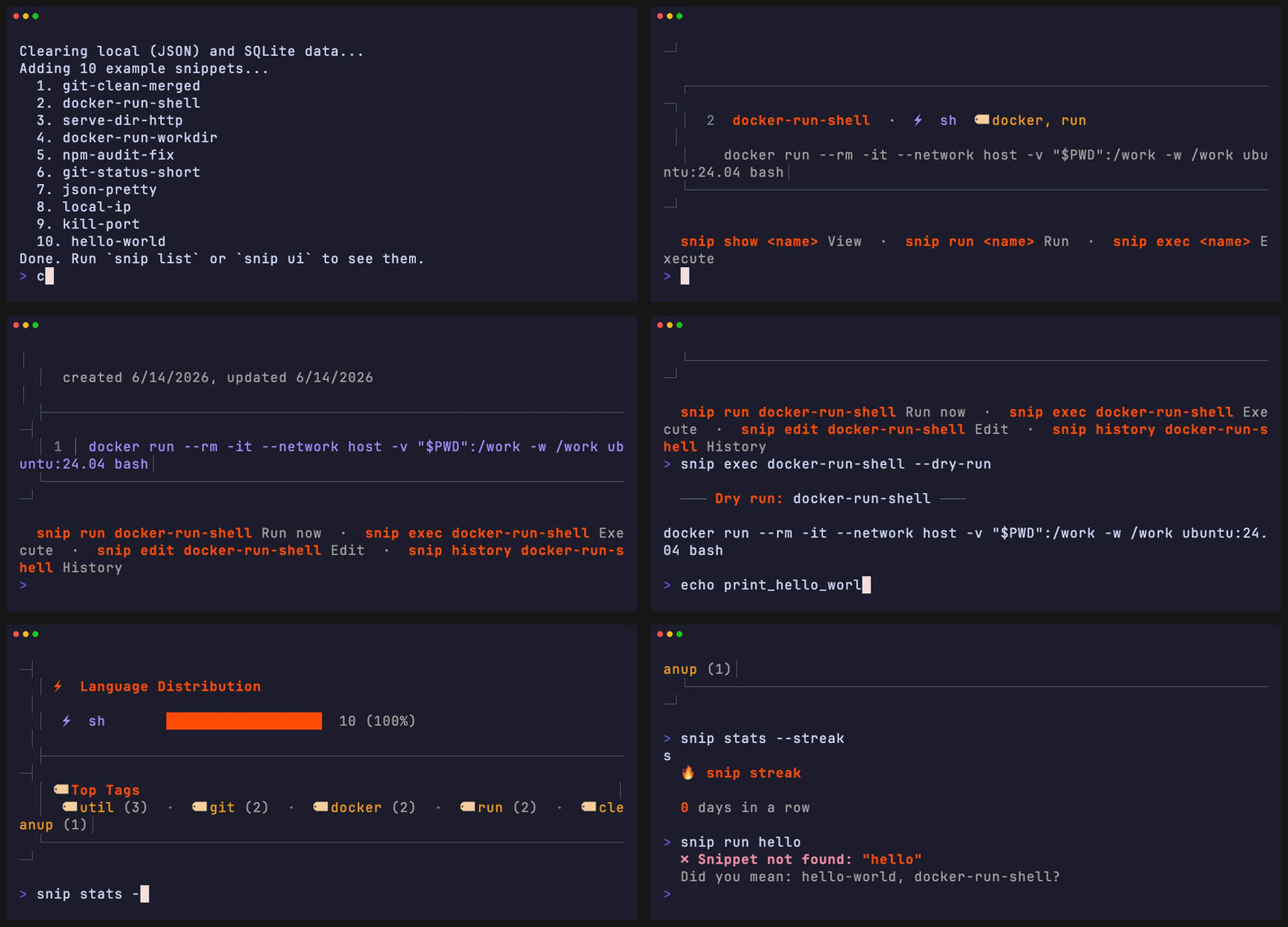
Most snippet managers only handle shell commands. snip handles code — deploy scripts, API calls, Docker commands, JS utilities — across any language, with safety rails, a real TUI, and unix pipeline integration.
| Feature | snip | pet | navi | tldr | dotfiles |
|---|---|---|---|---|---|
| Run snippets directly | ✅ Any language | ✅ Shell only | ✅ Shell only | ❌ | ✅ Shell only |
| Multi-language (JS, Python, Ruby…) | ✅ | ❌ | ❌ | ❌ | ❌ |
| Unix pipeline integration | ✅ snip pipe |
❌ | ❌ | ❌ | ❌ |
| Interactive TUI | ✅ Split-pane | ❌ | ✅ Basic | ❌ | ❌ |
| Dangerous command detection | ✅ | ❌ | ❌ | ❌ | ❌ |
| fzf integration | ✅ Native | ✅ | ✅ | ❌ | Manual |
| SQLite backend | ✅ Optional | ❌ | ❌ | ❌ | ❌ |
| Gist sync | ✅ | ✅ | ❌ | ❌ | Manual |
| Zero config | ✅ | ✅ | Needs cheats | ✅ | Heavy |
| Shell widget (Ctrl+G) | ✅ | ❌ | ❌ | ❌ | ❌ |
| Template variables | ✅ {{var:default}} |
❌ | ✅ | ❌ | ❌ |
| Statistics & streaks | ✅ | ❌ | ❌ | ❌ | ❌ |
| Import from URL | ✅ snip grab |
❌ | ❌ | ❌ | ❌ |
# Install
npm install -g snip-manager

# Save a snippet
echo 'docker compose up -d --build' | snip add dc-up --lang sh --tags docker

# Find it
snip search docker

# Run it
snip exec dc-up

# Launch TUI
snip uiPrerequisites: Node.js ≥ 18
# npm
npm install -g snip-manager

# yarn
yarn global add snip-manager

# pnpm
pnpm add -g snip-manager

# verify
snip --version
snip doctor # validates storage, editor, fzf, shell, gistFirst time? Run the guided setup wizard:
snip initThis interactive wizard will:
- ✍️ Set your preferred editor (
vim,code,nano, etc.) - ⌨️ Install the Ctrl+G shell widget for your shell (zsh/bash/fish)
- 📦 Seed 10 example snippets to get you started
- 🎨 Optionally launch the TUI for a quick tour
Goal: Zero to "aha moment" in under 60 seconds.
| Command | Description |
|---|---|
snip add <name> |
Save a snippet from stdin or $EDITOR |
snip add:js <name> |
Add with language shortcut (sh, py, js, ts, rb, go, rs) |
snip list |
List all snippets (--json, --tag, --lang, --sort, --limit) |
snip search <query> |
Fuzzy search (--json, --limit) |
snip show <name> |
Display snippet (--json, --raw, --edit) |
snip run <name> |
Preview + confirm + execute (with template prompts, --confirm) |
snip exec <name> |
Execute immediately, no modal (--dry-run, --force) |
snip pipe <name> |
Pipeline mode — stdin→template→stdout (--json, --dry-run) |
snip edit <name> |
Open in $EDITOR |
snip rm <name> |
Delete (alias: delete, --force to skip confirm) |
snip update <name> |
Update metadata (--tags, --lang) |
snip last |
Re-run the last executed snippet |
snip recent [n] |
Show last n used snippets (default: 5) |
| Command | Description |
|---|---|
snip ai generate "<prompt>" |
Generate a snippet using AI (requires OpenAI API key) |
Options: --lang, --tags, --name, --model |
# Set up OpenAI API key
export SNIP_AI_API_KEY="your-openai-api-key"

# Generate a Docker health check
snip ai generate "docker container health check"

# Generate a Python web server
snip ai generate "simple flask server" --lang python --tags web,api

# Generate with custom name and model
snip ai generate "curl wrapper with retry" --name curl-retry --model gpt-4| Command | Description |
|---|---|
snip cp <src> <dest> |
Duplicate a snippet |
snip mv <old> <new> |
Rename a snippet |
snip cat <name> |
Print raw content to stdout (for piping) |
snip stats |
Library statistics (--json, language chart, top tags, --streak) |
snip import-history |
Suggest commands from shell history run 3+ times (--last, --min-count) |
snip grab <url> |
Import from URL or github:user/repo/path |
snip fzf |
fzf search with live preview |
snip seed |
Clear data and add 10 example snippets |
| Command | Description |
|---|---|
snip alias [shell] |
Generate shell aliases (eval "$(snip alias)") |
snip widget [shell] |
Ctrl+G hotkey widget for zsh/bash/fish |
snip completion [shell] |
Tab-completion script (bash, zsh, fish) |
snip sync push [query] |
Push to GitHub Gist |
snip sync pull <id> |
Pull from GitHub Gist |
snip share <name...> |
Publish snippet(s) as a public Gist |
snip unshare <name> |
Delete a shared Gist (keeps local snippet) |
snip discover [query] |
Search public gists shared by the community |
snip doctor |
Health check |
snip config <action> |
Get / set configuration |
snip ui |
Interactive TUI |
snip mcp |
Start MCP server for AI agent integration (stdin/stdout) |
snip init |
Guided setup (editor, widget, example snippets, optional TUI) |
| Command | Description |
|---|---|
snip export [path] |
Export snippets to JSON file |
snip import <file> |
Import snippets from JSON file |
snip uiSplit-pane interface with fuzzy search with Catppuccin Mocha color palette. Keyboard shortcuts:
| Key | Action |
|---|---|
j / k or ↑ / ↓ |
Navigate |
Ctrl+u / Ctrl+d |
Page up/down |
/ |
Live search |
Enter |
Preview |
c |
Copy to clipboard |
r |
Run |
e |
Edit |
a |
Add new |
d |
Delete (type name to confirm, z to undo within 5s) |
t |
Tag filter |
s |
Cycle sort mode |
q |
Quit |
First time? The TUI shows helpful overlays and keybinding hints on first launch.
snip exec deploy-api            # run immediately
snip exec deploy-api --dry-run  # print only
snip exec deploy-api --force    # skip safety warning
Safety First: Dangerous commands (rm -rf, sudo, system-level ops) are detected automatically. snip run shows a preview and requires explicit confirmation. snip exec warns but lets you --force past.
Tip: Use
snip runfor interactive use (preview + confirm),snip execfor scripts (no prompts).
Use {{variable}} or {{variable:default}} syntax:
echo 'docker run --rm -it {{image:ubuntu:24.04}} {{cmd:bash}}' \
  | snip add docker-dev --lang sh --tags docker

snip run docker-dev
#   image [ubuntu:24.04]: node:20
#   cmd [bash]: ↵
Variables are auto-detected at runtime — no extra flags needed.
Dangerous commands (rm -rf, sudo, system-level ops) are detected automatically. snip run shows a preview and requires explicit confirmation. snip exec warns but lets you --force past.
eval "$(snip alias)"        # every snippet becomes a command
deploy-api # → snip exec deploy-api# add to ~/.zshrc
eval "$(snip widget zsh)"
# press Ctrl+G anywhere → search → paste snippet inlinesnip sync push # push all
snip sync push docker # push matching
snip sync pull <gist-id> # pullsnip fzf # search + preview
snip fzf | pbcopy # pipe to clipboard# Run a snippet, pipe output forward
snip pipe deploy-api | tee /tmp/deploy.log
# Pipe JSON as template values — no interactive prompts
echo '{"host":"prod.api.com","branch":"main"}' | snip pipe deploy --json
# Stdin passthrough to the snippet's process
curl -s https://api.example.com/data | snip pipe parse-json
# Dry-run: see resolved content without executing
echo '{"image":"node:20"}' | snip pipe docker-dev --json --dry-runPipeline mode is perfect for:
- CI/CD workflows — pipe deployment outputs to logs
- JSON processing — chain snippets with
jqor other tools - Automation scripts — resolve templates programmatically
- Zero-chrome output — clean stdout for piping
Also pipe-friendly: snip cat, snip show --raw, snip list --json, snip search --json.
snip grab https://example.com/script.sh --tags ops
snip grab github:user/repo/scripts/backup.sh
Language auto-detected from extension and shebang.
Turn your repeated shell commands into snippets automatically:
snip import-history --last 500Analyzes your last 500 shell commands, finds those run 3+ times, and suggests saving them as snippets. Perfect for discovering your own "muscle memory" commands.
snip lastInstantly re-run the last executed snippet. Like !! but for your snippet library.
snip now speaks the Model Context Protocol (MCP), the open standard that AI coding tools like Claude Code, Cline, and Goose use to interact with external tools. Start an MCP server and your AI agent can search, read, save, and execute snippets directly.
# Start the MCP server (stdio transport)
snip mcpThe MCP server exposes 16 tools — search, read, write, and share capabilities:
| Tool | Description | Safety |
|---|---|---|
snip_search |
Fuzzy-search by name, tags, or content | Read-only |
snip_searchRelevance |
Search with Fuse.js relevance scores (0 = perfect, 1 = no match). Includes min_score filter and snippet content in results. |
Read-only |
snip_list |
List with optional tag/language/sort/limit filters | Read-only |
snip_read |
Read snippet content + metadata by name | Read-only |
snip_suggest |
Context-aware suggestions based on current directory | Read-only |
snip_history |
View version history for a snippet | Read-only |
snip_diff |
Diff two versions of a snippet | Read-only |
snip_save |
Save a new snippet (auto-detects language) | Write |
snip_edit |
Update content, language, or tags of an existing snippet | Write |
snip_delete |
Permanently delete a snippet by name | Write |
snip_rename |
Rename a snippet (checks for name conflicts) | Write |
snip_undo |
Rollback a snippet to its previous version | Write |
snip_share |
Publish snippet(s) as a public Gist | Write (API) |
snip_unshare |
Delete a shared Gist (remotely, keeps local) | Write (API) |
snip_discover |
Search public gists / browse recent community snippets | Read (API) |
snip_exec |
Execute a snippet (dry-run by default) | Execute |
Add snip as an MCP server in your claude.json config:
{
  "mcpServers": {
    "snip": {
      "command": "snip",
      "args": ["mcp"]
    }
  }
}Any MCP-compatible AI client uses the same pattern. The server communicates over standard input/output:
| Client | Config File | Reference |
|---|---|---|
| Claude Code | ~/.claude/settings.json or project CLAUDE.md |
MCP docs |
| Cline | ~/.config/cline/settings.json |
Cline MCP |
| Goose | ~/.config/goose/config.yaml |
Goose MCP |
| Continue | ~/.continue/config.json |
Continue MCP |
All use the same command/args pattern with "snip" as the command and ["mcp"] as the args.
The MCP server also exposes snippet resources via the snip://snippets/ URI scheme for AI agents that support resource reading:
| Resource | Description |
|---|---|
snip://snippets |
List all snippets (returns resource metadata) |
snip://snippets/{name} |
Read a specific snippet's content + metadata |
Once connected, AI agents can:
> Search your snippet library for deployment commands
> Read the content of a specific snippet
> Save useful commands as new snippets during conversations
> Compare versions of a snippet with snip_diff
> Publish a snippet to share with teammates via snip_share
> Search public gists for community-shared code with snip_discover
> Search with relevance scores and min_score threshold to find the best match
> Preview a snippet before executing it
snip_execdefaults to dry-run mode (dry_run: true) — setdry_run: falseto actually execute- Dangerous commands (e.g.,
rm -rf,docker rm -f) are blocked and return an error snip_share/snip_unshare/snip_discoverrequire a GitHub token (SNIP_GIST_TOKEN) — they only make API calls after validating inputs- The agent sees the full command content and exit code, enabling self-correction
# Create a snippet from a GitHub gist
snip grab https://gist.github.com/user/123456 --tags utility

# Copy snippet to clipboard
snip fzf | pbcopy        # macOS
snip fzf | xclip         # Linux

# View snippet statistics
snip stats --json | jq '.totalSnippets'

# Check your usage streak
snip stats --streak

# Find recently used snippets
snip recent 10

# Export your entire library
snip export ~/snippets-backup.json

# Import from a backup
snip import ~/snippets-backup.json

# Duplicate and modify a snippet
snip cp deploy-staging deploy-prod
snip edit deploy-prodsnip config set editor "code --wait"
snip config set useSqlite true # for 100+ snippets
snip config set ai_model gpt-4 # AI model for generation
snip config list| Option | Default | Description |
|---|---|---|
editor |
$EDITOR / vi |
Snippet editor |
useSqlite |
false |
SQLite instead of JSON |
snippetDir |
~/.snip |
Data directory |
ai_provider |
openai |
AI provider (currently only OpenAI) |
ai_model |
gpt-3.5-turbo |
AI model for generation |
ai_max_tokens |
1000 |
Max tokens to generate |
ai_api_key |
- | OpenAI API key (use SNIP_AI_API_KEY env var) |
-
Set API key (recommended):
export SNIP_AI_API_KEY="sk-..."
-
Or store in config:
snip config set ai_api_key "sk-..."
# Warning: Key will be stored in plain text
-
Generate your first snippet:
snip ai generate "curl with retry logic"
Validation: snip config validates allowed keys and types, rejecting invalid values with helpful error messages.
SQLite uses better-sqlite3 (native module) or falls back to sql.js (WASM). If better-sqlite3 is missing, snip doctor will suggest installing it with npm install -g better-sqlite3.
snip
├── bin/snip              # Entry point
├── lib/
│   ├── cli.js            # Command definitions (Commander.js)
│   ├── storage.js        # JSON + SQLite abstraction
│   ├── search.js         # Fuse.js fuzzy search
│   ├── exec.js           # Multi-language runner
│   ├── template.js       # {{var:default}} engine
│   ├── safety.js         # Dangerous command detection
│   ├── config.js         # Config loader
│   ├── colors.js         # Unified brand color palette
│   ├── clipboard.js      # Cross-platform clipboard support
│   ├── lock.js           # Concurrency lock for storage
│   ├── migrate_to_sqlite.js  # JSON → SQLite migration
│   ├── readline.js       # Interactive prompts
│   ├── streak.js         # Usage streak tracking
│   ├── sync/             # Gist sync module
│   └── commands/         # One file per command (20+)
├── completions/          # Shell completions (bash, zsh, fish)
├── __tests__/            # Jest test suite
├── scripts/              # Seed / smoke scripts
└── docs/                 # Website + demo
Design decisions:
- Commander.js for CLI parsing — battle-tested, zero-config subcommands.
- Fuse.js for fuzzy search — searches name, tags, and content simultaneously.
- Dual storage — JSON for instant start, SQLite for scale. Same API, swap with one config.
- No daemon — every invocation is stateless. Fast cold starts.
- Blessed for TUI — raw terminal control, no React/Ink overhead.
- Unified brand colors —
#ff4d00orange across all CLI output.
git clone https://github.com/Bharath-code/snip.git
cd snip
npm install

# Run locally
node bin/snip --help

# Seed example snippets
node bin/snip seed

# Run tests
npm test

# Lint code
npm run lintTests use Jest and cover storage, search, template engine, exec, safety, and CLI integration.
npm test                     # run all tests
npx jest --verbose           # verbose output
npx jest __tests__/exec.test.js # single file| Directory | Purpose |
|---|---|
lib/commands/ |
Add a new command = add one file here + register in cli.js |
lib/storage.js |
Storage abstraction — both backends |
__tests__/ |
Mirror of lib/ — one test file per module |
completions/ |
Shell completion scripts |
"command not found: snip"
Ensure npm's global bin is in your PATH:
export PATH="$(npm prefix -g)/bin:$PATH"Editor not opening
snip config set editor "vim" # or code, nvim, nano, sublGitHub token errors with Gist sync
If you see 401 errors when pushing/pulling gists:
# Set a valid GitHub PAT (Personal Access Token)
export SNIP_GIST_TOKEN=your_token_here
Generate a token at https://github.com/settings/tokens with gist scope.
SQLite mode errors
If snip config set useSqlite true causes errors:
# Install the native SQLite module
npm install -g better-sqlite3

# Or continue using JSON backend (default)
snip config set useSqlite false
snip doctor will detect and suggest fixes for SQLite issues.
Permission errors on global install
Use nvm to avoid sudo:
nvm install --lts
npm install -g snip-manager-
snip pipe— stdin pipeline integration (--json,--dry-run) -
snip stats --json— machine-readable statistics -
snip stats --streak— days-in-a-row usage tracking -
snip recent— recently used snippets -
snip last— re-run last executed snippet -
snip cp/snip mv/snip cat— snippet management utilities -
snip seed— example snippets for onboarding -
snip completion— shell completion scripts (bash, zsh, fish) -
snip init— guided setup wizard -
snip import-history— import repeated commands from shell history -
snip doctor— enhanced with widget check, SQLite detection, better error messages - Unified brand colors (
#ff4d00) across CLI output - Catppuccin Mocha TUI theme with first-run overlays
- Config validation with type checking
- Improved error messages with next-step guidance
-
snip ai generate "..."— AI snippet generation (OpenAI)
- Snippet groups / namespaces (
docker/cleanup,k8s/deploy) - Snippet versioning & history
-
snip share— single-snippet and pack gist sharing -
snip unshare— delete a shared Gist (keeps local snippet) -
snip discover— search community-shared public gists - MCP server with 16 tools (share, unshare, discover, search, searchRelevance, list, read, save, edit, delete, rename, suggest, history, diff, undo, exec)
- Snippet versioning & history
-
snip watch <name>— re-run snippet on file edit - Team shared snippets
- VS Code / Neovim extension
See CHANGELOG.md for release history.
What is snip?
A CLI tool for saving and running code snippets from the terminal. Think of it as a personal, searchable library for commands and code blocks you run repeatedly.
How is snip different from dotfiles?
Dotfiles store configuration. snip stores executable snippets — commands and code blocks you run. snip provides instant search, multi-language execution, and safety rails.
Does snip support custom languages?
Yes. Use --lang to specify any language. snip resolves the interpreter (node, python3, ruby, etc.) automatically.
Is my data secure?
Snippets are stored locally in ~/.snip/. Nothing leaves your machine unless you explicitly snip sync push to GitHub Gist.
Contributions welcome. See CONTRIBUTING.md for setup and guidelines.
# Good first issues
# https://github.com/Bharath-code/snip/labels/good%20first%20issue- Issues — Bug reports & feature requests
- Discussions — Questions & ideas
- Security Policy — Vulnerability reporting