Simulation environment and baseline repo forked from: https://github.com/MCastelyns/BEP-Motion-planning-for-Truck-Trailers
The development of automated truck trailers has the potential to improve transportation efficiency at loading docks and warehouses. One crucial aspect of an automated truck trailer is the motion planning system, which generates a feasible path for the vehicle to follow. However, when a path requires the truck trailer to move in reverse, there is a significant risk of the trailer folding inwards and hitting the truck, a phenomenon known as jackknifing. This paper describes a method to mitigate this issue by implementing an MPC to counteract jackknifing. This enables robust backward driving of a truck-trailer combination, as well as a more flexible path planning algorithm for use in a warehouse parking scenario.
This GitHub page contains all code used to implement an Anti-Jackknifing controller together with a motion planner based on a Hybrid A* path finding algorithm with a Trajectory optimization algorithm.
As a basis for this project the code from Erik Nordeus has been used: https://github.com/Habrador/Self-driving-vehicle. Big improvements have been made for the scenario with a truck and trailer as this was a TODO item for Nordeus. New heuristic costs have been developed to increase the performance of the path finding algorithm. The smoothing of the path is now also done by an optimization algorithm. The basic PID controller has been replaced by an MPC, resulting in better driving of the truck trailer, especially going backwards.
The target for this project is to autonomously park a truck trailer in a warehouse scenario as can be seen in the image
below. The truck will need to dynamically find a path between the starting position and the target position. When a path
is found the truck will need to drive this path without the trailer jackkniffing.
 The following image show a general overview of how this project works.

Videos of these parts can be seen here:
- Hybrid A*
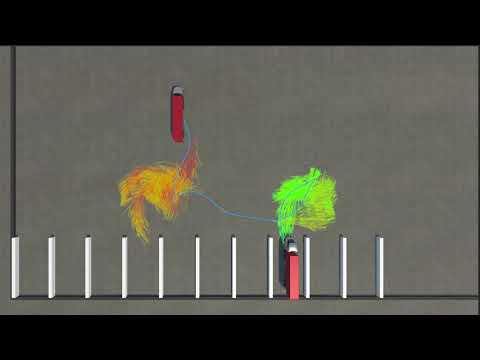
- Trajectory Optimization

- Model Predictive Controller

A scenario has been created with different parking spots. A truck trailer model can be placed in one of these spots. The Hybrid A* algorithm will find a path between the start position and the end position with the lowest costs. This path is found by expanding nodes in forward and backward direction under different steering angles to find new nodes. For each node a cost is calculated and the node with the lowest cost is expanded upon. These costs are based on two parts:
-
Cost to go
- Driven distance forward
- Driven distance backward
- Absolute steering wheel angle
- Change in steering wheel angle
- Hitch Angle
-
Heuristics
- Absolute Euclidian distance between current and end trailer
- Sideways distance between current and end trailer
- Forward distance between current and end trailer
- Angle between the current and end trailer
- Switching direction of movement
After a path has been found this path is saved and sent to the trajectory optimization code. This algorithm optimizes the trajectory by making the path smooth, so it can be more easily followed by the controller, this is done by optimizing a cost function. The trajectory animation is defined as a minimization problem, that also includes constraints on the states and control inputs of the system (this is to prevent jackknifing and abrupt changes in speed or steering). There are also constraints added to avoid collisions.
The optimized path is sent back to be used in the controller to control the truck. The MPC controller will follow this path while making sure no jackkniffing occurs. This is again described as an optimization problem, with a cost function that includes the difference between the optimized path's states and the actual states. And also includes constraints on the states and control inputs. No collision constraints are considered for the MPC, as in reality the MPC should ideally not be deviating from the optimized path, which is already collision free. And adding the constraints would increase the computation time a lot.
To generate the collision constraints in a way that can be used by the solver (IPOPT) we have used the method described in Optimization-Based Collision Avoidance. This method is known as optimization based collision avoidance (OBCA)
changes made:
- python-files/plot_rrt.py: plots the saved RRT path with start/end markers and the warehouse obstacles so you can visualize without inline snippets (set MPLCONFIGDIR if macOS complains).
- python-files/rrt_planner.py: rewritten to a planar RRT with CLI knobs (--step-size, --max-iters, --goal-rate, --clearance, etc.) that outputs rrt_path.json.
- README.md: RRT section now documents the planner workflow and flags.
The default Unity pipeline exports Hybrid A* paths through initialize.json. To compare against a sampling-based method we added a planar RRT implementation in python-files/rrt_planner.py. The script reads the same initialize.json/obstacles.json files to get start, goal, and obstacle rectangles, runs a geometric RRT with truck-width clearance, and writes an rrt_path.json that matches the Hybrid A* schema (positions plus headings; hitch angles are set to zero and can be refined later).
Run it after JSON files exist (Unity-generated or hand-edited):
cd python-files python rrt_planner.py --plot
Useful CLI flags:
--step-size– edge length of each RRT expansion (meters)--max-iters– iteration limit before giving up--goal-rate– probability of sampling the goal to bias the tree--clearance– inflation added to obstacle rectangles to model truck width--output– path to save the JSON (rrt_path.jsonby default)--plot– visualize the sampled path and warehouse obstacles
The resulting JSON can be fed into the trajectory optimizer/MPC (rename it to initialize.json if you want to use it as the reference path) or compared directly against the Hybrid A* output.
If switching between planners is getting repetitive, use this helper script in the repo root:
python python-files/run_rrt_workflow.py --apply --optimize --simulate --restore
This runs the planner with good default parameters, copies the generated rrt_path.json into initialize.json (backing up the original), optionally launches the trajectory optimizer (--optimize) and MPC simulation (--simulate), and restores the original Hybrid A* path when finished (--restore). Additional flags mirror the planner options (--step-size, --max-iters, --goal-rate, --clearance, --plot). Set MPLCONFIGDIR if macOS complains about Matplotlib.
cd /Users/runingguan/car-trailer-mpc
python python-files/rrt_planner.py --max-iters 50000 --step-size 3.5 --goal-rate 0.3 --clearance 0.8

# The planner prints a short summary (iterations, node count, path length)
# and writes python-files/rrt_path.json for downstream steps.

mv initialize.json initialize_hybrid.json
cp python-files/rrt_path.json initialize.json

cd python-files
python trajectory_animation.py
python simulation.py

cd ..
mv initialize_hybrid.json initialize.json
To compare the Hybrid A* reference path with the latest RRT path metrics (nodes + length) in one shot, run:
python python-files/compare_paths.py --step-size 3.5 --max-iters 50000 --goal-rate 0.3 --clearance 0.8
This computes the Hybrid A* metrics from initialize_hybrid.json, generates a fresh RRT path (printing its summary), and leaves both files untouched so you can continue with whichever planner you need.
To batch compare many RRT settings without overwriting initialize.json, run the sweep helper (writes sweep_metrics.csv in the repo root):
cd /Users/runingguan/car-trailer-mpc
MPLCONFIGDIR=.mplconfig python python-files/compare_sweep.py \
  --step-sizes 2.5 3.0 3.5 \
  --goal-rates 0.15 0.25 0.35 \
  --clearances 0.6 0.8 1.0 \
  --max-iters 30000 50000 \
  --output sweep_metrics.csv
Flags mirror the planner; use space-separated lists to sweep each parameter. Add --append to keep adding rows or --plot to show each run. CSV columns: step_size, goal_rate, clearance, max_iters, rrt_nodes, rrt_length_m, hybrid_nodes, hybrid_length_m.
The MPC now scales its Q/R weights each solve based on hitch angle and direction (boosting hitch/steering penalties when reversing or the trailer folds). See README_fuzzy_mpc.md for the rule set and tuning knobs.
In order to compare how succesful our various controller methods are, using Euclidean Distance is not an accurate enough measure as it does not capture the nuance between the amount of control effort and time it takes to get to the final position based on different configuration. For example, a truck trailer system that is 2 feet away horizontally from a parking spot would have to perform a complex manuever in order to get to the desired goal state, but a truck trailer system that is 2 feet away veritcally from a parking spot would only need to back up a bit or pull forward a bit to get to the desired goal state. Using euclidean distance, however, would give both of these scenarios the same score. We implement LQR as a distance evalutation metric in LQR_cost.py. This is accomplished through two functions lqr_riccati() and lqr_distance. In lqr_riccati(), the Infinite-horizon Riccati P is calculated using the system dynamics. In lqr_distance, the P is used to calcluate the cost of the end state of the system and the goal state. These functions are then imported and called in each of the simulation files, where the score is outputed at the end of the simulation to the terminal.
Swap predefined start/goal pairs into initialize.json using test_cases.json and the helper script:
cd /Users/runingguan/car-trailer-mpc
python python-files/apply_case.py --case diagonal_reverse_cross_aisle


and then run those

cd /Users/runingguan/car-trailer-mpc/python-files
python trajectory_animation.py   # visualize initial guess + planned trajectory
python simulation.py            # run MPC sim

but idk im confused bc they look the same
Available cases (update test_cases.json to add more): baseline_hybrid_path, center_aisle_long_reverse, left_offset_reverse_turn_in, right_lane_forward_exit, mid_lane_change_reverse, diagonal_reverse_cross_aisle.
What it does: overwrites initialize.json with a two-waypoint start/goal for the selected case. Then run your usual pipeline/visualizations (e.g., python python-files/trajectory_animation.py).
The planner reads parking obstacles from the repo-level obstacles.json. Use the helper to regenerate it with all one-sided stalls blocked except one open slot:
cd /Users/runingguan/car-trailer-mpc
python python-files/make_parking_obstacles.py --open-spot 5 --depth 20
Flags:
--open-spot(1–10) chooses which stall stays open; everything else becomes a parked-trailer box, plus left/right “wall” obstacles outside the aisle.--depthsets stall depth in meters (default 20). Width stays 5 m per stall with 1 m stripe gaps.--case-name ...(defaultleft_offset_reverse_turn_in) determines which test case goal is moved to the open stall center.initialize.jsonis also updated automatically.
After regenerating obstacles, apply your test case and run the animation/sim as usual:
python python-files/apply_case.py --case left_offset_reverse_turn_in
MPLCONFIGDIR=.mplconfig python python-files/trajectory_animation.py
- What software do I need? To make this project work you need Unity together with Python.
- Where can I find the Hybrid A* algorithm? This implementation can be found under Assets/Scripts/Pathfinding/Hybrid A star/HybridAStar.cs. The parameters used can be found in Assets/Scripts/Pathfinding/Parameters.cs
- Where can I find the Trajectory Optimization code? This is located in the folder PythonParts.
- Where can I find the MPC controller code? This is located in the folder PythonParts.
TU Delft BEP by: Cedric Pelsma, Erwin Bus, Kik Kramer, Matthijs Steyerberg, Mitchel Castelyns
Special thanks to our supervisor: Luyao Zhang