
Tellus vehicle movements API and import module.
Exposes API to query vehicle movements counted by "Tellussen". Tellussen are etched into the roads at several locations in Amsterdam and they count passing vehicles. The API exposes vehicle counts, speed, direction and length at several locations in the city of Amsterdam. These counts are available up to a resolution of an hour for authorized users.
This project follows the setup used in multiple projects and is described here: https://github.com/Amsterdam/opdrachten_team_dev.
            ┌────────────────────┐
            │                    │
            │                    │
            │    Object store    │
            │                    │
            │                    │
            └────────────────────┘
                       │
                       │
                       │
       ┌ ─ ─ ─ ─ ─ ─ ─ ┼ ─ ─ ─ ─ ─ ─ ┐
        Tellus repo    │
       │               ▼             │
            ┌────────────────────┐
       │    │                    │   │
            │                    │
       │    │      Importer      │───┼─────────────────────────────┐
            │                    │                                 │
       │    │                    │   │                             │
            └────────────────────┘                                 ▼
       │                             │                  ┌─────────────────────┐
                                                        │                     │
       │                             │                  │                     │
                                                        │      Database       │
       │                             │                  │                     │
                                                        │                     │
       │    ┌────────────────────┐   │                  └─────────────────────┘
            │                    │                                 │
       │    │                    │   │                             │
            │        API         │◀────────────────────────────────┤
       │    │                    │   │                             │
            │                    │                                 │
       │    └────────────────────┘   │                             │
                       │                                           │
       └ ─ ─ ─ ─ ─ ─ ─ ┼ ─ ─ ─ ─ ─ ─ ┘                             │
                       │                                           │
                       │                                           │
       ┌ ─ ─ ─ ─ ─ ─ ─ ┼ ─ ─ ─ ─ ─ ─ ┐                             │
        Catalog repo   │                                           │
       │               ▼             │                             ▼
            ┌────────────────────┐                      ┌─────────────────────┐
       │    │                    │   │                  │                     │
            │                    │                      │                     │
       │    │  Tableau web data  │   │   Not used       │       Tableau       │
            │     connector      │─ ─ ─ (To slow) ─ ─ ─▶│                     │
       │    │                    │   │                  │                     │
            │                    │                      │                     │
       │    └────────────────────┘   │                  └─────────────────────┘

       └ ─ ─ ─ ─ ─ ─ ─ ─ ─ ─ ─ ─ ─ ─ ┘
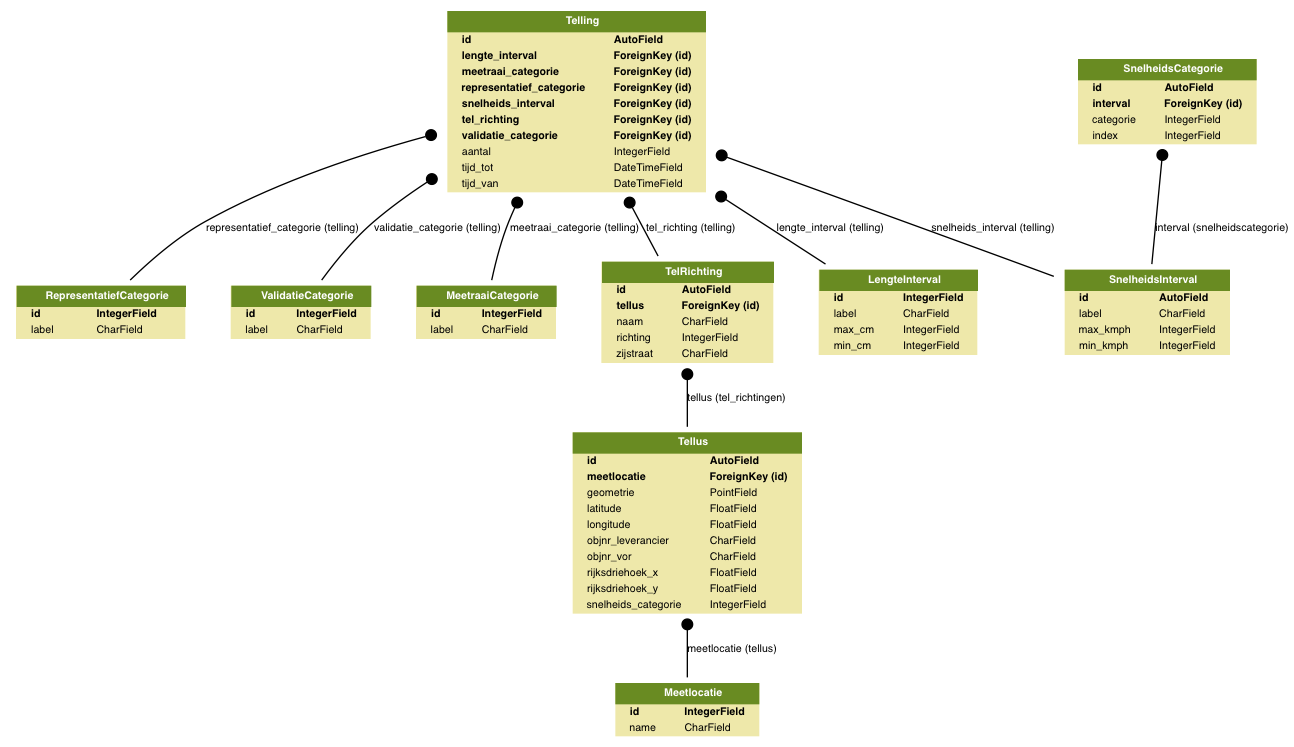 Data model driving the API
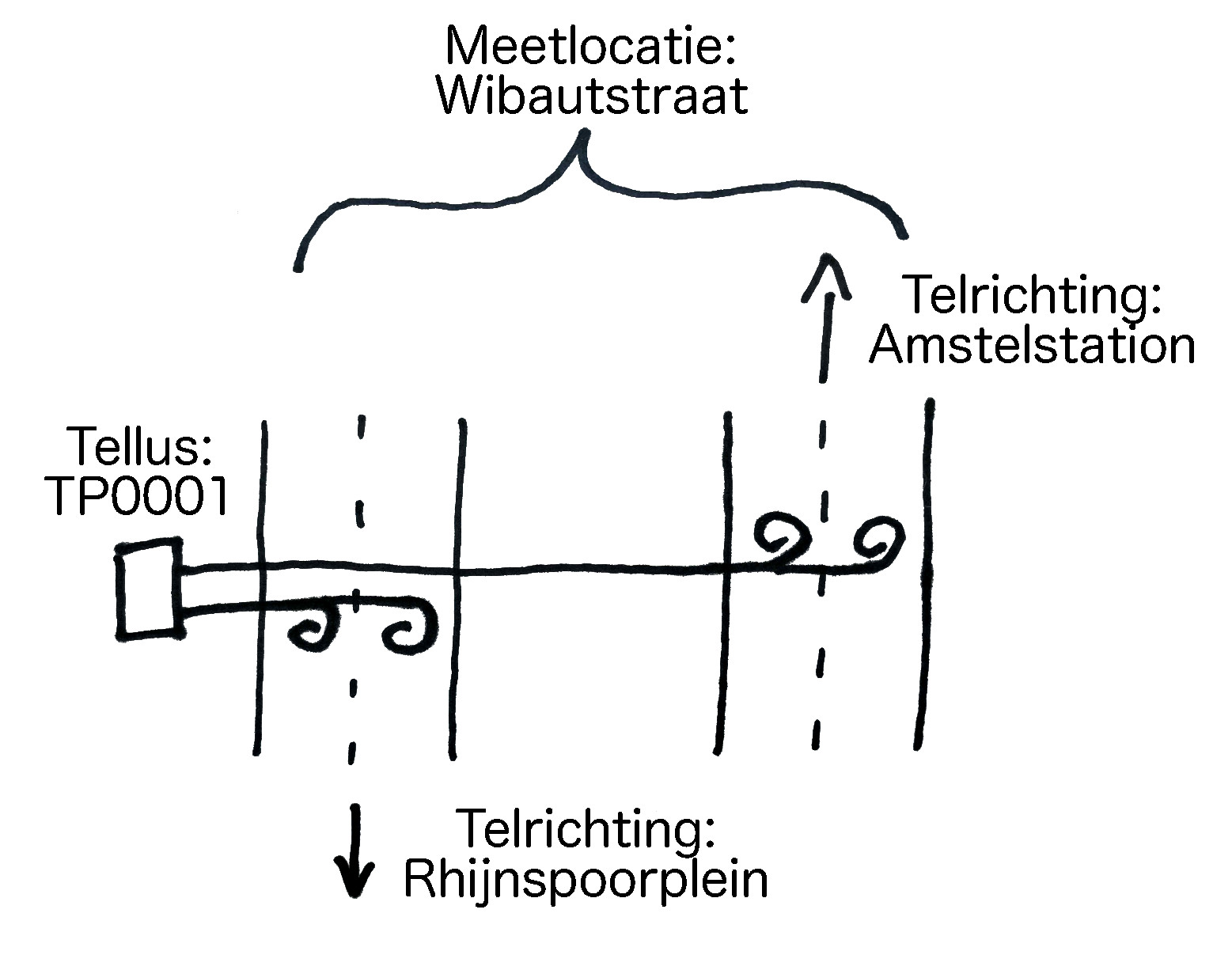
 Tellus system example with single "Tellus" box
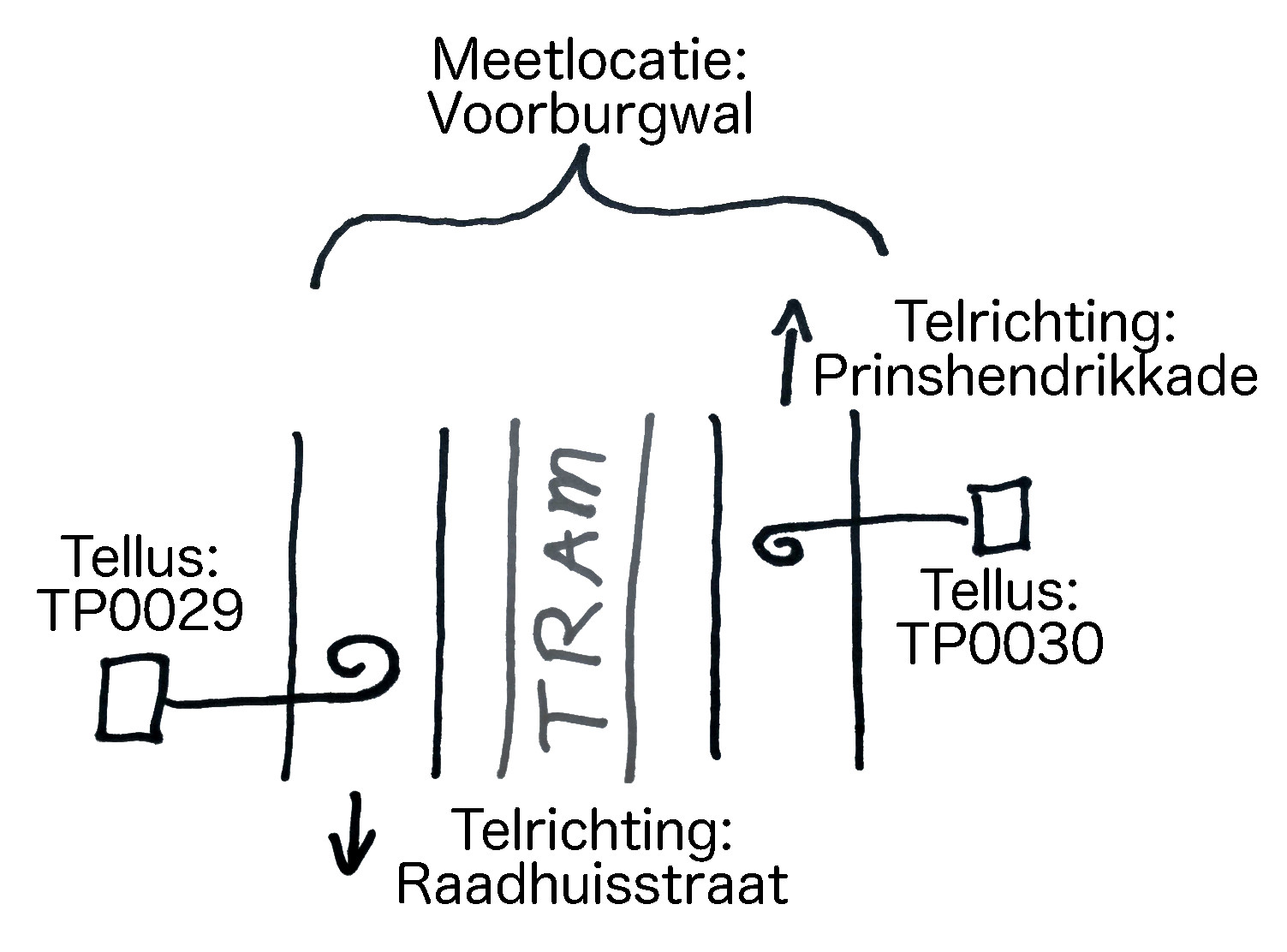
 Tellus system example with two "Tellus" boxes because the wires are physically separated by tram tracks
- Python 3.6 (required)
- Virtualenv (recommended)
- Docker-Compose (recommended)
The app can be developed using docker for everything or having only the database in docker. After using either method the following end points will be available:
- Basic web server and database health check: http://127.0.0.1:8107/status/health
- Basic database data health check: http://127.0.0.1:8107/status/data
- API overview: http://127.0.0.1:8107/tellus/
- A list view: http://127.0.0.1:8107/tellus/tellus/
Start the database and webapp with:
docker-compose up -d --build
Start the docker database
docker-compose up -d --build database
Optionally use virtualenv:
virtualenv -p /usr/local/bin/python3 venv
source venv/bin/activate
Install the requirements:
pip install -r requirements.txt
pip install -r requirements-dev.txt
Run database migrations
./web/tellus_app/manage.py migrate
Start the server
./web/tellus_app/manage.py runserver
An import or copy of a running database is required to work with actual data.
The best way to get data into your environment is to run the import process on the raw data. You will need access to the DataPunt object store.
Login to Rattic and retrieve the tellus objectstore password for CloudVPS Tellus.
Login to https://stack.cloudvps.com/ with the user 'tellus'.
Run the code
export DJANGO_SETTINGS_MODULE=tellus.settings
export TELLUS_OBJECTSTORE_PASSWORD=XXX_from_step_above_XXX
python ./web/tellus_app/importer.py
If your SSH key is accepted by DataPunt you are able to copy the acceptance database to you local project.
Use the following command:
docker-compose exec database update-db.sh tellus <username>
Replace <username> with your DataPunt username.
And please note that the process may take very long.