A beautiful, local-first music player with a modern interface
Features •
Tech Stack •
Installation •
Usage •
Shortcuts •
API •
Contributing




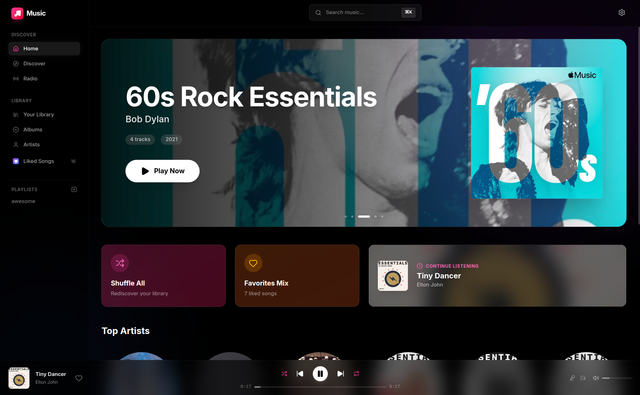
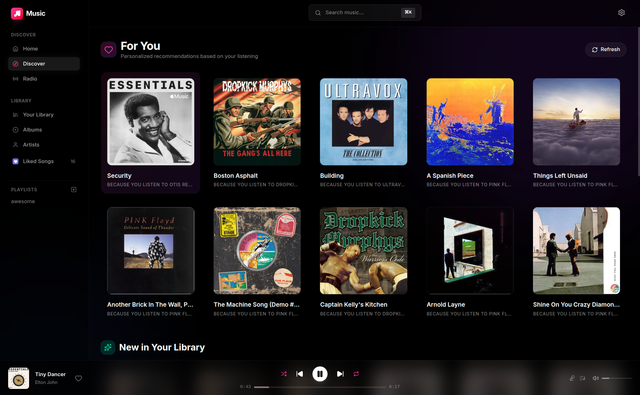
MyMusic is an open-source, local-first music player that brings a Spotify-like experience to your personal music collection. It scans your local music folders, extracts rich metadata, and presents everything in a sleek, modern interface.
Why MyMusic?
- Privacy-focused: Your music stays on your machine
- No subscriptions: Own your music, own your player
- Fast & lightweight: Built with modern technologies for smooth performance
- Feature-rich: Playlists, queues, shuffle, repeat, and more
- Local Music Scanning - Add folders and automatically discover all audio files
- Metadata Extraction - Extracts title, artist, album, genre, year, and embedded artwork
- Album Artwork - Displays high-quality embedded album art
- Real-time Updates - File watcher detects changes automatically
- Playlists - Create, edit, and manage custom playlists
- Liked Songs - Heart your favorites for quick access
- Search - Instant search across tracks, albums, and artists
- Browse - Explore by albums, artists, or genres
- Queue Management - Build and reorder your play queue
- Shuffle & Repeat - Multiple playback modes (off, one, all)
- Gapless Playback - Seamless transitions between tracks
- Volume Control - Fine-grained volume adjustment
- Modern Dark Theme - Easy on the eyes, beautiful to look at
- Smooth Animations - Polished transitions powered by Framer Motion
- Keyboard Shortcuts - Full keyboard control for power users
- Media Session API - System-level controls and Now Playing info
- Responsive Design - Works on various screen sizes
| Format |
Extensions |
Metadata Support |
| MP3 |
.mp3 |
ID3v2.3/2.4 |
| FLAC |
.flac |
Vorbis Comments |
| AAC |
.m4a, .aac |
MP4 Tags |
| OGG Vorbis |
.ogg |
Vorbis Comments |
| WAV |
.wav |
Limited |
| WMA |
.wma |
ASF Tags |
| Technology |
Purpose |
| React 19 |
UI framework with latest features |
| TypeScript |
Type-safe development |
| Vite |
Lightning-fast build tool |
| Tailwind CSS v4 |
Utility-first styling |
| Zustand |
Lightweight state management |
| React Query |
Server state & caching |
| Framer Motion |
Smooth animations |
| React Router |
Client-side routing |
| Lucide React |
Beautiful icons |
| Technology |
Purpose |
| Python 3.10+ |
Backend runtime |
| FastAPI |
High-performance API framework |
| SQLAlchemy |
Database ORM |
| SQLite |
Lightweight database |
| Mutagen |
Audio metadata extraction |
| Watchdog |
Filesystem monitoring |
| WebSockets |
Real-time updates |
| MusicBrainz |
Music database integration |
git clone https://github.com/yourusername/mymusic.git
cd mymusic
cd backend

# Create virtual environment
python -m venv venv

# Activate virtual environment
source venv/bin/activate        # Linux/macOS
# venv\Scripts\activate         # Windows

# Install dependencies
pip install -r requirements.txt

# Start the server
python run.py
The backend API will be available at http://localhost:8000
# From project root
npm install
npm run dev
The frontend will be available at http://localhost:5173
- Start both servers - Backend (
python run.py) and Frontend (npm run dev)
- Open the app - Navigate to
http://localhost:5173
- Add music folders - Go to Settings and add your music directories
- Wait for scan - The app will scan and index your music
- Enjoy! - Browse, search, and play your music
| Key |
Action |
Space |
Play / Pause |
← / → |
Seek backward / forward 5s |
Shift + ← / → |
Previous / Next track |
↑ / ↓ |
Volume up / down |
N |
Next track |
P |
Previous track |
S |
Toggle shuffle |
R |
Cycle repeat mode |
M |
Toggle mute |
L |
Like / unlike current track |
Q |
Toggle queue panel |
/ or Ctrl+K |
Focus search |
Esc |
Close modals / panels |
mymusic/
├── backend/
│   ├── app/
│   │   ├── api/routes/       # API endpoint handlers
│   │   ├── models/           # SQLAlchemy database models
│   │   ├── schemas/          # Pydantic validation schemas
│   │   ├── services/         # Business logic layer
│   │   │   ├── scanner.py    # Music folder scanning
│   │   │   ├── metadata.py   # Audio metadata extraction
│   │   │   └── watcher.py    # Filesystem monitoring
│   │   └── main.py           # FastAPI application entry
│   ├── requirements.txt      # Python dependencies
│   └── run.py                # Server startup script
│
├── src/
│   ├── api/                  # API client modules
│   ├── components/
│   │   ├── audio/            # Audio player components
│   │   ├── layout/           # Page layout components
│   │   └── ui/               # Reusable UI components
│   ├── hooks/                # Custom React hooks
│   ├── pages/                # Route page components
│   ├── stores/               # Zustand state stores
│   │   ├── playerStore.ts    # Playback state & queue
│   │   ├── libraryStore.ts   # Tracks & playlists
│   │   └── uiStore.ts        # UI state & modals
│   └── types/                # TypeScript definitions
│
├── package.json
├── vite.config.ts
└── README.md
| Method |
Endpoint |
Description |
GET |
/api/folders |
List all music folders |
POST |
/api/folders |
Add a new folder |
DELETE |
/api/folders/{id} |
Remove a folder |
POST |
/api/folders/{id}/scan |
Trigger manual scan |
| Method |
Endpoint |
Description |
GET |
/api/tracks |
List all tracks (paginated) |
GET |
/api/tracks/search?q= |
Search tracks |
GET |
/api/tracks/recent |
Recently added tracks |
| Method |
Endpoint |
Description |
GET |
/api/albums |
List all albums |
GET |
/api/albums/{name} |
Get album with tracks |
GET |
/api/artists |
List all artists |
GET |
/api/artists/{name} |
Get artist details |
| Method |
Endpoint |
Description |
GET |
/api/playlists |
List all playlists |
POST |
/api/playlists |
Create a playlist |
GET |
/api/playlists/{id} |
Get playlist details |
DELETE |
/api/playlists/{id} |
Delete a playlist |
| Method |
Endpoint |
Description |
GET |
/api/liked |
Get all liked songs |
POST |
/api/liked/{track_id} |
Like a song |
DELETE |
/api/liked/{track_id} |
Unlike a song |
| Method |
Endpoint |
Description |
GET |
/api/stream/{track_id} |
Stream audio (range requests supported) |
GET |
/api/artwork/{track_id} |
Get track artwork |
# Terminal 1 - Backend
cd backend && source venv/bin/activate && python run.py

# Terminal 2 - Frontend
npm run dev
# Build frontend
npm run build

# Preview production build
npm run preview
Contributions are welcome! Here's how you can help:
- Fork the repository
- Create a feature branch (
git checkout -b feature/amazing-feature)
- Commit your changes (
git commit -m 'Add amazing feature')
- Push to the branch (
git push origin feature/amazing-feature)
- Open a Pull Request
- Follow the existing code style
- Write meaningful commit messages
- Add tests for new features when applicable
- Update documentation as needed
This project is licensed under the MIT License - see the LICENSE file for details.






