
Open-source cross-agent memory layer for coding agents.
Tiered MCP support across Cursor, Claude Code, Codex, Windsurf, Gemini CLI, GitHub Copilot, Kiro, OpenCode, Antigravity, Trae, and other MCP-compatible clients.





Three-Layer Memory | Agent Team | Workspace Sync | Multi-Agent Orchestration | Dashboard
Chinese | Quick Start | Docker | Supported Clients | Common Workflows | Documentation | Setup Guide
Using Memorix through Cursor, Windsurf, Claude Code, Codex, or another AI coding agent? Read the Agent Operator Playbook for the agent-facing install, MCP, hook, and troubleshooting rules.
Memorix is a local-first memory control plane for coding agents.
It keeps project memory, reasoning context, Git-derived facts, and optional autonomous-agent state in one place so you can continue work across IDEs, sessions, terminals, and agent runs without losing project truth.
For most users, the default path is simple: use the local TUI/CLI or connect one IDE over stdio MCP. Treat HTTP as the shared-control-plane mode you opt into when you specifically want one long-lived background service, shared MCP access, or a live dashboard endpoint.
Most coding agents remember only the current thread. Memorix gives them a shared, persistent memory layer across IDEs, sessions, and projects.
| 🧠 Three-Layer Memory | Observation (what/how), Reasoning (why/trade-offs), Git Memory (immutable commit-derived facts with noise filtering) |
| 🔍 Source-Aware Retrieval | "What changed" queries favor Git Memory; "why" queries favor reasoning; project-scoped by default, global on demand |
| ⚙️ Memory Quality Pipeline | Formation (LLM-assisted evaluation), dedup, consolidation, retention with exponential decay — memory stays clean, not noisy |
| 🔄 Workspace & Rules Sync | One command to migrate MCP configs, workflows, rules, and skills across Cursor, Windsurf, Claude Code, Codex, Copilot, Kiro, etc. |
| 👥 Agent Team | Opt-in autonomous-agent state: task board with role-based claiming, inter-agent messaging, advisory file locks, situational-awareness poll |
| 🤖 Multi-Agent Orchestration | memorix orchestrate runs a structured coordination loop — plan → parallel execution → verify → fix → review — with capability routing and worktree isolation |
| 📋 Session Lifecycle | Session start/end with handoff summaries, watermark tracking (new memories since last session), cross-session context recovery |
| 🎯 Project Skills | Auto-generate SKILL.md from memory patterns; promote observations to permanent mini-skills injected at session start |
| 📊 Dashboard | Local web UI for browsing memories, Git history, sessions, and read-only autonomous agent team state |
| 🔒 Local & Private | SQLite as canonical store, Orama for search, no cloud dependency — everything stays on your machine |
| Tier | Clients |
|---|---|
| ★ Core | Claude Code, Cursor, Windsurf |
| ◆ Extended | GitHub Copilot, Kiro, Codex |
| ○ Community | Gemini CLI, OpenCode, Antigravity, Trae |
Core = full hook integration + tested MCP + rules sync. Extended = hook integration with platform caveats. Community = best-effort hooks, community-reported compatibility.
If a client can speak MCP and launch a local command or HTTP endpoint, it can usually connect to Memorix even if it is not in the list above yet.
Install globally:
npm install -g memorixInitialize Memorix config:
memorix initmemorix init lets you choose between Global defaults and Project config.
Memorix uses two files with two roles:
memorix.ymlfor behavior and project settings.envfor secrets such as API keys
Then pick the path that matches what you want to do:
| You want | Run | Best for |
|---|---|---|
| Interactive terminal workbench | memorix |
Default starting point for local search, chat, memory capture, and diagnostics |
| Quick MCP setup inside one IDE | memorix serve |
Default MCP path for Cursor, Claude Code, Codex, Windsurf, Gemini CLI, and other stdio clients |
| Dashboard + shared HTTP MCP in the background | memorix background start |
A long-lived shared control plane for multiple clients and a live dashboard endpoint |
| Foreground HTTP mode for debugging or a custom port | memorix serve-http --port 3211 |
Manual supervision, debugging, custom launch control |
Most users should choose one of the first two options above. Move to HTTP only when you intentionally want one shared background service, multi-client MCP access, or a live dashboard endpoint.
Common paths:
| Goal | Use | Why |
|---|---|---|
| Work directly in the terminal | memorix or memorix <command> |
CLI/TUI is the primary product surface. |
| Connect an IDE or coding agent over MCP | memorix serve first; HTTP + memorix_session_start when needed |
Start a lightweight memory session without joining Agent Team by default. |
| Run autonomous multi-agent execution | memorix orchestrate |
Structured plan → spawn → verify → fix → review loop with CLI agents. |
| Watch project memory and agent state in the browser | memorix dashboard |
Standalone read-mostly dashboard for memory, sessions, and autonomous agent team state. |
Companion commands: memorix background status|logs|stop. For multi-workspace HTTP sessions, bind with memorix_session_start(projectRoot=...).
Deeper details on startup, project binding, config precedence, and agent workflows: docs/SETUP.md and the Agent Operator Playbook.
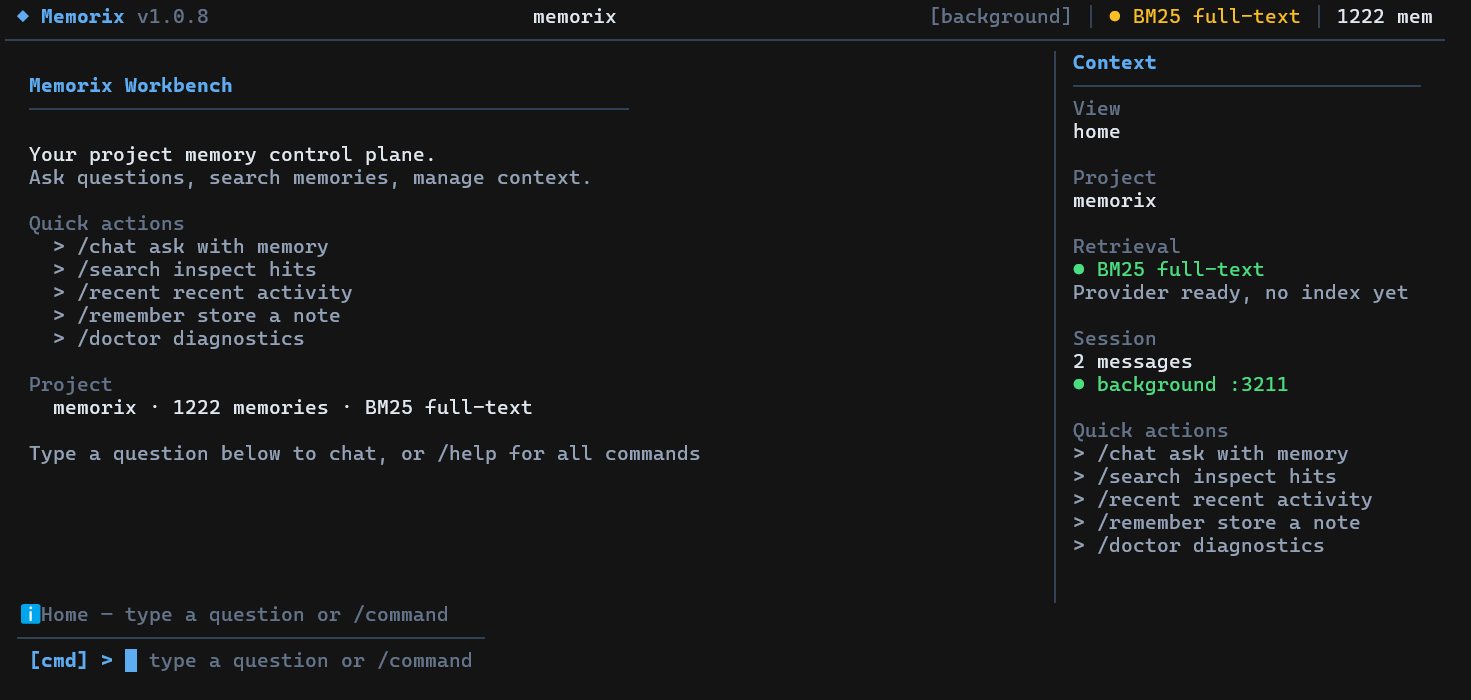
Running memorix without arguments opens an interactive fullscreen terminal UI (requires a TTY). Use it for chat with project memory, search, quick memory capture, diagnostics, background service control, dashboard launch, and IDE setup. Press /help inside the TUI for the current command list.
In 1.0.9 the TUI is organized as a knowledge workbench with Home, Knowledge, Memory, Workbench, and Graph tabs. It can browse the generated Knowledge Base, inspect memory detail, jump between wiki refs and source observations, view the text Knowledge Graph, and keep chatting after answers without leaving the terminal.
Single-shot chat (no TUI): memorix ask "your question".
Memorix exposes a CLI-first operator surface. Use it when you want to inspect or control the current project directly from a terminal. MCP remains the integration layer for IDEs and agents.
memorix session start --agent codex-main --agentType codex
memorix memory search --query "docker control plane"
memorix reasoning search --query "why sqlite"
memorix retention status
memorix team status
memorix task list
memorix audit project
memorix sync workspace --action scan
The CLI is intentionally task-shaped, not a 1:1 mirror of MCP tool names. Native capabilities are available through these namespaces: session, memory, reasoning, retention, formation, audit, transfer, skills, team, task, message, lock, handoff, poll, sync, ingest. MCP stays available for IDEs, agents, and optional graph-compatibility tools.
Memorix now includes an official Docker path for the HTTP control plane.
Quick start:
docker compose up --build -dThen connect to:
- dashboard:
http://localhost:3211 - MCP:
http://localhost:3211/mcp - health:
http://localhost:3211/health
Important: Docker support is for serve-http, not memorix serve. Project-scoped Git/config behavior only works when the container can see the repositories it is asked to bind.
Full Docker guide: docs/DOCKER.md
Add Memorix to your MCP client:
{
  "mcpServers": {
    "memorix": {
      "command": "memorix",
      "args": ["serve"]
    }
  }
}{
"mcpServers": {
"memorix": {
"transport": "http",
"url": "http://localhost:3211/mcp"
}
}
}The per-client examples below show the simplest stdio shape. If you prefer the shared HTTP control plane, keep the generic HTTP block above and use the client-specific variants in docs/SETUP.md.
Cursor | .cursor/mcp.json
{
  "mcpServers": {
    "memorix": {
      "command": "memorix",
      "args": ["serve"]
    }
  }
}
Claude Code
claude mcp add memorix -- memorix serveCodex | ~/.codex/config.toml
[mcp_servers.memorix]
command = "memorix"
args = ["serve"]
For the full IDE matrix, Windows notes, and troubleshooting, see docs/SETUP.md.
| You want to... | Use this | More detail |
|---|---|---|
| Save and retrieve project memory | memorix memory store/search/detail/resolve or MCP memorix_store/search/detail/resolve |
API Reference |
| Capture Git truth | memorix git-hook --force, memorix ingest commit, memorix ingest log |
Git Memory Guide |
| Run dashboard + HTTP MCP | memorix background start |
Setup Guide, Docker |
| Keep memory-only sessions lightweight | memorix_session_start(projectRoot=...) or memorix session start |
Agent Operator Playbook |
| Join the autonomous agent team | memorix session start --joinTeam or memorix team join |
TEAM.md, API Reference |
| Run autonomous multi-agent work | memorix orchestrate --goal "..." |
API Reference |
| Sync agent configs/rules | memorix sync workspace ..., memorix sync rules ... |
Setup Guide |
| Use Memorix from code | import { createMemoryClient } from 'memorix/sdk' |
API Reference |
The most common loop is deliberately small:
memorix memory store --text "Auth tokens expire after 24h" --title "Auth token TTL" --entity auth --type decision
memorix memory search --query "auth token ttl"
memorix session start --agent codex-main --agentType codex
When multiple HTTP sessions are open at once, each session should bind itself with memorix_session_start(projectRoot=...) before using project-scoped memory tools.
HTTP MCP sessions idle out after 30 minutes by default. If your client does not automatically recover from stale HTTP session IDs, set a longer timeout before starting the control plane:
MEMORIX_SESSION_TIMEOUT_MS=86400000 memorix background start # 24hAgent Team is not the normal memory startup path and it is not a chat room between IDE windows. Join only when you need tasks, messages, locks, or a structured autonomous-agent workflow. For real multi-agent execution, prefer:
memorix orchestrate --goal "Add user authentication" --agents claude-code,cursor,codexMemorix is designed to stay light during normal memory use:
- stdio MCP starts on demand and exits with the client
- HTTP background mode is one local Node process plus SQLite/Orama state
- LLM enrichment is optional; without API keys, Memorix falls back to local heuristic dedup/search
- the heavier paths are build/test, Docker image builds, dashboard browsing, large imports, and optional LLM-backed formation
On this Windows development machine, the healthy HTTP control plane was observed at about 16 MB working set after several hours idle. Treat that as a local observation, not a cross-platform guarantee. See Performance and Resource Notes for knobs and trade-offs.
Import Memorix directly into your own TypeScript/Node.js project — no MCP or CLI needed:
import { createMemoryClient } from 'memorix/sdk';

const client = await createMemoryClient({ projectRoot: '/path/to/repo' });

// Store a memory
await client.store({
  entityName: 'auth-module',
  type: 'decision',
  title: 'Use JWT for API auth',
  narrative: 'Chose JWT over session cookies for stateless API.',
});

// Search
const results = await client.search({ query: 'authentication' });

// Retrieve, resolve, count
const obs = await client.get(1);
const all = await client.getAll();
await client.resolve([1, 2]);

await client.close();
Three subpath exports:
| Import | What you get |
|---|---|
memorix/sdk |
createMemoryClient, createMemorixServer, detectProject, all types |
memorix/types |
Type-only — interfaces, enums, constants |
memorix |
MCP stdio entry point (not for programmatic use) |
flowchart LR
    subgraph ING["Ingress"]
        A["Git Hooks<br/>commit + ingest"]
        B["MCP Tools<br/>search, store, recall"]
        C["CLI / TUI<br/>operator workflows"]
        D["Dashboard<br/>read-mostly project view"]
    end

    subgraph RUN["Runtime"]
        E["stdio MCP Server<br/>memorix serve"]
        F["HTTP Control Plane<br/>background / serve-http"]
        G["Project Binding<br/>git root + config"]
    end

    subgraph MEM["Memory"]
        H["Observation<br/>facts, gotchas, fixes"]
        I["Reasoning<br/>why, trade-offs, risks"]
        J["Git Memory<br/>commit-derived ground truth"]
        K["Session + Agent Team<br/>opt-in tasks, locks, handoffs"]
    end

    subgraph PROC["Processing"]
        L["Formation<br/>quality shaping"]
        M["Embedding + Index<br/>hybrid retrieval"]
        N["Graph Linking<br/>entity relations"]
        O["Dedup + Retention<br/>consolidate over time"]
    end

    subgraph USE["Consumption"]
        P["Search / Timeline / Detail"]
        Q["Dashboard / Agent Team View<br/>read-mostly state"]
        R["Recall / Handoff / Resume"]
        S["Skills / Sync / Orchestrate"]
    end

    A --> E
    B --> E
    C --> E
    D --> F

    E --> G
    F --> G

    G --> H
    G --> I
    G --> J
    G --> K

    H --> L
    H --> M
    I --> L
    I --> N
    J --> M
    J --> N
    K --> O

    H --> P
    I --> P
    J --> P
    K --> Q
    H --> R
    I --> R
    J --> R
    K --> S
Memorix is not a single linear pipeline. It accepts memory from multiple ingress surfaces, persists it across multiple substrates, runs several asynchronous quality/indexing branches, and exposes the results through retrieval, dashboard, and explicit Agent Team surfaces.
- Observation Memory: what changed, how something works, gotchas, problem-solution notes
- Reasoning Memory: why a choice was made, alternatives, trade-offs, risks
- Git Memory: immutable engineering facts derived from commits
- Default search is project-scoped
scope="global"searches across projects- Global hits can be opened explicitly with project-aware refs
- Source-aware retrieval boosts Git memories for "what changed" questions and reasoning memories for "why" questions
📖 Docs Map — fastest route to the right document.
| Section | What's Covered |
|---|---|
| Setup Guide | Install, stdio vs HTTP control plane, per-client config |
| Docker Deployment | Official container image path, compose, healthcheck, and path caveats |
| Performance | Resource profile, idle/runtime costs, optimization knobs |
| Configuration | memorix.yml, .env, project overrides |
| Agent Operator Playbook | Canonical AI-facing guide for installation, binding, hooks, troubleshooting |
| Architecture | System shape, memory layers, data flows, module map |
| API Reference | MCP / HTTP / CLI command surface |
| Git Memory Guide | Ingestion, noise filtering, retrieval semantics |
| Development Guide | Contributor workflow, build, test, release |
Additional deep references:
- Memory Formation Pipeline
- Design Decisions
- Modules
- Known Issues and Roadmap
- AI Context Note
llms.txtllms-full.txt
Version 1.0.9 adds the first readable project knowledge layer and turns the terminal UI into a knowledge-native workbench.
- Knowledge Base / LLM Wiki: Memorix now exposes a generated, readable Knowledge Base from durable observations, git facts, mini-skills, and project evidence. Raw memory remains the source of truth; the Knowledge Base is a citable synthesis for humans and agents.
- Semantic Knowledge Graph: A graph projection over the same eligible knowledge inputs preserves source refs and supports concept/module/decision exploration without claiming to be GraphRAG.
- Tabbed TUI Workbench:
Home,Knowledge,Memory,Workbench, andGraphtabs replace the old scattered view model. - Cross-Reference Navigation: Jump between Knowledge items, Memory detail, and Graph nodes through stable refs where available.
- Explicit Session Center: Workbench shows session state and context sources with explicit bind/end actions. It does not auto-start sessions or auto-join Agent Team.
- TUI Chat Usability Fixes: Chat input remains active after assistant responses, and view shortcuts no longer steal normal CommandBar text.
- Architecture Boundaries: App, realtime agent messaging, full coding-agent harness, graph editing, and GraphRAG remain outside 1.0.9 scope.
git clone https://github.com/AVIDS2/memorix.git
cd memorix
npm install

npm run dev
npm test
npm run build
Key local commands:
memorix status
memorix dashboard
memorix background start
memorix serve-http --port 3211
memorix git-hook --forceMemorix builds on ideas from mcp-memory-service, MemCP, claude-mem, Mem0, and the broader MCP ecosystem.