


中文 | English
Agent-driven open-source GIS desktop app — geospatial analysis, cartography, automation & knowledge retention with natural language
Introduction • Features • Architecture • Getting Started • Development • Roadmap • License







OpenGIS is an Agent-based open-source GIS desktop application. It is not a simple "map + chat box" — it brings GIS data management, map rendering, spatial analysis, cartographic export, workflows, background workers, reusable operations, memory systems, and tool governance together in a single desktop environment.
The project is under active development. The current goal is not to replace all capabilities of ArcGIS Pro / QGIS, but to explore a more natural way of working with GIS: users describe intent in natural language, and the Agent reads data, runs code, calls map capabilities, generates charts, accumulates scripts and Operations within a governed tool system — with results displayed directly on the map, in chat, dashboards, or the cartographic canvas.

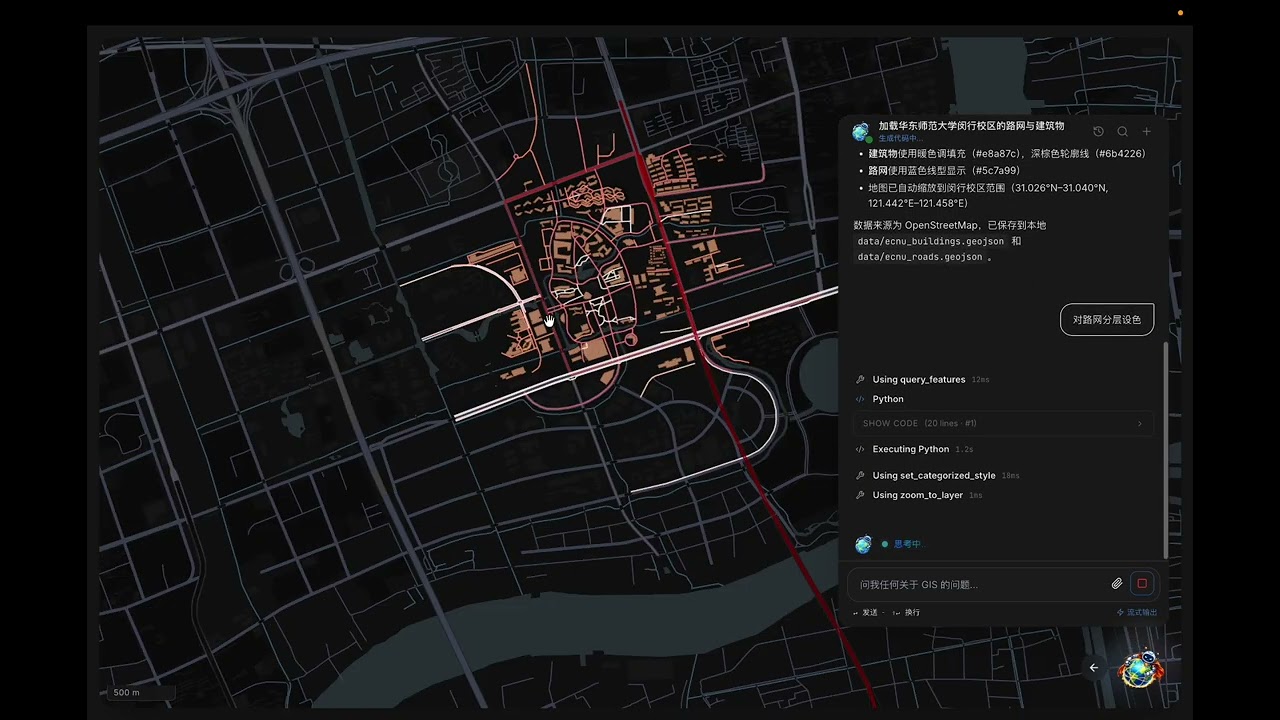
Main UI: Left — Resources / Layers / Workflow / Operation / Worker panels · Center — Map / Code / Layout Composer · Right — Agent Chat.


The Agent can read data, execute Python, generate charts, and display images / map results back in the chat and on the map.

Supports vector, raster, categorized styling, graduated styling, style variables, layer ordering, map camera control, and more.

Workflows organize multi-step tasks as DAGs, with structured input/output descriptions passed between nodes.
- Function-call Agent Loop: Structured tool calls as the primary path, avoiding the old CodeAct era of guessing code blocks and tool calls from plain text.
- Code Execution: Controlled Python execution for ad-hoc GIS analysis, data cleaning, charting, and long-tail algorithm validation.
- Tool Governance: All tools go through unified schema, permissions, result normalization, event archiving, and frontend display.
- Plan / Sub-Agent / Workflow: Plan, Subagent, and Workflow all share the same session / run / MessagePart protocol.
- Memory & Knowledge Retention: Structured MemoryStore, ContextProjector, KnowledgeExtractor, and FailureMemory jointly manage context and experience.
- Operation Reuse: A complex analysis can be distilled into an editable, verifiable, runnable, workspace-shareable Operation.
- Worker Background Tasks: With user approval, the Agent can create / restart / pause / delete resident Python Workers for dynamic data ingestion and real-time map rendering.
- Vector Data: GeoJSON, CSV, Shapefile, KML, GeoPackage, and other common formats.
- Raster Data: GeoTIFF / TIFF parsing, hybrid frontend/backend rendering, server-side tiles, color ramps, and transparency control.
- Map Rendering: MapLibre GL JS with point / line / polygon, categorized styling, graduated styling, size variables, opacity variables, ordering variables, labels, filters, and highlights.
- Dynamic Maps: Workers continuously push
rpc.ui.map.dynamic_layer_updatevia stdout JSON protocol for real-time layer updates. - 3D View: Map pitch / bearing control with basic extrusion styles.
- Cartographic Canvas: Layout Composer supports map frames, scale bars, north arrows, legends, canvas ratios, image export, and is designed for ArcGIS / QGIS-style extensibility.
- Data Pivot: Layers / files can open a data pivot panel with tables, statistics, field distributions, and Agent analysis results displayed separately.
- Workflow: DAG-based multi-step analysis where nodes describe what they receive from upstream and what they output.
- Operation: Software-level atomic operations with input/output schemas, dependencies, code, documentation, and run history.
- Worker: Resident Python service packages structured as
main.py + config.json + manifest.json + src/, suitable for real-time data, API polling, and dynamic rendering. - Project Skills: Skills are project-level capability / knowledge packages, distinct from tools. Tools are functions the Agent can call directly; Skills are user-injected context, flows, constraints, or capability sets.
- Run Archive: Every Agent execution round is archived as an event stream of tool calls, MessageParts, artifacts, and metadata.
OpenGIS uses a hybrid architecture of Electron shell + React Renderer + Python Sidecar + Python subprocess / Worker:
Electron Main
  ├─ Window, menu, file system, settings, Python sidecar lifecycle
  │
  └─ Renderer (React + TypeScript)
       ├─ MapLibre map rendering
       ├─ Chat / MessagePart UI
       ├─ Layers, assets, Operation, Workflow, Worker, Layout Composer
       └─ JSON-RPC Dispatcher: handles Python -> UI reverse RPC

Python Sidecar (FastAPI + uvicorn + LiteLLM)
  ├─ WebSocket JSON-RPC service
  ├─ Agent loop / session / memory / tool runtime
  ├─ GIS / OSM / datasource / raster / operation / workflow / worker integration
  ├─ Per-turn code execution subprocess
  └─ Resident Worker processes
| Layer | Technology | Responsibilities | Key Directories |
|---|---|---|---|
| Electron Main | Electron 30 + Node | Window, menu, IPC, Python sidecar lifecycle | electron/ |
| Renderer | React 18 + TypeScript + Zustand | UI, map, layer state, reverse RPC handlers | src/features/, src/services/, src/stores/ |
| Map Engine | MapLibre GL JS | WebGL map, source/layer sync, export | src/features/map/ |
| Python Sidecar | FastAPI + uvicorn + LiteLLM | JSON-RPC, Agent, Tool, Workflow, Worker | python-backend/opengis_backend/ |
| Python Execution | subprocess runner | Agent-generated Python code execution | agent/execution/ |
| Resident Worker | Python process | Background dynamic data, continuous rendering | worker/ |
The Renderer and Python sidecar communicate over a single WebSocket channel using JSON-RPC 2.0, supporting both directions:
Renderer -> Python
  chat.user_message
  rpc.code.run_script
  rpc.runs.list / get
  rpc.agent.*
  rpc.worker.*

Python -> Renderer
  rpc.ui.map.add_layer_from_geojson
  rpc.ui.map.dynamic_layer_update
  rpc.ui.map.set_layer_style
  rpc.ui.ask.*
  chat / event notification
The frontend src/services/pythonClient.ts handles WebSocket connection, request timeouts, notification dispatch, and dynamic map event buffering. Inbound rpc.ui.* notifications go to src/services/rpc/handlers/ and ultimately write to Zustand stores or directly invoke MapEngine.
Key principles:
- Map state lives in the frontend: Python does not hold MapLibre handles; all layer state is authoritative in the frontend store.
- Heavy computation in Python: Spatial analysis, raster processing, model inference, Operations, and Workers run in Python.
- UI operations via reverse RPC: Python tools command the frontend to load layers, update styles, and switch views through
rpc.ui.map.*. - Dynamic data via notification stream: Worker stdout outputs one line of JSON; the sidecar parses and forwards it to the frontend dynamic handler.
The Agent has been upgraded from the old CodeAct to a mainstream function-call architecture with the following layered design:
AgentProfile
  -> SessionCoordinator
  -> ContextProjector / ProviderProjector
  -> LLM function-call streaming
  -> TurnRunner / LoopKernel
  -> ToolRuntime / PermissionRuntime
  -> EventLog / RunArchive / MessagePart
| Module | Responsibilities | Directory |
|---|---|---|
agent/loop/ |
AgentLoop, TurnRunner, LoopKernel, RuntimeControl, loop policy | python-backend/opengis_backend/agent/loop/ |
agent/execution/ |
ToolRuntime, tool schema, parameter validation, Python execution, auto-install | agent/execution/ |
agent/context/ |
ContextManager, ContextProjector, MemoryStore, compression, failure memory | agent/context/ |
agent/session/ |
SessionCoordinator, queue, run session, inbox | agent/session/ |
agent/governance/ |
AgentProfile, PermissionRuntime, permission rules | agent/governance/ |
agent/telemetry/ |
EventLog, MessagePart, RunArchive, script archive, artifacts | agent/telemetry/ |
agent/workflow/ |
Workflow model, storage, output passing, DAG orchestration | agent/workflow/ |
OpenGIS now uses function calls as the primary Agent path. The model outputs structured tool calls, and the framework executes tools by schema and returns structured results. Python code execution remains a tool but is no longer the loop control protocol.
This addresses several issues from the old CodeAct:
- Agent reply text is no longer mistakenly executed as Python code.
- Tool parameters are constrained by schema, not natural language parsing.
- The frontend can uniformly display tools, code, artifacts, Operations, Workers, and errors.
- Permission approval, tool pruning, result compression, and run archiving all have unified entry points.
Agent output is no longer a single mixed block of text, but event-driven MessagePart[]:
| Part Type | Purpose |
|---|---|
text |
Normal Agent reply |
tool |
Tool call and result |
code |
Generated / executed Python code |
artifact |
Images, reports, files, layers, etc. |
operation |
Operation run block |
progress |
Current bottom status bar |
plan |
Plan / Workflow progress |
error |
Errors and interruptions |
The frontend Chat directly renders MessageParts. Default tool calls are collapsed; Python code is collapsible; execution output is compressed by default; images and locally-referenced Markdown resources are rendered through secure path conversion.
The Agent loop does not rely on hard-coded step limits. Instead, it converges based on:
- The model naturally stops with no tool calls.
- TurnObjective / DeviationGuard detects goal deviation.
- Loop Anomaly Detector catches repeated tools, repeated failures, and invalid retries.
- RuntimeControl performs health checks and graceful shutdown for long-running tasks like Workers and Operations.
- ToolRuntime provides structured feedback on errors, encouraging fixes to the original file / Operation rather than circumventing it.
Current naming conventions:
| Name | Definition | Example | Lifecycle |
|---|---|---|---|
| Tool | A function the Agent can call directly, with schema, permissions, and result structure | read_file, edit_file, add_layer, start_worker |
Built into code |
| Skill | A user / project injectable knowledge, flow, constraint, or capability package that can influence context and tool selection | External skill packages, project-level docs | Project / user level |
| Operation | A reusable software-level atomic operation with input/output schemas, dependencies, main program, docs, and run history | DBSCAN clustering, KDE, format conversion | Built-in + workspace |
| Workflow | DAG multi-step task orchestration where nodes define input/output descriptions | Academic reports, watershed analysis | .flow.json |
| Worker | A resident Python service for continuous data processing and dynamic rendering | Flight tracking, dynamic points, real-time trajectories | Workspace |
Legacy code sometimes called tools "skills." In the new architecture, avoid mixing: Tools are tools, external capability packages are Skills, reusable algorithms are Operations.
All tools are centralized in python-backend/opengis_backend/tools/:
| Tool Group | Representative Tools | Description |
|---|---|---|
| File | read_file, write_file, edit_file, list_directory, glob, grep |
Fuzzy matching, diff output, read protection, file suggestions |
| Shell | bash |
Shell execution with permission governance and risk prompts |
| Web | webfetch, websearch |
Fetch web pages, real-time search |
| Map | list_layers, add_layer, update_layer_style, set_categorized_style, set_graduated_style, set_layer_order |
Operate frontend maps via reverse RPC |
| Raster | add_raster, get_raster_info, set_raster_style |
TIFF / GeoTIFF / server-side tiles / color ramps |
| OSM | osm_call |
Nominatim + Overpass for OSM data |
| DataSource | datasource_call |
Built-in data sources |
| Workflow | create_workflow, run_workflow, etc. |
Create, read, save, execute Workflows |
| Operation | list_operations, run_operation, edit_operation, validate_operation |
Run and maintain reusable operations |
| Worker | start_worker, start_dynamic_map_worker, restart_worker, wait_worker_update, pause_worker, delete_worker |
Resident background services |
| Report | export_map_snapshot, write_report_section, export_report_pdf |
Reports and export |
| Subagent | run_subagent |
Sub-agent execution |
| Debug | debug_agent_context |
Context and tool exposure debugging |
ToolRuntime is responsible for:
- Registering Python functions as LLM-visible JSON schemas.
- Performing parameter validation and permission decisions before execution.
- Normalizing output, truncating large results, and generating artifact pointers after execution.
- Writing tool calls / results to RunArchive and MessagePart.
- Projecting frontend UI events into a unified stream.
The new memory system is no longer centered on injecting a single memory.md, but is organized in layers:
MemoryStore
  facts          # Stable facts: projects, files, layers, user preferences
  recipes        # Reusable operation steps and debugging experience
  dataset_cards  # Dataset field, range, statistical summary, path
  failure_memory # Repeated errors, failure causes, fix suggestions

ContextProjector
  -> Retrieves relevant memory based on current user intent
  -> Combines recent turns / working state / artifacts
  -> ProviderProjector generates the complete provider request
Key points:
- Task-based retrieval: Not all history is stuffed into the system prompt; relevant facts are selected per turn.
- Complete request budget: Context trimming considers not just message history, but also system prompt, tools, memory, artifacts, and provider format.
- Failure memory: Consecutive tool failures, missing packages, and signature misuse accumulate as failure memory to avoid repeating mistakes.
- Knowledge extraction: After a run, KnowledgeExtractor extracts facts, recipes, and dataset cards.
- User instructions: Global preferences and project-level preferences are managed separately.
Every Agent run writes to .opengis/runs/<run_id>/:
meta.json
events.jsonl
message_parts.jsonl
tool_calls.jsonl
artifacts.jsonl
steps.jsonl
This event-sourced structure enables the frontend to:
- Render Chat in real time.
- Recover historical runs.
- Display tool calls, code, Operations, Workers, and Artifacts.
- Detect abnormal endings and backfill running status.
- Offload long outputs to artifact pointers to prevent UI and context from freezing on large JSON.
Workflow is DAG orchestration, not simple prompt templates. Each node needs to describe:
- What it receives from upstream.
- What task it executes.
- What it outputs to downstream.
- Whether to retry on failure.
Workflow files are typically stored as .flow.json. Built-in workflows are located in project resources or the workspace's .opengis/workflows/. Users can also have the Agent create and save workflows.
Execution flow:
Workflow document
  -> parse nodes / edges
  -> topological sort
  -> node session
  -> node output summary + artifact
  -> downstream context
  -> final report
The frontend Workflow UI and Plan UI share the MessagePart protocol but display differently: Workflow emphasizes DAG progress, Plan emphasizes current task steps.
Operation is a more stable reuse unit than scripts. It distills a complex exploration into a reusable, modifiable, verifiable atomic capability.
An Operation contains:
operation/
  manifest.json      # Name, description, input/output schema, dependencies, version
  main.py            # Single entry point
  README.md          # Usage instructions
  examples/          # Example parameters
  runs/              # Run history
Two types of Operations:
- Built-in Operations: Shipped with OpenGIS source, shared across all workspaces.
- Workspace Operations: Created in user projects, can be promoted to built-in.
The Agent can:
- Query Operations.
- Construct parameters by schema and run.
- Read Operation code and fix after a failed run.
- Promote stable scripts to Operations.
The frontend Operation panel uses a list + detail structure, and Chat also displays run status and results as independent Operation blocks.
Worker is a resident Python service suitable for:
- Continuously polling external APIs.
- Real-time reading of dynamic data.
- Continuous data stream processing.
- Pushing dynamic points, trajectories, and status to the map.
Worker service package structure:
worker/<name>-<worker_id>/
  main.py              # Single entry point
  opengis_worker.py    # Auto-generated OpenGIS helper, should not be manually edited
  config.json          # worker_id, interval_seconds, layer ids, API parameters
  manifest.json        # Service metadata, permissions, dynamic layer declarations
  README.md
  stdout.log
  stderr.log
  metadata.json
  src/
    datasource.py      # Data fetching
    service.py         # State and business logic
    publisher.py       # OpenGIS output adapter
Dynamic map protocol:
from opengis_worker import emit_moving_objects

emit_moving_objects(
    point_layer_id="live_points",
    track_layer_id="live_tracks",
    points=[{"id": "p1", "lon": 121.5, "lat": 31.2}],
    tracks={"p1": [[121.5, 31.2], [121.51, 31.21]]},
    sequence=1,
)
The helper outputs to stdout:
{"opengis_method":"rpc.ui.map.dynamic_layer_update","params":{...}}The worker manager parses stdout, supplements worker_id, worker_name, workspace_path, worker_started_at, and forwards to the frontend. The frontend dynamic handler updates the layer store and instantly syncs MapLibre sources.
Constraints:
- Default max of two running workers.
- Start, restart, pause, and delete require permission governance.
- Background continuous tasks must use workers, not
execute_code. - Entry point must be
main.py; auxiliary modules are allowed but multiple entry points are not.
The frontend map is managed by src/features/map/engine/MapEngine.ts. Renderers are split across src/features/map/renderers/:
| Renderer | Purpose |
|---|---|
circleRenderer |
Points / multi-points |
lineRenderer |
Lines / multi-lines |
fillRenderer |
Polygons |
categorizedRenderer |
Categorized coloring |
graduatedRenderer |
Numeric graduated |
symbolRenderer |
Icons / labels |
rasterRenderer |
Raster |
extrusionRenderer |
3D extrusion |
Layer data parsing is in src/services/geo/parsers/. Large vector data uses handle-based strategies to avoid repeatedly stuffing entire GeoJSON into the React store. Raster data supports both frontend parsing and backend server-side tile paths.
The style system supports:
- Point color, size, opacity, stroke.
- Line color, width, opacity, dashes.
- Fill, border, separate fill and border opacity.
- Categorized and graduated coloring, explicit color mapping.
- Size variables, opacity variables, ordering variables.
- Labels / symbols / legends / filters.
Raster loading uses a hybrid frontend/backend strategy:
- Frontend lightweight parsing: Suitable for small GeoTIFFs, using
geotiff.jsto read and render as image sources. - Backend RasterService: Suitable for larger TIFF / multi-band data; reads statistics, generates tiles, applies color ramps.
- Style editing: Supports ramp, custom stops, source value stops, transparency, and stretch min/max.
- Agent awareness:
get_raster_infolets the Agent read dimensions, bands, statistics, and color ramp state.
Mainstream WebGIS typically renders server-side rasters as PNG / JPEG tiles or Cloud Optimized GeoTIFF window reads. OpenGIS currently uses PNG tiles and image sources, with potential future enhancement for COG / pyramids / overviews.
Layout Composer is a canvas system for cartographic export, targeting the basic mapping workflow of ArcGIS / QGIS:
- Define canvas ratios: 16:9, 4:3, 1:1, custom.
- Add map frames with adjustable position, size, and internal viewport.
- Add scale bars, north arrows, legends.
- Adjust background, borders, fonts, colors, transparency.
- Export images.
- Expose canvas elements as Agent tools for natural-language cartography.
Current implementation is in src/features/layout-composer/.
OpenGIS is not a hard sandbox product, but provides multiple safety layers:
| Layer | Mechanism |
|---|---|
| WebSocket | Local loopback + startup token |
| ToolRuntime | Tool permission policy: ask / allow / deny |
| Shell / File | Risk action logging, approval UI, read-before-write protection |
| Worker | Start / restart / delete approval, max running limit |
| RunArchive | Complete event and tool call audit trail |
| Workspace | Git snapshot, rollback capable |
| Python Execution | Subprocess isolation, interruptible, process tree cleanup |
OpenGIS/
  electron/                         # Electron main / preload
  src/
    features/
      chat/                         # MessagePart Chat UI
      map/                          # MapLibre engine / renderers / identify
      layers/                       # Layer management and style panel
      assets/                       # File asset browsing
      workflows/                    # Workflow editor
      operations/                   # Operation UI
      workers/                      # Worker management panel
      layout-composer/              # Cartographic canvas
      pivot/                        # Data pivot
      settings/                     # Settings
    services/
      rpc/                          # Frontend JSON-RPC dispatcher / handlers
      geo/                          # Data types, parsers, raster / vector tools
    stores/                         # Zustand stores
  python-backend/
    opengis_backend/
      agent/                        # Agent architecture
      tools/                        # Tool registry and built-in tools
      integrations/                 # GIS / OSM / QGIS / datasource
      operations/                   # Built-in Operations
      worker/                       # Worker manager and protocol
      runs/                         # RunArchive
      rpc/                          # WebSocket JSON-RPC handler
      workspace/                    # Workspace snapshot / templates
  resources/                        # Icons, screenshots, static assets
  docs/                             # Design records and bug scans
| Dependency | Version | Required | Description |
|---|---|---|---|
| Node.js | >= 18 | Yes | Frontend, Electron, build |
| Python | >= 3.11 | Yes | Python sidecar and GIS tools |
| Git | Any | Yes | Workspace snapshot / run rollback |
| LLM API Key | OpenAI / Anthropic / DeepSeek / MiniMax / GLM / Ollama, etc. | Required for Agent | Basic map features do not require LLM |
| GDAL / Rasterio wheels | Matching Python environment | Recommended | Raster / Shapefile / GeoPandas capabilities |
git clone <repo-url>
cd OpenGISnpm installnpm run setup:pythonThis command creates a shared virtual environment in the user data directory and installs Python dependencies. Both dev mode and packaged applications reuse this environment, avoiding the need to maintain two sets of Python dependencies between source and installed locations.
Typical paths:
macOS:   ~/Library/Application Support/opengis/venv
Windows: %APPDATA%/opengis/venv
Linux:   ~/.config/opengis/venv
If GDAL, Fiona, or Rasterio fail to install on Windows / macOS, use conda for binary dependencies first:
conda install -c conda-forge geopandas rasterio fiona pyproj shapely -y
npm run setup:pythonnpm run dev:electronStartup sequence:
- electron-vite starts the renderer dev server.
- Compiles Electron main / preload.
- Electron main launches the Python sidecar.
- Renderer connects to the sidecar WebSocket via token.
Once the window and Python ready status appear, you're good to go.
Open Settings / Model:
| Field | Description |
|---|---|
| Provider | OpenAI, Anthropic, DeepSeek, MiniMax, GLM, Ollama, etc. |
| Protocol | OpenAI Compatible or Anthropic Compatible |
| Base URL | Model service endpoint |
| API Key | Saved locally |
| Model Name | Specific model ID |
Click Test Connection to verify. After saving, send "hello" to the Agent; seeing a streaming reply means the pipeline is working.
Use File / Open Workspace to select a project directory. OpenGIS creates .opengis/ under the workspace:
.opengis/
  runs/
  workflows/
  operations/
  contexts/
  memory/
  permissions.json
  map-layers.json
Different workspaces have independent layers, runs, Operations, workflows, and memory.
npm run dev:electron     # Start desktop dev mode
npm run typecheck        # TypeScript type checking
npm test                 # Frontend unit tests
npm run build            # Build main / preload / renderer
npm run dist:mac         # macOS packaging
npm run dist:win         # Windows packaging
npm run dist:linux       # Linux packaging
Backend test example:
"$HOME/Library/Application Support/opengis/venv/bin/python" -m unittest discover -s python-backend/testsWindows PowerShell path is typically:
& "$env:APPDATA/opengis/venv/Scripts/python.exe" -m unittest discover -s python-backend/tests- Create or modify a tool file in
python-backend/opengis_backend/tools/builtin/. - Use
@tool(...)to declare name, group, parameters, and return description. - Access workspace, conversation, notify, and other context via
ToolContext. - For map operations, prefer sending
rpc.ui.map.*reverse RPC; do not maintain map state in Python. - Add tests covering at least parameter validation and return structure.
Map capabilities typically require changes on both sides:
- Backend tool: Declare the Agent-callable entry point.
- Frontend RPC handler: Receive
rpc.ui.map.*insrc/services/rpc/handlers/map/. - Store: Extend
MapLayerDefinitionorLayerStyleif needed. - Renderer: Extend MapLibre paint / layout in
src/features/map/renderers/. - UI: If users need manual control, add an edit entry in the layer or style panel.
Built-in Operations go in:
python-backend/opengis_backend/operations/builtin/
Recommended structure:
my_operation/
  manifest.json
  main.py
  README.md
  examples/
manifest.json should clearly describe:
- Input schema.
- Output schema.
- Python dependencies.
- Operation description.
- Applicable scenarios.
Workers should not be written as a single large script. Recommended structure:
main.py              # Load config, start loop
src/datasource.py    # Fetch data
src/service.py       # Update state, trajectories, filters
src/publisher.py     # emit_dynamic_points / emit_moving_objects
Dynamic maps must ensure:
- Stable layer IDs.
- Full first frame, subsequent diffs, or use high-level helpers for automatic handling.
- Stable feature IDs.
- Monotonically increasing sequence.
- Do not write infinite loops in
execute_code.
- Paths may contain spaces and Chinese characters; use
Path/ JSON parameters, not shell string concatenation. - Python venv paths and Electron packaging paths differ; avoid hardcoding macOS paths.
- Subprocess cancellation on Windows uses
CTRL_BREAK_EVENTandtaskkill /F /T; consider process tree cleanup when adding background processes. - GDAL / Rasterio are recommended to use precompiled wheels or conda-forge.
- More complete dynamic map protocol: frontend source diff adapter, state monitoring, Worker debug loop.
- Stronger Operation marketplace: versioning, dependency locking, visual parameter forms, run benchmarks.
- More complete Layout Composer: legend grouping, map bookmarks, multi-page, PDF export.
- Larger data rendering: vector tiles, WebGL aggregation, deck.gl / custom high-performance rendering evaluation.
- Stronger raster pyramids: COG, overviews, server-side window reads, time-series rasters.
- More mature skills integration: project-level skill registry, skill marketplace, permission isolation.
- Stricter permission modes: configurable approval, persistent authorization, risk rule templates.
This project is licensed under the MIT License.
OpenGIS is under active development. This README describes the current mainline architecture, core implementation paths, and near-term evolution direction. If there are minor discrepancies between code and documentation, the code and tests are authoritative.